Snapshot of jcjohnson/torch-rnn: 2.6k★, Lua. Efficient, reusable RNNs and LSTMs for torch
Snapshot summary built from the project's own GitHub metadata — there's no written TopGit review yet. The page will update automatically when a full review is published.
WHY NO REVIEW YET
TopGit writes full reviews for the most-starred, most-requested repositories. This page is a snapshot until then — see the READ ME tab for the original README in full.
torch-rnn provides high-performance, reusable RNN and LSTM modules for torch7, and uses these modules for character-level
language modeling similar to char-rnn.
You can find documentation for the RNN and LSTM modules here; they have no dependencies other than torch
and nn, so they should be easy to integrate into existing projects.
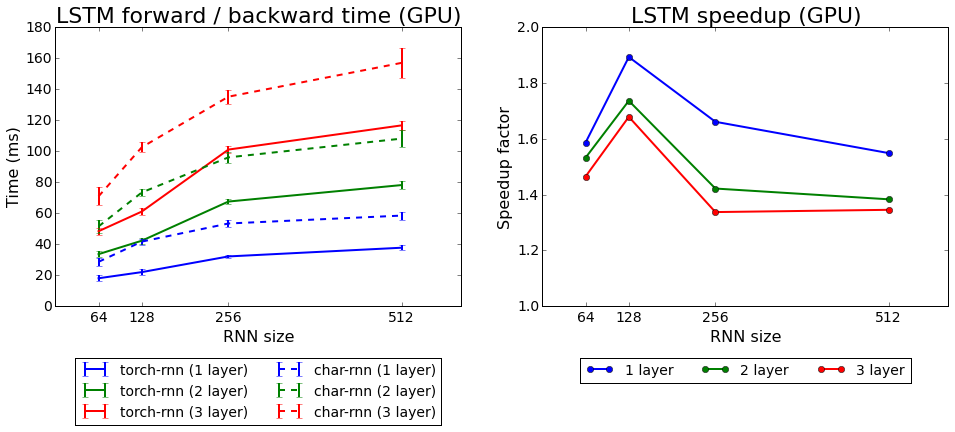
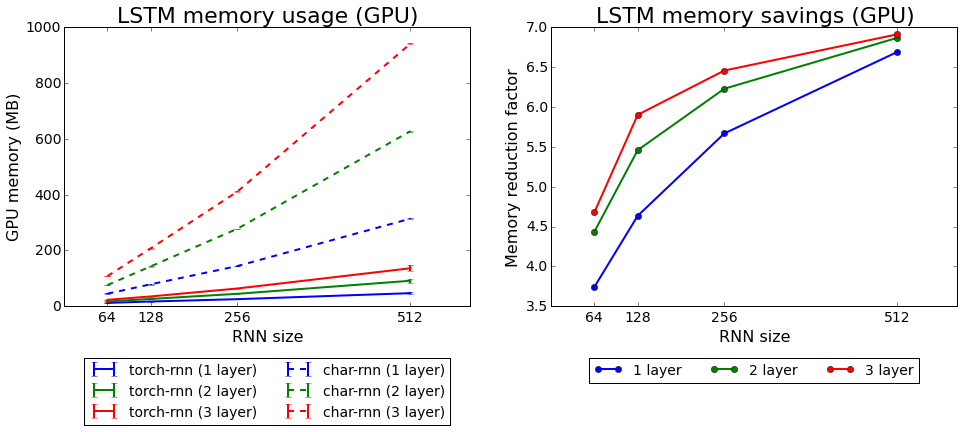
Compared to char-rnn, torch-rnn is up to 1.9x faster and uses up to 7x less memory. For more details see
the Benchmark section below.
Installation
Docker Images
Cristian Baldi has prepared Docker images for both CPU-only mode and GPU mode;
you can find them here.
System setup
You'll need to install the header files for Python 2.7 and the HDF5 library. On Ubuntu you should be able to install
like this:
The preprocessing script is written in Python 2.7; its dependencies are in the file requirements.txt.
You can install these dependencies in a virtual environment like this:
virtualenv .env                  # Create the virtual environment
source .env/bin/activate         # Activate the virtual environment
pip install -r requirements.txt  # Install Python dependencies
# Work for a while ...
deactivate                       # Exit the virtual environment
Lua setup
The main modeling code is written in Lua using torch; you can find installation instructions
here. You'll need the following Lua packages:
torch/torch7
torch/nn
torch/optim
lua-cjson
torch-hdf5
After installing torch, you can install / update these packages by running the following:
# Install most things using luarocks
luarocks install torch
luarocks install nn
luarocks install optim
luarocks install lua-cjson

# We need to install torch-hdf5 from GitHub
git clone https://github.com/deepmind/torch-hdf5
cd torch-hdf5
luarocks make hdf5-0-0.rockspec
CUDA support (Optional)
To enable GPU acceleration with CUDA, you'll need to install CUDA 6.5 or higher and the following Lua packages:
torch/cutorch
torch/cunn
You can install / update them by running:
luarocks install cutorch
luarocks install cunn
OpenCL support (Optional)
To enable GPU acceleration with OpenCL, you'll need to install the following Lua packages:
cltorch
clnn
You can install / update them by running:
luarocks install cltorch
luarocks install clnn
OSX Installation
Jeff Thompson has written a very detailed installation guide for OSX that you can find here.
Usage
To train a model and use it to generate new text, you'll need to follow three simple steps:
Step 1: Preprocess the data
You can use any text file for training models. Before training, you'll need to preprocess the data using the script
scripts/preprocess.py; this will generate an HDF5 file and JSON file containing a preprocessed version of the data.
If you have training data stored in my_data.txt, you can run the script like this:
This will produce files my_data.h5 and my_data.json that will be passed to the training script.
There are a few more flags you can use to configure preprocessing; read about them here
Step 2: Train the model
After preprocessing the data, you'll need to train the model using the train.lua script. This will be the slowest step.
You can run the training script like this:
This will load the trained checkpoint cv/checkpoint_10000.t7 from the previous step, sample 2000 characters from it,
and print the results to the console.
By default the sampling script will run in GPU mode using CUDA; to run in CPU-only mode add the flag -gpu -1 and
to run in OpenCL mode add the flag -gpu_backend opencl.
There are more flags you can use to configure sampling; read about them here.
Benchmarks
To benchmark torch-rnn against char-rnn, we use each to train LSTM language models for the tiny-shakespeare dataset
with 1, 2 or 3 layers and with an RNN size of 64, 128, 256, or 512. For each we use a minibatch size of 50, a sequence
length of 50, and no dropout. For each model size and for both implementations, we record the forward/backward times and
GPU memory usage over the first 100 training iterations, and use these measurements to compute the mean time and memory
usage.
All benchmarks were run on a machine with an Intel i7-4790k CPU, 32 GB main memory, and a Titan X GPU.
Below we show the forward/backward times for both implementations, as well as the mean speedup of torch-rnn over
char-rnn. We see that torch-rnn is faster than char-rnn at all model sizes, with smaller models giving a larger
speedup; for a single-layer LSTM with 128 hidden units, we achieve a 1.9x speedup; for larger models we achieve about
a 1.4x speedup.
Below we show the GPU memory usage for both implementations, as well as the mean memory saving of torch-rnn over
char-rnn. Again torch-rnn outperforms char-rnn at all model sizes, but here the savings become more significant for
larger models: for models with 512 hidden units, we use 7x less memory than char-rnn.
Yes — jcjohnson/torch-rnn ships under the MIT license, which makes its source code freely readable (and, depending on license terms, forkable and reusable). Source: github.com/jcjohnson/torch-rnn.
What is jcjohnson/torch-rnn?
jcjohnson/torch-rnn (jcjohnson/torch-rnn) is a Lua project on GitHub. From the project's own README: Efficient, reusable RNNs and LSTMs for torch
Where do I read more about jcjohnson/torch-rnn?
This TopGit page is a snapshot — the READ ME tab shows the project's own README content (links stripped, images preserved). The GitHub repository at github.com/jcjohnson/torch-rnn is the definitive source.
Read full README in the tab above.
Want a second opinion on torch-rnn?
Ask an AI that can read this page — one click and you get its take on torch-rnn.
 /torch-rnn