kevana/ui-for-docker — 5.1k★ on GitHub (JavaScript). A web interface for Docker, formerly known as DockerUI. This repo is not maintained
Snapshot summary built from the project's own GitHub metadata — there's no written TopGit review yet. The page will update automatically when a full review is published.
WHY NO REVIEW YET
TopGit writes full reviews for the most-starred, most-requested repositories. This page is a snapshot until then — see the READ ME tab for the original README in full.
This repo is deprecated. Development continues at Portainer: github.com/portainer/portainer
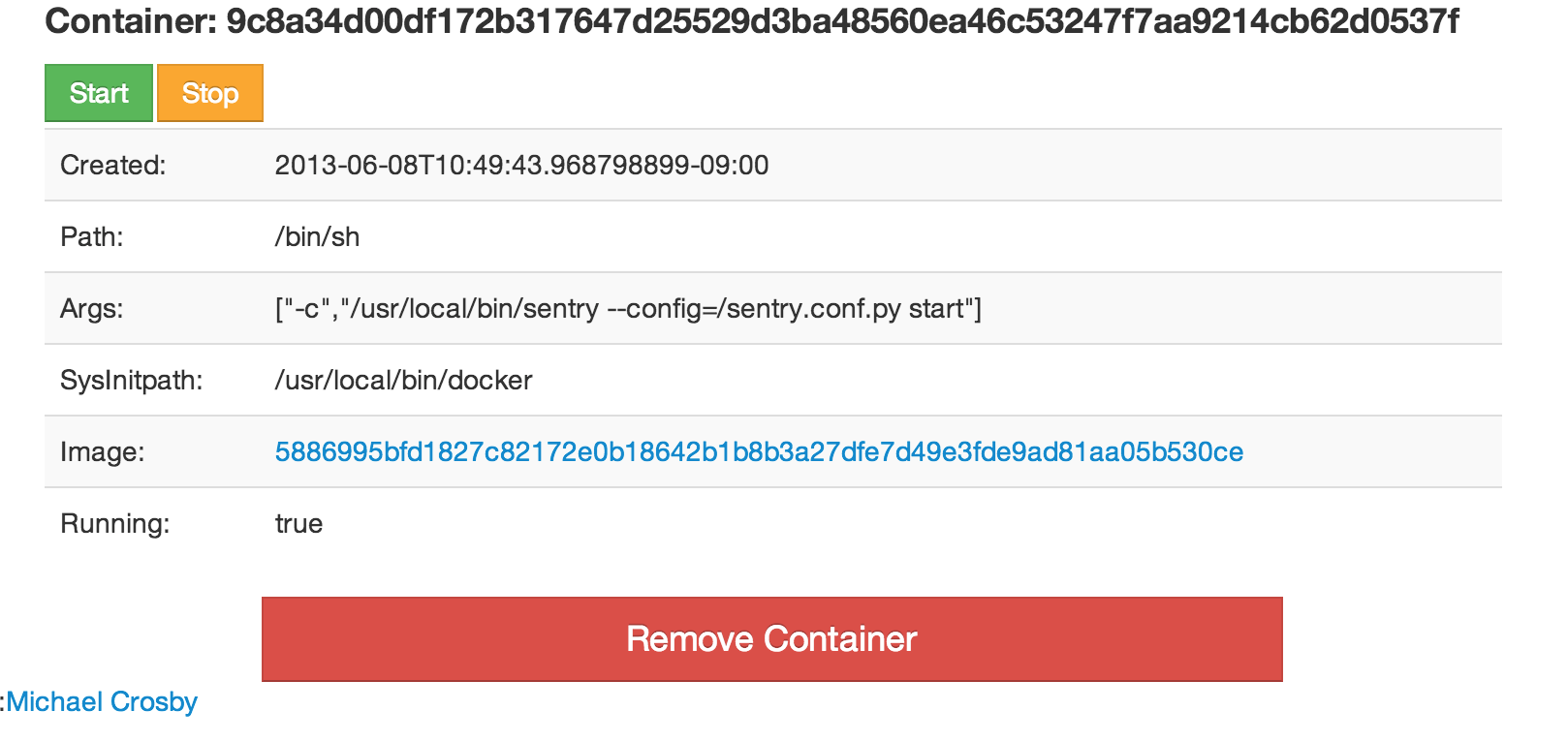
UI For Docker is a web interface for the Docker Remote API. The goal is to provide a pure client side implementation so it is effortless to connect and manage docker.
Goals
Minimal dependencies - I really want to keep this project a pure html/js app.
Consistency - The web UI should be consistent with the commands found on the docker CLI.
Quickstart
Run: docker run -d -p 9000:9000 --privileged -v /var/run/docker.sock:/var/run/docker.sock uifd/ui-for-docker
Open your browser to http://<dockerd host ip>:9000
Bind mounting the Unix socket into the UI For Docker container is much more secure than exposing your docker daemon over TCP. The --privileged flag is required for hosts using SELinux. You should still secure your UI For Docker instance behind some type of auth. Directions for using Nginx auth are here.
Specify socket to connect to Docker daemon
By default UI For Docker connects to the Docker daemon with/var/run/docker.sock. For this to work you need to bind mount the unix socket into the container with -v /var/run/docker.sock:/var/run/docker.sock.
You can use the -H flag to change this socket:
# Connect to a tcp socket:
$ docker run -d -p 9000:9000 --privileged uifd/ui-for-docker -H tcp://127.0.0.1:2375
Change address/port UI For Docker is served on
UI For Docker listens on port 9000 by default. If you run UI For Docker inside a container then you can bind the container's internal port to any external address and port:
# Expose UI For Docker on 10.20.30.1:80
$ docker run -d -p 10.20.30.1:80:9000 --privileged -v /var/run/docker.sock:/var/run/docker.sock uifd/ui-for-docker
Access a Docker engine protected via TLS
Ensure that you have access to the CA, the TLS certificate and the TLS key used to access your Docker engine.
These files will need to be named ca.pem, cert.pem and key.pem respectively. Store them somewhere on your disk and mount a volume containing these files inside the UI container:
Note: Replace /path/to/certs to the path to the certificate files on your disk.
Check the wiki for more info about using UI For Docker
Stack
Angular.js
Bootstrap
Gritter
Spin.js
Golang
Vis.js
Todo:
Full repository support
Search
Push files to a container
Unit tests
License - MIT
The UI For Docker code is licensed under the MIT license.
UI For Docker:
Copyright (c) 2013-2016 Michael Crosby (crosbymichael.com), Kevan Ahlquist (kevanahlquist.com)
Permission is hereby granted, free of charge, to any person
obtaining a copy of this software and associated documentation
files (the "Software"), to deal in the Software without
restriction, including without limitation the rights to use, copy,
modify, merge, publish, distribute, sublicense, and/or sell copies
of the Software, and to permit persons to whom the Software is
furnished to do so, subject to the following conditions:
The above copyright notice and this permission notice shall be
included in all copies or substantial portions of the Software.
THE SOFTWARE IS PROVIDED "AS IS", WITHOUT WARRANTY OF ANY KIND,
EXPRESS OR IMPLIED,
INCLUDING BUT NOT LIMITED TO THE WARRANTIES OF MERCHANTABILITY,
FITNESS FOR A PARTICULAR PURPOSE AND NONINFRINGEMENT.
IN NO EVENT SHALL THE AUTHORS OR COPYRIGHT
HOLDERS BE LIABLE FOR ANY CLAIM,
DAMAGES OR OTHER LIABILITY,
WHETHER IN AN ACTION OF CONTRACT,
TORT OR OTHERWISE,
ARISING FROM, OUT OF OR IN CONNECTION WITH
THE SOFTWARE OR THE USE OR OTHER DEALINGS IN THE SOFTWARE.
TopGit's metadata for kevana/ui-for-docker does not record a license. Most public repositories on GitHub ARE open source, but the exact terms vary — verify by opening the LICENSE file directly.
What is kevana/ui-for-docker?
kevana/ui-for-docker (kevana/ui-for-docker) is a JavaScript project on GitHub. From the project's own README: A web interface for Docker, formerly known as DockerUI. This repo is not maintained
Where do I read more about kevana/ui-for-docker?
This TopGit page is a snapshot — the READ ME tab shows the project's own README content (links stripped, images preserved). The GitHub repository at github.com/kevana/ui-for-docker is the definitive source.
Read full README in the tab above.
Still deciding about ui-for-docker?
One click hands the question to an AI along with this page — see what it says about ui-for-docker.
 /ui-for-docker
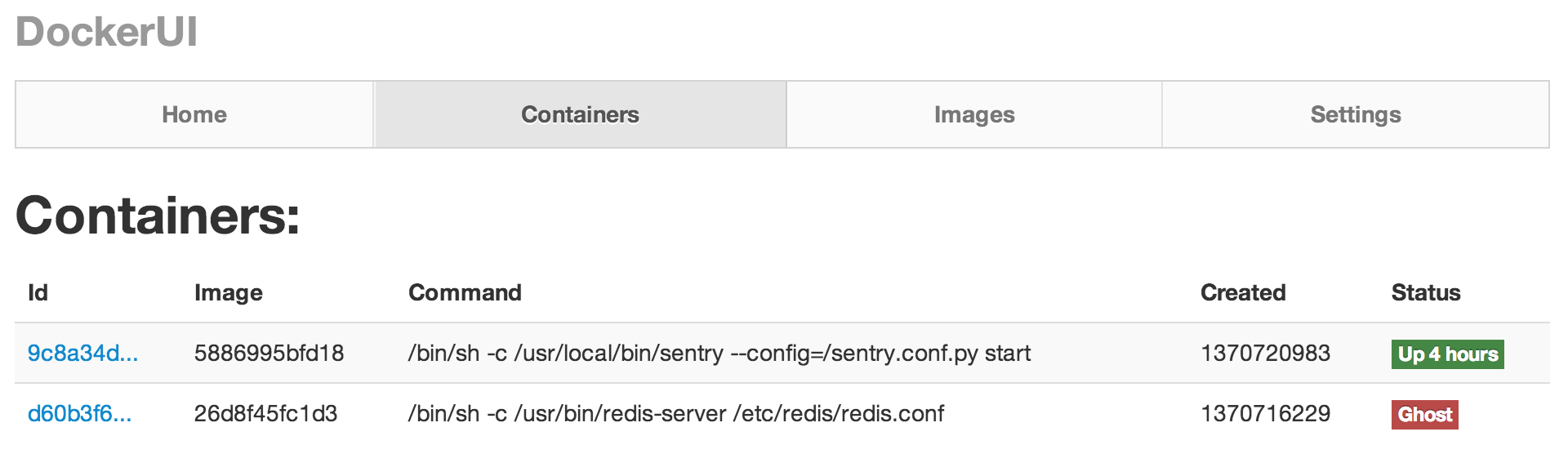 UI For Docker is a web interface for the Docker Remote API. The goal is to provide a pure client side implementation so it is effortless to connect and manage docker.