A look at kholia/xvc-pico: 502 stars on GitHub, written primarily in C. Raspberry Pico powered Xilinx Virtual Cable - Xilinx JTAG Cable! This is now quite fast, thanks to tom01h! We also support JTAG + serial terminal over a single cable now. Now with (slow) WiFi support for Pico W!
Snapshot summary built from the project's own GitHub metadata — there's no written TopGit review yet. The page will update automatically when a full review is published.
WHY NO REVIEW YET
TopGit writes full reviews for the most-starred, most-requested repositories. This page is a snapshot until then — see the READ ME tab for the original README in full.
This project implements a Raspberry Pico based Xilinx Virtual Cable (XVC). It
allows using Raspberry Pico (and Pico 2) as a JTAG adapter for programming
Xilinx FPGAs.
It is derived from the excellent pico-dirtyJtag project.
A special shoutout goes to https://github.com/tom01h for crazily improving the
performance of this project - thank you!
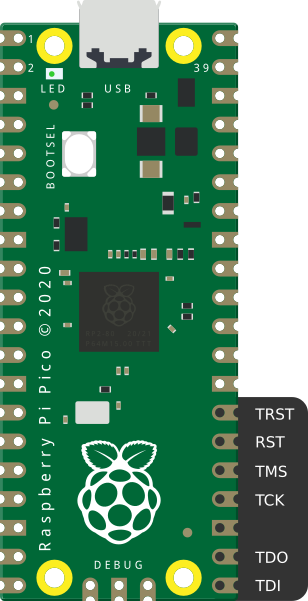
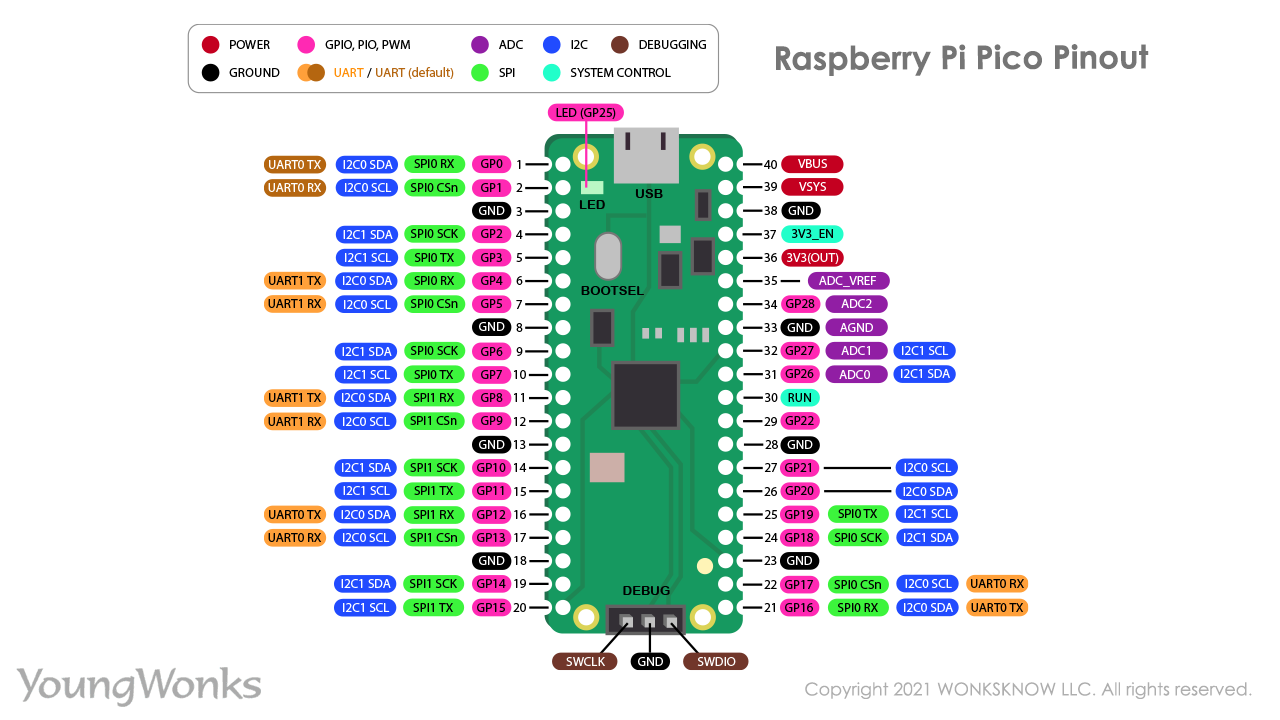
The pinout is as follows (it maches the pin names of the target device's JTAG port, in other word - you DON'T need to swap TDI and TDO pins like you would do with the interfaces like SPI or UART):
Pin name
GPIO
TDI
GPIO16
TDO
GPIO17
TCK
GPIO18
TMS
GPIO19
GND
Pin 23
Note: The Raspberry Pico is a 3.3v device. Ensure that the target device and
the Pico are electrically compatible before connecting them.
Compatibility tests
The project has been verified to be working with the following hardware and software combinations:
Programmer Board
Firmware
Target
Software
Date
Raspberry Pi Pico
xvc-pico
EBAZ4205 'Development' FPGA Board
Vivado 2021.1
August 2021
Raspberry Pi Pico
xvc-pico
EBAZ4205 'Development' FPGA Board
Vivado ML Standard 2023.1
May 2023
Raspberry Pi Pico W
xvc-pico-wifi
Unknown
Vivado v2023.1 (64-bit)
April 2024
Raspberry Pi Pico
xvc-pico
Coolrunner II XC2C64A (Matrix Glitcher)
Xilinx ISE 14.7 (Linux x64)
August 2024
Building pico-xvc (for Linux users)
Shortcut: Upload the pre-built xvcPico.uf2 file to the Raspberry Pico
Board. Done - skip to the next section.
mkdir ~/repos
cd ~/repos

git clone https://github.com/raspberrypi/pico-sdk.git
cd pico-sdk; git submodule update --init

cd ~/repos
git clone https://github.com/kholia/xvc-pico.git
Build the host-side daemon:
cd ~/repos/xvc-pico/daemon
cmake .
make
sudo ./xvcd-pico  # run on the host computer, turn on the pico board before
Build the Raspberry Pico's firmware:
cd ~/repos/xvc-pico/firmware
export PICO_SDK_PATH=${HOME}/repos/pico-sdk
cmake .
make -j4
Windows Notes
Grab xvcd-pico.exe from the builds folder of this repository itself.
You need to install the libusbK driver with Zadig (https://zadig.akeo.ie/).
OR
You can install the WinLibUSB driver from USB Drive Tool Application
(https://visualgdb.com/UsbDriverTool/).
Credit goes to https://github.com/benitoss/ for these instructions.
Usage
On the host computer with the Raspberry Pi Pico connected, run the XVC Daemon
Server.
./xvcd-pico
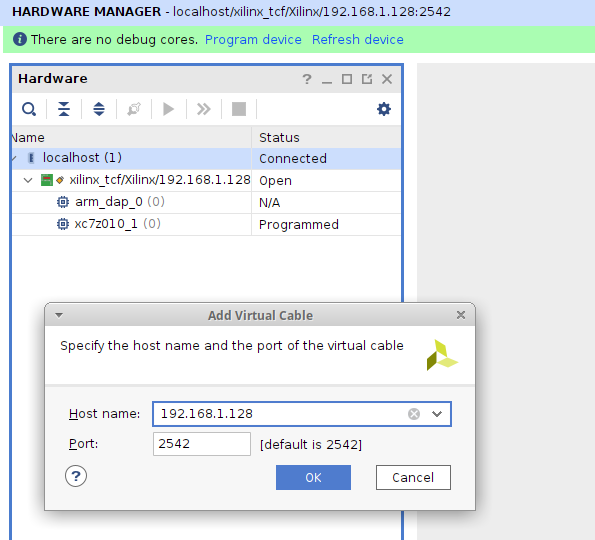
In Vivado, select the Add Xilinx Virtual Cable (XVC) option in the Hardware Manager and mention the IP address and the Port of the host computer.
Tips
If you see the End of startup status: LOW error message in Vivado, check the
FPGA power supply's voltage and current ratings.
I found Maker Pi Pico Base really helpful for debugging GPIO stuff.
This URL
says that Xilinx Virtual Cable (XVC) protocol allows (local or remote) Vivado
to connect to a target FPGA for debug leveraging standard Xilinx standard debug
cores like Integrated Logic Analyzer - ILA, Virtual Input/Output - VIO, and
others. ILA works fine over our Raspberry Pico JTAG adapter. Vitis stuff is
also supported.
Rough Performance Stats ("Speed")
If cost and ease-of-availability are the driving constraints (at the cost of
speed), then this project is 'usable' and can probably suffice. If higher
programming speed is a requirement, I recommend using xc3sprog or
openFPGALoader with an FT2232H board.
This project might be one of the cheapest, most energy-efficient Vivado-Compatible
JTAG programmers. I use this project as my "daily driver" now ;)
Writing ebaz4205_top.bit (371.6 KiB) takes only ~2.5 seconds now - thanks to
tom01h. Don't overestimate the speed of human programmers and Vivado though
;)
$ time ./openFPGALoader -c xvc-client --port 2542 --file-type bin ebaz4205_top.bin
empty
detected xvcServer version v1.0 packet size 12288
freq 6000000 166.666667 166 0
a6 0 0 0
Open file DONE
Parse file DONE
load program
Load SRAM: [==================================================] 100.00%
Done
./openFPGALoader -c xvc-client --port 2542 --file-type bin ebaz4205_top.bin  0.00s user 0.01s system 0% cpu 7.389 total
It seems openFPGALoader is a lot slower than Vivado in programming devices
via XVC!?
Writing corescore_0.bit (2 MiB) which uses ~100% FPGA LEs takes around ~9
seconds.
Flash FPGA without Vivado
./openFPGALoader -c xvc-client --port 2542 --file-type bin ebaz4205_top.bin
USB UARTs
Connect Pico's hardware UART pins to FPGA's UART.
#define UART_TX_PIN 0
#define UART_RX_PIN 1
Set UART of FPGA to 115200 baud rate.
Note: /dev/ttyACM(n) will appear when Pico's USB is connected.
No homepage URL was recorded for kholia/xvc-pico in TopGit's last sync. The README tab above frequently contains screenshots and demo links, or check the repository description on GitHub.
How many stars does kholia/xvc-pico have?
kholia/xvc-pico has 502 GitHub stars — refresh the page for the live number, or check github.com/kholia/xvc-pico. TopGit mirrors GitHub's count but does not claim minute-by-minute accuracy.
Is kholia/xvc-pico open source?
TopGit's metadata for kholia/xvc-pico does not record a license. Most public repositories on GitHub ARE open source, but the exact terms vary — verify by opening the LICENSE file directly.
What is kholia/xvc-pico?
kholia/xvc-pico (kholia/xvc-pico) is a C project on GitHub. From the project's own README: Raspberry Pico powered Xilinx Virtual Cable - Xilinx JTAG Cable! This is now quite fast, thanks to tom01h! We also support JTAG + serial terminal over a single cable now. Now with (slow) WiFi support for Pico W!
Where do I read more about kholia/xvc-pico?
This TopGit page is a snapshot — the READ ME tab shows the project's own README content (links stripped, images preserved). The GitHub repository at github.com/kholia/xvc-pico is the definitive source.
Read full README in the tab above.
Curious whether xvc-pico is right for you?
Let ChatGPT, Claude, or Perplexity look into it — click below and see what AI actually says about xvc-pico.

 /xvc-pico