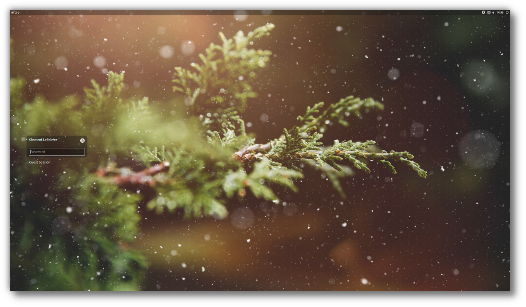
TopGit tracks linuxmint/slick-greeter on GitHub. The project has 443 stars. A slick-looking LightDM greeter
Snapshot summary built from the project's own GitHub metadata — there's no written TopGit review yet. The page will update automatically when a full review is published.
WHY NO REVIEW YET
TopGit writes full reviews for the most-starred, most-requested repositories. This page is a snapshot until then — see the READ ME tab for the original README in full.
The default configuration is stored in dconf under the schema x.dm.slick-greeter.
Distributions should set their own defaults using a glib override.
Users can create and modify /etc/lightdm/slick-greeter.conf, settings in this files take priority and overwrite dconf settings.
A configuration tool is available at https://github.com/linuxmint/lightdm-settings
Features
Slick-Greeter is cross-distribution and should work pretty much anywhere.
All panel applets are embedded. No external indicators are launched or loaded by the greeter.
No settings daemon are launched or loaded by the greeter.
This greeter supports HiDPI.
Sessions are validated. If a default/chosen session isn't present on the system, the greeter scans for known sessions in /usr/share/xsessions and replaces the invalid session choice with a valid session.
You can take a screenshot by pressing PrintScrn. The screenshot is saved in /var/lib/lightdm/Screenshot.png.
Credit
Slick Greeter started as a fork of Unity Greeter 16.04.2, a greeter developed for Ubuntu by Canonical, which used indicators and unity-settings-daemon.
Configuration file format for /etc/lightdm/slick-greeter.conf
[Greeter]
# LightDM GTK+ Configuration
# Available configuration options listed below.
#
# activate-numlock=Whether to activate numlock. This features requires the installation of numlockx. (true or false)
# background=Background file to use, either an image path or a color (e.g. #772953)
# background-color=Background color (e.g. #772953), set before wallpaper is seen
# draw-user-backgrounds=Whether to draw user backgrounds (true or false)
# draw-grid=Whether to draw an overlay grid (true or false)
# show-hostname=Whether to show the hostname in the menubar (true or false)
# show-power=Whether to show the power indicator in the menubar (true or false)
# show-a11y=Whether to show the accessibility options in the menubar (true or false)
# show-keyboard=Whether to show the keyboard indicator in the menubar (true or false)
# show-clock=Whether to show the clock in the menubar (true or false)
# show-quit=Whether to show the quit menu in the menubar (true or false)
# logo=Logo file to use
# other-monitors-logo=Logo file to use for other monitors
# theme-name=GTK+ theme to use
# icon-theme-name=Icon theme to use
# font-name=Font to use
# xft-antialias=Whether to antialias Xft fonts (true or false)
# xft-dpi=Resolution for Xft in dots per inch
# xft-hintstyle=What degree of hinting to use (hintnone/hintslight/hintmedium/hintfull)
# xft-rgba=Type of subpixel antialiasing (none/rgb/bgr/vrgb/vbgr)
# onscreen-keyboard=Whether to enable the onscreen keyboard (true or false)
# high-contrast=Whether to use a high contrast theme (true or false)
# screen-reader=Whether to enable the screen reader (true or false)
# play-ready-sound=A sound file to play when the greeter is ready
# hidden-users=List of usernames (separated by semicolons) that are hidden until Ctr+Alt+Shift is pressed
# group-filter=List of groups that users must be part of to be shown (empty list shows all users)
# enable-hidpi=Whether to enable HiDPI support (on/off/auto)
# only-on-monitor=Sets the monitor on which to show the login window, -1 means "follow the mouse"
# stretch-background-across-monitors=Whether to stretch the background across multiple monitors (false by default)
# clock-format=What clock format to use (e.g., %H:%M or %l:%M %p)
Yes — linuxmint/slick-greeter ships under the GPL-3.0 license, which makes its source code freely readable (and, depending on license terms, forkable and reusable). Source: github.com/linuxmint/slick-greeter.
What is linuxmint/slick-greeter?
linuxmint/slick-greeter (linuxmint/slick-greeter) is a Vala project on GitHub. From the project's own README: A slick-looking LightDM greeter
Where do I read more about linuxmint/slick-greeter?
This TopGit page is a snapshot — the READ ME tab shows the project's own README content (links stripped, images preserved). The GitHub repository at github.com/linuxmint/slick-greeter is the definitive source.
Read full README in the tab above.
Want a second opinion on slick-greeter?
Ask an AI that can read this page — one click and you get its take on slick-greeter.

 /slick-greeter