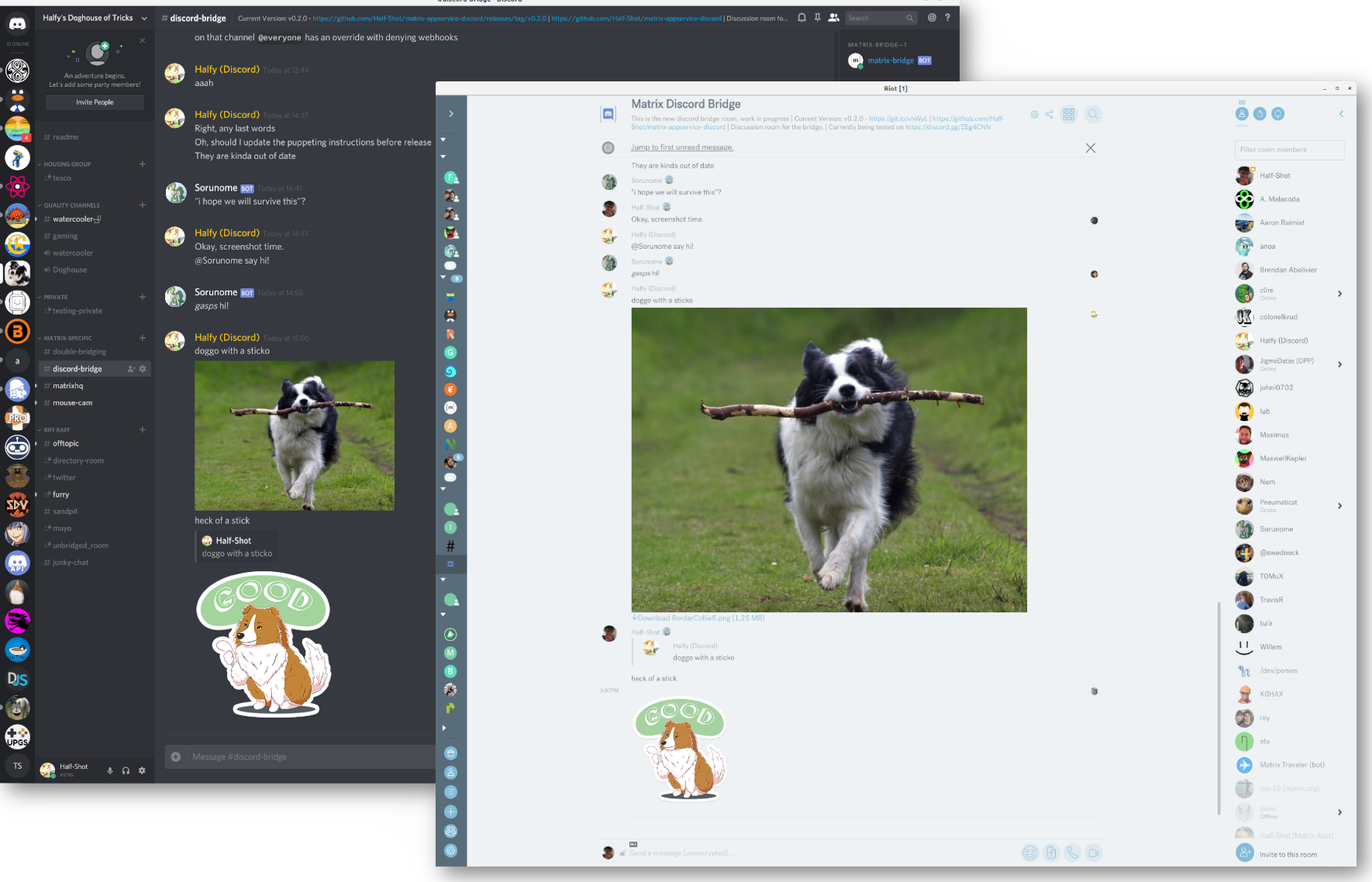
908 GitHub stars and counting — matrix-org/matrix-appservice-discord is a TypeScript project TopGit is tracking across repositories on the platform. A bridge between Matrix and Discord.
Snapshot summary built from the project's own GitHub metadata — there's no written TopGit review yet. The page will update automatically when a full review is published.
WHY NO REVIEW YET
TopGit writes full reviews for the most-starred, most-requested repositories. This page is a snapshot until then — see the READ ME tab for the original README in full.
A bridge between Matrix and Discord.
Currently the bridge is in Beta and quite usable for everyday
bridging, with one or two bugs cropping up.
Helping out
PRs
PRs are graciously accepted, so please come talk to us in #discord-bridge:matrix.org
about any neat ideas you might have. If you are going to make a change, please merge it with the develop branch :).
Issues
You can also file bug reports/ feature requests on Github Issues which also helps a ton. Please remember to include logs.
Please also be aware that this is an unoffical project worked on in our spare time.
Setting up
The bridge has been tested against the Synapse homeserver, although any homeserver
that implements the AS API should work with this bridge.
The bridge supports any version of Node.js between v18.X - v20.X. View the releases for more details.
The bridge uses Yarn for dependency management and package scripts.
For the time being, only Yarn Classic / v1 is supported. To install it, follow these instructions.
If you already have Yarn 2+ installed, you may configure just this project to use Yarn Classic
by running yarn set version classic in the directory where you cloned this repository.
Set up the bridge
Run yarn to grab the dependencies.
Copy config/config.sample.yaml to config.yaml and edit it to reflect your setup.
Note that you are expected to set domain and homeserverURL to your public host name.
While localhost would work, it does not resolve correctly with Webhooks/Avatars.
Please note that a self-signed SSL certificate won't work, either.
Copy discord-registration.yaml to your Synapse's directory.
Docker
Following the instructions above, generate a registration file. The file may also be hand-crafted if you're familiar with the layout. You'll need this file to use the Docker image.
# Create the volume where we'll keep the bridge's files
mkdir -p /matrix-appservice-discord

# Create the configuration file. Use the sample configuration file as a template.
# Be sure to set the database paths to something like this:
#  database:
#    filename: "/data/discord.db"
#    userStorePath: "/data/user-store.db"
#    roomStorePath: "/data/room-store.db"
nano /matrix-appservice-discord/config.yaml

# Copy the registration file to the volume
cp discord-registration.yaml /matrix-appservice-discord/discord-registration.yaml

# Optional: Build the container yourself (requires a git clone, and to be in the root of the project)
docker build -t halfshot/matrix-appservice-discord .

# Run the container
docker run -v /matrix-appservice-discord:/data -p 9005:9005 halfshot/matrix-appservice-discord
Metrics
The bridge supports reporting metrics via Prometheus. You can configure metrics support in the config
file. The metrics will be reported under the URL provided in the registration file, on the /metrics endpoint.
3PID Protocol Support
This bridge support searching for rooms within networks via the 3pid system
used in clients like Element. Any new servers/guilds you bridge
should show up in the network list on Element and other clients.
Setting up Discord
Create a new application via https://discord.com/developers/applications
Make sure to create a bot user. Fill in config.yaml
Run yarn addbot to get a authorisation link.
Give this link to owners of the guilds you plan to bridge.
Finally, you can join a room with #_discord_guildid_channelid
These can be taken from the url ("/$GUILDID/$CHANNELID") when you are in a channel.
Element (and other clients with third party protocol support) users can directly join channels from the room directory.
You can use Webhooks to make messages relayed by the bridge not nested by the bot user. This will also display the avatar of the user speaking on matrix with their messages.
The bot should create this automatically, but if not perform the following:
Enable Manage Webhooks on the role added by the bot.
Add the _matrix Webhook for each channel you'd like to enable this feature on.
Running the Bridge
For the bot to appear online on Discord you need to run the bridge itself.
yarn start
Particular configuration keys can be overridden by defining corresponding environment variables. For instance, auth.botToken can be set with APPSERVICE_DISCORD_AUTH_BOT_TOKEN.
Howto
End User Documentation
Bridging a Room
You must get an authorization link from bridge owner. You must be a server admin or get
help from server admin on Discord side.
Invite the Matrix side bot to your room and wait for it to join.
On Discord side use the authorization link to invite bot to Discord server.
Find out a serverid and channelid for your server/channel you want to bridge. Search the web for instructions.
In Matrix room give command !discord bridge ServerID ChannelID
The bridge will ask for confirmation from the Discord server admins to complete the bridge. Once approved, you're all set.
Unbridging a Room
In Matrix room give command !discord unbridge
Features and Roadmap
In a vague order of what is coming up next
Matrix -> Discord
Text content
Image content
Audio/Video content
Typing notifs (Not supported, requires syncing)
User Profiles
Discord -> Matrix
Text content
Image content
Audio/Video content
Typing notifs
User Profiles
Presence
Per-guild display names.
Group messages
Third Party Lookup
Rooms
Users
Puppet a user's real Discord account.
Sending messages
Direct messages
UI for setup
Rooms react to Discord updates
Integrate Discord into existing rooms
Feature
UI
Manage channel from Matrix (possibly)
Authorise admin rights from Discord to Matrix users
Topic
Room Name
Provisioning API
Webhooks (allows for prettier messages to discord)
VOIP (Hard | Unlikely to be finished anytime soon)
How active is development on matrix-org/matrix-appservice-discord?
The most recent commit recorded on matrix-org/matrix-appservice-discord was 2.3 years ago, based on the GitHub push timestamp. The repository has 153 forks — one of the better signals of community interest.
How many stars does matrix-org/matrix-appservice-discord have?
matrix-org/matrix-appservice-discord has 908 GitHub stars — refresh the page for the live number, or check github.com/matrix-org/matrix-appservice-discord. TopGit mirrors GitHub's count but does not claim minute-by-minute accuracy.
What is matrix-org/matrix-appservice-discord?
matrix-org/matrix-appservice-discord (matrix-org/matrix-appservice-discord) is a TypeScript project on GitHub. From the project's own README: A bridge between Matrix and Discord.
What language is matrix-org/matrix-appservice-discord written in?
matrix-org/matrix-appservice-discord is written primarily in TypeScript. GitHub's language field is based on the largest share of bytes in the default branch.
What topics is matrix-org/matrix-appservice-discord associated with?
GitHub's repository topics for matrix-org/matrix-appservice-discord: "bridge", "discord", "matrix", "riot". TopGit's editorial category is open-source.
Read full README in the tab above.
Is matrix-appservice-discord worth your time?
ChatGPT, Claude and Perplexity can all read this page. Ask one of them what it makes of matrix-appservice-discord.
 /matrix-appservice-discord