Snapshot of mattdesl/budo: 2.2k★, JavaScript. :clapper: a dev server for rapid prototyping
Snapshot summary built from the project's own GitHub metadata — there's no written TopGit review yet. The page will update automatically when a full review is published.
WHY NO REVIEW YET
TopGit writes full reviews for the most-starred, most-requested repositories. This page is a snapshot until then — see the READ ME tab for the original README in full.
This is a browserify development server focused on incremental reloading, LiveReload integration (including CSS injection) and other high-level features for rapid prototyping.
To install it globally:
npm install budo -g
Running budo will start a server with a default index.html and incrementally bundle your source on filesave. The requests are delayed until the bundle has finished, so you won't be served stale or empty bundles if you refresh the page mid-update. Examples:
# serve file on port 9966 and open browser
budo index.js --open

# enable LiveReload on HTML/CSS/JS file changes
budo index.js --live

# default html will use src="static/bundle.js"
budo src/index.js:static/bundle.js

# pass some options to browserify
budo index.js --live -- -t babelify

# use HTTPS and enable CORS headers
budo index.js --ssl --cors

# LiveReload public directory without any bundling
# Add all extensions of file types you want to trigger reloads
budo --dir public/ --wg **/*.{html,css,js} --live
Then open http://localhost:9966/ to see the content in action.
By default, budo pretty-prints to terminal with garnish.
See docs for more details and integrations, such as React Hot Module Replacement, Pushstate Servers and HTTPS. PRs/suggestions/comments welcome.
features
At a glance:
serves a default index.html
fast incremental bundling, suspending the response until the new source is ready
watches HTML and CSS files for changes; CSS is injected without reloading the page
can emit ndjson logs to use another pretty-printer, like bistre.
provides clear error messaging during development in DOM and console
supports SSL and can generate a self-signed certificate
the rich API allows you to build more complex development tools on top of budo
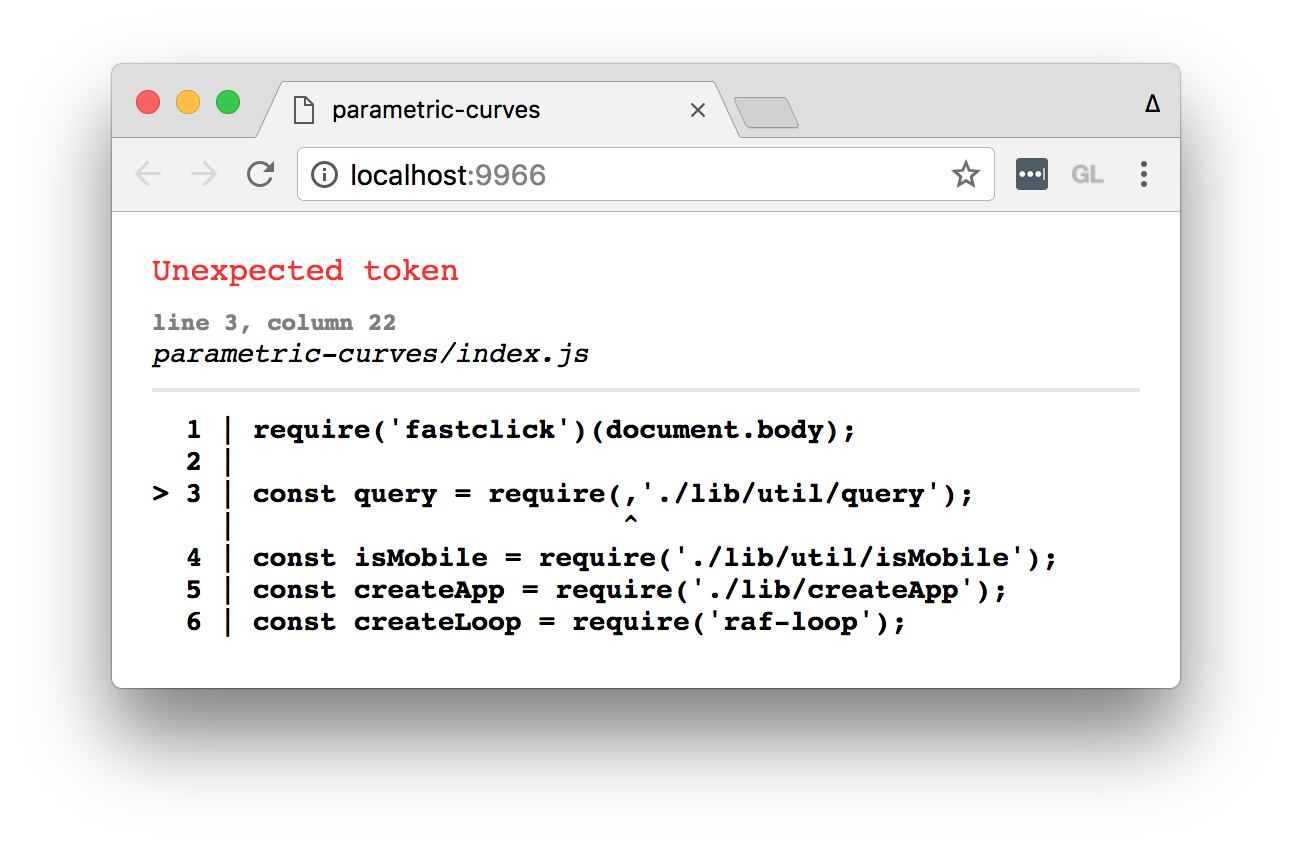
Below is an example of how syntax errors look during development, using the babelify transform.
docs
command line usage
API usage
running tests and examples
rapid prototyping with budō
experimental script injection with budo-chrome
usage
CLI
Details for budo command-line interface.
Usage:
  budo index.js [opts] -- [browserify opts]

Options:
  --help, -h       show help message
  --version        show version
  --port, -p       the port to run, default 9966
  --host, -H       the host, default internal IP (localhost)
  --dir, -d        a path, or array of paths for base static content
  --serve, -s      override the bundle path being served
  --live, -l       enable default LiveReload integration
  --live-port, -L  the LiveReload port, default 35729
  --open, -o       launch the browser once connected
  --pushstate, -P  always render the index page instead of a 404 page
  --base           set the base path for the generated HTML, default to '/'
  --onupdate       a shell command to trigger on bundle update
  --poll=N         use polling for file watch, with optional interval N
  --title          optional title for default index.html
  --css            optional stylesheet href for default index.html
  --ssl, -S        create an HTTPS server instead of HTTP
  --cert, -C       the cert for SSL (default cert.pem)
  --key, -K        the key for SSL (default key.pem)
  --cors           set header to use CORS (Access-Control-Allow-Origin: *)
  --ndjson         print ndjson instead of pretty-printed logs
  --verbose, -v    also include debug messages
  --force-default-index always serve a generated index.html instead of a static one
  --no-stream      do not print messages to stdout
  --no-debug       do not use inline source maps
  --no-portfind    will not attempt auto-portfinding
  --no-error-handler    disable default DOM error handling
  --watch-glob, --wg    glob(s) to watch for reloads, default '**/*.{html,css}'
  --static-options      subarg options to pass to serve-static module
By default, messages will be printed to process.stdout, and --debug will be sent to browserify (for source maps). You can turn these off with --no-stream and --no-debug, respectively.
Everything after -- is passed directly to browserify. Example:
The API mirrors the CLI except it does not write to process.stdout by default.
var budo = require('budo')
var babelify = require('babelify')

budo('./src/index.js', {
  live: true,             // setup live reload
  port: 8000,             // use this port
  browserify: {
    transform: babelify   // ES6
  }
}).on('connect', function (ev) {
  console.log('Server running on %s', ev.uri)
  console.log('LiveReload running on port %s', ev.livePort)
}).on('update', function (buffer) {
  console.log('bundle - %d bytes', buffer.length)
})
See API usage for details.
See Also
budō combines several smaller and less opinionated modules.
watchify-middleware - the underlying request handler for serving incremental reloads
watchify-server - a less opinionated alternative to budo, built on the same underlying modules
simple-html-index - a stream for a default index.html file
Also, special thanks to beefy and wzrd which originally inspired budo.
TopGit's last sync did not record any GitHub topics for mattdesl/budo. GitHub topics appear in the right sidebar of a repository page; that's the authoritative place to check.
How active is development on mattdesl/budo?
The most recent commit recorded on mattdesl/budo was 4.0 years ago, based on the GitHub push timestamp. The repository has 104 forks — one of the better signals of community interest.
How many stars does mattdesl/budo have?
mattdesl/budo has 2.2k GitHub stars — refresh the page for the live number, or check github.com/mattdesl/budo. TopGit mirrors GitHub's count but does not claim minute-by-minute accuracy.
What language is mattdesl/budo written in?
mattdesl/budo is written primarily in JavaScript. GitHub's language field is based on the largest share of bytes in the default branch.
Where do I read more about mattdesl/budo?
This TopGit page is a snapshot — the READ ME tab shows the project's own README content (links stripped, images preserved). The GitHub repository at github.com/mattdesl/budo is the definitive source.
Read full README in the tab above.
Want a second opinion on budo?
Ask an AI that can read this page — one click and you get its take on budo.
 /budo
/budo