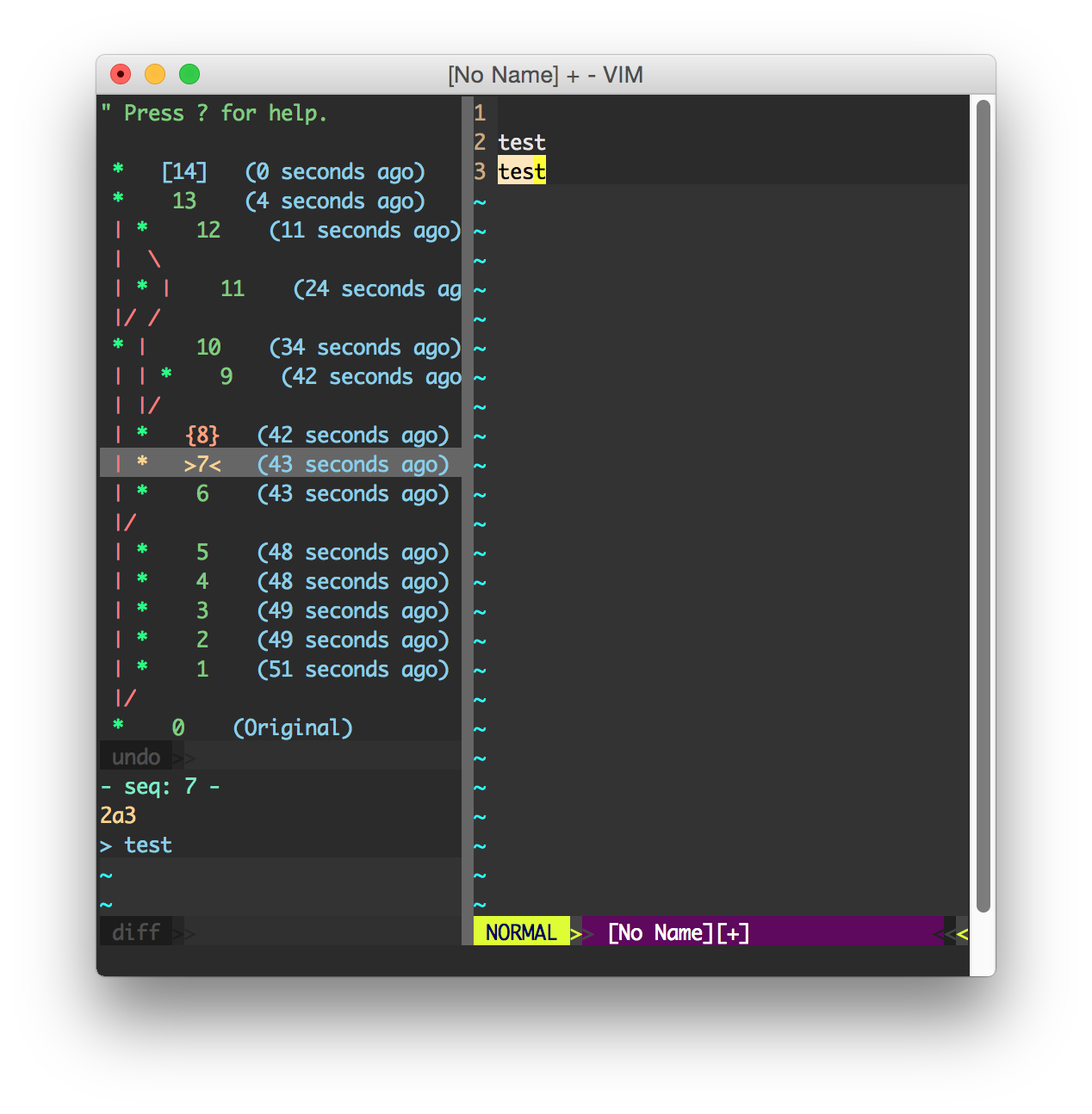
Snapshot of mbbill/undotree: 4.6k★, Vim Script. The undo history visualizer for VIM
Snapshot summary built from the project's own GitHub metadata — there's no written TopGit review yet. The page will update automatically when a full review is published.
WHY NO REVIEW YET
TopGit writes full reviews for the most-starred, most-requested repositories. This page is a snapshot until then — see the READ ME tab for the original README in full.
[!Note]
If you are using Vim version 9.0 or higher, you can try out this plugin for an experience with Vim9 script.
Description
Undotree visualizes the undo history and makes it easy to browse and switch between different undo branches. You may be wondering, what are undo "branches" anyway? They're a feature of Vim that allow you to go back to a prior state even after it has been overwritten by later edits. For example: In most editors, if you make some change A, followed by change B, then go back to A and make another change C, normally you wouldn't be able to go back to change B because the undo history is linear. That's not the case with Vim, however. Vim internally stores the entire edit history for each file as a single, monolithic tree structure; this plug-in exposes that tree to you so that you can not only switch back and forth between older and more recent edits linearly but can also switch between diverging branches.
Note: use :help 'undolevels' in Vim for information on configuring the size of the undo history
How it works
Some users may have questions about whether file contents change when switching between undo history states. With undotree, you don't need to worry about data loss or disk writes. The plugin will never save your data or write to disk. Instead, it modifies the current buffer temporarily, just like auto-completion plugins do. This means that any changes made by undotree are reversible with a single click, allowing you to easily revert to any prior state.
Vim's undo/redo feature is a great way to protect your work from accidental changes or data loss. Unlike other editors, where undoing and then accidentally typing something can cause you to lose your edits, Vim allows you to revert to previous states without losing any data, as long as you keep the Vim session alive. If you want to keep your undo history permanently, Vim offers a persistent undo feature. This feature saves your undo history to a file on disk, allowing you to preserve your undo history across editing sessions. To enable persistent undo, refer to the instructions below. This can be a useful option for those who want to maintain a long-term undo history for a file or project.
Persisting the undo history
Undo/redo functionality is a useful feature for most editors, including Vim. However, by default, Vim's undo history is only available during the current editing session, as it is stored in memory and lost once the process exits. While tools such as undotree can aid in accessing historical states, it does not offer a permanent solution. For some users, it may be safer or more convenient to persist the undo history across editing sessions, and that's where Vim's persistent undo feature comes in.
Persistent undo saves the undo history in a file on disk, rather than in RAM. Whenever a change is made, Vim saves the edited file with its current state, while also saving the entire undo history to a separate file on disk that includes all states. This means that even after exiting Vim, the undo history is still available when you reopen the file, allowing you to continue to undo/redo changes. The undo history file is incremental and saves every change permanently, similar to Git.
If you're worried about the potential storage space used by persistent undo files, undotree provides an option to clean them up. Additionally, undotree is written in pure Vim script, making it lightweight, simple, and fast, and only runs when needed. To enable persistent undo, simply type :h persistent-undo in Vim, or follow the instructions provided in the Usage section below.
Download and Install
Using Vim's built-in package manager:
mkdir -p ~/.vim/pack/mbbill/start
cd ~/.vim/pack/mbbill/start
git clone https://github.com/mbbill/undotree.git
vim -u NONE -c "helptags undotree/doc" -c q
Use whatever plug-in manager to pull the master branch. I've included 2 examples of the most used:
Vundle:Plugin 'mbbill/undotree'
Vim-Plug:Plug 'mbbill/undotree'
Packer:use 'mbbill/undotree'
And install them with the following:
Vundle::PluginInstall
Vim-Plug::PlugInstall
Packer::PackerSync
Usage
Use :UndotreeToggle to toggle the undo-tree panel.
You may want to map this command to whatever hotkey by adding the following line to your vimrc, take F5 for example.
nnoremap <F5> :UndotreeToggle<CR>
Or the equivalent mapping if using Neovim and Lua script.
Every change has a sequence number and it is displayed before timestamps.
The current state is marked as > number <.
The next state which will be restored by :redo or <ctrl-r> is marked as { number }.
The [ number ] marks the most recent change.
The undo history is sorted by timestamps.
Saved changes are marked as s and the big S indicates the most recent saved change.
Press ? in undotree window for quick help.
Persistent undo
Usually, I would like to store the undo files in a separate place like below.
if has("persistent_undo")
   let target_path = expand('~/.undodir')

    " create the directory and any parent directories
    " if the location does not exist.
    if !isdirectory(target_path)
        call mkdir(target_path, "p", 0700)
    endif

    let &undodir=target_path
    set undofile
endif
 * Alternatively, if you wish to persist the undo history for a currently
   open file only, you can use the `:UndotreePersistUndo` command.
Configuration
Here is a list of options.
Debug
Create a file under $HOME with the name undotree_debug.log
$touch ~/undotree_debug.log
Run vim, and the log will automatically be appended to the file, and you may watch it using tail:
$tail -F ~/undotree_debug.log
If you want to disable debug, just delete that file.
The most recent commit recorded on mbbill/undotree was 8 months ago, based on the GitHub push timestamp. The repository has 121 forks — one of the better signals of community interest.
How many stars does mbbill/undotree have?
mbbill/undotree has 4.6k GitHub stars — refresh the page for the live number, or check github.com/mbbill/undotree. TopGit mirrors GitHub's count but does not claim minute-by-minute accuracy.
Is mbbill/undotree open source?
Yes — mbbill/undotree ships under the BSD-3-Clause license, which makes its source code freely readable (and, depending on license terms, forkable and reusable). Source: github.com/mbbill/undotree.
What is mbbill/undotree?
mbbill/undotree (mbbill/undotree) is a Vim Script project on GitHub. From the project's own README: The undo history visualizer for VIM
What language is mbbill/undotree written in?
mbbill/undotree is written primarily in Vim Script. GitHub's language field is based on the largest share of bytes in the default branch.
What license does mbbill/undotree use?
mbbill/undotree is released under the BSD-3-Clause license. Always verify the LICENSE file directly on GitHub for the authoritative terms — license strings can be edited out of sync with a project's actual stance.
Where do I read more about mbbill/undotree?
This TopGit page is a snapshot — the READ ME tab shows the project's own README content (links stripped, images preserved). The GitHub repository at github.com/mbbill/undotree is the definitive source.
Read full README in the tab above.
Curious whether undotree is right for you?
Let ChatGPT, Claude, or Perplexity look into it — click below and see what AI actually says about undotree.

 /undotree