mcollina/githuman is a open-source project on GitHub, written primarily in TypeScript. It has 258 stars. Keep the Human in the Loop of coding
Snapshot summary built from the project's own GitHub metadata — there's no written TopGit review yet. The page will update automatically when a full review is published.
WHY NO REVIEW YET
TopGit writes full reviews for the most-starred, most-requested repositories. This page is a snapshot until then — see the READ ME tab for the original README in full.
GitHub revolutionized how humans collaborate on code.
GitHuman defines how humans review code written by AI.
The Problem
AI coding agents write code. But the traditional PR workflow assumes humans are the authors. By the time AI-generated code reaches a pull request, you've already committed to the approach. Review happens too late.
The Solution
GitHuman moves the review checkpoint to where it belongs: the staging area.
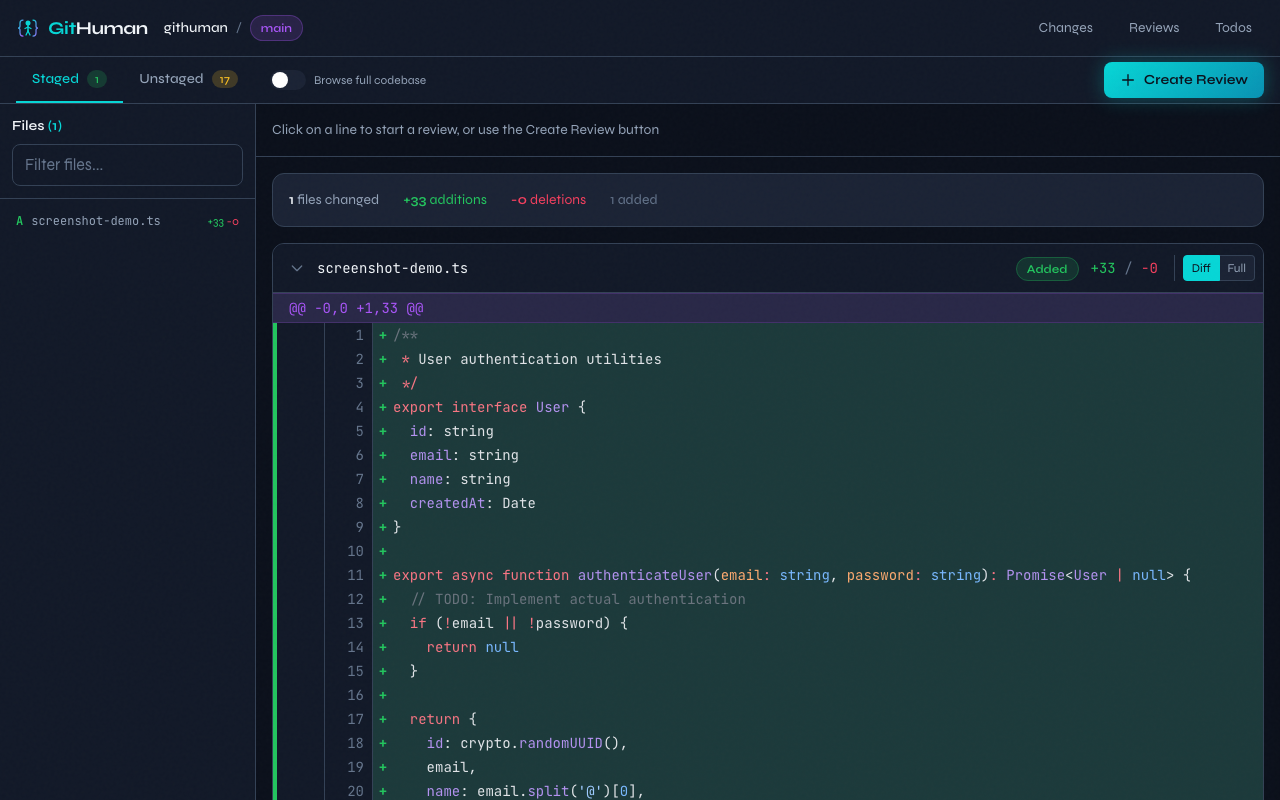
Before git commit, you get a proper review interface—not a wall of terminal diff output. Add comments, track issues, and make informed decisions about what the AI produced.
Screenshots
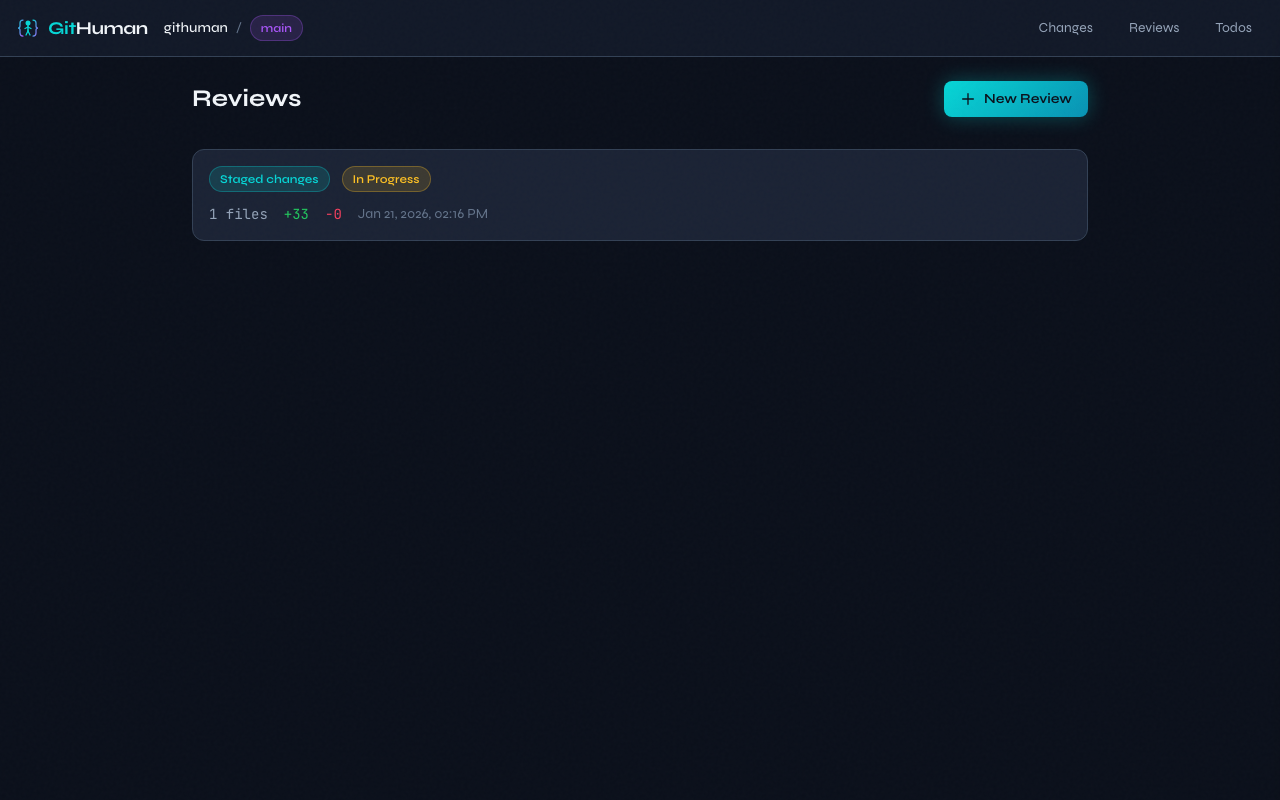
Reviews List
Staged Changes
Features
Visual diff review - Review staged changes in a clean, GitHub-like interface
Human handoff for agents - Run githuman ask to ask a human for review, wait, and hand their feedback back to the agent
Inline comments - Add comments to specific lines with code suggestions
Review workflow - Track status: in progress, approved, or changes requested
Todo tracking - Create tasks for follow-up work via CLI or web interface
Markdown export - Export reviews with comments for documentation
Keyboard shortcuts - Navigate quickly with vim-style bindings
Local & private - Everything runs on your machine, no data leaves
Requirements
Node.js 24.0.0 or higher
Installation
npm install -g githuman
Or run directly:
npx githuman@latest serve
Quick Start
Review staged changes before commit
# Stage your changes (from AI agent or manual edits)
git add .

# Start the review interface
githuman serve
This opens a web interface at http://localhost:3847 where you can review your staged changes before committing.
Ask a human to review and wait for feedback
githuman ask "Please review the parser refactor"
githuman ask starts or reuses GitHuman, opens a dedicated ask page, waits for the human to finish reviewing, and then prints the new todos, comments, and review status updates for the agent.
The handoff is completed in the UI with a dedicated Continue assistant button.
Agent Skills
GitHuman provides an agent skill that teaches AI coding agents when and how to use GitHuman for reviewing changes.
Install it with the skills CLI:
npx skills add mcollina/githuman-skills
CLI Reference
Start Review Server
githuman serve [options]

Options:
  -p, --port <port>    Port to listen on (default: 3847)
  --host <host>        Host to bind to (default: localhost)
  --open               Auto-open browser
  --no-open            Don't open browser automatically
  --https              Enable HTTPS
  --no-https           Disable HTTPS
  --cert <path>        Use a custom TLS certificate
  --key <path>         Use a custom TLS private key
  --auth [token]       Enable auth, optionally with a provided token
  -v, --verbose        Enable verbose logging
  -h, --help           Show help
Ask a Human to Review
githuman ask [message] [options]

Options:
  -p, --port <port>    Port to use for GitHuman
  --host <host>        Host to bind to when starting GitHuman
  --open               Open the browser automatically
  --no-open            Don't open the browser automatically
  --review <id>        Scope feedback to a specific review
  --interval <ms>      Polling interval in milliseconds
  --json               Output final feedback as JSON
  -h, --help           Show help
List Reviews
githuman list [options]

Options:
  --status <status>    Filter by status (in_progress|approved|changes_requested)
  --json               Output as JSON
  -h, --help           Show help
Export Review
githuman export <review-id|last> [options]

Arguments:
  review-id            The ID of the review, or "last" for most recent

Options:
  -o, --output <file>  Output file path (default: stdout)
  --no-resolved        Exclude resolved comments
  --no-snippets        Exclude diff snippets
  -h, --help           Show help
Manage Todos
githuman todo <subcommand> [options]

Subcommands:
  add <content>     Add a new todo item
  list              List all todos (pending by default)
  done <id>         Mark todo as completed
  undone <id>       Mark todo as not completed
  remove <id>       Delete a todo
  clear --done      Remove all completed todos

Options:
  --review <id>     Scope todo to a specific review
  --all             Show all todos (not just pending)
  --done            Filter to show only completed todos
  --json            Output as JSON
  -h, --help        Show help
Workflow
Staging-area review
AI agent makes changes - Claude, Copilot, Cursor, or any tool stages code
Run githuman serve - Opens the review interface
Review the diff - See exactly what changed, file by file
Add comments - Note issues, questions, or suggestions
Create todos - Track follow-up work
Decide - Approve and commit, or request changes from the agent
Export - Optionally save the review as documentation
Human-in-the-loop agent handoff
The agent runs githuman ask
GitHuman starts or reconnects and prints the review URL
The human reviews in the browser and leaves comments or todos
The human clicks Continue assistant when feedback is ready
githuman ask exits with the new feedback so the agent can continue
Web Interface
Creating a Review
Stage your changes with git add
Run githuman serve
Click "New Review" or navigate to Staged Changes
Click "Create Review"
Adding Comments
Hover over any line in the diff
Click the + button that appears
Write your comment
Optionally add a code suggestion
Click "Add Comment"
Keyboard Shortcuts
Key
Action
j
Next file
k
Previous file
Esc
Cancel / Close
API
The server exposes a REST API with OpenAPI documentation at /docs.
Authentication
Set a token to require authentication:
# Via CLI flag
githuman serve --auth mysecrettoken-that-is-at-least-32-characters

# Auto-generate a token
githuman serve --auth

# Via environment variable
GITHUMAN_TOKEN=mysecrettoken-that-is-at-least-32-characters githuman serve
Clients must include the token in the Authorization header:
# Clone the repository
git clone https://github.com/mcollina/local-code-reviewer.git
cd local-code-reviewer

# Install dependencies
npm install

# Run server in watch mode
npm run dev:server

# Run web dev server (Vite)
npm run dev

# Run all tests
npm test
Tech Stack
Backend: Fastify, Node.js native SQLite
Frontend: React 19, Vite, Tailwind CSS v4
Testing: Node.js test runner, Vitest, Playwright
Why "GitHuman"?
In the age of AI coding assistants, someone needs to review the code before it's committed. That someone is you. GitHuman is the human checkpoint in an AI-assisted workflow.
License
MIT License for the code.
The GitHuman logo is Copyright (c) Matteo Collina, All Rights Reserved.
TopGit's last sync did not record any GitHub topics for mcollina/githuman. GitHub topics appear in the right sidebar of a repository page; that's the authoritative place to check.
How active is development on mcollina/githuman?
The most recent commit recorded on mcollina/githuman was 4 months ago, based on the GitHub push timestamp. The repository has 19 forks — one of the better signals of community interest.
How many stars does mcollina/githuman have?
mcollina/githuman has 258 GitHub stars — refresh the page for the live number, or check github.com/mcollina/githuman. TopGit mirrors GitHub's count but does not claim minute-by-minute accuracy.
Is mcollina/githuman open source?
TopGit's metadata for mcollina/githuman does not record a license. Most public repositories on GitHub ARE open source, but the exact terms vary — verify by opening the LICENSE file directly.
Where can I see mcollina/githuman in action?
The project maintains a homepage at https://githuman.dev/. The README tab on this page also usually contains screenshots and a quickstart.
Where do I read more about mcollina/githuman?
This TopGit page is a snapshot — the READ ME tab shows the project's own README content (links stripped, images preserved). The GitHub repository at github.com/mcollina/githuman is the definitive source.
Read full README in the tab above.
Want a second opinion on githuman?
Ask an AI that can read this page — one click and you get its take on githuman.
 /githuman