
megvii-research/HiDiffusion

megvii-research/HiDiffusion is a open-source project on GitHub. It has 838 stars.
Snapshot summary built from the project's own GitHub metadata — there's no written TopGit review yet. The page will update automatically when a full review is published.
TopGit writes full reviews for the most-starred, most-requested repositories. This page is a snapshot until then — see the READ ME tab for the original README in full.
Snapshot
Top contributors
Show top contributors
💡 HiDiffusion: Unlocking Higher-Resolution Creativity and Efficiency in Pretrained Diffusion Models



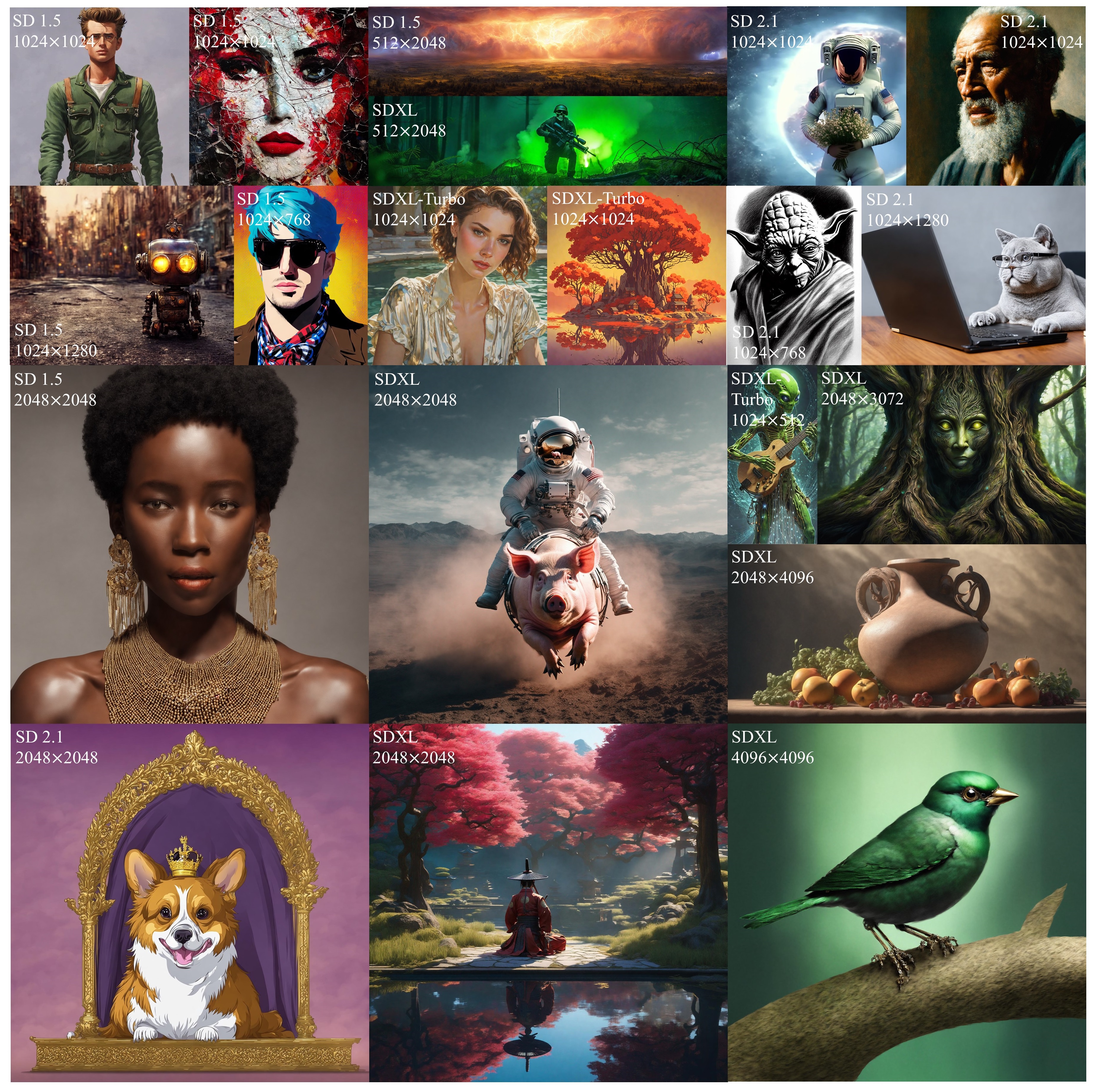
(Select HiDiffusion samples for various diffusion models, resolutions, and aspect ratios.)
👉 Why HiDiffusion
- A training-free method that increases the resolution and speed of pretrained diffusion models.
- Designed as a plug-and-play implementation. It can be integrated into diffusion pipelines by only adding a single line of code!
- Supports various tasks, including text-to-image, image-to-image, inpainting.
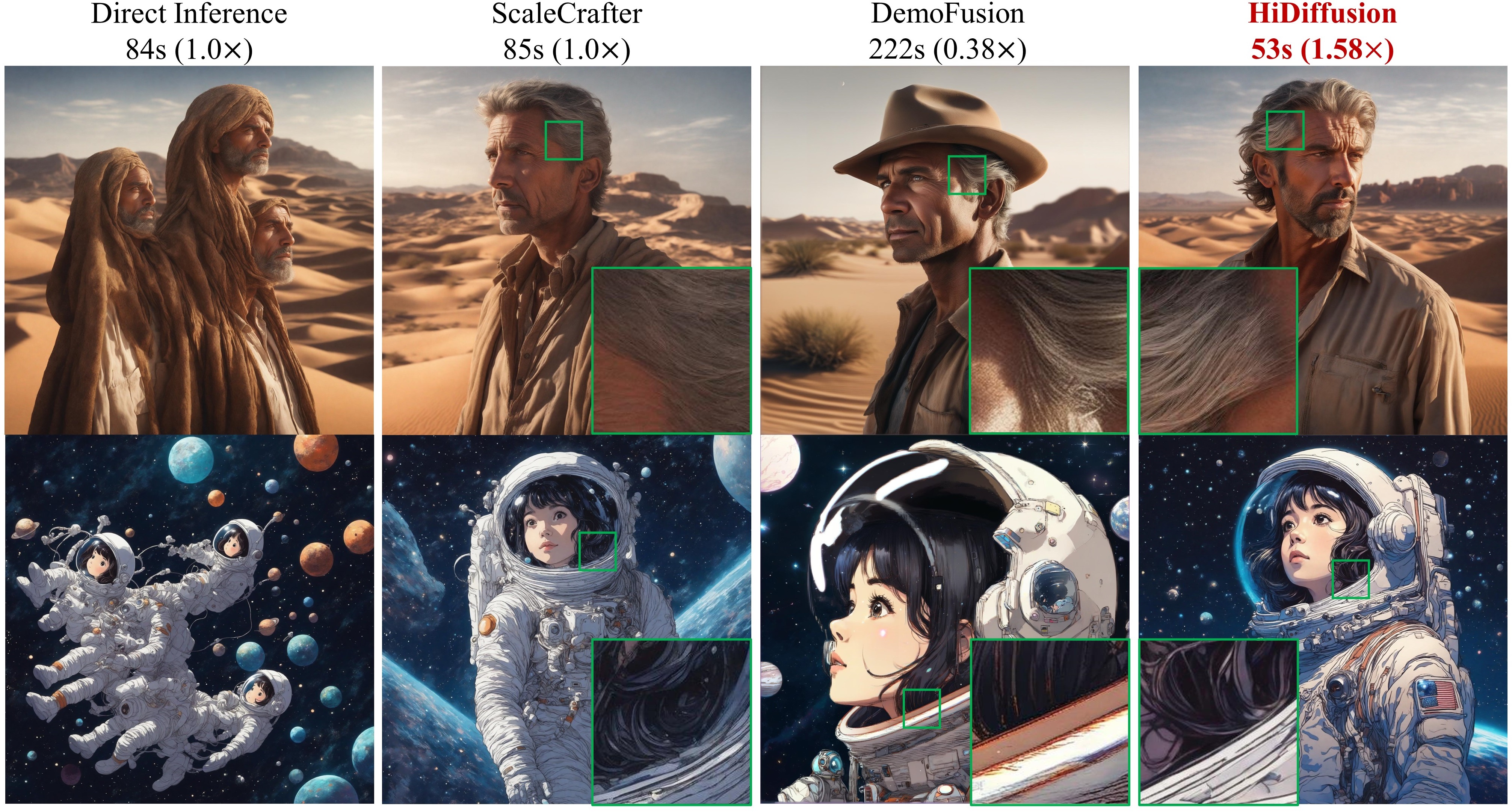
(Faster, and better image details.)
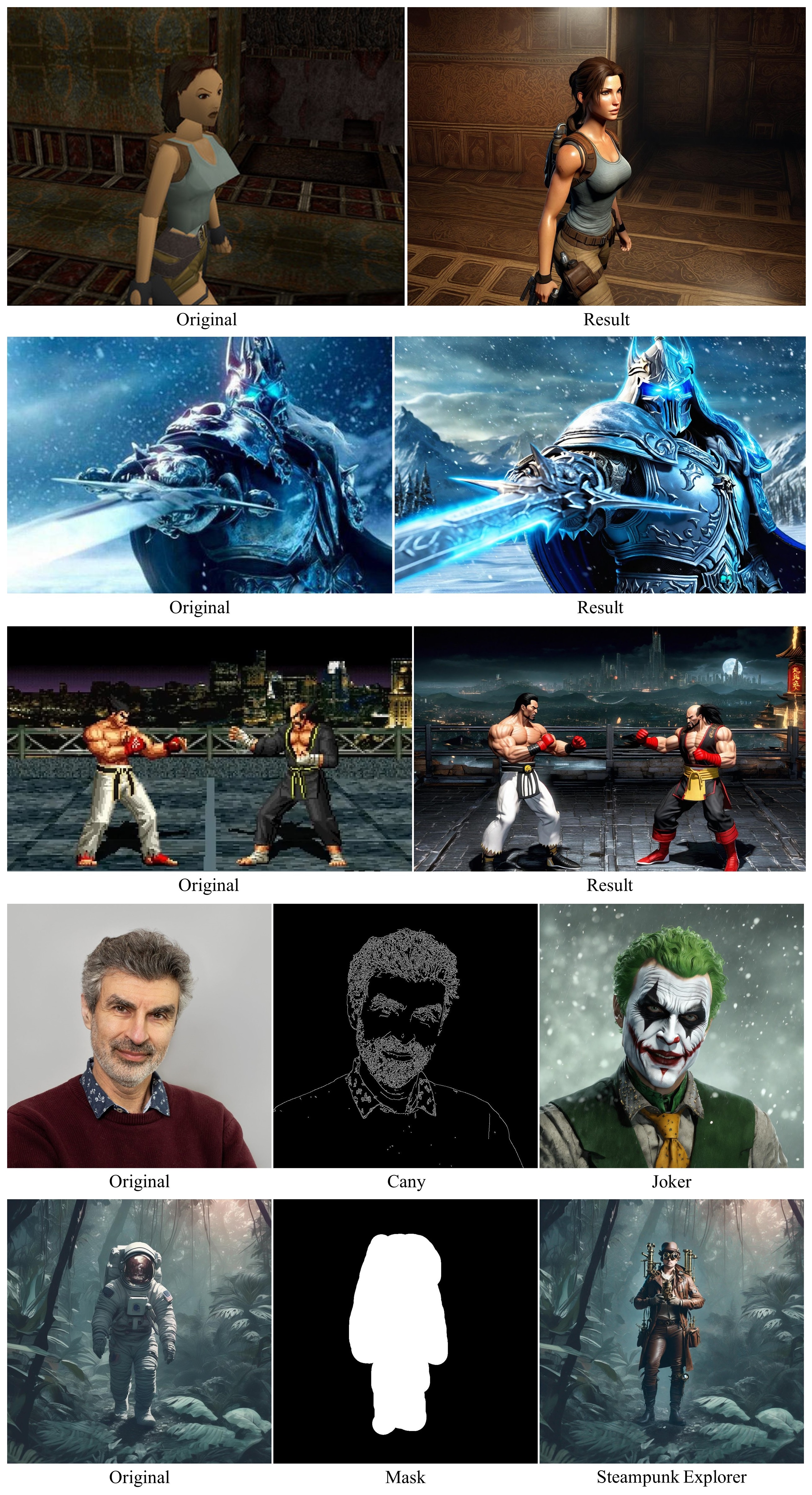
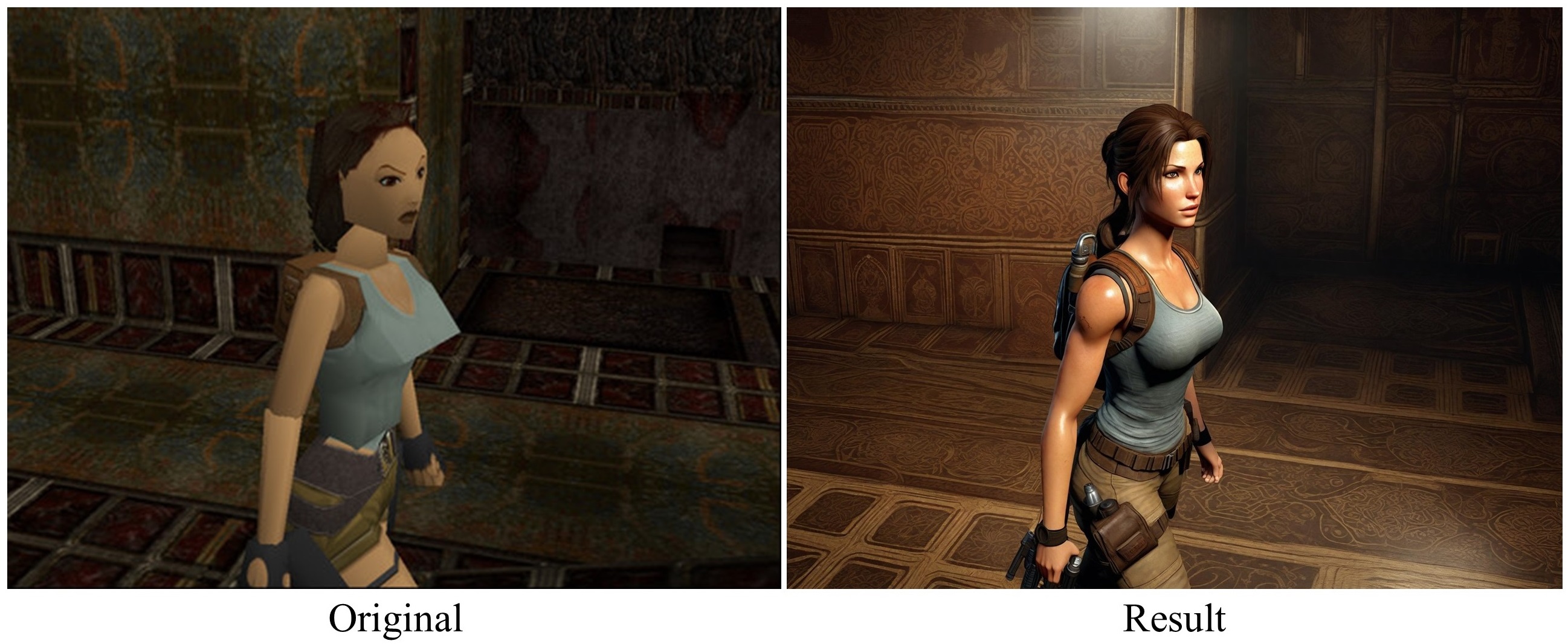
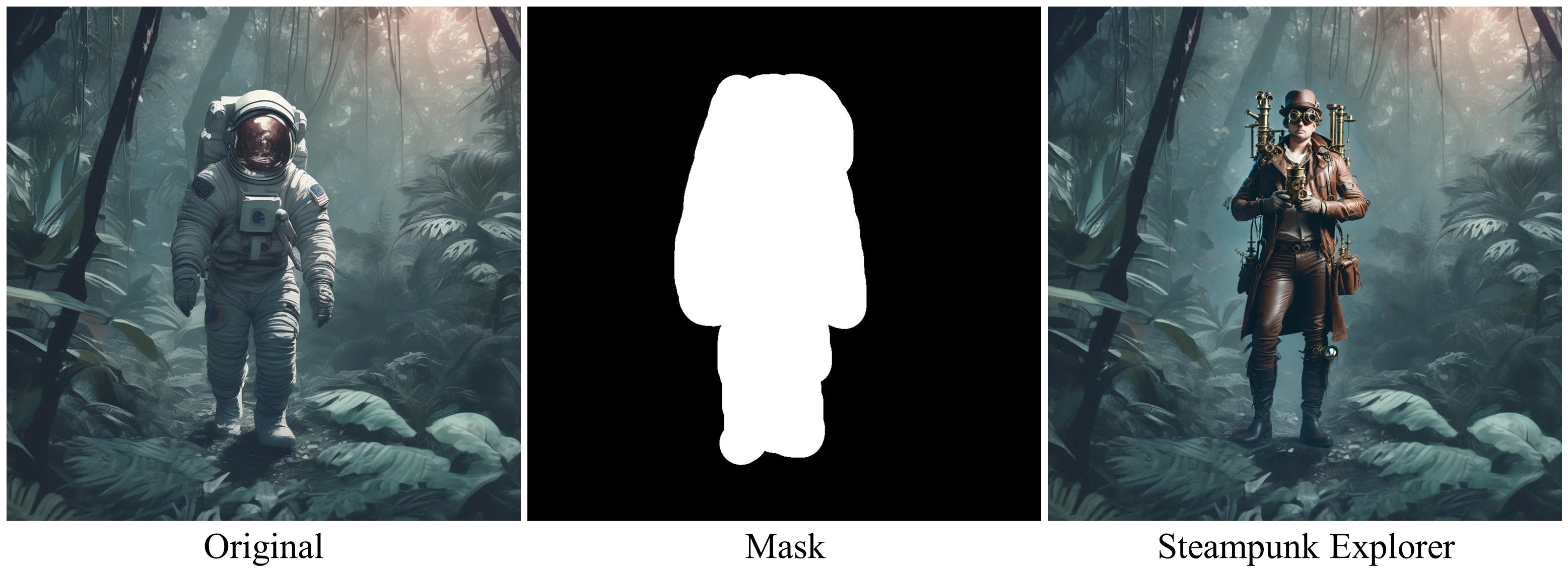
(2K results of ControlNet and inpainting tasks.)
🔥 Update
-
2024.8.15 - 💥 Diffusers documentation has added HiDiffusion, see here. Thank Diffusers team!
-
2024.7.3 - 💥 Accepted by ECCV 2024!
-
2024.6.19 - 💥 Integrated into OpenBayes, see the demo. Thank OpenBayes team!
-
2024.6.16 - 💥 Support PyTorch 2.X.
-
2024.6.16 - 💥 Fix non-square generation issue. Now HiDiffusion supports more image sizes and aspect ratios.
-
2024.5.7 - 💥 Support image-to-image task, see here.
-
2024.4.16 - 💥 Release source code.
📢 Supported Models
- ✅ Stable Diffusion XL
- ✅ Stable Diffusion XL Turbo
- ✅ Stable Diffusion v2
- ✅ Stable Diffusion v1
Note: HiDiffusion also supports the downstream diffusion models based on these repositories, such as Ghibli-Diffusion, Playground, etc.
💣 Supported Tasks
- ✅ Text-to-image
- ✅ ControlNet, including text-to-image, image-to-image
- ✅ Inpainting
🔎 Main Requirements
This repository is tested on
- Python==3.8
- torch>=1.13.1
- diffusers>=0.25.0
- transformers
- accelerate
- xformers
🔑 Install HiDiffusion
After installing the packages in the main requirements, install HiDiffusion:
pip3 install hidiffusion
Installing from source
Alternatively, you can install from github source. Clone the repository and install:
git clone https://github.com/megvii-model/HiDiffusion.git
cd HiDiffusion
python3 setup.py install
🚀 Usage
Generating outputs with HiDiffusion is super easy based on 🤗 diffusers. You just need to add a single line of code.
Text-to-image generation
Stable Diffusion XL
from hidiffusion import apply_hidiffusion, remove_hidiffusion
from diffusers import StableDiffusionXLPipeline, DDIMScheduler
import torch
pretrain_model = "stabilityai/stable-diffusion-xl-base-1.0"
scheduler = DDIMScheduler.from_pretrained(pretrain_model, subfolder="scheduler")
pipe = StableDiffusionXLPipeline.from_pretrained(pretrain_model, scheduler = scheduler, torch_dtype=torch.float16, variant="fp16").to("cuda")

# # Optional. enable_xformers_memory_efficient_attention can save memory usage and increase inference speed. enable_model_cpu_offload and enable_vae_tiling can save memory usage.
# pipe.enable_xformers_memory_efficient_attention()
# pipe.enable_model_cpu_offload()
# pipe.enable_vae_tiling()

# Apply hidiffusion with a single line of code.
apply_hidiffusion(pipe)

prompt = "Standing tall amidst the ruins, a stone golem awakens, vines and flowers sprouting from the crevices in its body."
negative_prompt = "blurry, ugly, duplicate, poorly drawn face, deformed, mosaic, artifacts, bad limbs"
image = pipe(prompt, guidance_scale=7.5, height=2048, width=2048, eta=1.0, negative_prompt=negative_prompt).images[0]
image.save(f"golem.jpg")
Output:
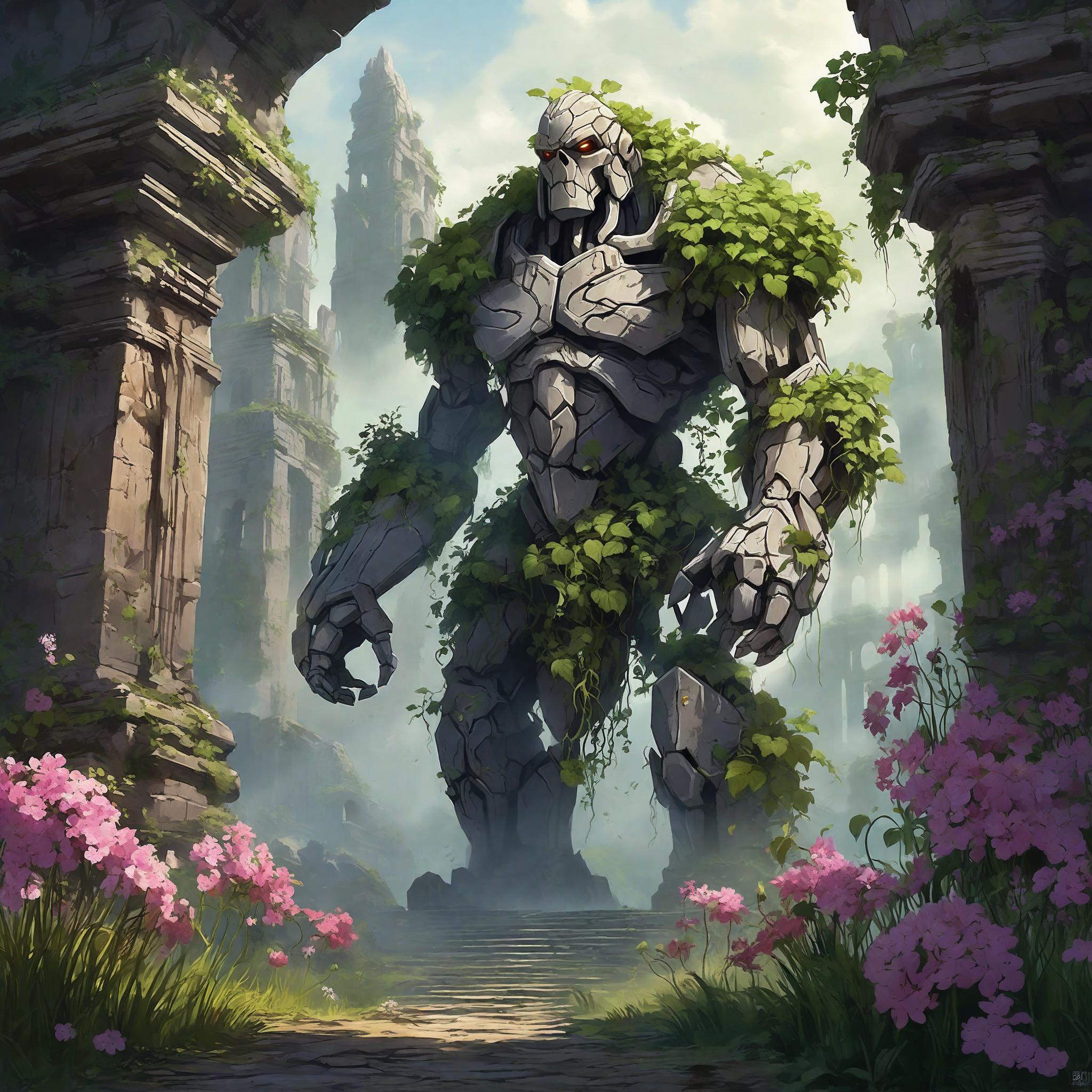
Set height = 4096, width = 4096, and you can get output with 4096x4096 resolution.
Stable Diffusion XL Turbo
from hidiffusion import apply_hidiffusion, remove_hidiffusion
from diffusers import AutoPipelineForText2Image
import torch
pretrain_model = "stabilityai/sdxl-turbo"
pipe = AutoPipelineForText2Image.from_pretrained(pretrain_model, torch_dtype=torch.float16, variant="fp16").to('cuda')

# # Optional. enable_xformers_memory_efficient_attention can save memory usage and increase inference speed. enable_model_cpu_offload and enable_vae_tiling can save memory usage.
# pipe.enable_xformers_memory_efficient_attention()
# pipe.enable_model_cpu_offload()
# pipe.enable_vae_tiling()

# Apply hidiffusion with a single line of code.
apply_hidiffusion(pipe)

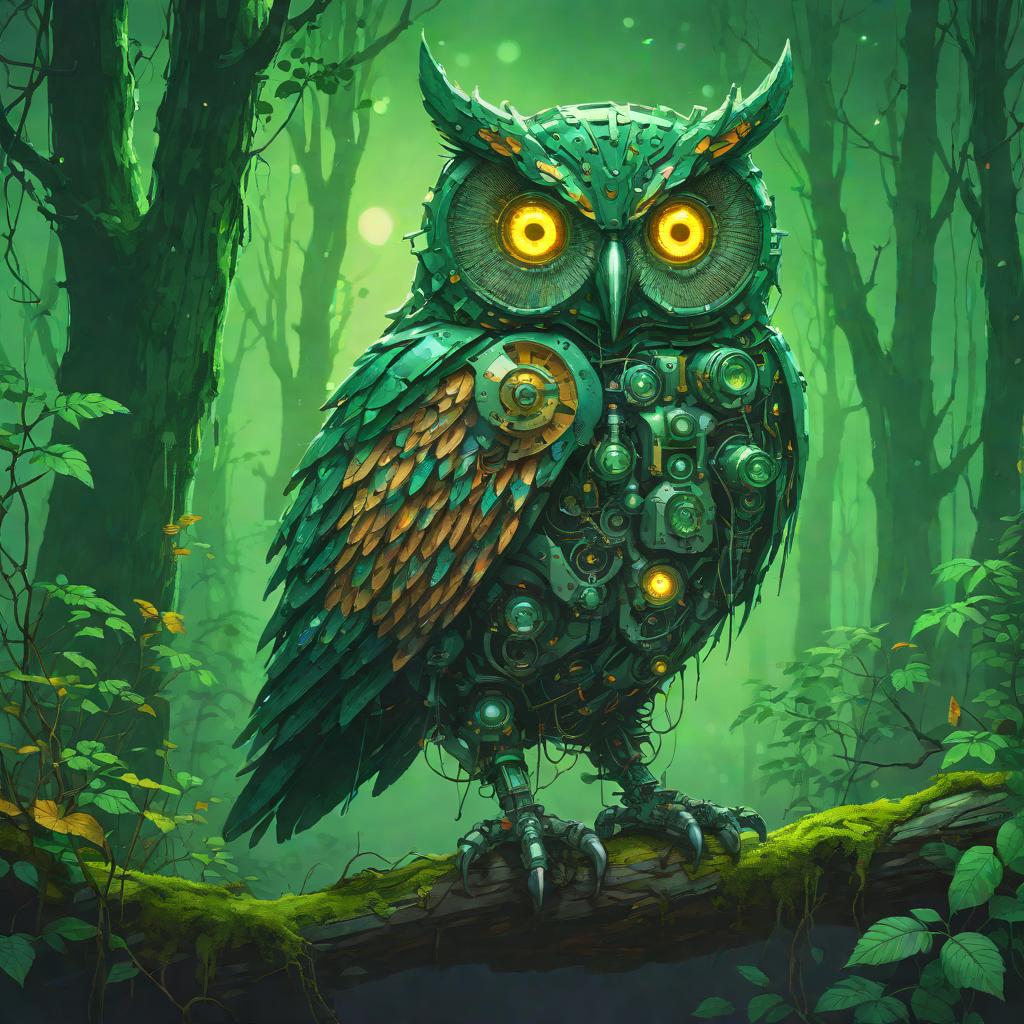
prompt = "In the depths of a mystical forest, a robotic owl with night vision lenses for eyes watches over the nocturnal creatures."
image = pipe(prompt, num_inference_steps=4, height=1024, width=1024, guidance_scale=0.0).images[0]
image.save(f"./owl.jpg")
Output:
Stable Diffusion v2-1
from hidiffusion import apply_hidiffusion, remove_hidiffusion
from diffusers import DiffusionPipeline, DDIMScheduler
import torch
pretrain_model = "stabilityai/stable-diffusion-2-1-base"
scheduler = DDIMScheduler.from_pretrained(pretrain_model, subfolder="scheduler")
pipe = DiffusionPipeline.from_pretrained(pretrain_model, scheduler = scheduler, torch_dtype=torch.float16).to("cuda")

# # Optional. enable_xformers_memory_efficient_attention can save memory usage and increase inference speed. enable_model_cpu_offload and enable_vae_tiling can save memory usage.
# pipe.enable_xformers_memory_efficient_attention()
# pipe.enable_model_cpu_offload()
# pipe.enable_vae_tiling()

# Apply hidiffusion with a single line of code.
apply_hidiffusion(pipe)

prompt = "An adorable happy brown border collie sitting on a bed, high detail."
negative_prompt = "ugly, tiling, out of frame, poorly drawn face, extra limbs, disfigured, deformed, body out of frame, blurry, bad anatomy, blurred, artifacts, bad proportions."
image = pipe(prompt, guidance_scale=7.5, height=1024, width=1024, eta=1.0, negative_prompt=negative_prompt).images[0]
image.save(f"collie.jpg")
Output:
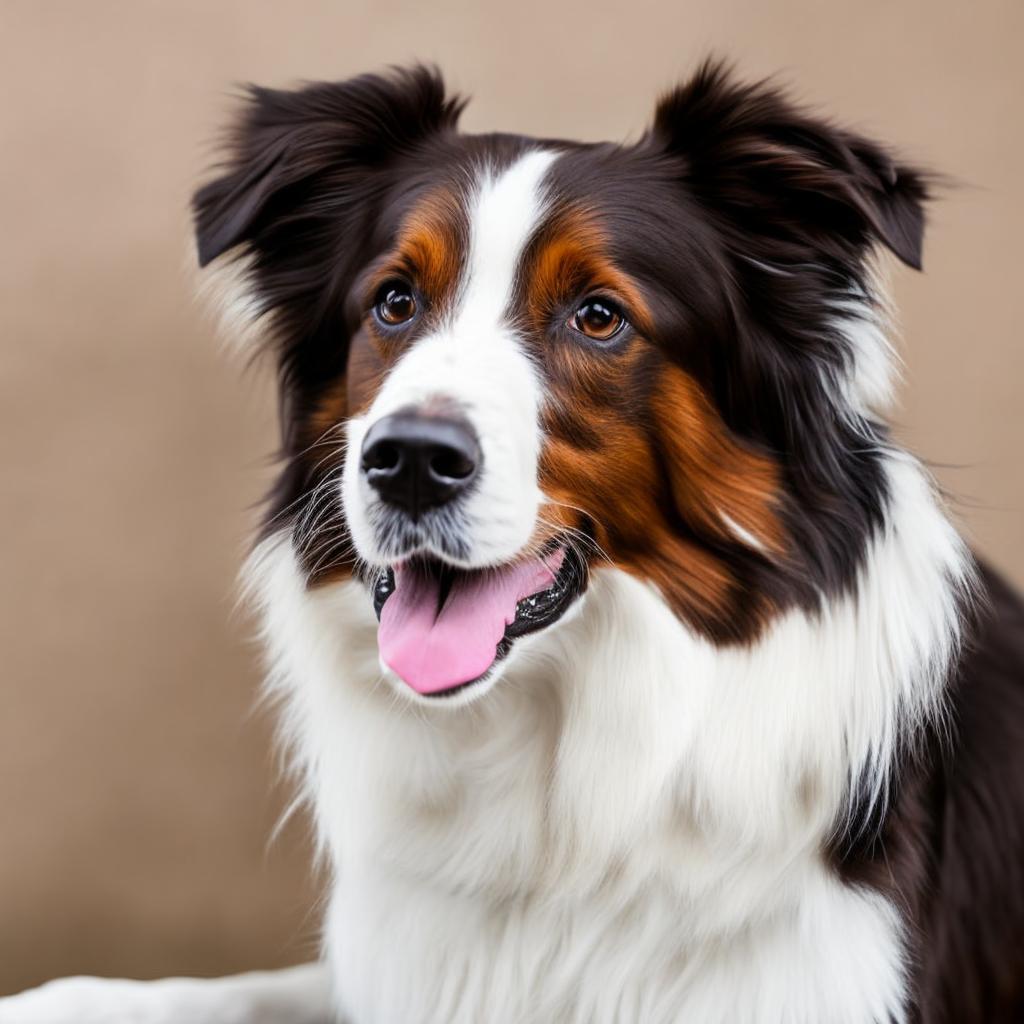
Set height = 2048, width = 2048, and you can get output with 2048x2048 resolution.
Stable Diffusion v1-5
from hidiffusion import apply_hidiffusion, remove_hidiffusion
from diffusers import DiffusionPipeline, DDIMScheduler
import torch
pretrain_model = "runwayml/stable-diffusion-v1-5"
scheduler = DDIMScheduler.from_pretrained(pretrain_model, subfolder="scheduler")
pipe = DiffusionPipeline.from_pretrained(pretrain_model, scheduler = scheduler, torch_dtype=torch.float16).to("cuda")

# # Optional. enable_xformers_memory_efficient_attention can save memory usage and increase inference speed. enable_model_cpu_offload and enable_vae_tiling can save memory usage.
# pipe.enable_xformers_memory_efficient_attention()
# pipe.enable_model_cpu_offload()
# pipe.enable_vae_tiling()

# Apply hidiffusion with a single line of code.
apply_hidiffusion(pipe)

prompt = "thick strokes, bright colors, an exotic fox, cute, chibi kawaii. detailed fur, hyperdetailed , big reflective eyes, fairytale, artstation,centered composition, perfect composition, centered, vibrant colors, muted colors, high detailed, 8k."
negative_prompt = "ugly, tiling, poorly drawn face, out of frame, disfigured, deformed, blurry, bad anatomy, blurred."
image = pipe(prompt, guidance_scale=7.5, height=1024, width=1024, eta=1.0, negative_prompt=negative_prompt).images[0]
image.save(f"fox.jpg")
Output:
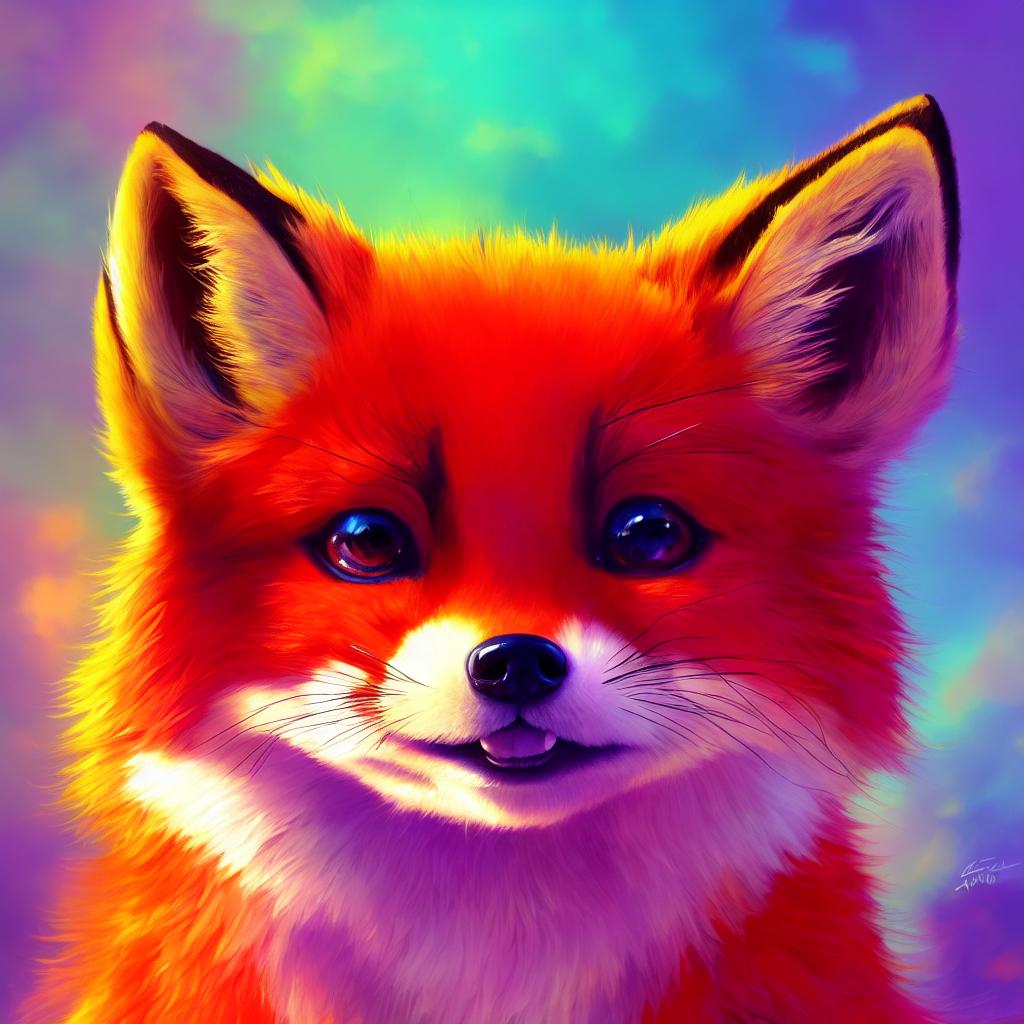
Set height = 2048, width = 2048, and you can get output with 2048x2048 resolution.
Remove HiDiffusion
If you want to remove HiDiiffusion, simply use remove_hidiffusion(pipe).
ControlNet
Text-to-image generation
from diffusers import StableDiffusionXLControlNetPipeline, ControlNetModel, DDIMScheduler
import numpy as np
import torch
import cv2
from PIL import Image
from hidiffusion import apply_hidiffusion, remove_hidiffusion

# load Yoshua_Bengio.jpg in the assets file.
path = './assets/Yoshua_Bengio.jpg'
image = Image.open(path)
# get canny image
image = np.array(image)
image = cv2.Canny(image, 100, 200)
image = image[:, :, None]
image = np.concatenate([image, image, image], axis=2)
canny_image = Image.fromarray(image)

# initialize the models and pipeline
controlnet_conditioning_scale = 0.5  # recommended for good generalization
controlnet = ControlNetModel.from_pretrained(
    "diffusers/controlnet-canny-sdxl-1.0", torch_dtype=torch.float16, variant="fp16"
)
scheduler = DDIMScheduler.from_pretrained("stabilityai/stable-diffusion-xl-base-1.0", subfolder="scheduler")
pipe = StableDiffusionXLControlNetPipeline.from_pretrained(
    "stabilityai/stable-diffusion-xl-base-1.0", controlnet=controlnet, torch_dtype=torch.float16,
    scheduler = scheduler
)

# Apply hidiffusion with a single line of code.
apply_hidiffusion(pipe)

pipe.enable_model_cpu_offload()
pipe.enable_xformers_memory_efficient_attention()

prompt = "The Joker, high face detail, high detail, muted color, 8k"
negative_prompt = "blurry, ugly, duplicate, poorly drawn, deformed, mosaic."

image = pipe(
    prompt, controlnet_conditioning_scale=controlnet_conditioning_scale, image=canny_image,
    height=2048, width=2048, guidance_scale=7.5, negative_prompt = negative_prompt, eta=1.0
).images[0]

image.save('joker.jpg')
Output:
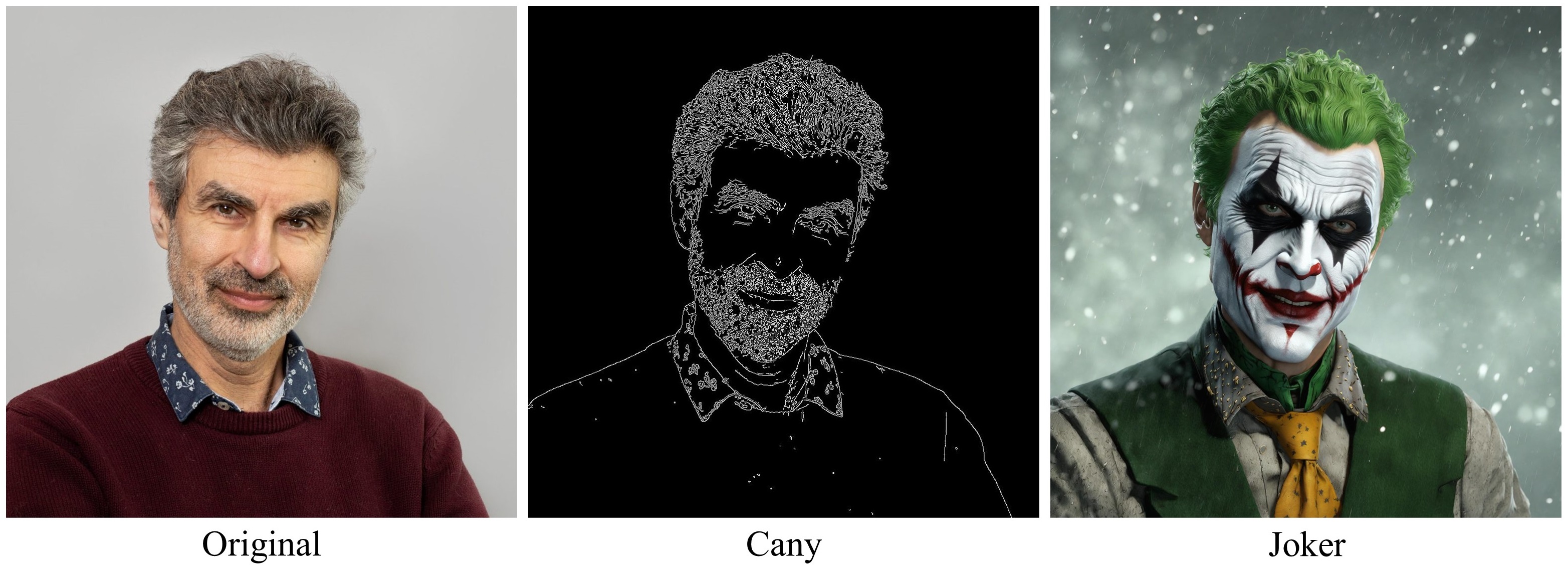
Image-to-image generation
import torch
import numpy as np
from PIL import Image
from diffusers import ControlNetModel, StableDiffusionXLControlNetImg2ImgPipeline, DDIMScheduler
from hidiffusion import apply_hidiffusion, remove_hidiffusion
import cv2

controlnet = ControlNetModel.from_pretrained(
    "diffusers/controlnet-canny-sdxl-1.0", torch_dtype=torch.float16, variant="fp16"
).to("cuda")
scheduler = DDIMScheduler.from_pretrained("stabilityai/stable-diffusion-xl-base-1.0", subfolder="scheduler")

pipe = StableDiffusionXLControlNetImg2ImgPipeline.from_pretrained(
    "stabilityai/stable-diffusion-xl-base-1.0",
    controlnet=controlnet,
    scheduler = scheduler,
    torch_dtype=torch.float16,
).to("cuda")

# Apply hidiffusion with a single line of code.
apply_hidiffusion(pipe)

pipe.enable_model_cpu_offload()
pipe.enable_xformers_memory_efficient_attention()

path = './assets/lara.jpeg'
ori_image = Image.open(path)
# get canny image
image = np.array(ori_image)
image = cv2.Canny(image, 50, 120)
image = image[:, :, None]
image = np.concatenate([image, image, image], axis=2)
canny_image = Image.fromarray(image)

controlnet_conditioning_scale = 0.5  # recommended for good generalization
prompt = "Lara Croft with brown hair, and is wearing a tank top, a brown backpack. The room is dark and has an old-fashioned decor with a patterned floor and a wall featuring a design with arches and a dark area on the right side, muted color, high detail, 8k high definition award winning"
negative_prompt = "underexposed, poorly drawn hands, duplicate hands, overexposed, bad art, beginner, amateur, abstract, disfigured, deformed, close up, weird colors, watermark"

image = pipe(prompt,
    image=ori_image,
    control_image=canny_image,
    height=1536,
    width=2048,
    strength=0.99,
    num_inference_steps=50,
    controlnet_conditioning_scale=controlnet_conditioning_scale,
    guidance_scale=12.5,
    negative_prompt = negative_prompt,
    eta=1.0
).images[0]

image.save("lara.jpg")
Output:
Inpainting
import torch
from diffusers import AutoPipelineForInpainting, DDIMScheduler
from diffusers.utils import load_image
from hidiffusion import apply_hidiffusion, remove_hidiffusion
from PIL import Image

scheduler = DDIMScheduler.from_pretrained("stabilityai/stable-diffusion-xl-base-1.0", subfolder="scheduler")
pipeline = AutoPipelineForInpainting.from_pretrained(
    "diffusers/stable-diffusion-xl-1.0-inpainting-0.1", torch_dtype=torch.float16, variant="fp16",
    scheduler=scheduler
)

# Apply hidiffusion with a single line of code.
apply_hidiffusion(pipeline)

pipeline.enable_model_cpu_offload()
# remove following line if xFormers is not installed
pipeline.enable_xformers_memory_efficient_attention()

# load base and mask image
img_url = "https://huggingface.co/datasets/huggingface/documentation-images/resolve/main/diffusers/sdxl-text2img.png"
init_image = load_image(img_url)
# load mask_image.jpg in the assets file.
mask_image = Image.open("./assets/mask_image.png")

prompt =  "A steampunk explorer in a leather aviator cap and goggles, with a brass telescope in hand, stands amidst towering ancient trees, their roots entwined with intricate gears and pipes."

negative_prompt = "blurry, ugly, duplicate, poorly drawn, deformed, mosaic"
image = pipeline(prompt=prompt, image=init_image, mask_image=mask_image, height=2048, width=2048, strength=0.85, guidance_scale=12.5, negative_prompt = negative_prompt, eta=1.0).images[0]
image.save('steampunk_explorer.jpg')
Output:
Integration into downstream models
HiDiffusion supports models based on supported models, such as Ghibli-Diffusion, Playground, etc.
Ghibli-Diffusion
from diffusers import StableDiffusionPipeline
import torch
from hidiffusion import apply_hidiffusion, remove_hidiffusion

model_id = "nitrosocke/Ghibli-Diffusion"
pipe = StableDiffusionPipeline.from_pretrained(model_id, torch_dtype=torch.float16)
pipe = pipe.to("cuda")

# Apply hidiffusion with a single line of code.
apply_hidiffusion(pipe)

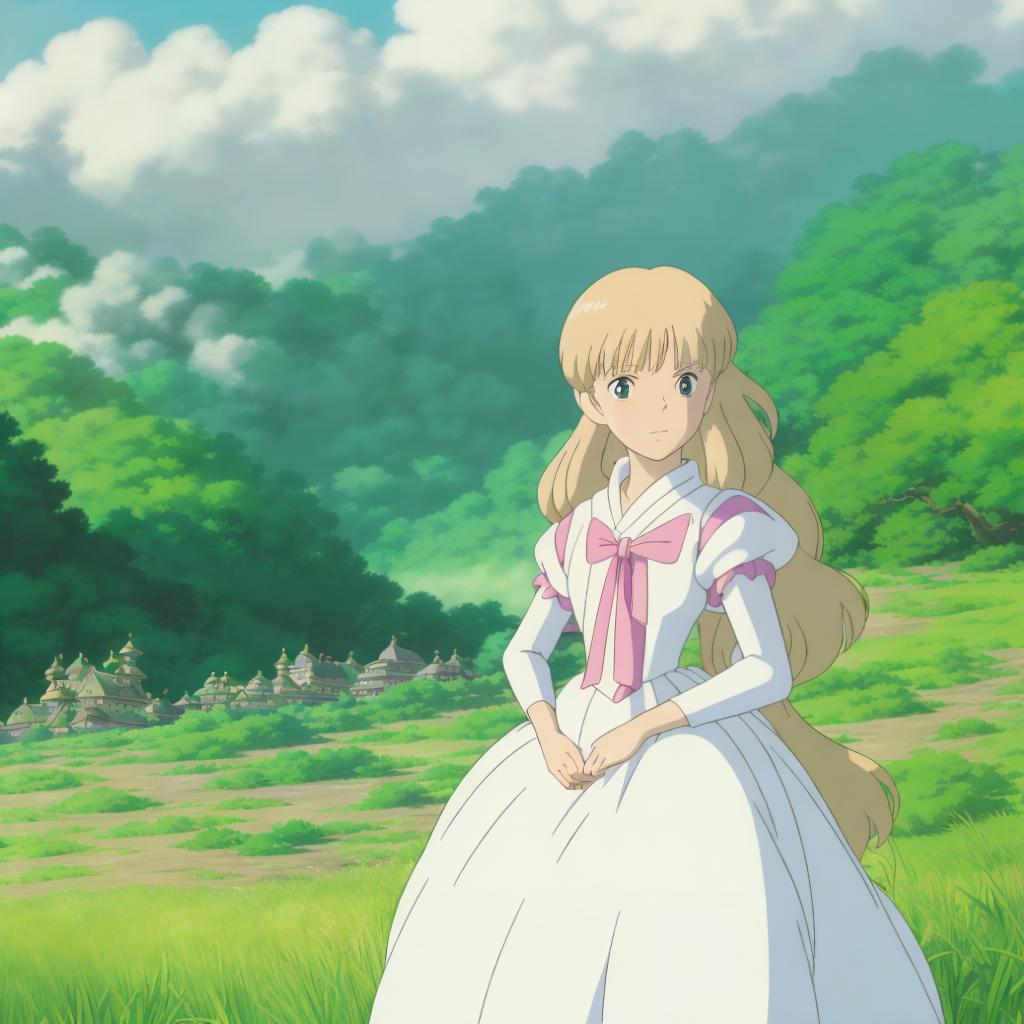
prompt = "ghibli style magical princess with golden hair"
negative_prompt="blurry, ugly, duplicate, poorly drawn face, deformed, mosaic, artifacts, bad limbs"
image = pipe(prompt, height=1024, width=1024, eta=1.0, negative_prompt=negative_prompt).images[0]

image.save("./magical_princess.jpg")
Output:
Playground
from diffusers import DiffusionPipeline
import torch
from hidiffusion import apply_hidiffusion, remove_hidiffusion

pipe = DiffusionPipeline.from_pretrained(
    "playgroundai/playground-v2-1024px-aesthetic",
    torch_dtype=torch.float16,
    use_safetensors=True,
    add_watermarker=False,
    variant="fp16"
)
pipe.to("cuda")
pipe.enable_xformers_memory_efficient_attention()

# Apply hidiffusion with a single line of code.
apply_hidiffusion(pipe)

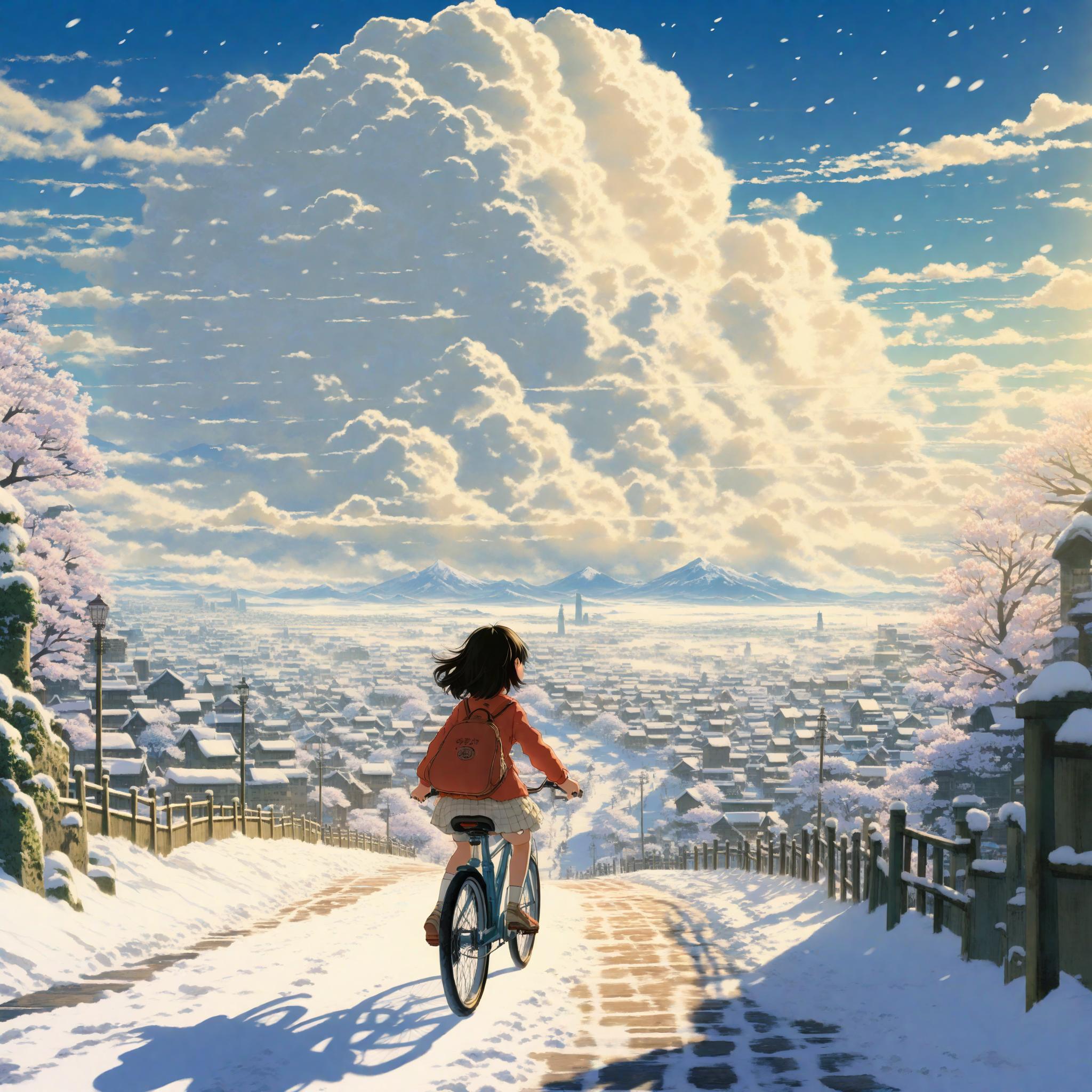
prompt = "The little girl riding a bike, in a beautiful anime scene by Hayao Miyazaki: a snowy Tokyo city with massive Miyazaki clouds floating in the blue sky, enchanting snowscapes of the city with bright sunlight, Miyazaki's landscape imagery, Japanese art"
negative_prompt="blurry, ugly, duplicate, poorly drawn, deformed, mosaic"
image  = pipe(prompt=prompt, guidance_scale=3.0, height=2048, width=2048, negative_prompt=negative_prompt).images[0]
image.save('girl.jpg')
Note: You may change guidance scale from 3.0 to 5.0 and design appropriate negative prompt to generate satisfactory results.
Output:
🙏 Acknowledgements
This codebase is based on tomesd and diffusers. Thanks!
🎓 Citation
@inproceedings{zhang2025hidiffusion,
  title={HiDiffusion: Unlocking Higher-Resolution Creativity and Efficiency in Pretrained Diffusion Models},
  author={Zhang, Shen and Chen, Zhaowei and Zhao, Zhenyu and Chen, Yuhao and Tang, Yao and Liang, Jiajun},
  booktitle={European Conference on Computer Vision},
  pages={145--161},
  year={2025},
  organization={Springer}
}
Related repositories
Master programming by recreating your favorite technologies from scratch.
A curated meta-list of curated lists organized by technology domain. The repository acts as a directory pointing to hundreds of specialized awesome lists covering programming languages, platforms, frameworks, and tooling. All content is community-contributed under the CC0 public domain dedication.
Public APIs is a community-curated GitHub repository listing free, publicly accessible APIs across a wide range of categories, with auth type, HTTPS, and CORS noted for each entry. It's a browsable reference, not a library to install.
REA is an MCP server and CLI that gives AI coding agents the ability to reverse engineer binaries, JavaScript apps, .NET assemblies, and websites. It hooks into Hopper, Ghidra, or IDA Pro for native binary work, or runs static JavaScript analysis with just Node.js. Every investigation returns an Evidence bundle that includes what was found, what was not, and the reasoning path. Setup registers REA with supported agents and walks you through connecting an analysis engine. The CLI also works standalone for terminal-first workflows.
Quick answers
How many stars does megvii-research/HiDiffusion have?
megvii-research/HiDiffusion has 838 GitHub stars — refresh the page for the live number, or check github.com/megvii-research/HiDiffusion. TopGit mirrors GitHub's count but does not claim minute-by-minute accuracy.
Is megvii-research/HiDiffusion open source?
TopGit's metadata for megvii-research/HiDiffusion does not record a license. Most public repositories on GitHub ARE open source, but the exact terms vary — verify by opening the LICENSE file directly.
Is megvii-research/HiDiffusion still maintained?
TopGit's metadata for megvii-research/HiDiffusion does not include a recent push date. Check the commit history on the GitHub repository page for the most authoritative activity timeline.
What is megvii-research/HiDiffusion?
megvii-research/HiDiffusion (megvii-research/HiDiffusion) is a multi-language project tracked by TopGit. The repository has 838 GitHub stars at the time of our last sync.
Where do I read more about megvii-research/HiDiffusion?
This TopGit page is a snapshot — the READ ME tab shows the project's own README content (links stripped, images preserved). The GitHub repository at github.com/megvii-research/HiDiffusion is the definitive source.
Read full README in the tab above.
Still deciding about HiDiffusion?
One click hands the question to an AI along with this page — see what it says about HiDiffusion.