mobxjs/mobx-react-devtools is an open-source project on GitHub with 1.2k stars, written primarily in JavaScript. [DEPRECATED] Tools to perform runtime analyses of React applications powered by MobX and React
Snapshot summary built from the project's own GitHub metadata — there's no written TopGit review yet. The page will update automatically when a full review is published.
WHY NO REVIEW YET
TopGit writes full reviews for the most-starred, most-requested repositories. This page is a snapshot until then — see the READ ME tab for the original README in full.
:warning: Note: This package is deprecated. Use the browser plugin instead. Also note that with mobx-react@6 and higher the package should no longer be needed, see changelog :warning:
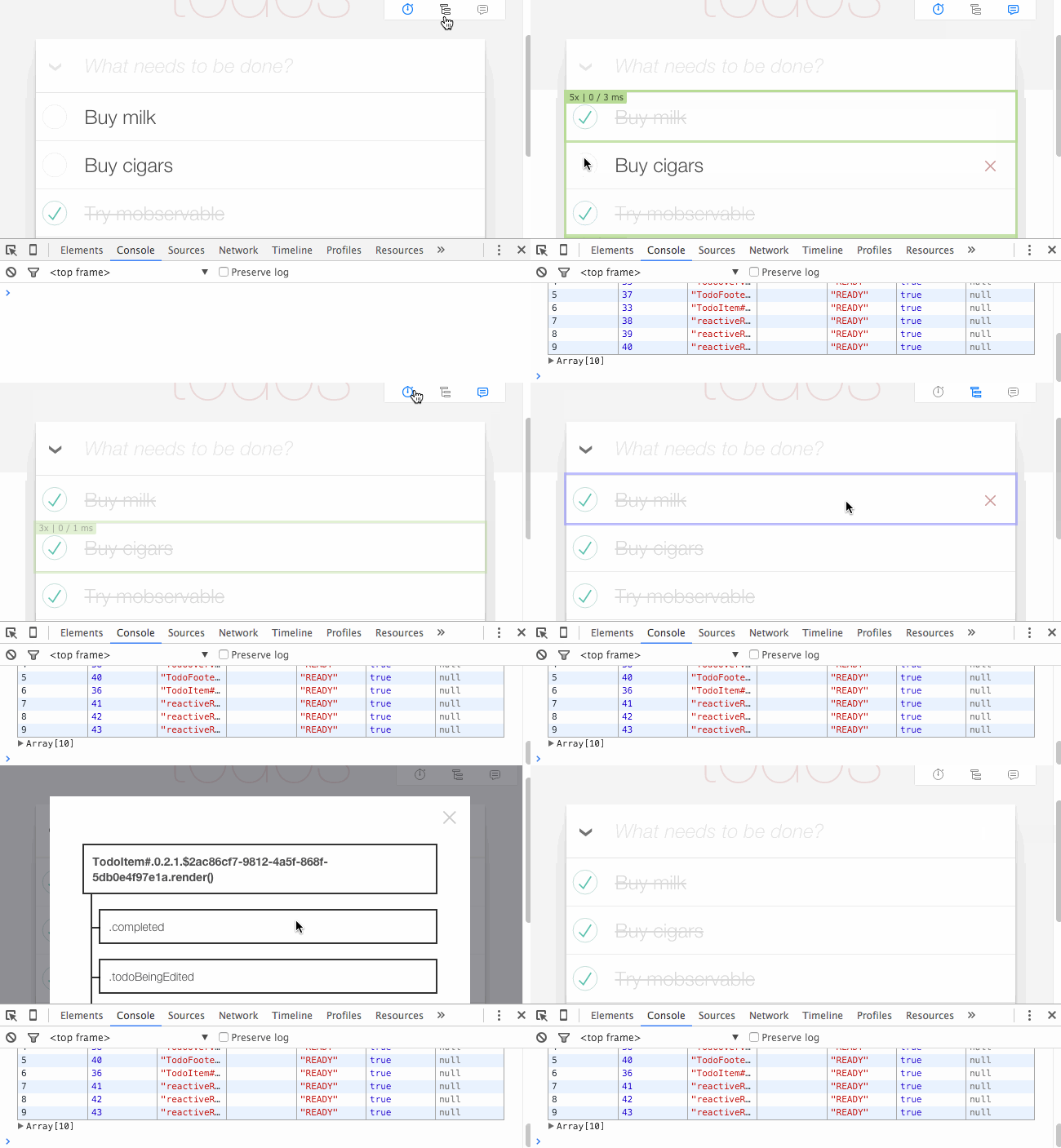
DevTools for MobX to track the rendering behavior and data dependencies of your app.
The default position of the panel has been changed to bottom right. If you prefer top right like in the gif above, add position="topRight" to <DevTools />.
noPanel — boolean, if set, do not render control panel, default: false
position — string (or object), topRight, bottomRight, bottomLeft or topLeft, default: bottomRight
className — string, className of control panel, default: not defined
style — object, inline style object of control panel, default: not defined
In order to be compatible with earlier versions of mobx-react-devtools it is also possible to assign position to an object containing inline styles. Using the dedicated style property is however recommended.
From there on, after each rendering a reactive components logs the following three metrics:
Number of times the component did render so far
The time spend in the render() method of a component
The time spend from the start of the render() method until the changes are flushed to the DOM
For each component the color indicates roughly how long the coloring took. Rendering times are cumulative; they include time spend in the children
Green: less then 25 ms
Orange: less then 100 ms
Red: rendering for this component took more than 100ms
About log groups
Note that if logging is enabled, MobX actions and reactions will appear as collapsible groups inside the browsers console.
Mind that any log statements that are printed during these (re)actions will appear inside those groups as well, so that you can exactly trace when they are triggered.
Configuration
import { configureDevtool } from 'mobx-react-devtools';

// Any configurations are optional
configureDevtool({
  // Turn on logging changes button programmatically:
  logEnabled: true,
  // Turn off displaying components updates button programmatically:
  updatesEnabled: false,
  // Log only changes of type `reaction`
  // (only affects top-level messages in console, not inside groups)
  logFilter: change => change.type === 'reaction',
});
There are also aliases for turning on/off devtools buttons:
import { setLogEnabled, setUpdatesEnabled, setGraphEnabled } from 'mobx-react-devtools';

setLogEnabled(true); // same as configureDevtool({ logEnabled: true });
setUpdatesEnabled(false); // same as configureDevtool({ updatesEnabled: false });
setGraphEnabled(false); // same as configureDevtool({ graphEnabled: false });
Custom panel design
import DevTools, { GraphControl, LogControl, UpdatesControl } from 'mobx-react-devtools';

class MyNiceButton extends React.Component {
  render() {
    const { active, onToggle, children } = this.props;
    return (
      <button onClick={onToggle}>
        {children}
        {active ? ' on' : ' off'}
      </button>
    );
  }
}

class MyApp extends React.Component {
  render() {
    return (
      <div>

        {/* Include somewhere with `noPanel` prop. Is needed to display updates and modals */}
        <DevTools noPanel />

        <div className="my-custom-devtools-panel-design">
          <GraphControl>
            {/* Must have only one child that takes props: `active` (bool), `onToggle` (func) */}
            <MyNiceButton>Graph</MyNiceButton>
          </GraphControl>
          <LogControl>
            {/* Must have only one child that takes props: `active` (bool), `onToggle` (func) */}
            <MyNiceButton>Log</MyNiceButton>
          </LogControl>
          <UpdatesControl>
            {/* Must have only one child that takes props: `active` (bool), `onToggle` (func) */}
            <MyNiceButton>Updates</MyNiceButton>
          </UpdatesControl>
        </div>
      </div>
    );
  }
}
Roadmap
Be able to turn dev-tools on and off at runtime
Select and log dependency tree of components
Visualize observer tree values
Be able to enable state change tracking from the extras module
Does mobxjs/mobx-react-devtools have a project website?
No homepage URL was recorded for mobxjs/mobx-react-devtools in TopGit's last sync. The README tab above frequently contains screenshots and demo links, or check the repository description on GitHub.
Does mobxjs/mobx-react-devtools have any tags?
TopGit's last sync did not record any GitHub topics for mobxjs/mobx-react-devtools. GitHub topics appear in the right sidebar of a repository page; that's the authoritative place to check.
How active is development on mobxjs/mobx-react-devtools?
The most recent commit recorded on mobxjs/mobx-react-devtools was 7.2 years ago, based on the GitHub push timestamp. The repository has 45 forks — one of the better signals of community interest.
Is mobxjs/mobx-react-devtools open source?
Yes — mobxjs/mobx-react-devtools ships under the MIT license, which makes its source code freely readable (and, depending on license terms, forkable and reusable). Source: github.com/mobxjs/mobx-react-devtools.
What license does mobxjs/mobx-react-devtools use?
mobxjs/mobx-react-devtools is released under the MIT license. Always verify the LICENSE file directly on GitHub for the authoritative terms — license strings can be edited out of sync with a project's actual stance.
Where do I read more about mobxjs/mobx-react-devtools?
This TopGit page is a snapshot — the READ ME tab shows the project's own README content (links stripped, images preserved). The GitHub repository at github.com/mobxjs/mobx-react-devtools is the definitive source.
Read full README in the tab above.
Curious whether mobx-react-devtools is right for you?
Let ChatGPT, Claude, or Perplexity look into it — click below and see what AI actually says about mobx-react-devtools.