mrdbourke/simple-local-rag is a open-source project on GitHub, written primarily in Jupyter Notebook. It has 1.0k stars. Build a RAG (Retrieval Augmented Generation) pipeline from scratch and have it all run locally.
Snapshot summary built from the project's own GitHub metadata — there's no written TopGit review yet. The page will update automatically when a full review is published.
WHY NO REVIEW YET
TopGit writes full reviews for the most-starred, most-requested repositories. This page is a snapshot until then — see the READ ME tab for the original README in full.
All the way from PDF ingestion to "chat with PDF" style features.
All using open-source tools.
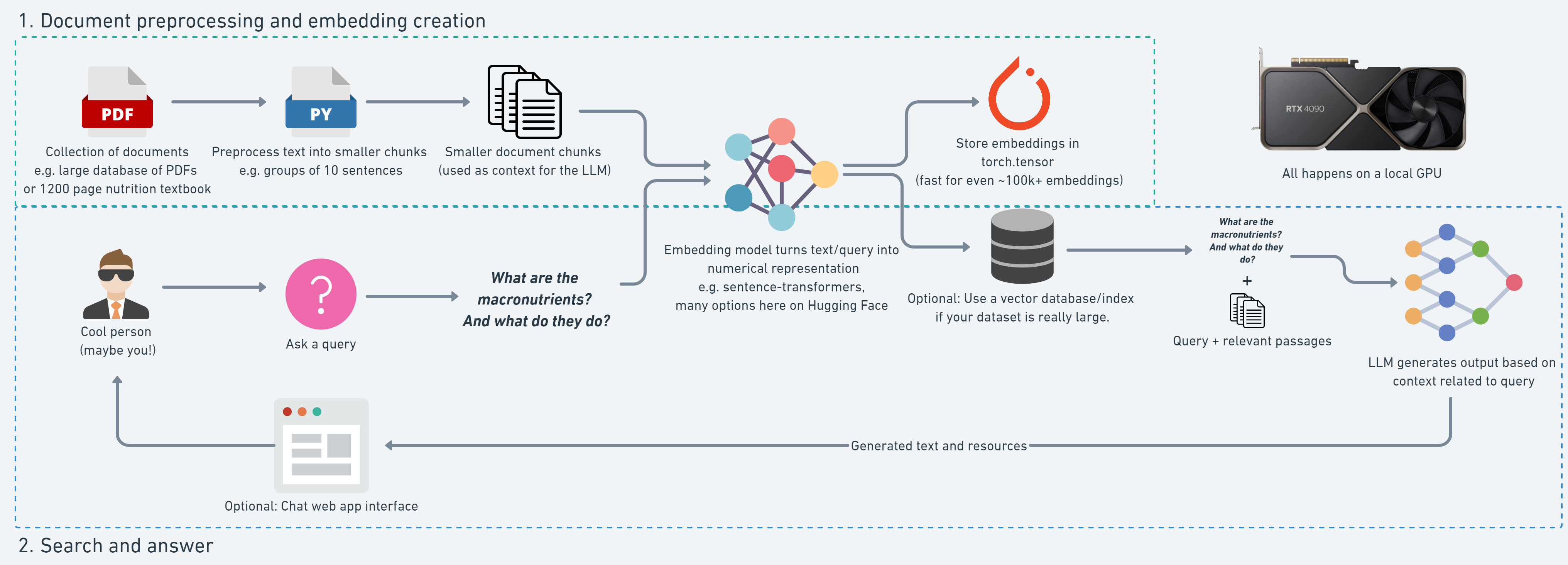
In our specific example, we'll build NutriChat, a RAG workflow that allows a person to query a 1200 page PDF version of a Nutrition Textbook and have an LLM generate responses back to the query based on passages of text from the textbook.
PDF source: https://pressbooks.oer.hawaii.edu/humannutrition2/
You can also run notebook 00-simple-local-rag.ipynb directly in Google Colab.
TODO:
Finish setup instructions
Make header image of workflow
Add intro to RAG info in README?
Add extensions to README
Record video of code writing/walkthrough - DONE, follow along with each line of code on YouTube: https://youtu.be/qN_2fnOPY-M
Getting Started
Two main options:
If you have a local NVIDIA GPU with 5GB+ VRAM, follow the steps below to have this pipeline run locally on your machine.
If you don’t have a local NVIDIA GPU, you can follow along in Google Colab and have it run on a NVIDIA GPU there.
Note: I found I had to install torch manually (torch 2.1.1+ is required for newer versions of attention for faster inference) with CUDA, see: https://pytorch.org/get-started/locally/
If you run into any install/setup troubles, please leave an issue.
To get access to the Gemma LLM models, you will have to agree to the terms & conditions on the Gemma model page on Hugging Face. You will then have to authorize your local machine via the Hugging Face CLI/Hugging Face Hub login() function. Once you've done this, you'll be able to download the models. If you're using Google Colab, you can add a Hugging Face token to the "Secrets" tab.
For speedups, installing and compiling Flash Attention 2 (faster attention implementation) can take ~5 minutes to 3 hours depending on your system setup. See the Flash Attention 2 GitHub for more. In particular, if you're running on Windows, see this GitHub issue thread. I've commented out flash-attn in the requirements.txt due to compile time, feel free to uncomment if you'd like use it or run pip install flash-attn.
What is RAG?
RAG stands for Retrieval Augmented Generation.
It was introduced in the paper Retrieval-Augmented Generation for Knowledge-Intensive NLP Tasks.
Each step can be roughly broken down to:
Retrieval - Seeking relevant information from a source given a query. For example, getting relevant passages of Wikipedia text from a database given a question.
Augmented - Using the relevant retrieved information to modify an input to a generative model (e.g. an LLM).
Generation - Generating an output given an input. For example, in the case of an LLM, generating a passage of text given an input prompt.
Why RAG?
The main goal of RAG is to improve the generation outptus of LLMs.
Two primary improvements can be seen as:
Preventing hallucinations - LLMs are incredible but they are prone to potential hallucination, as in, generating something that looks correct but isn't. RAG pipelines can help LLMs generate more factual outputs by providing them with factual (retrieved) inputs. And even if the generated answer from a RAG pipeline doesn't seem correct, because of retrieval, you also have access to the sources where it came from.
Work with custom data - Many base LLMs are trained with internet-scale text data. This means they have a great ability to model language, however, they often lack specific knowledge. RAG systems can provide LLMs with domain-specific data such as medical information or company documentation and thus customized their outputs to suit specific use cases.
The authors of the original RAG paper mentioned above outlined these two points in their discussion.
This work offers several positive societal benefits over previous work: the fact that it is more
strongly grounded in real factual knowledge (in this case Wikipedia) makes it “hallucinate” less
with generations that are more factual, and offers more control and interpretability. RAG could be
employed in a wide variety of scenarios with direct benefit to society, for example by endowing it
with a medical index and asking it open-domain questions on that topic, or by helping people be more
effective at their jobs.
RAG can also be a much quicker solution to implement than fine-tuning an LLM on specific data.
What kind of problems can RAG be used for?
RAG can help anywhere there is a specific set of information that an LLM may not have in its training data (e.g. anything not publicly accessible on the internet).
For example you could use RAG for:
Customer support Q&A chat - By treating your existing customer support documentation as a resource, when a customer asks a question, you could have a system retrieve relevant documentation snippets and then have an LLM craft those snippets into an answer. Think of this as a "chatbot for your documentation". Klarna, a large financial company, uses a system like this to save $40M per year on customer support costs.
Email chain analysis - Let's say you're an insurance company with long threads of emails between customers and insurance agents. Instead of searching through each individual email, you could retrieve relevant passages and have an LLM create strucutred outputs of insurance claims.
Company internal documentation chat - If you've worked at a large company, you know how hard it can be to get an answer sometimes. Why not let a RAG system index your company information and have an LLM answer questions you may have? The benefit of RAG is that you will have references to resources to learn more if the LLM answer doesn't suffice.
Textbook Q&A - Let's say you're studying for your exams and constantly flicking through a large textbook looking for answers to your quesitons. RAG can help provide answers as well as references to learn more.
All of these have the common theme of retrieving relevant resources and then presenting them in an understandable way using an LLM.
From this angle, you can consider an LLM a calculator for words.
Why local?
Privacy, speed, cost.
Running locally means you use your own hardware.
From a privacy standpoint, this means you don't have send potentially sensitive data to an API.
From a speed standpoint, it means you won't necessarily have to wait for an API queue or downtime, if your hardware is running, the pipeline can run.
And from a cost standpoint, running on your own hardware often has a heavier starting cost but little to no costs after that.
Performance wise, LLM APIs may still perform better than an open-source model running locally on general tasks but there are more and more examples appearing of smaller, focused models outperforming larger models.
Key terms
Term
Description
Token
A sub-word piece of text. For example, "hello, world!" could be split into ["hello", ",", "world", "!"]. A token can be a whole word, part of a word or group of punctuation characters. 1 token ~= 4 characters in English, 100 tokens ~= 75 words. Text gets broken into tokens before being passed to an LLM.
Embedding
A learned numerical representation of a piece of data. For example, a sentence of text could be represented by a vector with 768 values. Similar pieces of text (in meaning) will ideally have similar values.
Embedding model
A model designed to accept input data and output a numerical representation. For example, a text embedding model may take in 384 tokens of text and turn it into a vector of size 768. An embedding model can and often is different to an LLM model.
Similarity search/vector search
Similarity search/vector search aims to find two vectors which are close together in high-demensional space. For example, two pieces of similar text passed through an embedding model should have a high similarity score, whereas two pieces of text about different topics will have a lower similarity score. Common similarity score measures are dot product and cosine similarity.
Large Language Model (LLM)
A model which has been trained to numerically represent the patterns in text. A generative LLM will continue a sequence when given a sequence. For example, given a sequence of the text "hello, world!", a genertive LLM may produce "we're going to build a RAG pipeline today!". This generation will be highly dependant on the training data and prompt.
LLM context window
The number of tokens a LLM can accept as input. For example, as of March 2024, GPT-4 has a default context window of 32k tokens (about 96 pages of text) but can go up to 128k if needed. A recent open-source LLM from Google, Gemma (March 2024) has a context window of 8,192 tokens (about 24 pages of text). A higher context window means an LLM can accept more relevant information to assist with a query. For example, in a RAG pipeline, if a model has a larger context window, it can accept more reference items from the retrieval system to aid with its generation.
Prompt
A common term for describing the input to a generative LLM. The idea of "prompt engineering" is to structure a text-based (or potentially image-based as well) input to a generative LLM in a specific way so that the generated output is ideal. This technique is possible because of a LLMs capacity for in-context learning, as in, it is able to use its representation of language to breakdown the prompt and recognize what a suitable output may be (note: the output of LLMs is probable, so terms like "may output" are used).
Does mrdbourke/simple-local-rag have a project website?
No homepage URL was recorded for mrdbourke/simple-local-rag in TopGit's last sync. The README tab above frequently contains screenshots and demo links, or check the repository description on GitHub.
Does mrdbourke/simple-local-rag have any tags?
TopGit's last sync did not record any GitHub topics for mrdbourke/simple-local-rag. GitHub topics appear in the right sidebar of a repository page; that's the authoritative place to check.
How active is development on mrdbourke/simple-local-rag?
The most recent commit recorded on mrdbourke/simple-local-rag was 2.5 years ago, based on the GitHub push timestamp. The repository has 305 forks — one of the better signals of community interest.
Is mrdbourke/simple-local-rag open source?
TopGit's metadata for mrdbourke/simple-local-rag does not record a license. Most public repositories on GitHub ARE open source, but the exact terms vary — verify by opening the LICENSE file directly.
Where do I read more about mrdbourke/simple-local-rag?
This TopGit page is a snapshot — the READ ME tab shows the project's own README content (links stripped, images preserved). The GitHub repository at github.com/mrdbourke/simple-local-rag is the definitive source.
Read full README in the tab above.
Still deciding about simple-local-rag?
One click hands the question to an AI along with this page — see what it says about simple-local-rag.

 /simple-local-rag