mxrch/ProtoDeep is a Python project with 137 stars. 🏄♂️ Decode and analyze protobuf efficiently.
Snapshot summary built from the project's own GitHub metadata — there's no written TopGit review yet. The page will update automatically when a full review is published.
WHY NO REVIEW YET
TopGit writes full reviews for the most-starred, most-requested repositories. This page is a snapshot until then — see the READ ME tab for the original README in full.
ProtoDeep is an easy to use tool that allows you to decode and analyze protobuf data.
It is heavily based on the well-established Blackbox Protobuf package, and inspired by Protobuf Inspector for the custom definitions feature.
This project was originally intended to be integrated into the GHunt RDTK, but the script grew a lot and ended up becoming a tool that can help many people.
Features :
CLI usage
Python library usage
Make your own definitions
Easily match / filter data
Export and compile on the fly
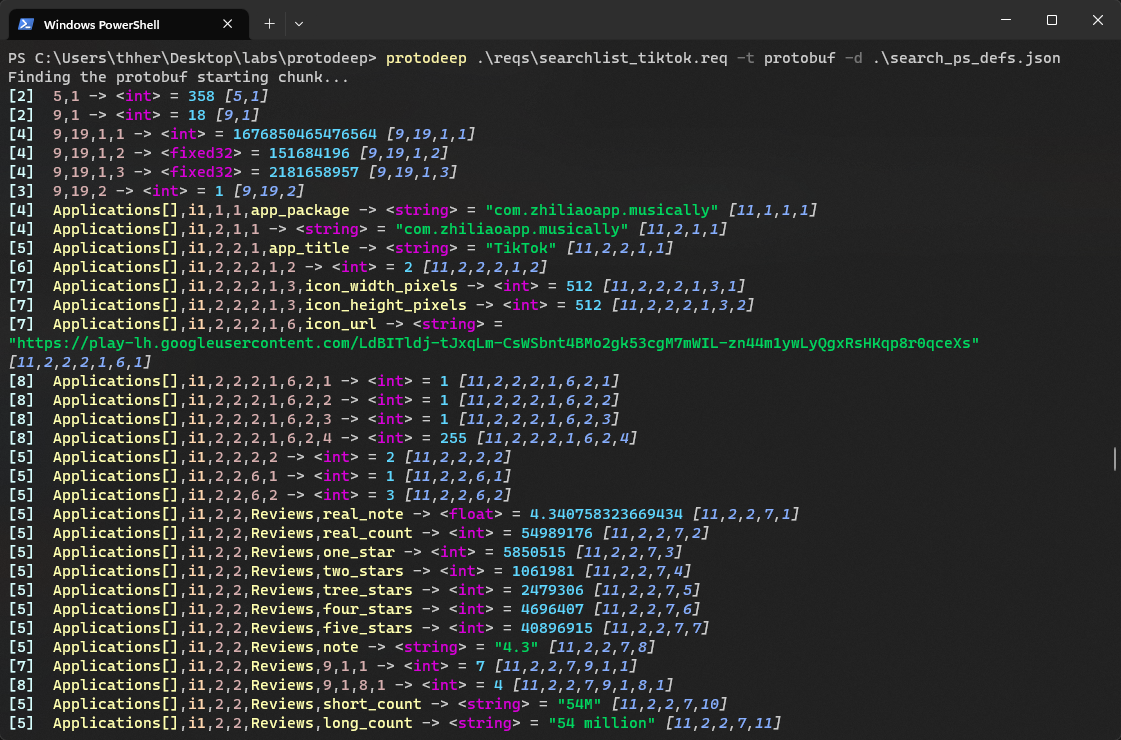
Example of using ProtoDeep on the Google's Play Store searchList endpoint, with custom definitions :
It will automatically use venvs to avoid dependency conflicts with other projects.
💃 Usage
Help menu
Usage: main.py [-h] -t TYPE [-d DEFINITIONS] [-na] [-nk] [-s] [-b] [-hx] [-bi NUMBER] [-he] [-np] [-m MASK] [-mk MASK]
               [-mv MASK] [-f MASK] [-fk MASK] [-fv MASK] [-epf [PROTOFILE_FILENAME]] [-epd [PROTODEEP_FILENAME]]
               [-c [PYTHON_FILENAME]] [-n SCHEMA_NAME]
               [proto_file]

Positional Arguments:
  proto_file

Options:
  -h, --help            show this help message and exit
  -t, --type TYPE       Either protobuf (raw protobuf content), or protodeep (a ProtoDeep file).
  -d, --definitions DEFINITIONS
                        The file containing the custom protobuf definitions.
  -na, --no-autodetect  Don't try to autodetect if it's a raw HTTP request.
  -nk, --named-keychains
                        Show and extract only named keychains.
  -s, --stdin           Parse from stdin.
  -b, --base64          If this is a base64 input, so it automatically decodes it.
  -hx, --hex            If this is a hex input, so it automatically decodes it.
  -bi, --bruteforce-index NUMBER
                        The index up to which to try bruteforce to find Protobuf content. Default : 20
  -he, --hide-empty     Hide the empty values.
  -np, --no-print       Don't print the decoded protobuf.
  -m, --match MASK      Match anything with the given string. You can use '?' and '*' to wildcard match.Ex : "*token*"
  -mk, --match-keychain MASK
                        Match keychains with the given string.
  -mv, --match-value MASK
                        Match values with the given string.
  -f, --filter MASK     Filter anything with the given string. You can use '?' and '*' to wildcard match.
  -fk, --filter-keychain MASK
                        Filter keychains with the given string.
  -fv, --filter-value MASK
                        Filter values with the given string.
  -epf, --export-protofile [PROTOFILE_FILENAME]
                        Export the proto file with the definitions.
  -epd, --export-protodeep [PROTODEEP_FILENAME]
                        Export a protodeep file, to reuse in ProtoDeep.
  -c, --compile [PYTHON_FILENAME]
                        Compile protobuf into a Python file.
  -n, --name SCHEMA_NAME
                        Name of the schema when exporting into a proto file.
Concepts
Here are the main concepts to know when using ProtoDeep :
Output example
Keychains : Since the protobuf is made of nested keys and values, keychains are a way to precisely identify a value in the decoded protobuf. It's the key sequence used to access the value.
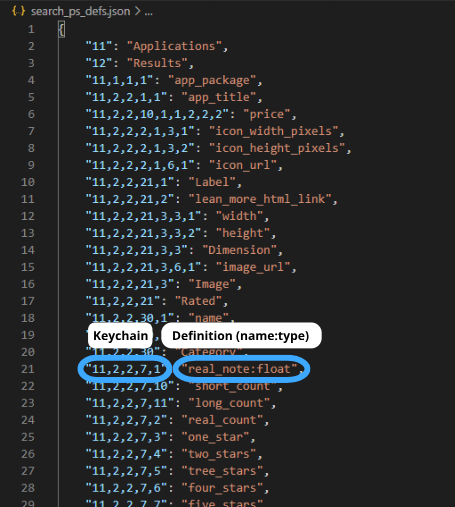
Pretty Keychains : This is the same as keychains, except that the keys are replaced by the names defined in the custom definitions.
Type : Type of the value. Supported types are listed in this blackboxprotobuf's file.
Value : The value found in the protobuf data.
Iterator : ProtoDeep will try to autodetect repeated messages, and will print elements of these arrays with the i<position> key, so you can know the position of the element in the list.
Custom definitions file
Definitions : It is a JSON file, containg a dict with the keychains as keys, and names as values. You can specify the type of a value by adding :<type> next to it. By doing so, ProtoDeep will detect it, and relaunch the decoding of the protobuf data with this new type. Note that it will only work when using protobuf data, not a protodeep file, since data has already been decoded.
Have fun 🥰💞
🧑💻 Developers
To use ProtoDeep as a lib, you can't use pipx because it uses a venv.
So you should install ProtoDeep with pip :
$ pip3 install protodeep
And now, you should be able to import protodeep in your projects like this :
from protodeep.lib import guess_schema

with open('protobuf_data.bin', 'rb') as f:
    raw = f.read()

protodeep_schema = guess_schema(data=raw)
protodeep_schema.pretty_print(hide_empty=True, filter_any=["*term_to_filter*"])
protodeep_schema.export_protodeep("obj.pdeep")
Testing
Thanks to learn-more, tests are now available, to test the CLI and lib usage !
You can launch the tests by doing :
$ pip3 install -r requirements-dev.txt
$ pytest
Tests are run automatically through GitHub Actions.
📕 Cheatsheet
Some examples so you know how to use protodeep :
Reading a protobuf file:
$ protodeep protobuf_data.bin -t protobuf
Read a protobuf file, provide a custom definitions file, hide the output, export to protofile & protodeep, and compile a Python file called "final.py" :
Names for the arguments --export-protofile / --export-protodeep / --compile are optional. If they aren't set, a default name will be used.
Read protobuf from stdin, provide a custom definitions file, match the keychain "11,1,1,2", hide the empty values, and filter lines where the word "access" and "denied" are present, and lines where the word "tiktok" is present:
TopGit's last sync did not record any GitHub topics for mxrch/ProtoDeep. GitHub topics appear in the right sidebar of a repository page; that's the authoritative place to check.
How active is development on mxrch/ProtoDeep?
The most recent commit recorded on mxrch/ProtoDeep was 1.9 years ago, based on the GitHub push timestamp. The repository has 8 forks — one of the better signals of community interest.
How many stars does mxrch/ProtoDeep have?
mxrch/ProtoDeep has 137 GitHub stars — refresh the page for the live number, or check github.com/mxrch/ProtoDeep. TopGit mirrors GitHub's count but does not claim minute-by-minute accuracy.
What language is mxrch/ProtoDeep written in?
mxrch/ProtoDeep is written primarily in Python. GitHub's language field is based on the largest share of bytes in the default branch.
Where do I read more about mxrch/ProtoDeep?
This TopGit page is a snapshot — the READ ME tab shows the project's own README content (links stripped, images preserved). The GitHub repository at github.com/mxrch/ProtoDeep is the definitive source.
Read full README in the tab above.
Curious whether ProtoDeep is right for you?
Let ChatGPT, Claude, or Perplexity look into it — click below and see what AI actually says about ProtoDeep.
 /ProtoDeep