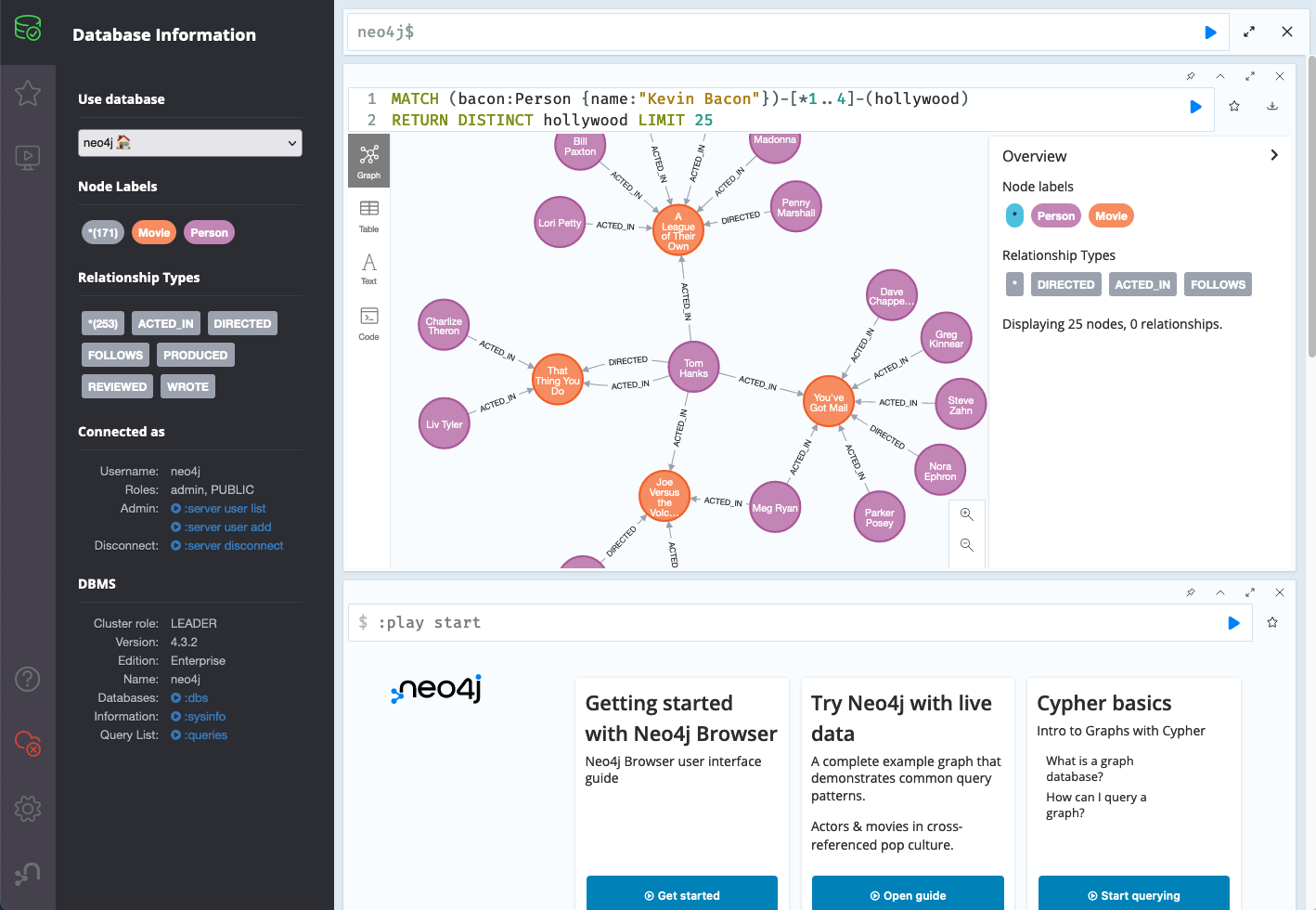
828 GitHub stars and counting — neo4j/neo4j-browser is a TypeScript project TopGit is tracking across repositories on the platform. Neo4j Browser is the general purpose user interface for working with Neo4j. Query, visualize, administrate and monitor the database.
Snapshot summary built from the project's own GitHub metadata — there's no written TopGit review yet. The page will update automatically when a full review is published.
WHY NO REVIEW YET
TopGit writes full reviews for the most-starred, most-requested repositories. This page is a snapshot until then — see the READ ME tab for the original README in full.
Neo4j Browser is the general purpose graphical user interface for Neo4j. Query, visualize, administer and monitor the database with modern and easy-to-use tools.
⚠️ The new Neo4j Browser is not built or maintained from this repository.
The current Neo4j Browser, hosted at browser.neo4j.io, is built and released from closed-source artefacts that are shared with Neo4j Console and Neo4j Desktop. This repository holds the classic Neo4j Browser. It is no longer bundled with Neo4j server or available as a fallback from the new Browser, and receives limited maintenance.
Demo
You can try out the latest (unreleased) version of the classic Neo4j Browser built from this repository at http://browser-canary.graphapp.io/.
Keep in mind that you will need to connect to an instance of Neo4j (the database) for most operations in Neo4j Browser. A simple way to get started is through Neo4j Desktop. Once you've started a database it's by default available for Neo4j Browser to connect to on localhost:7687.
Feedback & Contributing
Found a bug or some other problem with the classic Neo4j Browser? Please open an issue.
Have an idea for a new feature or feedback on the new Browser? You're welcome to leave suggestions and ideas here.
Contributions welcome! More information in our CONTRIBUTING.md.
Project structure
Browser has a subproject of re-usable components bundled together and exposed as neo4j-arc. Rather than set up mono-repo tooling the we've set up eslint to isolate neo4j-arc and given it a seperate build step. Code in browser can only to import code from neo4j-arc through neo4j-arc aliases (as if it was a seperate project) and neo4j-arc is not allowed to import any code from outside it's own folder.
Development
Running Neo4j Browser locally requires Node.js (^12.4.0) and for dependencies we use yarn (npm install -g yarn).
To install dependencies and then start the development server at http://localhost:8080:
yarn install
yarn start
Or to run in production mode:
yarn start-prod
Testing overview
Neo4j Browser has both unit and end to end tests running automatically on every pull request. To run the tests locally:
yarn test-unit runs a linter and then our unit tests.
yarn test-e2e runs our Cypress end to end tests in the easiest, slowest way. Running them with this command requires docker installed and that nothing else runs on ports 7687 and 8080.
Cypress e2e test suite in depth
yarn e2e-open to open the Cypress test runner (requires a fresh installation of Neo4j to run against, expects neo4j 3.5 by default). See details below on how to configure database version.
yarn e2e-local-open to run against an existing server (with a password already set). We use newpassword as the default password here, make sure to pass your password:
yarn e2e-local-open --env browser-password=<your-password-here>
To avoid opening the Cypress test runner and just run the tests in the terminal, remove the "-open" suffix from the previous two commands (so yarn e2e and yarn e2e-local respectively).
So to run tests on your existing 4.2 database with the password "hunter2" without opening the Cypress visual test runner:
yarn e2e-local --env browser-password=hunter2,server=4.2
There are some additional options that can only be set as system environmental variables (meaning they cannot be set using the --env flag as the ones above).
These needs to be set before the test command is run.
CYPRESS_E2E_TEST_ENV=local|null (if the initial set of pw should run or not) (default undefined)
CYPRESS_BASE_URL=<url to reach the browser to test> (default http://localhost:8080)
Example: CYPRESS_E2E_TEST_ENV="local" CYPRESS_BASE_URL=http://localhost:30000 cypress open --env server=4.2
The most recent commit recorded on neo4j/neo4j-browser was 11 days ago, based on the GitHub push timestamp. The repository has 379 forks — one of the better signals of community interest.
How many stars does neo4j/neo4j-browser have?
neo4j/neo4j-browser has 828 GitHub stars — refresh the page for the live number, or check github.com/neo4j/neo4j-browser. TopGit mirrors GitHub's count but does not claim minute-by-minute accuracy.
What is neo4j/neo4j-browser?
neo4j/neo4j-browser (neo4j/neo4j-browser) is a TypeScript project on GitHub. From the project's own README: Neo4j Browser is the general purpose user interface for working with Neo4j. Query, visualize, administrate and monitor the database.
What language is neo4j/neo4j-browser written in?
neo4j/neo4j-browser is written primarily in TypeScript. GitHub's language field is based on the largest share of bytes in the default branch.
What topics is neo4j/neo4j-browser associated with?
GitHub's repository topics for neo4j/neo4j-browser: "graph-app", "neo4j". TopGit's editorial category is open-source.
Read full README in the tab above.
Want a second opinion on neo4j-browser?
Ask an AI that can read this page — one click and you get its take on neo4j-browser.