nexmoe/VidBee — a developer tool — sits at 11.1k GitHub stars in the Developer Tools space. Download video and audio from 1000+ sites, transcribe locally with speaker labels, and summarize, translate, or chat with your media using your preferred AI provider.
Snapshot summary built from the project's own GitHub metadata — there's no written TopGit review yet. The page will update automatically when a full review is published.
WHY NO REVIEW YET
TopGit writes full reviews for the most-starred, most-requested repositories. This page is a snapshot until then — see the READ ME tab for the original README in full.
VidBee is a free, open-source desktop app that turns video and audio into an organized, searchable library. Download media from 1000+ supported sites or import local files. Create transcripts on your computer with speaker labels and timestamped playback, then summarize, translate, or ask questions with the AI provider and prompts you choose. Download queues, RSS subscriptions, flexible exports, and metadata controls keep the whole workflow in one place.
👋🏻 Getting Started
VidBee is currently under active development, and feedback is welcome for any issue encountered.
📥 Download VidBee | 📚 Documentation
[!IMPORTANT]
Star Us, You will receive all release notifications from GitHub without any delay ~
If VidBee is useful to you, sharing it is one of the best ways to support the project.
[!IMPORTANT]
When you post about VidBee on X or Threads, please mention @nexmoe so I can see it and help amplify it:
X: @nexmoe
Threads: @nexmoe
GitHub: @nexmoe
✨ Features
📝 Transcribe locally with the model that fits your computer
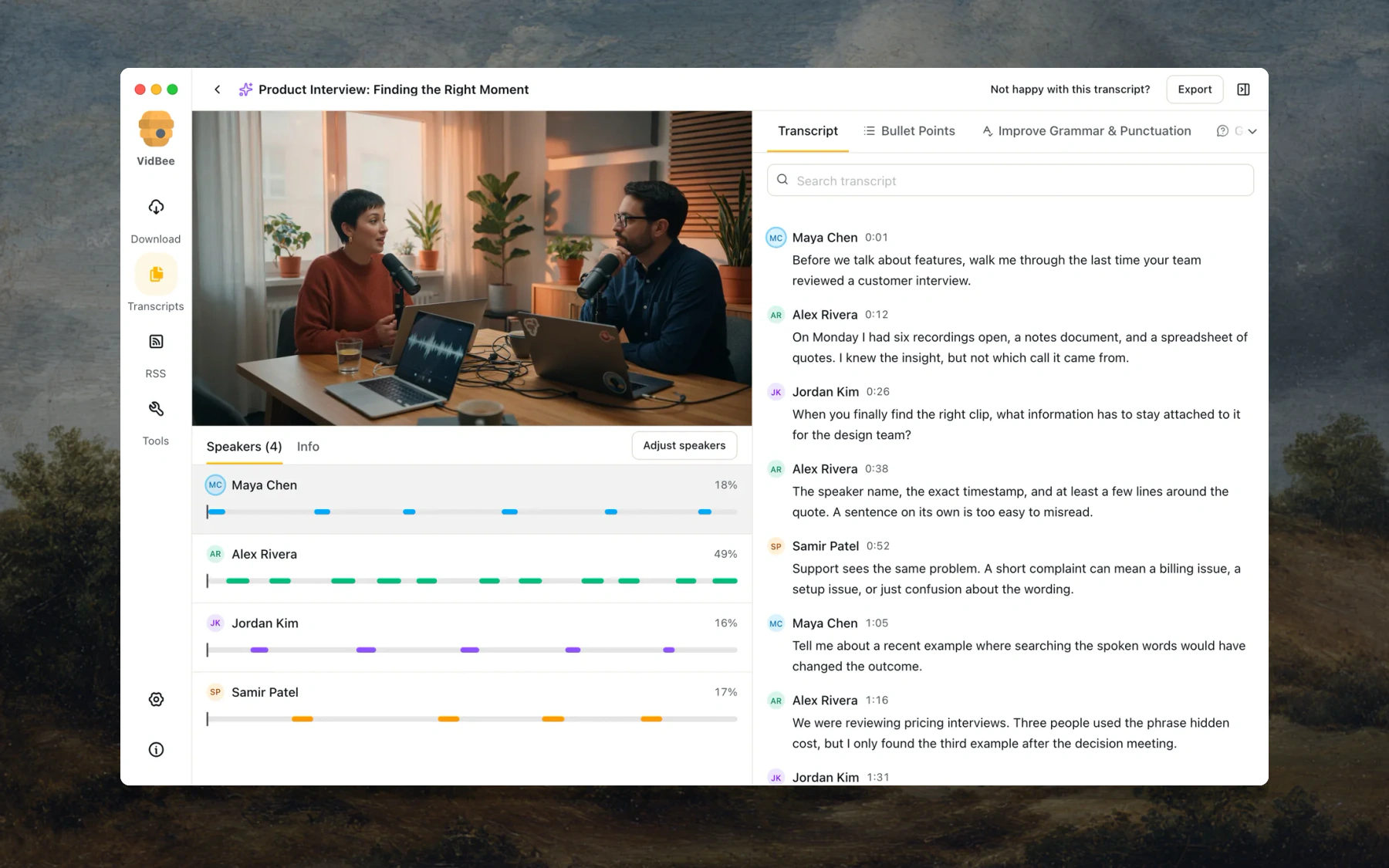
Create a transcript from a finished download, or import a local audio or video file. Speech recognition runs on your computer, so the media does not need to be uploaded to a transcription service.
Choose from local Whisper, SenseVoice, Parakeet, and Qwen3-ASR model families. VidBee can recommend a model for your computer and language, and you can download or switch models from Settings.
Start transcription automatically after a download and set how many transcript jobs may run at once.
Use source captions when available, or run local speech recognition when you need a new transcript.
Detect speakers automatically, or set a fixed speaker count and re-label the conversation without changing the recognized words.
Search spoken text or speaker names, click a timestamp, and continue playback from that exact moment.
Copy the transcript, export plain text or Markdown, or create a new video with selectable or burned-in captions.
[!NOTE]
Local transcription, provider-controlled AI. Speech recognition runs on your computer. When you run an AI prompt, the prompt and transcript content go to the provider you selected. Choose Ollama, LM Studio, or another local endpoint to keep the AI step on your computer too.
🧠 Ask AI with the provider and prompts you choose
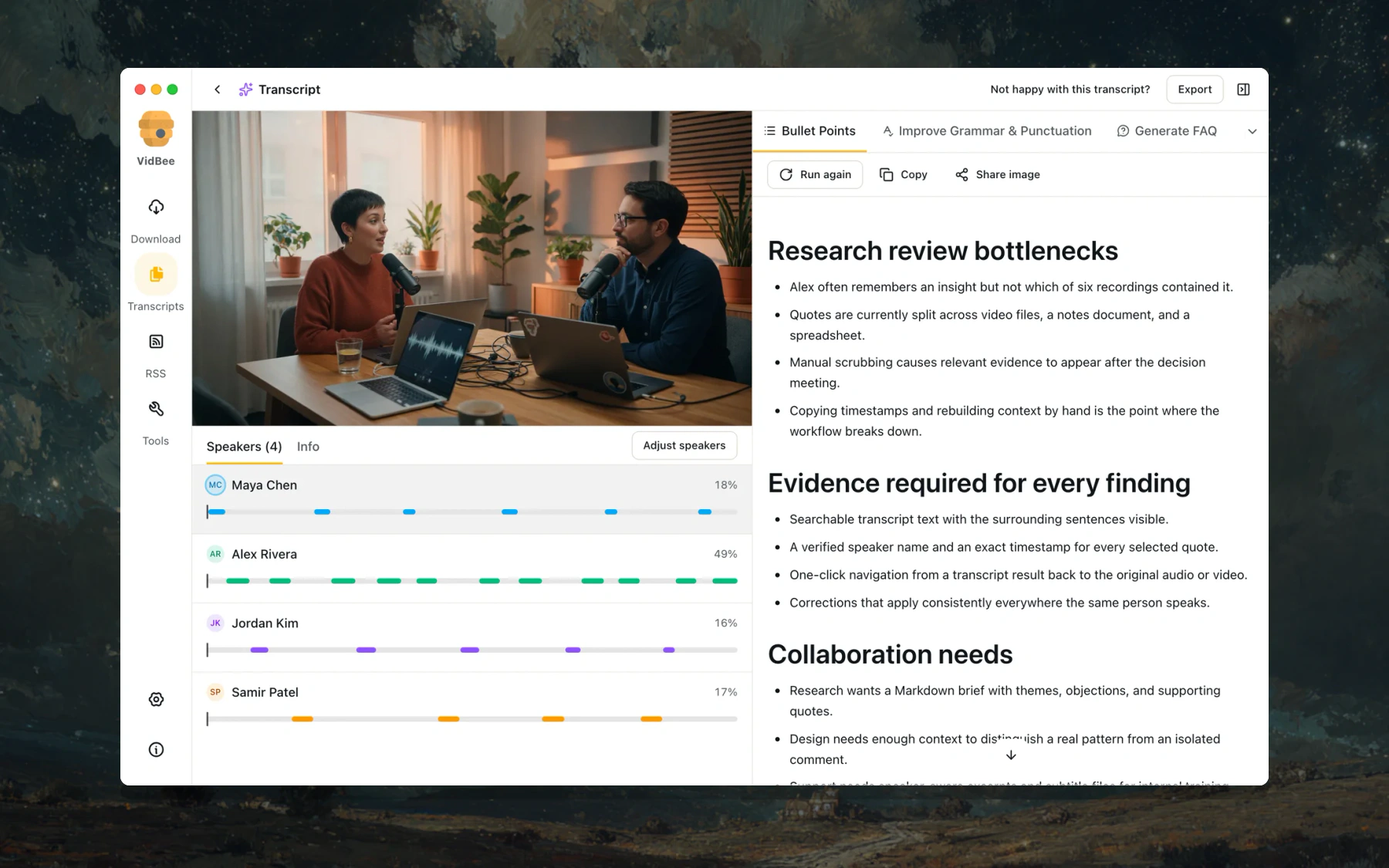
Run AI prompts against the transcript without leaving VidBee. Built-in prompts can create bullet summaries, clean up grammar, generate FAQs, extract statistics, build mind maps, paraphrase text, or translate the transcript.
Add a custom provider with your own name, Base URL, model ID, and API key, then test the connection before using it.
Import SKILL.md files, manage installed skills, try suggested requests in chat, or restore the defaults.
Switch the active provider without changing your prompt library. API keys are stored on your computer.
📥 Download and organize video or audio
Save video, audio, playlists, and channels from 1000+ supported sites. Paste one link or add a batch, then manage everything from the same desktop queue.
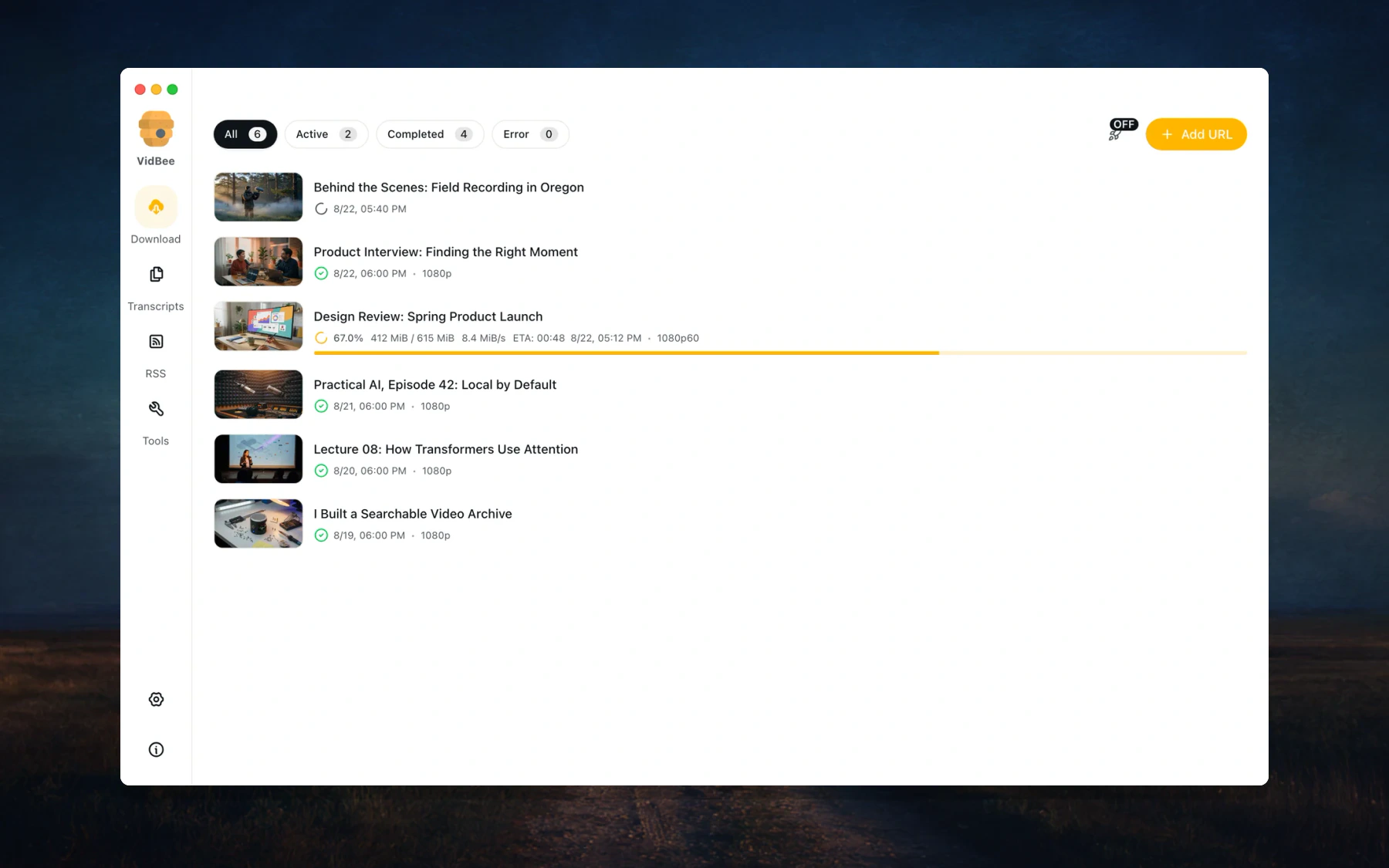
Track active, completed, and failed downloads in one place.
See live progress, speed, file size, and the format being saved.
Pause, resume, retry, or remove tasks without rebuilding the queue.
Use one-click defaults when you want a fast download, or choose formats for a specific item.
📡 Follow creators with configurable RSS subscriptions
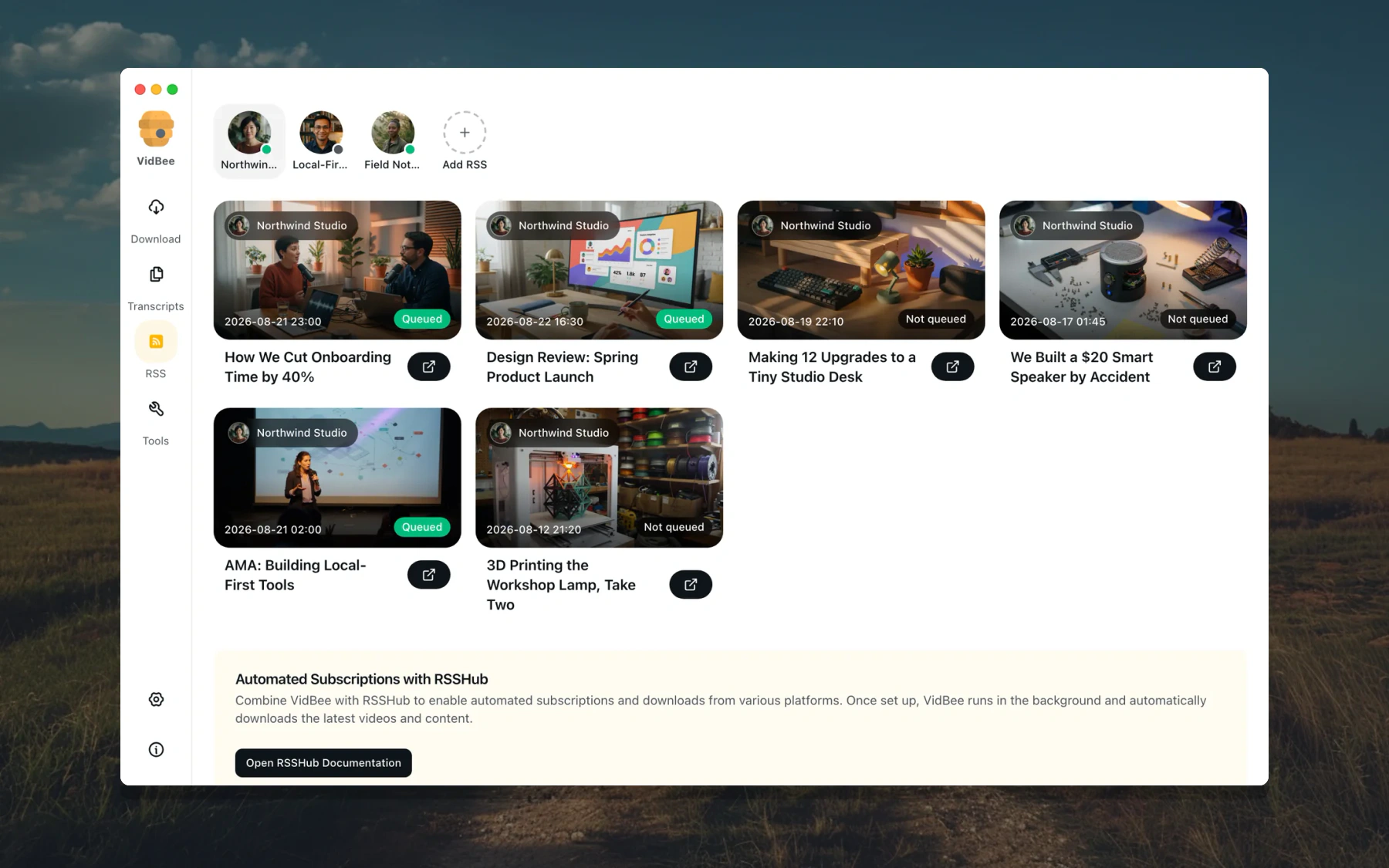
Subscribe to RSS feeds and let VidBee check for new items and add them to your download queue. Each subscription can use its own rules, so regular releases do not need the same manual setup every time.
Turn automatic downloads on or keep new items ready for manual review.
Filter feed items by keywords, add automatic tags, and download only the latest item when you do not want the backlog.
Choose a custom directory and filename template for each subscription.
See whether each feed item is queued, downloading, completed, failed, or still waiting.
🏷️ Control formats, filenames, and metadata
Choose Auto (MP4/MKV), MP4, MKV, WebM, or Original for video downloads, or save audio separately. VidBee also lets you control what is written into the finished file.
Embed the source title, artist, and other available metadata.
Add the thumbnail as cover art, keep chapter markers, and include source or automatically generated subtitles when available.
Choose a filename style, decide whether to use channel subfolders, and set the default download location.
Keep simple defaults for everyday downloads while using custom filename templates for playlists or RSS subscriptions.
See Formats & Containers for details.
🎬 Built for real media workflows
Working with
VidBee helps you
Interviews
Separate speakers, find a quote, jump back to its timestamp, and export the transcript.
Podcasts
Create a searchable episode transcript, summarize the discussion, and use RSS to keep new episodes organized.
Lectures
Search for an explanation, translate the transcript, and turn a long recording into structured notes.
YouTube and saved videos
Download from a supported page or import a local file, preserve available captions and metadata, and manage everything in one queue.
🌐 Supported Sites
VidBee works with 1000+ supported video and audio sites. Browse the current list at vidbee.org/supported-sites.
apps/api: Fastify API server with oRPC and SSE events
apps/web: TanStack Start web client using oRPC
Run locally:
pnpm run start:web
This command starts apps/api and apps/web together.
Run with Docker:
docker compose up -d --build
Run with GitHub Container Registry images:
services:
  api:
    image: ghcr.io/nexmoe/vidbee-api:latest
    environment:
      VIDBEE_API_HOST: 0.0.0.0
      VIDBEE_API_PORT: 3100
      VIDBEE_DOWNLOAD_DIR: /data/downloads
      VIDBEE_DATA_DIR: /data/vidbee
      VIDBEE_HISTORY_STORE_PATH: /data/vidbee/vidbee.db
    ports:
      - "3100:3100"
    volumes:
      # Replace the named volume with /path/on/your/NAS:/data/downloads
      # when downloaded files must be directly visible on the host.
      - vidbee-downloads:/data/downloads
      - vidbee-data:/data/vidbee
    restart: unless-stopped

  web:
    image: ghcr.io/nexmoe/vidbee-web:latest
    depends_on:
      - api
    ports:
      - "3000:3000"
    restart: unless-stopped

volumes:
  vidbee-downloads:
  vidbee-data:
Stop services:
docker compose down
Optional env vars (via .env):
VIDBEE_API_PORT=3100
VIDBEE_WEB_PORT=3000
# Optional host or NAS bind mount. The named volume remains the default.
VIDBEE_DOWNLOAD_DIR_HOST=/path/on/your/NAS/downloads
Storage inside the API container:
/data/downloads — media files (VIDBEE_DOWNLOAD_DIR)
The web API uses the same SQLite file layout as Desktop: one vidbee.db for the download queue, history, transcripts, and RSS subscriptions. The web UI talks to the server filesystem, not the browser. Use Save to this computer to pull a finished file down, and upload a Netscape cookies.txt for authenticated sites. If you already stored sqlite under /data/downloads/.vidbee, VidBee keeps using that directory until /data/vidbee/vidbee.db exists.
🤝 Contributing
You are welcome to join the open source community to build together. For more details, check out:
Monorepo apps:
apps/desktop: VidBee desktop app
apps/extension: Browser extension (WXT)
Documentation: vidbee.org/docs
apps/desktop/docs/glitchtip.md: GlitchTip and sentry-cli setup for desktop monitoring
Contributing Guide
DeepWiki Documentation
📄 License
This project is distributed under the MIT License. See LICENSE for details.
🙏 Thanks
yt-dlp - The powerful video downloader engine
FFmpeg - The multimedia framework for video and audio processing
The most recent commit recorded on nexmoe/VidBee was 13 days ago, based on the GitHub push timestamp. The repository has 876 forks — one of the better signals of community interest.
How does nexmoe/VidBee compare to other Developer Tools projects?
nexmoe/VidBee is tracked by TopGit in the Developer Tools category, with 11.1k GitHub stars and written in TypeScript. Browse the Developer Tools topic page on TopGit to compare it against similar projects by stars and activity.
How many stars does nexmoe/VidBee have?
nexmoe/VidBee has 11.1k GitHub stars — refresh the page for the live number, or check github.com/nexmoe/VidBee. TopGit mirrors GitHub's count but does not claim minute-by-minute accuracy.
What is nexmoe/VidBee?
nexmoe/VidBee (nexmoe/VidBee) is a TypeScript project on GitHub. From the project's own README: Download video and audio from 1000+ sites, transcribe locally with speaker labels, and summarize, translate, or chat with your media using your preferred AI provider.
What language is nexmoe/VidBee written in?
nexmoe/VidBee is written primarily in TypeScript. GitHub's language field is based on the largest share of bytes in the default branch.
Why is nexmoe/VidBee categorized under Developer Tools?
TopGit places nexmoe/VidBee in the Developer Tools category based on its GitHub topics and description (tagged: "ai-summary", "audio-downloader", "audio-transcription"). Categories are assigned from real repository metadata, not editorial guesswork.
Read full README in the tab above.
Still deciding about VidBee?
One click hands the question to an AI along with this page — see what it says about VidBee.

 /VidBee