TopGit theo dõi nexmoe/VidBee trên GitHub trong nhóm Developer Tools, đã đạt 11.1k sao. Download video and audio from 1000+ sites, transcribe locally with speaker labels, and summarize, translate, or chat with your media using your preferred AI provider.
Tóm tắt dựng từ metadata GitHub của chính dự án — chưa có bài review TopGit. Trang sẽ tự động cập nhật khi bài review đầy đủ được xuất bản.
VÌ SAO CHƯA CÓ REVIEW
TopGit viết bài đầy đủ cho repo có nhiều sao nhất và được yêu cầu nhiều nhất. Trang này là snapshot trong thời gian chờ — xem README gốc ở tab READ ME.
VidBee is a free, open-source desktop app that turns video and audio into an organized, searchable library. Download media from 1000+ supported sites or import local files. Create transcripts on your computer with speaker labels and timestamped playback, then summarize, translate, or ask questions with the AI provider and prompts you choose. Download queues, RSS subscriptions, flexible exports, and metadata controls keep the whole workflow in one place.
👋🏻 Getting Started
VidBee is currently under active development, and feedback is welcome for any issue encountered.
📥 Download VidBee | 📚 Documentation
[!IMPORTANT]
Star Us, You will receive all release notifications from GitHub without any delay ~
If VidBee is useful to you, sharing it is one of the best ways to support the project.
[!IMPORTANT]
When you post about VidBee on X or Threads, please mention @nexmoe so I can see it and help amplify it:
X: @nexmoe
Threads: @nexmoe
GitHub: @nexmoe
✨ Features
📝 Transcribe locally with the model that fits your computer
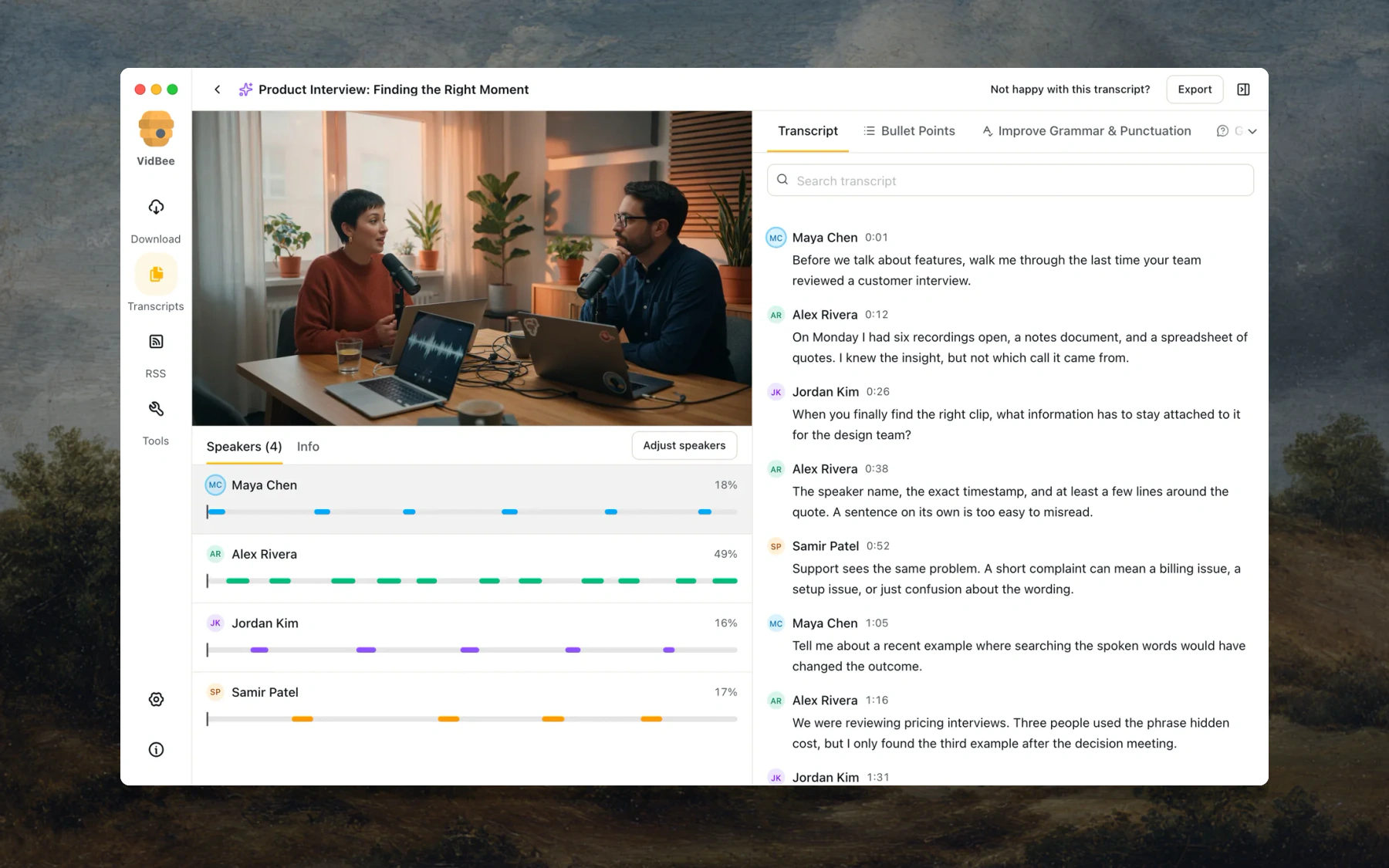
Create a transcript from a finished download, or import a local audio or video file. Speech recognition runs on your computer, so the media does not need to be uploaded to a transcription service.
Choose from local Whisper, SenseVoice, Parakeet, and Qwen3-ASR model families. VidBee can recommend a model for your computer and language, and you can download or switch models from Settings.
Start transcription automatically after a download and set how many transcript jobs may run at once.
Use source captions when available, or run local speech recognition when you need a new transcript.
Detect speakers automatically, or set a fixed speaker count and re-label the conversation without changing the recognized words.
Search spoken text or speaker names, click a timestamp, and continue playback from that exact moment.
Copy the transcript, export plain text or Markdown, or create a new video with selectable or burned-in captions.
[!NOTE]
Local transcription, provider-controlled AI. Speech recognition runs on your computer. When you run an AI prompt, the prompt and transcript content go to the provider you selected. Choose Ollama, LM Studio, or another local endpoint to keep the AI step on your computer too.
🧠 Ask AI with the provider and prompts you choose
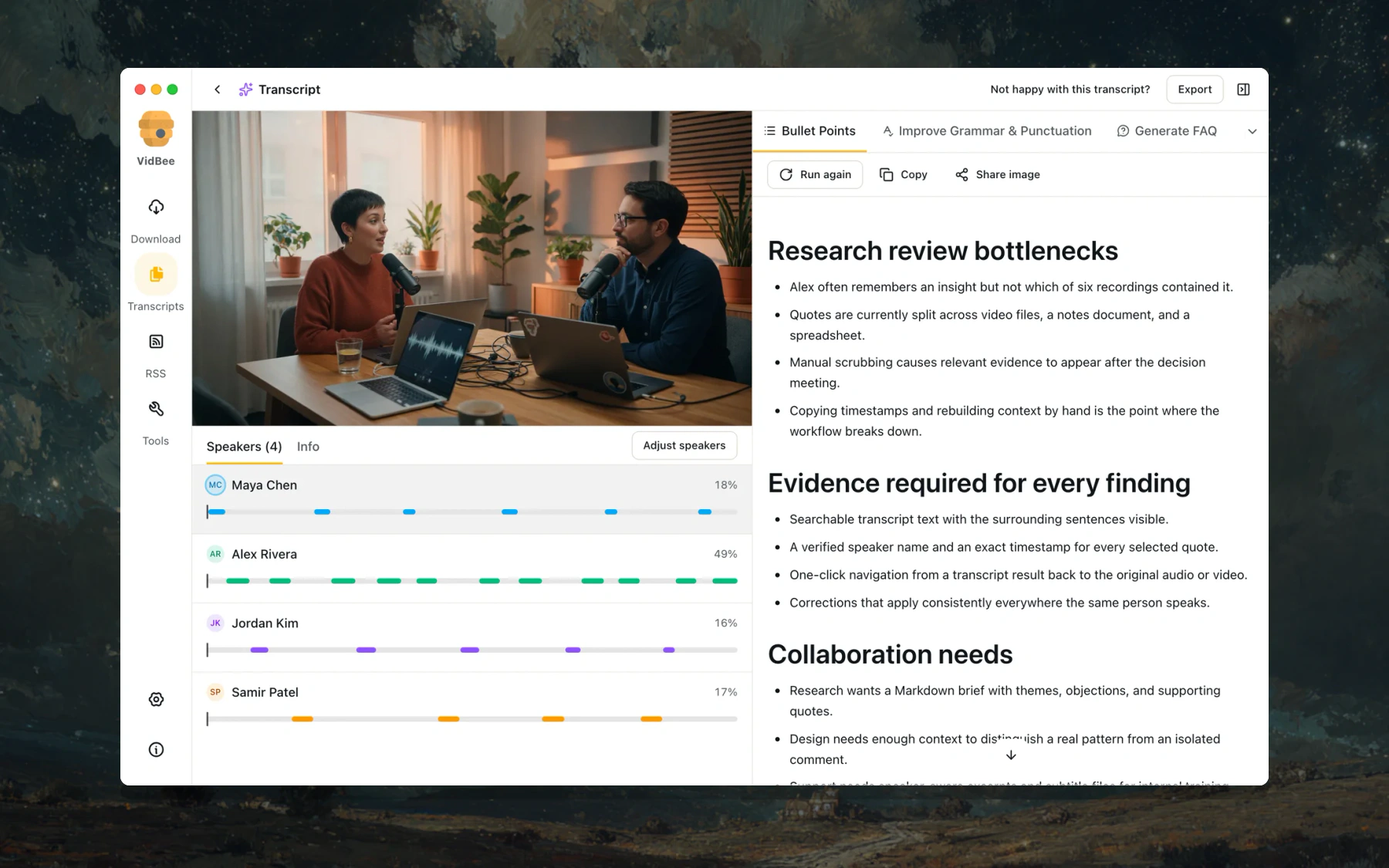
Run AI prompts against the transcript without leaving VidBee. Built-in prompts can create bullet summaries, clean up grammar, generate FAQs, extract statistics, build mind maps, paraphrase text, or translate the transcript.
Add a custom provider with your own name, Base URL, model ID, and API key, then test the connection before using it.
Import SKILL.md files, manage installed skills, try suggested requests in chat, or restore the defaults.
Switch the active provider without changing your prompt library. API keys are stored on your computer.
📥 Download and organize video or audio
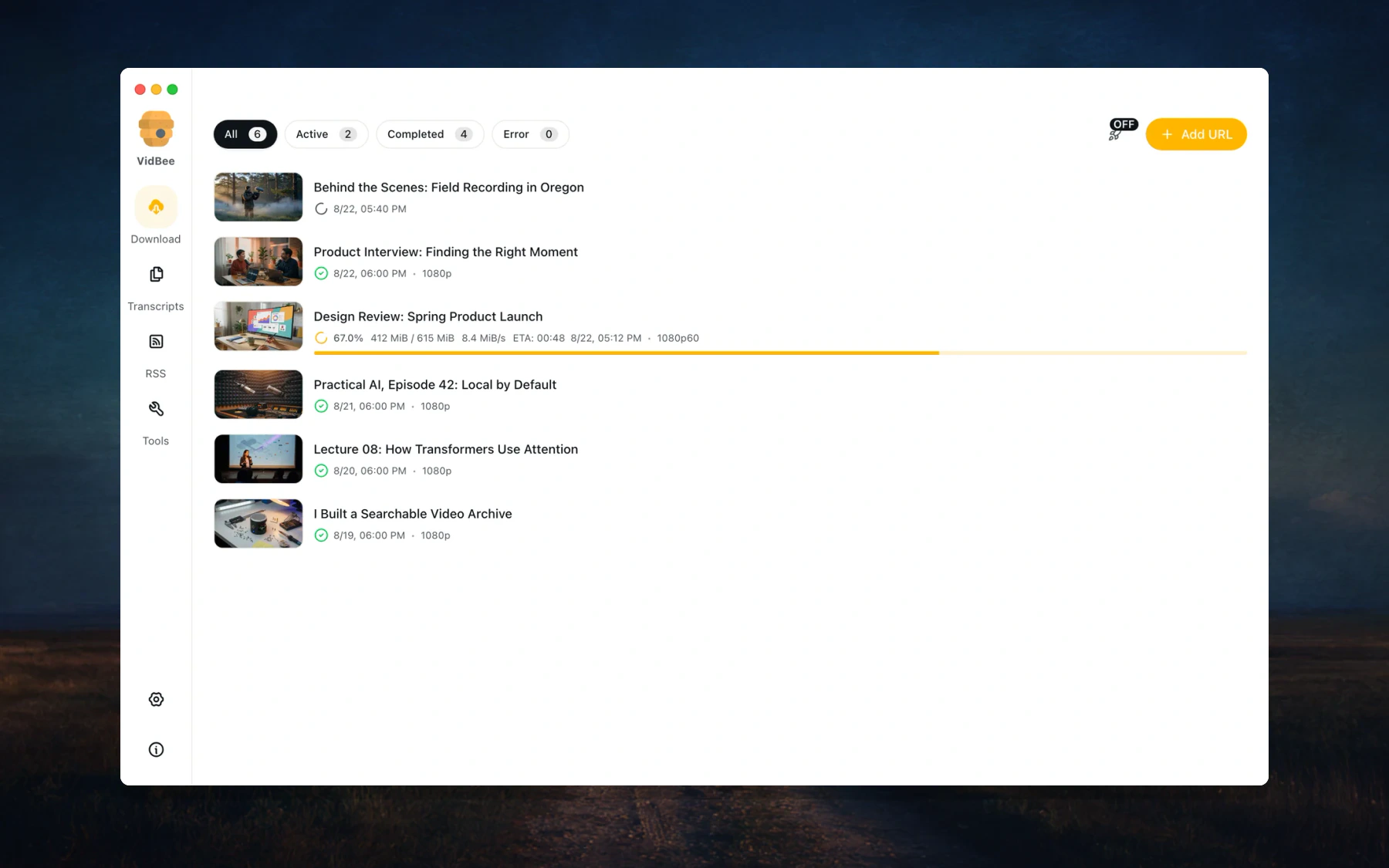
Save video, audio, playlists, and channels from 1000+ supported sites. Paste one link or add a batch, then manage everything from the same desktop queue.
Track active, completed, and failed downloads in one place.
See live progress, speed, file size, and the format being saved.
Pause, resume, retry, or remove tasks without rebuilding the queue.
Use one-click defaults when you want a fast download, or choose formats for a specific item.
📡 Follow creators with configurable RSS subscriptions
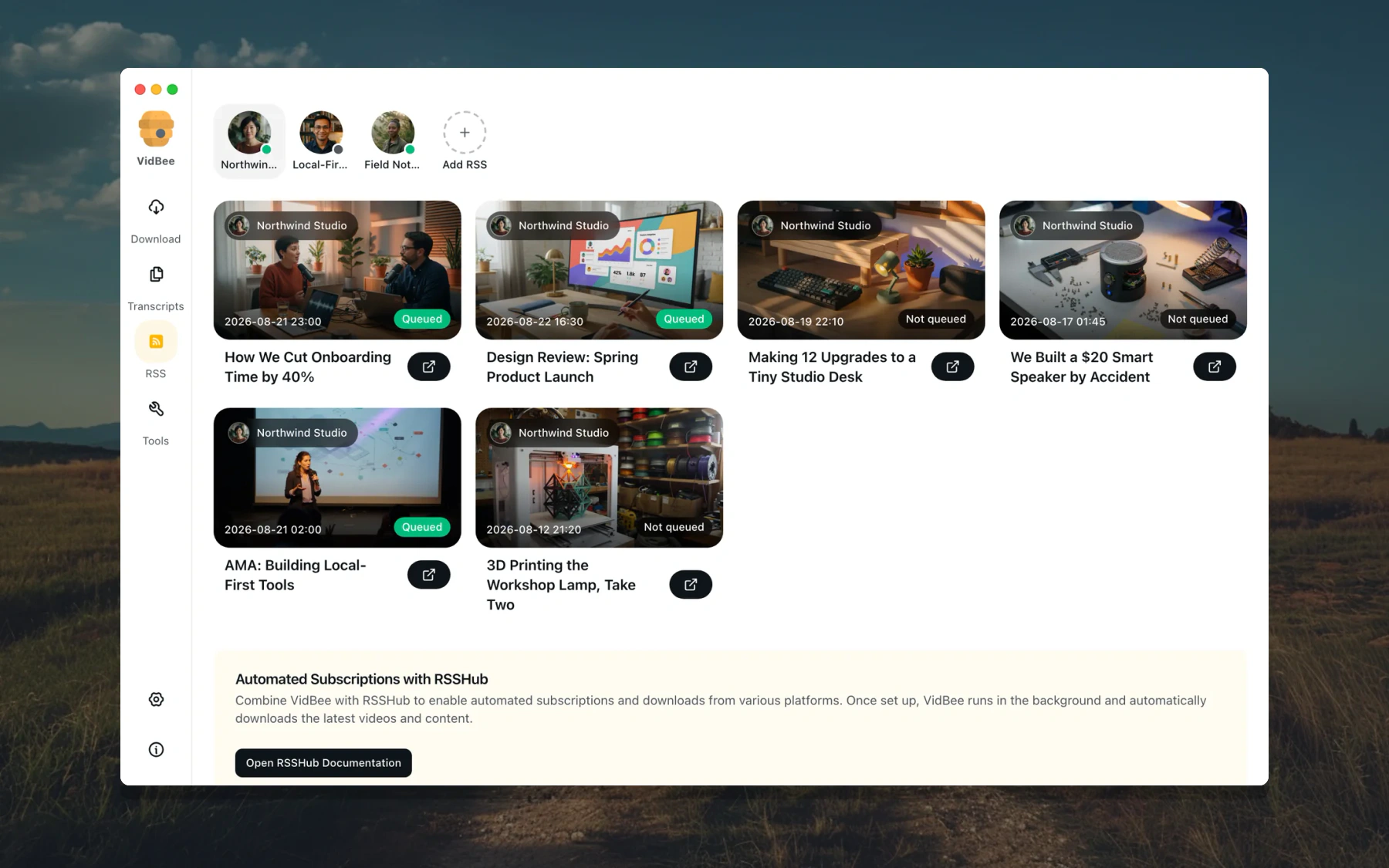
Subscribe to RSS feeds and let VidBee check for new items and add them to your download queue. Each subscription can use its own rules, so regular releases do not need the same manual setup every time.
Turn automatic downloads on or keep new items ready for manual review.
Filter feed items by keywords, add automatic tags, and download only the latest item when you do not want the backlog.
Choose a custom directory and filename template for each subscription.
See whether each feed item is queued, downloading, completed, failed, or still waiting.
🏷️ Control formats, filenames, and metadata
Choose Auto (MP4/MKV), MP4, MKV, WebM, or Original for video downloads, or save audio separately. VidBee also lets you control what is written into the finished file.
Embed the source title, artist, and other available metadata.
Add the thumbnail as cover art, keep chapter markers, and include source or automatically generated subtitles when available.
Choose a filename style, decide whether to use channel subfolders, and set the default download location.
Keep simple defaults for everyday downloads while using custom filename templates for playlists or RSS subscriptions.
See Formats & Containers for details.
🎬 Built for real media workflows
Working with
VidBee helps you
Interviews
Separate speakers, find a quote, jump back to its timestamp, and export the transcript.
Podcasts
Create a searchable episode transcript, summarize the discussion, and use RSS to keep new episodes organized.
Lectures
Search for an explanation, translate the transcript, and turn a long recording into structured notes.
YouTube and saved videos
Download from a supported page or import a local file, preserve available captions and metadata, and manage everything in one queue.
🌐 Supported Sites
VidBee works with 1000+ supported video and audio sites. Browse the current list at vidbee.org/supported-sites.
apps/api: Fastify API server with oRPC and SSE events
apps/web: TanStack Start web client using oRPC
Run locally:
pnpm run start:web
This command starts apps/api and apps/web together.
Run with Docker:
docker compose up -d --build
Run with GitHub Container Registry images:
services:
  api:
    image: ghcr.io/nexmoe/vidbee-api:latest
    environment:
      VIDBEE_API_HOST: 0.0.0.0
      VIDBEE_API_PORT: 3100
      VIDBEE_DOWNLOAD_DIR: /data/downloads
      VIDBEE_DATA_DIR: /data/vidbee
      VIDBEE_HISTORY_STORE_PATH: /data/vidbee/vidbee.db
    ports:
      - "3100:3100"
    volumes:
      # Replace the named volume with /path/on/your/NAS:/data/downloads
      # when downloaded files must be directly visible on the host.
      - vidbee-downloads:/data/downloads
      - vidbee-data:/data/vidbee
    restart: unless-stopped

  web:
    image: ghcr.io/nexmoe/vidbee-web:latest
    depends_on:
      - api
    ports:
      - "3000:3000"
    restart: unless-stopped

volumes:
  vidbee-downloads:
  vidbee-data:
Stop services:
docker compose down
Optional env vars (via .env):
VIDBEE_API_PORT=3100
VIDBEE_WEB_PORT=3000
# Optional host or NAS bind mount. The named volume remains the default.
VIDBEE_DOWNLOAD_DIR_HOST=/path/on/your/NAS/downloads
Storage inside the API container:
/data/downloads — media files (VIDBEE_DOWNLOAD_DIR)
The web API uses the same SQLite file layout as Desktop: one vidbee.db for the download queue, history, transcripts, and RSS subscriptions. The web UI talks to the server filesystem, not the browser. Use Save to this computer to pull a finished file down, and upload a Netscape cookies.txt for authenticated sites. If you already stored sqlite under /data/downloads/.vidbee, VidBee keeps using that directory until /data/vidbee/vidbee.db exists.
🤝 Contributing
You are welcome to join the open source community to build together. For more details, check out:
Monorepo apps:
apps/desktop: VidBee desktop app
apps/extension: Browser extension (WXT)
Documentation: vidbee.org/docs
apps/desktop/docs/glitchtip.md: GlitchTip and sentry-cli setup for desktop monitoring
Contributing Guide
DeepWiki Documentation
📄 License
This project is distributed under the MIT License. See LICENSE for details.
🙏 Thanks
yt-dlp - The powerful video downloader engine
FFmpeg - The multimedia framework for video and audio processing
nexmoe/VidBee có 11.1k sao GitHub — tải lại trang để xem số mới nhất, hoặc xem trực tiếp github.com/nexmoe/VidBee. TopGit phản chiếu số sao của GitHub nhưng không cam kết đến từng phút.
Commit gần nhất trên nexmoe/VidBee là 13 ngày trước (theo timestamp GitHub). Repo có 876 fork — một chỉ báo về mức độ quan tâm của cộng đồng.
nexmoe/VidBee là gì?
nexmoe/VidBee (nexmoe/VidBee) là dự án TypeScript trên GitHub. Theo mô tả gốc: Download video and audio from 1000+ sites, transcribe locally with speaker labels, and summarize, translate, or chat with your media using your preferred AI provider.
nexmoe/VidBee so với các dự án Developer Tools khác thế nào?
nexmoe/VidBee được TopGit xếp vào nhóm Developer Tools, với 11.1k sao GitHub và viết bằng TypeScript. Xem trang chủ đề Developer Tools trên TopGit để so sánh với các dự án tương tự theo số sao và mức độ hoạt động.
nexmoe/VidBee viết bằng ngôn ngữ gì?
nexmoe/VidBee chủ yếu viết bằng TypeScript. Trường "language" của GitHub dựa trên phần lớn byte ở nhánh mặc định.
Vì sao nexmoe/VidBee được xếp vào nhóm Developer Tools?
TopGit xếp nexmoe/VidBee vào nhóm Developer Tools dựa trên GitHub topics và mô tả của repo (gắn thẻ: "ai-summary", "audio-downloader", "audio-transcription"). Việc phân loại dựa trên metadata thật của repo, không phải đoán theo cảm tính biên tập.
Đọc đầy đủ README ở tab phía trên.
Vẫn đang phân vân về VidBee?
Một cú bấm sẽ gửi câu hỏi kèm trang này cho AI — xem AI nói gì về VidBee.

 /VidBee