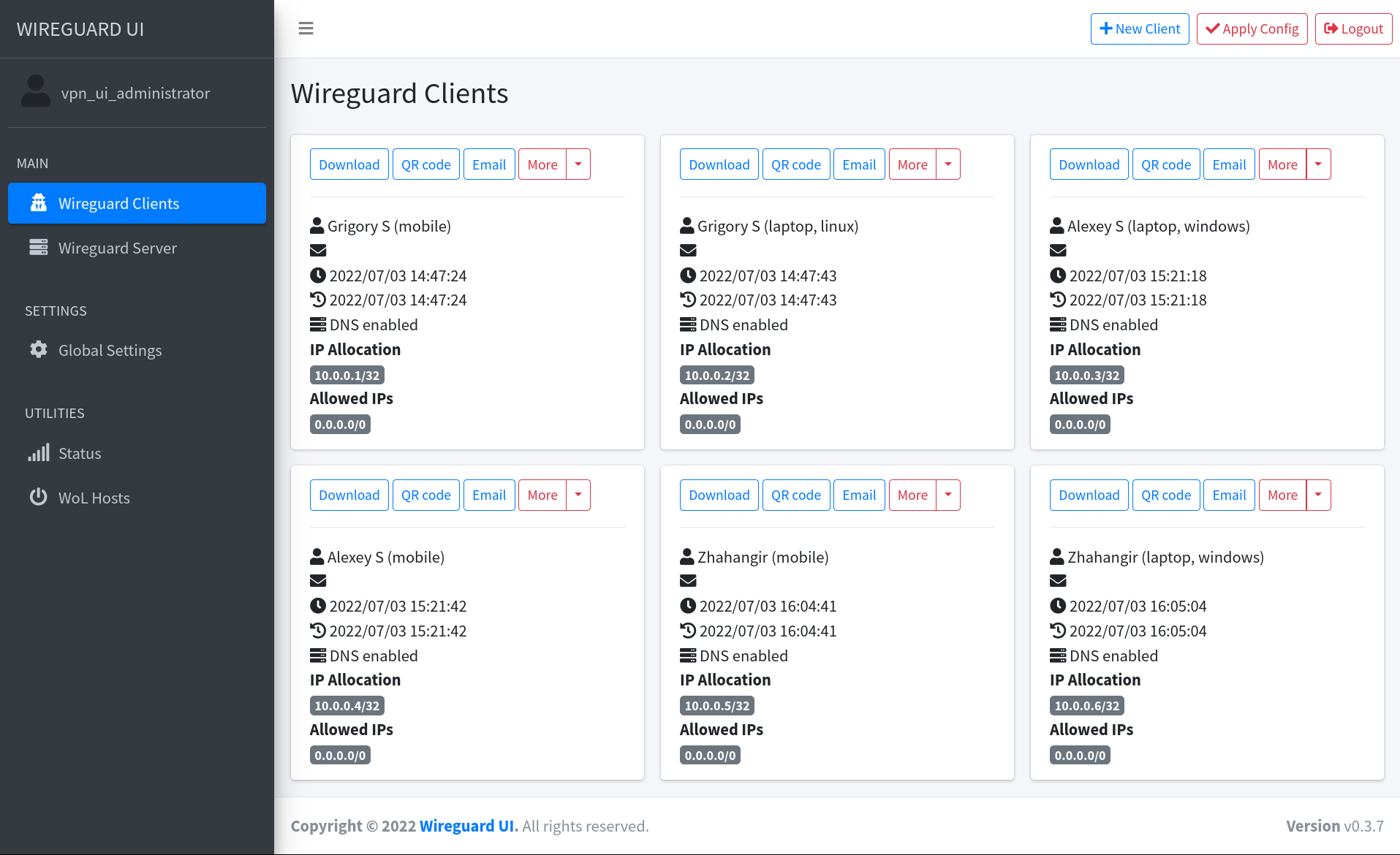
5.2k GitHub stars and counting — ngoduykhanh/wireguard-ui is a Go project TopGit is tracking across repositories on the platform. Wireguard web interface
Snapshot summary built from the project's own GitHub metadata — there's no written TopGit review yet. The page will update automatically when a full review is published.
WHY NO REVIEW YET
TopGit writes full reviews for the most-starred, most-requested repositories. This page is a snapshot until then — see the READ ME tab for the original README in full.
A web user interface to manage your WireGuard setup.
Features
Friendly UI
Authentication
Manage extra client information (name, email, etc.)
Retrieve client config using QR code / file / email / Telegram
Run WireGuard-UI
⚠️The default username and password are admin. Please change it to secure your setup.
Using binary file
Download the binary file from the release page and run it directly on the host machine
./wireguard-ui
Using docker compose
The examples/docker-compose folder contains example docker-compose files.
Choose the example which fits you the most, adjust the configuration for your needs, then run it like below:
docker-compose up
Environment Variables
Variable
Description
Default
BASE_PATH
Set this variable if you run wireguard-ui under a subpath of your reverse proxy virtual host (e.g. /wireguard)
N/A
BIND_ADDRESS
The addresses that can access to the web interface and the port, use unix:///abspath/to/file.socket for unix domain socket.
0.0.0.0:80
SESSION_SECRET
The secret key used to encrypt the session cookies. Set this to a random value
N/A
SESSION_SECRET_FILE
Optional filepath for the secret key used to encrypt the session cookies. Leave SESSION_SECRET blank to take effect
N/A
SESSION_MAX_DURATION
Max time in days a remembered session is refreshed and valid. Non-refreshed session is valid for 7 days max, regardless of this setting.
90
SUBNET_RANGES
The list of address subdivision ranges. Format: SR Name:10.0.1.0/24; SR2:10.0.2.0/24,10.0.3.0/24 Each CIDR must be inside one of the server interfaces.
N/A
WGUI_USERNAME
The username for the login page. Used for db initialization only
admin
WGUI_PASSWORD
The password for the user on the login page. Will be hashed automatically. Used for db initialization only
admin
WGUI_PASSWORD_FILE
Optional filepath for the user login password. Will be hashed automatically. Used for db initialization only. Leave WGUI_PASSWORD blank to take effect
N/A
WGUI_PASSWORD_HASH
The password hash for the user on the login page. (alternative to WGUI_PASSWORD). Used for db initialization only
N/A
WGUI_PASSWORD_HASH_FILE
Optional filepath for the user login password hash. (alternative to WGUI_PASSWORD_FILE). Used for db initialization only. Leave WGUI_PASSWORD_HASH blank to take effect
N/A
WGUI_ENDPOINT_ADDRESS
The default endpoint address used in global settings where clients should connect to. The endpoint can contain a port as well, useful when you are listening internally on the WGUI_SERVER_LISTEN_PORT port, but you forward on another port (ex 9000). Ex: myvpn.dyndns.com:9000
Resolved to your public ip address
WGUI_FAVICON_FILE_PATH
The file path used as website favicon
Embedded WireGuard logo
WGUI_DNS
The default DNS servers (comma-separated-list) used in the global settings
1.1.1.1
WGUI_MTU
The default MTU used in global settings
1450
WGUI_PERSISTENT_KEEPALIVE
The default persistent keepalive for WireGuard in global settings
15
WGUI_FIREWALL_MARK
The default WireGuard firewall mark
0xca6c (51820)
WGUI_TABLE
The default WireGuard table value settings
auto
WGUI_CONFIG_FILE_PATH
The default WireGuard config file path used in global settings
/etc/wireguard/wg0.conf
WGUI_LOG_LEVEL
The default log level. Possible values: DEBUG, INFO, WARN, ERROR, OFF
INFO
WG_CONF_TEMPLATE
The custom wg.conf config file template. Please refer to our default template
N/A
EMAIL_FROM_ADDRESS
The sender email address
N/A
EMAIL_FROM_NAME
The sender name
WireGuard UI
SENDGRID_API_KEY
The SendGrid api key
N/A
SENDGRID_API_KEY_FILE
Optional filepath for the SendGrid api key. Leave SENDGRID_API_KEY blank to take effect
N/A
SMTP_HOSTNAME
The SMTP IP address or hostname
127.0.0.1
SMTP_PORT
The SMTP port
25
SMTP_USERNAME
The SMTP username
N/A
SMTP_PASSWORD
The SMTP user password
N/A
SMTP_PASSWORD_FILE
Optional filepath for the SMTP user password. Leave SMTP_PASSWORD blank to take effect
N/A
SMTP_AUTH_TYPE
The SMTP authentication type. Possible values: PLAIN, LOGIN, NONE
NONE
SMTP_ENCRYPTION
The encryption method. Possible values: NONE, SSL, SSLTLS, TLS, STARTTLS
STARTTLS
SMTP_HELO
Hostname to use for the HELO message. smtp-relay.gmail.com needs this set to anything but localhost
localhost
TELEGRAM_TOKEN
Telegram bot token for distributing configs to clients
N/A
TELEGRAM_ALLOW_CONF_REQUEST
Allow users to get configs from the bot by sending a message
false
TELEGRAM_FLOOD_WAIT
Time in minutes before the next conf request is processed
60
Defaults for server configuration
These environment variables are used to control the default server settings used when initializing the database.
Variable
Description
Default
WGUI_SERVER_INTERFACE_ADDRESSES
The default interface addresses (comma-separated-list) for the WireGuard server configuration
10.252.1.0/24
WGUI_SERVER_LISTEN_PORT
The default server listen port
51820
WGUI_SERVER_POST_UP_SCRIPT
The default server post-up script
N/A
WGUI_SERVER_POST_DOWN_SCRIPT
The default server post-down script
N/A
Defaults for new clients
These environment variables are used to set the defaults used in New Client dialog.
Variable
Description
Default
WGUI_DEFAULT_CLIENT_ALLOWED_IPS
Comma-separated-list of CIDRs for the Allowed IPs field. (default )
0.0.0.0/0
WGUI_DEFAULT_CLIENT_EXTRA_ALLOWED_IPS
Comma-separated-list of CIDRs for the Extra Allowed IPs field. (default empty)
These environment variables only apply to the docker container.
Variable
Description
Default
WGUI_MANAGE_START
Start/stop WireGuard when the container is started/stopped
false
WGUI_MANAGE_RESTART
Auto restart WireGuard when we Apply Config changes in the UI
false
Auto restart WireGuard daemon
WireGuard-UI only takes care of configuration generation. You can use systemd to watch for the changes and restart the
service. Following is an example:
Set WGUI_MANAGE_RESTART=true to manage Wireguard interface restarts.
Using WGUI_MANAGE_START=true can also replace the function of wg-quick@wg0 service, to start Wireguard at boot, by
running the container with restart: unless-stopped. These settings can also pick up changes to Wireguard Config File
Path, after restarting the container. Please make sure you have --cap-add=NET_ADMIN in your container config to make
this feature work.
Build
Build docker image
Go to the project root directory and run the following command:
Does ngoduykhanh/wireguard-ui have a project website?
No homepage URL was recorded for ngoduykhanh/wireguard-ui in TopGit's last sync. The README tab above frequently contains screenshots and demo links, or check the repository description on GitHub.
Is ngoduykhanh/wireguard-ui open source?
Yes — ngoduykhanh/wireguard-ui ships under the MIT license, which makes its source code freely readable (and, depending on license terms, forkable and reusable). Source: github.com/ngoduykhanh/wireguard-ui.
What is ngoduykhanh/wireguard-ui?
ngoduykhanh/wireguard-ui (ngoduykhanh/wireguard-ui) is a Go project on GitHub. From the project's own README: Wireguard web interface
What license does ngoduykhanh/wireguard-ui use?
ngoduykhanh/wireguard-ui is released under the MIT license. Always verify the LICENSE file directly on GitHub for the authoritative terms — license strings can be edited out of sync with a project's actual stance.
Where do I read more about ngoduykhanh/wireguard-ui?
This TopGit page is a snapshot — the READ ME tab shows the project's own README content (links stripped, images preserved). The GitHub repository at github.com/ngoduykhanh/wireguard-ui is the definitive source.
Read full README in the tab above.
Want a second opinion on wireguard-ui?
Ask an AI that can read this page — one click and you get its take on wireguard-ui.

 /wireguard-ui