nsf/gocode sits at 5.0k stars on GitHub, written primarily in Go. An autocompletion daemon for the Go programming language
Snapshot summary built from the project's own GitHub metadata — there's no written TopGit review yet. The page will update automatically when a full review is published.
WHY NO REVIEW YET
TopGit writes full reviews for the most-starred, most-requested repositories. This page is a snapshot until then — see the READ ME tab for the original README in full.
An autocompletion daemon for the Go programming language
IMPORTANT: This project is not maintained anymore, consider using https://pkg.go.dev/golang.org/x/tools/gopls, a tool which provides similar functionality and more, created and maintained by Go team.
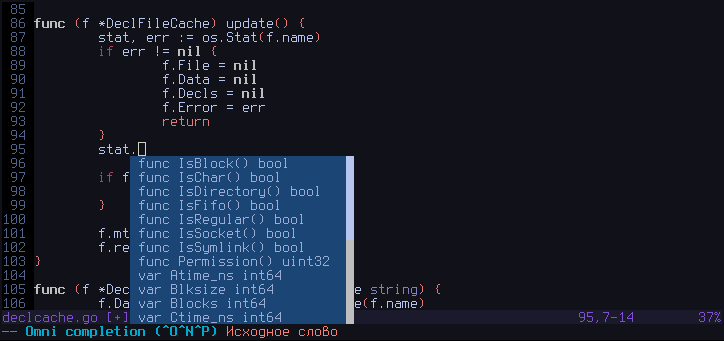
Gocode is a helper tool which is intended to be integrated with your source code editor, like vim, neovim and emacs. It provides several advanced capabilities, which currently includes:
Context-sensitive autocompletion
It is called daemon, because it uses client/server architecture for caching purposes. In particular, it makes autocompletions very fast. Typical autocompletion time with warm cache is 30ms, which is barely noticeable.
Also watch the demo screencast.
Setup
You should have a correctly installed Go compiler environment and your personal workspace ($GOPATH). If you have no idea what $GOPATH is, take a look here. Please make sure that your $GOPATH/bin is available in your $PATH. This is important, because most editors assume that gocode binary is available in one of the directories, specified by your $PATH environment variable. Otherwise manually copy the gocode binary from $GOPATH/bin to a location which is part of your $PATH after getting it in step 2.
Do these steps only if you understand why you need to do them:
export GOPATH=$HOME/goprojects
export PATH=$PATH:$GOPATH/bin
Then you need to get the appropriate version of the gocode, for 6g/8g/5g compiler you can do this:
go get -u github.com/nsf/gocode (-u flag for "update")
Windows users should consider doing this instead:
go get -u -ldflags -H=windowsgui github.com/nsf/gocode
That way on the Windows OS gocode will be built as a GUI application and doing so solves hanging window issues with some of the editors.
Next steps are editor specific. See below.
Vim setup
Vim manual installation
Note: As of go 1.5 there is no $GOROOT/misc/vim script. Suggested installation is via vim-go plugin.
In order to install vim scripts, you need to fulfill the following steps:
Install official Go vim scripts from $GOROOT/misc/vim. If you did that already, proceed to the step 2.
Install gocode vim scripts. Usually it's enough to do the following:
And then update your packages by running :PlugInstall.
Other
Alternatively take a look at the vundle/pathogen friendly repo: https://github.com/Blackrush/vim-gocode.
Neovim setup
Neovim manual installation
Neovim users should also follow Vim manual installation, except that you should goto gocode/nvim in step 2, and remember that, the Neovim configuration file is ~/.config/nvim/init.vim.
Using Vundle in Neovim
Add the following line to your init.vim:
Plugin 'nsf/gocode', {'rtp': 'nvim/'}
And then update your packages by running :PluginInstall.
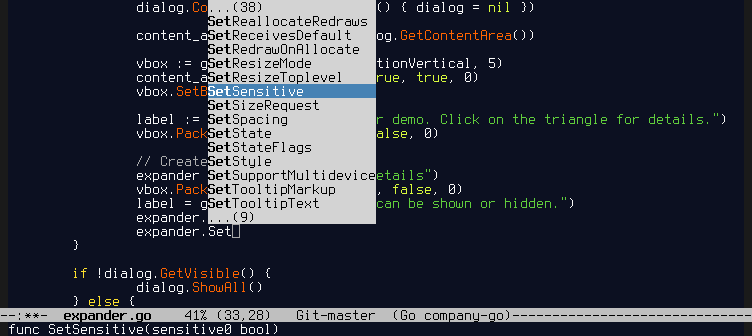
Also, there is an alternative plugin for emacs using company-mode. See emacs-company/README for installation instructions.
If you're a MacOSX user, you may find that script useful: https://github.com/purcell/exec-path-from-shell. It helps you with setting up the right environment variables as Go and gocode require it. By default it pulls the PATH, but don't forget to add the GOPATH as well, e.g.:
You can change all available options using gocode set command. The config file uses json format and is usually stored somewhere in ~/.config/gocode directory. On windows it's stored in the appropriate AppData folder. It's suggested to avoid modifying config file manually, do that using the gocode set command.
gocode set lists all options and their values.
gocode set <option> shows the value of that option.
gocode set <option> <value> sets the new value for that option.
propose-builtins
A boolean option. If true, gocode will add built-in types, functions and constants to autocompletion proposals. Default: false.
lib-path
A string option. Allows you to add search paths for packages. By default, gocode only searches $GOPATH/pkg/$GOOS_$GOARCH and $GOROOT/pkg/$GOOS_$GOARCH in terms of previously existed environment variables. Also you can specify multiple paths using ':' (colon) as a separator (on Windows use semicolon ';'). The paths specified by lib-path are prepended to the default ones.
autobuild
A boolean option. If true, gocode will try to automatically build out-of-date packages when their source files are modified, in order to obtain the freshest autocomplete results for them. This feature is experimental. Default: false.
force-debug-output
A string option. If is not empty, gocode will forcefully redirect the logging into that file. Also forces enabling of the debug mode on the server side. Default: "" (empty).
package-lookup-mode
A string option. If go, use standard Go package lookup rules. If gb, use gb-specific lookup rules. See https://github.com/constabulary/gb for details. Default: go.
close-timeout
An integer option. If there have been no completion requests after this number of seconds, the gocode process will terminate. Defaults to 1800 (30 minutes).
unimported-packages
A boolean option. If set to true, gocode will try to import certain known packages automatically for identifiers which cannot be resolved otherwise. Currently only a limited set of standard library packages are supported. Default: false.
partials
A boolean option. If set to false, gocode will not filter autocompletion results based on entered prefix before the cursor. Instead it will return all available autocompletion results viable for a given context. Whether this option is set to true or false, gocode will return a valid prefix length for output formats which support it. Setting this option to a non-default value may result in editor misbehaviour. Default: true.
ignore-case
A boolean option. If set to true, gocode will perform case-insensitive matching when doing prefix-based filtering. Default: false.
class-filtering
A boolean option. Enables or disables gocode's feature where it performs class-based filtering if partial input matches corresponding class keyword: const, var, type, func, package. Default: true.
Debugging
If something went wrong, the first thing you may want to do is manually start the gocode daemon with a debug mode enabled and in a separate terminal window. It will show you all the stack traces, panics if any and additional info about autocompletion requests. Shutdown the daemon if it was already started and run a new one explicitly with a debug mode enabled:
gocode close
gocode -s -debug
Please, report bugs, feature suggestions and other rants to the github issue tracker of this project.
Developing
There is Guide for IDE/editor plugin developers.
If you have troubles, please, contact me and I will try to do my best answering your questions. You can contact me via email. Or for short question find me on IRC: #go-nuts @ freenode.
Misc
It's a good idea to use the latest git version always. I'm trying to keep it in a working state.
Use go install (not go build) for building a local source tree. The objects in pkg/ are needed for Gocode to work.
TopGit's last sync did not record any GitHub topics for nsf/gocode. GitHub topics appear in the right sidebar of a repository page; that's the authoritative place to check.
How active is development on nsf/gocode?
The most recent commit recorded on nsf/gocode was 6 months ago, based on the GitHub push timestamp. The repository has 651 forks — one of the better signals of community interest.
How many stars does nsf/gocode have?
nsf/gocode has 5.0k GitHub stars — refresh the page for the live number, or check github.com/nsf/gocode. TopGit mirrors GitHub's count but does not claim minute-by-minute accuracy.
What language is nsf/gocode written in?
nsf/gocode is written primarily in Go. GitHub's language field is based on the largest share of bytes in the default branch.
Where do I read more about nsf/gocode?
This TopGit page is a snapshot — the READ ME tab shows the project's own README content (links stripped, images preserved). The GitHub repository at github.com/nsf/gocode is the definitive source.
Read full README in the tab above.
Curious whether gocode is right for you?
Let ChatGPT, Claude, or Perplexity look into it — click below and see what AI actually says about gocode.
 /gocode