olekukonko/tablewriter

olekukonko/tablewriter sits at 4.8k stars on GitHub, written primarily in Go. ASCII table in golang
Snapshot summary built from the project's own GitHub metadata — there's no written TopGit review yet. The page will update automatically when a full review is published.
TopGit writes full reviews for the most-starred, most-requested repositories. This page is a snapshot until then — see the READ ME tab for the original README in full.
Snapshot
Top contributors
Show top contributors
TableWriter for Go



tablewriter is a Go library for generating rich text-based tables with support for multiple output formats, including ASCII, Unicode, Markdown, HTML, and colorized terminals. Perfect for CLI tools, logs, and web applications.
Key Features
- Multi-format rendering: ASCII, Unicode, Markdown, HTML, ANSI-colored
- Advanced styling: Cell merging, alignment, padding, borders
- Flexible input: CSV, structs, slices, or streaming data
- High performance: Minimal allocations, buffer reuse
- Modern features: Generics support, hierarchical merging, real-time streaming
Installation
Legacy Version (v0.0.5)
For use with legacy applications:
go get github.com/olekukonko/[email protected]
Latest Version
The latest stable version
go get github.com/olekukonko/[email protected]
Warning: Version v1.0.0 contains missing functionality and should not be used.
Version Guidance
- Legacy: Use
v0.0.5(stable)- New Features: Use
@latest(includes generics, super fast streaming APIs)- Legacy Docs: See README_LEGACY.md
Why TableWriter?
- CLI Ready: Instant compatibility with terminal outputs
- Database Friendly: Native support for
sql.Null*types - Secure: Auto-escaping for HTML/Markdown
- Extensible: Custom renderers and formatters
Quick Example
package main

import (
	"github.com/olekukonko/tablewriter"
	"os"
)

func main() {
	data := [][]string{
		{"Package", "Version", "Status"},
		{"tablewriter", "v0.0.5", "legacy"},
		{"tablewriter", "v1.1.4", "latest"},
	}

	table := tablewriter.NewWriter(os.Stdout)
	table.Header(data[0])
	table.Bulk(data[1:])
	table.Render()
}
Output:
┌─────────────┬─────────┬────────┐
│   PACKAGE   │ VERSION │ STATUS │
├─────────────┼─────────┼────────┤
│ tablewriter │ v0.0.5  │ legacy │
│ tablewriter │ v1.1.4  │ latest │
└─────────────┴─────────┴────────┘
Detailed Usage
Create a table with NewTable or NewWriter, configure it using options or a Config struct, add data with Append or Bulk, and render to an io.Writer. Use renderers like Blueprint (ASCII), HTML, Markdown, Colorized, or Ocean (streaming).
Here's how the API primitives map to the generated ASCII table:
API Call                                  ASCII Table Component
--------                                  ---------------------

table.Header([]string{"NAME", "AGE"})     ┌──────┬─────┐  ← Borders.Top
                                          │ NAME │ AGE │  ← Header row
                                          ├──────┼─────┤  ← Lines.ShowTop (header separator)

table.Append([]string{"Alice", "25"})     │ Alice│ 25  │  ← Data row
                                          ├──────┼─────┤  ← Separators.BetweenRows

table.Append([]string{"Bob", "30"})       │ Bob  │ 30  │  ← Data row
                                          ├──────┼─────┤  ← Lines.ShowBottom (footer separator)

table.Footer([]string{"Total", "2"})      │ Total│ 2   │  ← Footer row
                                          └──────┴─────┘  ← Borders.Bottom
The core components include:
-
Renderer - Implements the core interface for converting table data into output formats. Available renderers include Blueprint (ASCII), HTML, Markdown, Colorized (ASCII with color), Ocean (streaming ASCII), and SVG.
-
Config - The root configuration struct that controls all table behavior and appearance
- Behavior - Controls high-level rendering behaviors including auto-hiding empty columns, trimming row whitespace, header/footer visibility, and compact mode for optimized merged cell calculations
- CellConfig - The comprehensive configuration template used for table sections (header, row, footer). Combines formatting, padding, alignment, filtering, callbacks, and width constraints with global and per-column control
- StreamConfig - Configuration for streaming mode including enable/disable state and strict column validation
-
Rendition - Defines how a renderer formats tables and contains the complete visual styling configuration
- Borders - Control the outer frame visibility (top, bottom, left, right edges) of the table
- Lines - Control horizontal boundary lines (above/below headers, above footers) that separate different table sections
- Separators - Control the visibility of separators between rows and between columns within the table content
- Symbols - Define the characters used for drawing table borders, corners, and junctions
These components can be configured with various tablewriter.With*() functional options when creating a new table.
Examples
Basic Examples
1. Simple Tables
Create a basic table with headers and rows.
default
package main

import (
	"fmt"
	"github.com/olekukonko/tablewriter"
	"os"
)

type Age int

func (a Age) String() string {
	return fmt.Sprintf("%d yrs", a)
}

func main() {
	data := [][]any{
		{"Alice", Age(25), "New York"},
		{"Bob", Age(30), "Boston"},
	}

	table := tablewriter.NewTable(os.Stdout)
	table.Header("Name", "Age", "City")
	table.Bulk(data)
	table.Render()
}
Output:
┌───────┬────────┬──────────┐
│ NAME  │  AGE   │   CITY   │
├───────┼────────┼──────────┤
│ Alice │ 25 yrs │ New York │
│ Bob   │ 30 yrs │ Boston   │
└───────┴────────┴──────────┘
with customization
package main

import (
	"fmt"
	"github.com/olekukonko/tablewriter"
	"github.com/olekukonko/tablewriter/renderer"
	"github.com/olekukonko/tablewriter/tw"
	"os"
)

type Age int

func (a Age) String() string {
	return fmt.Sprintf("%d yrs", a)
}

func main() {
	data := [][]any{
		{"Alice", Age(25), "New York"},
		{"Bob", Age(30), "Boston"},
	}

	symbols := tw.NewSymbolCustom("Nature").
		WithRow("~").
		WithColumn("|").
		WithTopLeft("🌱").
		WithTopMid("🌿").
		WithTopRight("🌱").
		WithMidLeft("🍃").
		WithCenter("❀").
		WithMidRight("🍃").
		WithBottomLeft("🌻").
		WithBottomMid("🌾").
		WithBottomRight("🌻")

	table := tablewriter.NewTable(os.Stdout, tablewriter.WithRenderer(renderer.NewBlueprint(tw.Rendition{Symbols: symbols})))
	table.Header("Name", "Age", "City")
	table.Bulk(data)
	table.Render()
}
🌱~~~~~~❀~~~~~~~~❀~~~~~~~~~🌱
| NAME  |  AGE   |   CITY   |
🍃~~~~~~❀~~~~~~~~❀~~~~~~~~~🍃
| Alice | 25 yrs | New York |
| Bob   | 30 yrs | Boston   |
🌻~~~~~~❀~~~~~~~~❀~~~~~~~~~🌻
See symbols example for more
2. Markdown Table
Generate a Markdown table for documentation.
package main

import (
	"fmt"
	"github.com/olekukonko/tablewriter"
	"github.com/olekukonko/tablewriter/renderer"
	"os"
	"strings"
	"unicode"
)

type Name struct {
	First string
	Last  string
}

// this will be ignored since  Format() is present
func (n Name) String() string {
	return fmt.Sprintf("%s %s", n.First, n.Last)
}

// Note: Format() overrides String() if both exist.
func (n Name) Format() string {
	return fmt.Sprintf("%s %s", n.clean(n.First), n.clean(n.Last))
}

// clean ensures the first letter is capitalized and the rest are lowercase
func (n Name) clean(s string) string {
	s = strings.TrimSpace(strings.ToLower(s))
	words := strings.Fields(s)
	s = strings.Join(words, "")

	if s == "" {
		return s
	}
	// Capitalize the first letter
	runes := []rune(s)
	runes[0] = unicode.ToUpper(runes[0])
	return string(runes)
}

type Age int

// Age int will be ignore and string will be used
func (a Age) String() string {
	return fmt.Sprintf("%d yrs", a)
}

func main() {
	data := [][]any{
		{Name{"Al  i  CE", " Ma  SK"}, Age(25), "New York"},
		{Name{"bOb", "mar   le   y"}, Age(30), "Boston"},
	}

	table := tablewriter.NewTable(os.Stdout,
		tablewriter.WithRenderer(renderer.NewMarkdown()),
	)

	table.Header([]string{"Name", "Age", "City"})
	table.Bulk(data)
	table.Render()
}
Output:
|    NAME    |  AGE   |   CITY   |
|:----------:|:------:|:--------:|
| Alice Mask | 25 yrs | New York |
| Bob Marley | 30 yrs | Boston   |
3. CSV Input
Create a table from a CSV file with custom row alignment.
package main

import (
	"github.com/olekukonko/tablewriter"
	"github.com/olekukonko/tablewriter/tw"
	"log"
	"os"
)

func main() {
	// Assuming "test.csv" contains: "First Name,Last Name,SSN\nJohn,Barry,123456\nKathy,Smith,687987"
	table, err := tablewriter.NewCSV(os.Stdout, "test.csv", true)
	if err != nil {
		log.Fatalf("Error: %v", err)
	}

	table.Configure(func(config *tablewriter.Config) {
		config.Row.Alignment.Global = tw.AlignLeft
	})
	table.Render()
}
Output:
┌────────────┬───────────┬─────────┐
│ FIRST NAME │ LAST NAME │   SSN   │
├────────────┼───────────┼─────────┤
│ John       │ Barry     │ 123456  │
│ Kathy      │ Smith     │ 687987  │
└────────────┴───────────┴─────────┘
Advanced Examples
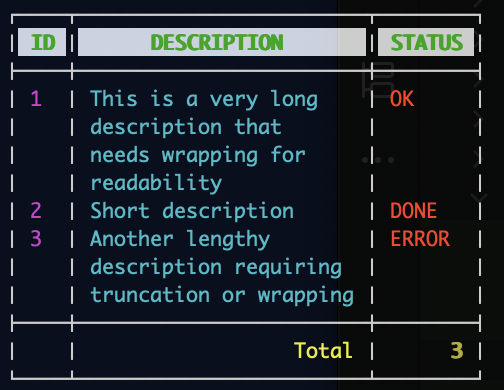
4. Colorized Table with Long Values
Create a colorized table with wrapped long values, per-column colors, and a styled footer (inspired by TestColorizedLongValues and TestColorizedCustomColors).
package main

import (
	"github.com/fatih/color"
	"github.com/olekukonko/tablewriter"
	"github.com/olekukonko/tablewriter/renderer"
	"github.com/olekukonko/tablewriter/tw"
	"os"
)

func main() {
	data := [][]string{
		{"1", "This is a very long description that needs wrapping for readability", "OK"},
		{"2", "Short description", "DONE"},
		{"3", "Another lengthy description requiring truncation or wrapping", "ERROR"},
	}

	// Configure colors: green headers, cyan/magenta rows, yellow footer
	colorCfg := renderer.ColorizedConfig{
		Header: renderer.Tint{
			FG: renderer.Colors{color.FgGreen, color.Bold}, // Green bold headers
			BG: renderer.Colors{color.BgHiWhite},
		},
		Column: renderer.Tint{
			FG: renderer.Colors{color.FgCyan}, // Default cyan for rows
			Columns: []renderer.Tint{
				{FG: renderer.Colors{color.FgMagenta}}, // Magenta for column 0
				{},                                     // Inherit default (cyan)
				{FG: renderer.Colors{color.FgHiRed}},   // High-intensity red for column 2
			},
		},
		Footer: renderer.Tint{
			FG: renderer.Colors{color.FgYellow, color.Bold}, // Yellow bold footer
			Columns: []renderer.Tint{
				{},                                      // Inherit default
				{FG: renderer.Colors{color.FgHiYellow}}, // High-intensity yellow for column 1
				{},                                      // Inherit default
			},
		},
		Border:    renderer.Tint{FG: renderer.Colors{color.FgWhite}}, // White borders
		Separator: renderer.Tint{FG: renderer.Colors{color.FgWhite}}, // White separators
	}

	table := tablewriter.NewTable(os.Stdout,
		tablewriter.WithRenderer(renderer.NewColorized(colorCfg)),
		tablewriter.WithConfig(tablewriter.Config{
			Row: tw.CellConfig{
				Formatting:   tw.CellFormatting{AutoWrap: tw.WrapNormal}, // Wrap long content
				Alignment:    tw.CellAlignment{Global: tw.AlignLeft},     // Left-align rows
				ColMaxWidths: tw.CellWidth{Global: 25},
			},
			Footer: tw.CellConfig{
				Alignment: tw.CellAlignment{Global: tw.AlignRight},
			},
		}),
	)

	table.Header([]string{"ID", "Description", "Status"})
	table.Bulk(data)
	table.Footer([]string{"", "Total", "3"})
	table.Render()
}
Output (colors visible in ANSI-compatible terminals):
5. Streaming Table with Truncation
Stream a table incrementally with truncation and a footer, simulating a real-time data feed (inspired by TestOceanStreamTruncation and TestOceanStreamSlowOutput).
package main

import (
	"github.com/olekukonko/tablewriter"
	"github.com/olekukonko/tablewriter/tw"
	"log"
	"os"
	"time"
)

func main() {
	table := tablewriter.NewTable(os.Stdout, tablewriter.WithStreaming(tw.StreamConfig{Enable: true}))

	// Start streaming
	if err := table.Start(); err != nil {
		log.Fatalf("Start failed: %v", err)
	}

	defer table.Close()

	// Stream header
	table.Header([]string{"ID", "Description", "Status"})

	// Stream rows with simulated delay
	data := [][]string{
		{"1", "This description is too long", "OK"},
		{"2", "Short desc", "DONE"},
		{"3", "Another long description here", "ERROR"},
	}
	for _, row := range data {
		table.Append(row)
		time.Sleep(500 * time.Millisecond) // Simulate real-time data feed
	}

	// Stream footer
	table.Footer([]string{"", "Total", "3"})
}
Output (appears incrementally):
┌────────┬───────────────┬──────────┐
│   ID   │  DESCRIPTION  │  STATUS  │
├────────┼───────────────┼──────────┤
│ 1      │ This          │ OK       │
│        │ description   │          │
│        │ is too long   │          │
│ 2      │ Short desc    │ DONE     │
│ 3      │ Another long  │ ERROR    │
│        │ description   │          │
│        │ here          │          │
├────────┼───────────────┼──────────┤
│        │         Total │        3 │
└────────┴───────────────┴──────────┘
Note: Long descriptions are truncated with … due to fixed column widths. The output appears row-by-row, simulating a real-time feed.
6. Hierarchical Merging for Organizational Data
Show hierarchical merging for a tree-like structure, such as an organizational hierarchy (inspired by TestMergeHierarchicalUnicode).
package main

import (
	"github.com/olekukonko/tablewriter"
	"github.com/olekukonko/tablewriter/renderer"
	"github.com/olekukonko/tablewriter/tw"
	"os"
)

func main() {
	data := [][]string{
		{"Engineering", "Backend", "API Team", "Alice"},
		{"Engineering", "Backend", "Database Team", "Bob"},
		{"Engineering", "Frontend", "UI Team", "Charlie"},
		{"Marketing", "Digital", "SEO Team", "Dave"},
		{"Marketing", "Digital", "Content Team", "Eve"},
	}

	table := tablewriter.NewTable(os.Stdout,
		tablewriter.WithRenderer(renderer.NewBlueprint(tw.Rendition{
			Settings: tw.Settings{Separators: tw.Separators{BetweenRows: tw.On}},
		})),
		tablewriter.WithConfig(tablewriter.Config{
			Header: tw.CellConfig{Alignment: tw.CellAlignment{Global: tw.AlignCenter}},
			Row: tw.CellConfig{
				Merging: tw.CellMerging{Mode: tw.MergeHierarchical},
				Alignment:  tw.CellAlignment{Global: tw.AlignLeft},
			},
		}),
	)
	table.Header([]string{"Department", "Division", "Team", "Lead"})
	table.Bulk(data)
	table.Render()
}
Output:
┌────────────┬──────────┬──────────────┬────────┐
│ DEPARTMENT │ DIVISION │    TEAM      │  LEAD  │
├────────────┼──────────┼──────────────┼────────┤
│ Engineering│ Backend  │ API Team     │ Alice  │
│            │          ├──────────────┼────────┤
│            │          │ Database Team│ Bob    │
│            │ Frontend ├──────────────┼────────┤
│            │          │ UI Team      │ Charlie│
├────────────┼──────────┼──────────────┼────────┤
│ Marketing  │ Digital  │ SEO Team     │ Dave   │
│            │          ├──────────────┼────────┤
│            │          │ Content Team │ Eve    │
└────────────┴──────────┴──────────────┴────────┘
Note: Hierarchical merging groups repeated values (e.g., "Engineering" spans multiple rows, "Backend" spans two teams), creating a tree-like structure.
7. Custom Padding with Merging
Showcase custom padding and combined horizontal/vertical merging (inspired by TestMergeWithPadding in merge_test.go).
package main

import (
	"github.com/olekukonko/tablewriter"
	"github.com/olekukonko/tablewriter/renderer"
	"github.com/olekukonko/tablewriter/tw"
	"os"
)

func main() {
	data := [][]string{
		{"1/1/2014", "Domain name", "Successful", "Successful"},
		{"1/1/2014", "Domain name", "Pending", "Waiting"},
		{"1/1/2014", "Domain name", "Successful", "Rejected"},
		{"", "", "TOTAL", "$145.93"},
	}

	table := tablewriter.NewTable(os.Stdout,
		tablewriter.WithRenderer(renderer.NewBlueprint(tw.Rendition{
			Settings: tw.Settings{Separators: tw.Separators{BetweenRows: tw.On}},
		})),
		tablewriter.WithConfig(tablewriter.Config{
			Row: tw.CellConfig{
				Merging:   tw.CellMerging{Mode: tw.MergeBoth},
				Alignment: tw.CellAlignment{PerColumn: []tw.Align{tw.Skip, tw.Skip, tw.AlignRight, tw.AlignLeft}},
			},

			Footer: tw.CellConfig{
				Padding: tw.CellPadding{
					Global:    tw.Padding{Left: "*", Right: "*"},
					PerColumn: []tw.Padding{{}, {}, {Bottom: "^"}, {Bottom: "^"}},
				},
				Alignment: tw.CellAlignment{PerColumn: []tw.Align{tw.Skip, tw.Skip, tw.AlignRight, tw.AlignLeft}},
			},
		}),
	)
	table.Header([]string{"Date", "Description", "Status", "Conclusion"})
	table.Bulk(data)
	table.Render()
}
Output:
┌──────────┬─────────────┬────────────┬────────────┐
│   DATE   │ DESCRIPTION │   STATUS   │ CONCLUSION │
├──────────┼─────────────┼────────────┴────────────┤
│ 1/1/2014 │ Domain name │              Successful │
│          │             ├────────────┬────────────┤
│          │             │    Pending │ Waiting    │
│          │             ├────────────┼────────────┤
│          │             │ Successful │ Rejected   │
├──────────┼─────────────┼────────────┼────────────┤
│          │             │      TOTAL │ $145.93    │
│          │             │^^^^^^^^^^^^│^^^^^^^^^^^^│
└──────────┴─────────────┴────────────┴────────────┘
8. Nested Tables
Create a table with nested sub-tables for complex layouts (inspired by TestMasterClass in extra_test.go).
package main

import (
	"bytes"
	"github.com/olekukonko/tablewriter"
	"github.com/olekukonko/tablewriter/renderer"
	"github.com/olekukonko/tablewriter/tw"
	"os"
)

func main() {
	// Helper to create a sub-table
	createSubTable := func(s string) string {
		var buf bytes.Buffer
		table := tablewriter.NewTable(&buf,
			tablewriter.WithRenderer(renderer.NewBlueprint(tw.Rendition{
				Borders: tw.BorderNone,
				Symbols: tw.NewSymbols(tw.StyleASCII),
				Settings: tw.Settings{
					Separators: tw.Separators{BetweenRows: tw.On},
					Lines:      tw.Lines{ShowFooterLine: tw.On},
				},
			})),
			tablewriter.WithConfig(tablewriter.Config{
				MaxWidth: 10,
				Row:      tw.CellConfig{Alignment: tw.CellAlignment{Global: tw.AlignCenter}},
			}),
		)
		table.Append([]string{s, s})
		table.Append([]string{s, s})
		table.Render()
		return buf.String()
	}

	// Main table
	table := tablewriter.NewTable(os.Stdout,
		tablewriter.WithRenderer(renderer.NewBlueprint(tw.Rendition{
			Borders:  tw.BorderNone,
			Settings: tw.Settings{Separators: tw.Separators{BetweenColumns: tw.On}},
		})),
		tablewriter.WithConfig(tablewriter.Config{
			MaxWidth: 30,
			Row:      tw.CellConfig{Alignment: tw.CellAlignment{Global: tw.AlignCenter}},
		}),
	)
	table.Append([]string{createSubTable("A"), createSubTable("B")})
	table.Append([]string{createSubTable("C"), createSubTable("D")})
	table.Render()
}
Output:
  A | A  │  B | B
 ---+--- │ ---+---
  A | A  │  B | B
  C | C  │  D | D
 ---+--- │ ---+---
  C | C  │  D | D
9. Structs with Database
Render a table from a slice of structs, simulating a database query (inspired by TestStructTableWithDB in struct_test.go).
package main

import (
	"fmt"
	"github.com/olekukonko/tablewriter"
	"github.com/olekukonko/tablewriter/renderer"
	"github.com/olekukonko/tablewriter/tw"
	"os"
)

type Employee struct {
	ID         int
	Name       string
	Age        int
	Department string
	Salary     float64
}

func employeeStringer(e interface{}) []string {
	emp, ok := e.(Employee)
	if !ok {
		return []string{"Error: Invalid type"}
	}
	return []string{
		fmt.Sprintf("%d", emp.ID),
		emp.Name,
		fmt.Sprintf("%d", emp.Age),
		emp.Department,
		fmt.Sprintf("%.2f", emp.Salary),
	}
}

func main() {
	employees := []Employee{
		{ID: 1, Name: "Alice Smith", Age: 28, Department: "Engineering", Salary: 75000.50},
		{ID: 2, Name: "Bob Johnson", Age: 34, Department: "Marketing", Salary: 62000.00},
		{ID: 3, Name: "Charlie Brown", Age: 45, Department: "HR", Salary: 80000.75},
	}

	table := tablewriter.NewTable(os.Stdout,
		tablewriter.WithRenderer(renderer.NewBlueprint(tw.Rendition{
			Symbols: tw.NewSymbols(tw.StyleRounded),
		})),
		tablewriter.WithStringer(employeeStringer),
		tablewriter.WithConfig(tablewriter.Config{
			Header: tw.CellConfig{
				Formatting: tw.CellFormatting{AutoFormat: tw.On},
				Alignment:  tw.CellAlignment{Global: tw.AlignCenter},
			},
			Row:    tw.CellConfig{Alignment: tw.CellAlignment{Global: tw.AlignLeft}},
			Footer: tw.CellConfig{Alignment: tw.CellAlignment{Global: tw.AlignRight}},
		}),
	)
	table.Header([]string{"ID", "Name", "Age", "Department", "Salary"})

	for _, emp := range employees {
		table.Append(emp)
	}

	totalSalary := 0.0
	for _, emp := range employees {
		totalSalary += emp.Salary
	}
	table.Footer([]string{"", "", "", "Total", fmt.Sprintf("%.2f", totalSalary)})
	table.Render()
}
Output:
╭────┬───────────────┬─────┬─────────────┬───────────╮
│ ID │     NAME      │ AGE │ DEPARTMENT  │  SALARY   │
├────┼───────────────┼─────┼─────────────┼───────────┤
│ 1  │ Alice Smith   │ 28  │ Engineering │ 75000.50  │
│ 2  │ Bob Johnson   │ 34  │ Marketing   │ 62000.00  │
│ 3  │ Charlie Brown │ 45  │ HR          │ 80000.75  │
├────┼───────────────┼─────┼─────────────┼───────────┤
│    │               │     │       Total │ 217001.25 │
╰────┴───────────────┴─────┴─────────────┴───────────╯
10. Simple Html Table
package main

import (
	"github.com/olekukonko/tablewriter"
	"github.com/olekukonko/tablewriter/renderer"
	"github.com/olekukonko/tablewriter/tw"
	"os"
)

func main() {
	data := [][]string{
		{"North", "Q1 & Q2", "Q1 & Q2", "$2200.00"},
		{"South", "Q1", "Q1", "$1000.00"},
		{"South", "Q2", "Q2", "$1200.00"},
	}

	// Configure HTML with custom CSS classes and content escaping
	htmlCfg := renderer.HTMLConfig{
		TableClass:     "sales-table",
		HeaderClass:    "table-header",
		BodyClass:      "table-body",
		FooterClass:    "table-footer",
		RowClass:       "table-row",
		HeaderRowClass: "header-row",
		FooterRowClass: "footer-row",
		EscapeContent:  true, // Escape HTML characters (e.g., "&" to "&")
	}

	table := tablewriter.NewTable(os.Stdout,
		tablewriter.WithRenderer(renderer.NewHTML(htmlCfg)),
		tablewriter.WithConfig(tablewriter.Config{
			Header: tw.CellConfig{
				Merging:   tw.CellMerging{Mode: tw.MergeHorizontal}, // Merge identical header cells
				Alignment: tw.CellAlignment{Global: tw.AlignCenter},
			},
			Row: tw.CellConfig{
				Merging:   tw.CellMerging{Mode: tw.MergeHorizontal}, // Merge identical row cells
				Alignment: tw.CellAlignment{Global: tw.AlignLeft},
			},
			Footer: tw.CellConfig{Alignment: tw.CellAlignment{Global: tw.AlignRight}},
		}),
	)

	table.Header([]string{"Region", "Quarter", "Quarter", "Sales"})
	table.Bulk(data)
	table.Footer([]string{"", "", "Total", "$4400.00"})
	table.Render()
}
Output:
<table class="sales-table">
<thead class="table-header">
<tr class="header-row">
<th style="text-align: center;">REGION</th>
<th colspan="2" style="text-align: center;">QUARTER</th>
<th style="text-align: center;">SALES</th>
</tr>
</thead>
<tbody class="table-body">
<tr class="table-row">
<td style="text-align: left;">North</td>
<td colspan="2" style="text-align: left;">Q1 & Q2</td>
<td style="text-align: left;">$2200.00</td>
</tr>
<tr class="table-row">
<td style="text-align: left;">South</td>
<td colspan="2" style="text-align: left;">Q1</td>
<td style="text-align: left;">$1000.00</td>
</tr>
<tr class="table-row">
<td style="text-align: left;">South</td>
<td colspan="2" style="text-align: left;">Q2</td>
<td style="text-align: left;">$1200.00</td>
</tr>
</tbody>
<tfoot class="table-footer">
<tr class="footer-row">
<td style="text-align: right;"></td>
<td style="text-align: right;"></td>
<td style="text-align: right;">Total</td>
<td style="text-align: right;">$4400.00</td>
</tr>
</tfoot>
</table>
11. SVG Support
package main

import (
	"fmt"
	"github.com/olekukonko/ll"
	"github.com/olekukonko/tablewriter"
	"github.com/olekukonko/tablewriter/renderer"
	"os"
)

type Age int

func (a Age) String() string {
	return fmt.Sprintf("%d yrs", a)
}

func main() {
	data := [][]any{
		{"Alice", Age(25), "New York"},
		{"Bob", Age(30), "Boston"},
	}

	file, err := os.OpenFile("out.svg", os.O_CREATE|os.O_WRONLY, 0644)
	if err != nil {
		ll.Fatal(err)
	}
	defer file.Close()

	table := tablewriter.NewTable(file, tablewriter.WithRenderer(renderer.NewSVG()))
	table.Header("Name", "Age", "City")
	table.Bulk(data)
	table.Render()
}
<svg xmlns="http://www.w3.org/2000/svg" width="170.80" height="84.40" font-family="sans-serif" font-size="12.00">
<style>text { stroke: none; }</style>
  <rect x="1.00" y="1.00" width="46.00" height="26.80" fill="#F0F0F0"/>
  <text x="24.00" y="14.40" fill="black" text-anchor="middle" dominant-baseline="middle">NAME</text>
  <rect x="48.00" y="1.00" width="53.20" height="26.80" fill="#F0F0F0"/>
  <text x="74.60" y="14.40" fill="black" text-anchor="middle" dominant-baseline="middle">AGE</text>
  <rect x="102.20" y="1.00" width="67.60" height="26.80" fill="#F0F0F0"/>
  <text x="136.00" y="14.40" fill="black" text-anchor="middle" dominant-baseline="middle">CITY</text>
  <rect x="1.00" y="28.80" width="46.00" height="26.80" fill="white"/>
  <text x="6.00" y="42.20" fill="black" text-anchor="start" dominant-baseline="middle">Alice</text>
  <rect x="48.00" y="28.80" width="53.20" height="26.80" fill="white"/>
  <text x="53.00" y="42.20" fill="black" text-anchor="start" dominant-baseline="middle">25 yrs</text>
  <rect x="102.20" y="28.80" width="67.60" height="26.80" fill="white"/>
  <text x="107.20" y="42.20" fill="black" text-anchor="start" dominant-baseline="middle">New York</text>
  <rect x="1.00" y="56.60" width="46.00" height="26.80" fill="#F9F9F9"/>
  <text x="6.00" y="70.00" fill="black" text-anchor="start" dominant-baseline="middle">Bob</text>
  <rect x="48.00" y="56.60" width="53.20" height="26.80" fill="#F9F9F9"/>
  <text x="53.00" y="70.00" fill="black" text-anchor="start" dominant-baseline="middle">30 yrs</text>
  <rect x="102.20" y="56.60" width="67.60" height="26.80" fill="#F9F9F9"/>
  <text x="107.20" y="70.00" fill="black" text-anchor="start" dominant-baseline="middle">Boston</text>
  <g class="table-borders" stroke="black" stroke-width="1.00" stroke-linecap="square">
    <line x1="0.50" y1="0.50" x2="170.30" y2="0.50" />
    <line x1="0.50" y1="28.30" x2="170.30" y2="28.30" />
    <line x1="0.50" y1="56.10" x2="170.30" y2="56.10" />
    <line x1="0.50" y1="83.90" x2="170.30" y2="83.90" />
    <line x1="0.50" y1="0.50" x2="0.50" y2="83.90" />
    <line x1="47.50" y1="0.50" x2="47.50" y2="83.90" />
    <line x1="101.70" y1="0.50" x2="101.70" y2="83.90" />
    <line x1="170.30" y1="0.50" x2="170.30" y2="83.90" />
  </g>
</svg>
12 Simple Application
package main

import (
	"fmt"
	"github.com/olekukonko/tablewriter"
	"github.com/olekukonko/tablewriter/tw"
	"io/fs"
	"os"
	"path/filepath"
	"strings"
	"time"
)

const (
	folder    = "📁"
	file      = "📄"
	baseDir   = "../"
	indentStr = "    "
)

func main() {
	table := tablewriter.NewTable(os.Stdout, tablewriter.WithTrimSpace(tw.Off))
	table.Header([]string{"Tree", "Size", "Permissions", "Modified"})
	err := filepath.WalkDir(baseDir, func(path string, d fs.DirEntry, err error) error {
		if err != nil {
			return err
		}

		if d.Name() == "." || d.Name() == ".." {
			return nil
		}

		// Calculate relative path depth
		relPath, err := filepath.Rel(baseDir, path)
		if err != nil {
			return err
		}

		depth := 0
		if relPath != "." {
			depth = len(strings.Split(relPath, string(filepath.Separator))) - 1
		}

		indent := strings.Repeat(indentStr, depth)

		var name string
		if d.IsDir() {
			name = fmt.Sprintf("%s%s %s", indent, folder, d.Name())
		} else {
			name = fmt.Sprintf("%s%s %s", indent, file, d.Name())
		}

		info, err := d.Info()
		if err != nil {
			return err
		}

		table.Append([]string{
			name,
			Size(info.Size()).String(),
			info.Mode().String(),
			Time(info.ModTime()).Format(),
		})

		return nil
	})

	if err != nil {
		fmt.Fprintf(os.Stdout, "Error: %v\n", err)
		return
	}

	table.Render()
}

const (
	KB = 1024
	MB = KB * 1024
	GB = MB * 1024
	TB = GB * 1024
)

type Size int64

func (s Size) String() string {
	switch {
	case s < KB:
		return fmt.Sprintf("%d B", s)
	case s < MB:
		return fmt.Sprintf("%.2f KB", float64(s)/KB)
	case s < GB:
		return fmt.Sprintf("%.2f MB", float64(s)/MB)
	case s < TB:
		return fmt.Sprintf("%.2f GB", float64(s)/GB)
	default:
		return fmt.Sprintf("%.2f TB", float64(s)/TB)
	}
}

type Time time.Time

func (t Time) Format() string {
	now := time.Now()
	diff := now.Sub(time.Time(t))

	if diff.Seconds() < 60 {
		return "just now"
	} else if diff.Minutes() < 60 {
		return fmt.Sprintf("%d minutes ago", int(diff.Minutes()))
	} else if diff.Hours() < 24 {
		return fmt.Sprintf("%d hours ago", int(diff.Hours()))
	} else if diff.Hours() < 24*7 {
		return fmt.Sprintf("%d days ago", int(diff.Hours()/24))
	} else {
		return time.Time(t).Format("Jan 2, 2006")
	}
}
┌──────────────────┬─────────┬─────────────┬──────────────┐
│       TREE       │  SIZE   │ PERMISSIONS │   MODIFIED   │
├──────────────────┼─────────┼─────────────┼──────────────┤
│ 📁 filetable     │ 160 B   │ drwxr-xr-x  │ just now     │
│     📄 main.go   │ 2.19 KB │ -rw-r--r--  │ 22 hours ago │
│     📄 out.txt   │ 0 B     │ -rw-r--r--  │ just now     │
│     📁 testdata  │ 128 B   │ drwxr-xr-x  │ 1 days ago   │
│         📄 a.txt │ 11 B    │ -rw-r--r--  │ 1 days ago   │
│         📄 b.txt │ 17 B    │ -rw-r--r--  │ 1 days ago   │
│ 📁 symbols       │ 128 B   │ drwxr-xr-x  │ just now     │
│     📄 main.go   │ 4.58 KB │ -rw-r--r--  │ 1 hours ago  │
│     📄 out.txt   │ 8.72 KB │ -rw-r--r--  │ just now     │
└──────────────────┴─────────┴─────────────┴──────────────┘
Changes
AutoFormatchanges See #261
What is new
Countingchanges See #294
Command-Line Tool
The csv2table tool converts CSV files to ASCII tables. See cmd/csv2table/csv2table.go for details.
Example usage:
csv2table -f test.csv -h true -a left
Contributing
Contributions are welcome! Submit issues or pull requests to the GitHub repository.
License
MIT License. See the LICENSE file for details.
Related repositories
Master programming by recreating your favorite technologies from scratch.
A curated meta-list of curated lists organized by technology domain. The repository acts as a directory pointing to hundreds of specialized awesome lists covering programming languages, platforms, frameworks, and tooling. All content is community-contributed under the CC0 public domain dedication.
Public APIs is a community-curated GitHub repository listing free, publicly accessible APIs across a wide range of categories, with auth type, HTTPS, and CORS noted for each entry. It's a browsable reference, not a library to install.
freeCodeCamp is a free, self-paced curriculum for learning to code, published as open source at freeCodeCamp/freeCodeCamp. It's a 501(c)(3) nonprofit funded by donor support, structured around six certifications in its Full-Stack Developer Curriculum, each gated by required projects instead of open-book quizzes. The repository also carries beta language certifications for developers, interview-prep resources, and the code that runs the live freecodecamp.org platform.
Quick answers
How active is development on olekukonko/tablewriter?
The most recent commit recorded on olekukonko/tablewriter was 1 month ago, based on the GitHub push timestamp. The repository has 396 forks — one of the better signals of community interest.
How many stars does olekukonko/tablewriter have?
olekukonko/tablewriter has 4.8k GitHub stars — refresh the page for the live number, or check github.com/olekukonko/tablewriter. TopGit mirrors GitHub's count but does not claim minute-by-minute accuracy.
Is olekukonko/tablewriter open source?
Yes — olekukonko/tablewriter ships under the MIT license, which makes its source code freely readable (and, depending on license terms, forkable and reusable). Source: github.com/olekukonko/tablewriter.
What is olekukonko/tablewriter?
olekukonko/tablewriter (olekukonko/tablewriter) is a Go project on GitHub. From the project's own README: ASCII table in golang
Where do I read more about olekukonko/tablewriter?
This TopGit page is a snapshot — the READ ME tab shows the project's own README content (links stripped, images preserved). The GitHub repository at github.com/olekukonko/tablewriter is the definitive source.
Read full README in the tab above.
Want a second opinion on tablewriter?
Ask an AI that can read this page — one click and you get its take on tablewriter.