As an open-source project, onevcat/VVDocumenter-Xcode has picked up 8.2k stars on GitHub (Objective-C). Xcode plug-in which helps you write documentation comment easier, for both Objective-C and Swift.
Snapshot summary built from the project's own GitHub metadata — there's no written TopGit review yet. The page will update automatically when a full review is published.
WHY NO REVIEW YET
TopGit writes full reviews for the most-starred, most-requested repositories. This page is a snapshot until then — see the READ ME tab for the original README in full.
In Xcode 8, Apple integrated a comment documentation generator plugin, which is built on top of VVDocumenter. Now this project is proud to be a part of Apple. It means you could just use the shortcut (⌥ Option + ⌘ Command + /) to add a documentation comment to your code if you are using Xcode 8 or above!
VVDocumenter is one of my hobby projects from 2013, back to the age of Xcode 4. It serves well for these years and I am so glad that it helps a lot of developers to improve their productivity. Since there is no need to install this plugin anymore, the development of VVDocumenter will not continue. Yes, it's time to say goodbye, with a happy ending.
Thank you all for your selfless support to this project. Let's build more great things and make the world better in future!
What is this?
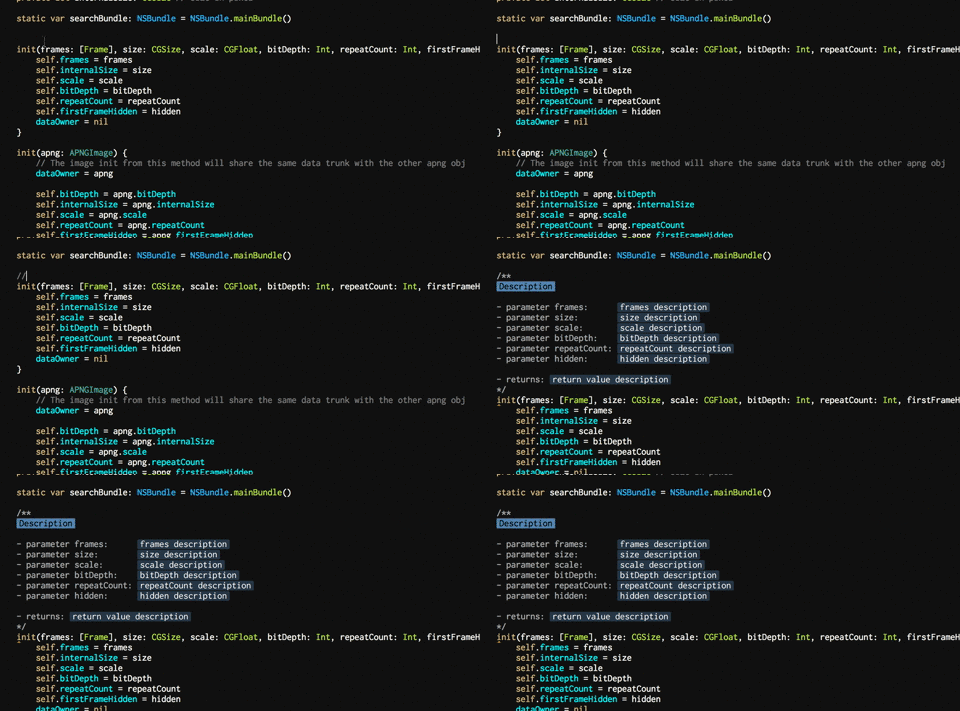
Writing documentation is so important for developing, but it is really painful with Xcode. Think about how much time you are wasting in pressing '*' or '/', and typing the parameters again and again. Now, you can find the method (or any code) you want to document to, and type in ///, the document will be generated for you and all params and return will be extracted into a Javadoc style, which is compatible with appledoc, Doxygen and HeaderDoc. You can just fill the inline placeholder tokens to finish your document.
Here is an image which can show what it exactly does.
By the way, it also supports Swift now. Cheers!
How to install and use?
The best way of installing is by Alcatraz. Install Alcatraz followed by the instruction, restart your Xcode and press ⇧⌘9. You can find VVDocumenter-Xcode in the list and click the icon on left to install.
If you do not like the Alcatraz way, you can also clone the repo. Then build the VVDocumenter-Xcode target in the Xcode project and the plug-in will automatically be installed in ~/Library/Application Support/Developer/Shared/Xcode/Plug-ins. Relaunch Xcode and type in /// above any code you want to write a document to.
If you want to use other text beside of /// to trigger the document insertion, you can find a setting panel by clicking VVDocument in the Window menu of Xcode. You can also find some other useful options there, including setting using spaces instead of tab in the panel or changing the format of generated documentation.
Xcode version?
This plug-in is supported in Xcode 5, 6 and 7. From Xcode 5, Apple added a UUID-verification to all plugins to ensure the stability when Xcode gets updated. The value of DVTPlugInCompatibilityUUIDs in project plist should contains current UUID of Xcode version, or the plugin does not work. And from Xcode 6.3, you will be prompt to "Load third party bundle" if you are using a plugin. You should always select "Load bundles" to enable this plugin.
All plugins will be disabled once you update your Xcode, since the supported UUIDs in the plugins do not contain the one. You should try to clean your plugins folder (~/Library/Application Support/Developer/Shared/Xcode/Plug-ins by default) and clone/build the latest version from master branch. If you happened to skip the bundle loading, you can use this to reset the prompt:
Please do not open an issue if this plugin not work in your newly updated Xcode. Pull request for new DVTPlugInCompatibilityUUIDs is welcome, and if UUID of your Xcode version is already there, please try to reinstall the plugin from a clean state.
The default deployment target is 10.8. If you want to use it in a earlier OS version, you should change OS X Deployment Target (in project info setting) to your system version.
Swift Support
Yes, this plugin supports documentation for Swift 2 now. Check this post to see how to write the documentation for swift. By using VVDocumenter-Xcode, you can just type /// to make the magic happen.
The documentation format changed from Swift 1.x to 2. If you are using Swift 1.x, you could build from branch Xcode6 to get the support for the earlier format.
Limitations and Future
The plugin is using simulation of keyboard event to insert the doc comments for you. So it is depending the keyboard shortcut of Xcode. These two kinds of operation are being used:
Delete to Beginning of the Line (⌘⌫)
Paste (⌘V)
If you have modified these two shortcuts in your Xcode, the newset version of the plugin would not work correctly. Instead, you can use a earlier version such as this one(commit 03c4169ff7). Be causion you may suffer an undo and redo issue .
VVDocumenter-Xcode is now using regular expression to extract things needed, which is not the best way to do such thing. A better approach could be using the AST, and I also have a plan to do it later if I have some more time :)
License
VVDocumenter is published under MIT License. See the LICENSE file for more.
Does onevcat/VVDocumenter-Xcode have a project website?
No homepage URL was recorded for onevcat/VVDocumenter-Xcode in TopGit's last sync. The README tab above frequently contains screenshots and demo links, or check the repository description on GitHub.
Does onevcat/VVDocumenter-Xcode have any tags?
TopGit's last sync did not record any GitHub topics for onevcat/VVDocumenter-Xcode. GitHub topics appear in the right sidebar of a repository page; that's the authoritative place to check.
How active is development on onevcat/VVDocumenter-Xcode?
The most recent commit recorded on onevcat/VVDocumenter-Xcode was 9.5 years ago, based on the GitHub push timestamp. The repository has 1.5k forks — one of the better signals of community interest.
How many stars does onevcat/VVDocumenter-Xcode have?
onevcat/VVDocumenter-Xcode has 8.2k GitHub stars — refresh the page for the live number, or check github.com/onevcat/VVDocumenter-Xcode. TopGit mirrors GitHub's count but does not claim minute-by-minute accuracy.
Is onevcat/VVDocumenter-Xcode open source?
Yes — onevcat/VVDocumenter-Xcode ships under the MIT license, which makes its source code freely readable (and, depending on license terms, forkable and reusable). Source: github.com/onevcat/VVDocumenter-Xcode.
Where do I read more about onevcat/VVDocumenter-Xcode?
This TopGit page is a snapshot — the READ ME tab shows the project's own README content (links stripped, images preserved). The GitHub repository at github.com/onevcat/VVDocumenter-Xcode is the definitive source.
Read full README in the tab above.
Curious whether VVDocumenter-Xcode is right for you?
Let ChatGPT, Claude, or Perplexity look into it — click below and see what AI actually says about VVDocumenter-Xcode.
 /VVDocumenter-Xcode