
PaddlePaddle/PaddleX

Indexed by TopGit from live GitHub metadata: PaddlePaddle/PaddleX has 6.3k stars, written primarily in Python. All-in-One Development Tool based on PaddlePaddle
Snapshot summary built from the project's own GitHub metadata — there's no written TopGit review yet. The page will update automatically when a full review is published.
TopGit writes full reviews for the most-starred, most-requested repositories. This page is a snapshot until then — see the READ ME tab for the original README in full.
Snapshot
Top contributors
Show top contributors



🌟 特性 | 🌐 在线体验|🚀 快速开始 | 📖 文档 | 🔥能力支持 | 📋 模型列表
🇨🇳 简体中文 | 🇬🇧 English
🔍 简介
PaddleX 3.0 是基于飞桨框架构建的低代码开发工具,它集成了众多开箱即用的预训练模型,可以实现模型从训练到推理的全流程开发,支持国内外多款主流硬件,助力AI 开发者进行产业实践。
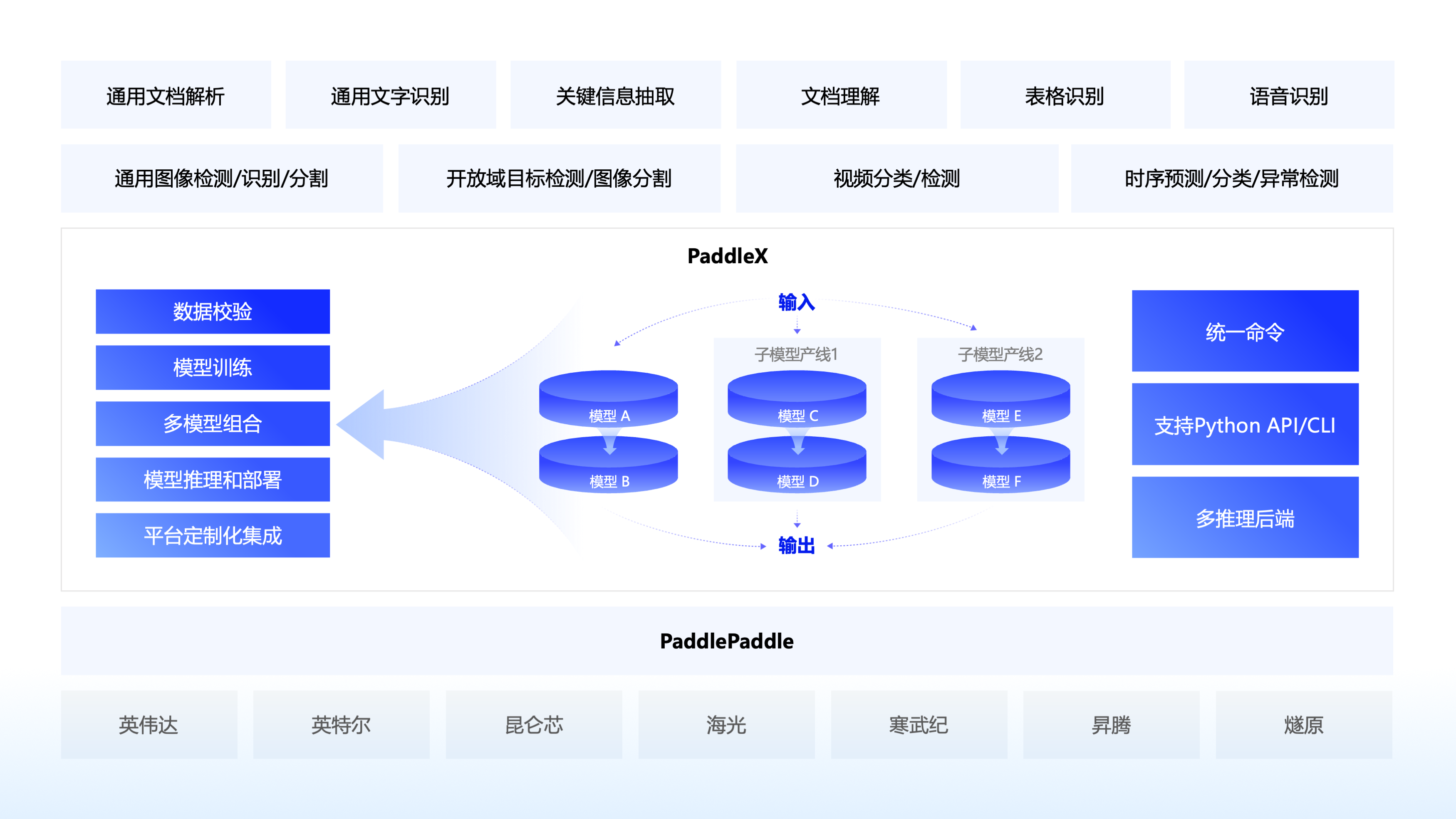
🌟 特性
🎨 模型丰富一键调用:将覆盖文本图像智能分析、OCR、目标检测、时序预测等多个关键领域的 200+ 飞桨模型整合为 33 条模型产线,通过极简的 Python API 一键调用,快速体验模型效果。同时支持 39 种单功能模块,方便开发者进行模型组合使用。
🚀 提高效率降低门槛:实现基于统一命令和图形界面的模型全流程开发,打造大小模型结合、大模型半监督学习和多模型融合的8 条特色模型产线,大幅度降低迭代模型的成本。
🌐 多种场景灵活部署:支持高性能推理、服务化部署和端侧部署等多种部署方式,确保不同应用场景下模型的高效运行和快速响应。
🔧 主流硬件高效支持:支持英伟达 GPU、昆仑芯、昇腾和寒武纪等多种主流硬件的无缝切换,确保高效运行。
📣 近期更新
🔥🔥 2025.10.16,发布 PaddleX v3.3.0,新增能力如下:
- 支持PaddleOCR-VL、PP-OCRv5多语种模型的推理部署能力。
🔥🔥 2025.8.20,发布 PaddleX v3.2.0,新增能力如下:
-
部署能力升级:
- 全面支持飞桨框架 3.1.0 和 3.1.1 版本。
- 高性能推理支持 CUDA 12,可使用 Paddle Inference、ONNX Runtime 后端推理。
- 高稳定性服务化部署方案全面开源,支持用户根据需求对 Docker 镜像和 SDK 进行定制化修改。
- 高稳定性服务化部署方案支持通过手动构造HTTP请求的方式调用,该方式允许客户端代码使用任意编程语言编写。
-
重要模型新增:
- 新增 PP-OCRv5 英文、泰文、希腊文识别模型的训练、推理、部署。其中 PP-OCRv5 英文模型较 PP-OCRv5 主模型在英文场景提升 11%,泰文识别模型精度 82.68%,希腊文识别模型精度 89.28%。
-
Benchmark升级:
- 全部产线支持产线细粒度 benchmark,能够测量产线端到端推理时间以及逐层、逐模块的耗时数据,可用于辅助产线性能分析。
- 在文档中补充各产线常用配置在主流硬件上的关键指标,包括推理耗时和内存占用等,为用户部署提供参考。
-
Bug修复:
- 修复了当输入图片文件格式不合法时,导致递归调用的问题。
- 修复了 PP-DocTranslation 和 PP-StructureV3 产线配置文件中图表识别、印章识别、文档预处理参数设置不生效的问题。
- 修复 PDF 文件在推理结束后未正确关闭的问题。
-
其他升级:
- 支持 Windows 用户使用英伟达 50 系显卡,可根据安装文档安装对应版本的 paddle 框架。
- PP-OCR 系列模型支持返回单文字坐标。
- 将
PaddlePredictorOption中的model_name参数移至PaddleInfer中,改善了用户易用性。 - 重构了官方模型下载逻辑,新增了 AIStudio、ModelScope 等多模型托管平台。
🔥🔥 2025.6.28,发布 PaddleX v3.1.0,新增能力如下:
- 重要模型:
- 新增PP-OCRv5多语种文本识别模型,支持法语、西班牙语、葡萄牙语、俄语、韩语等37种语言的文字识别模型的训推流程。平均精度涨幅超30%。
- 升级PP-StructureV3中的PP-Chart2Table模型,图表转表能力进一步升级,在内部自建测评集合上指标(RMS-F1)提升9.36个百分点(71.24% -> 80.60%)
- 重要产线:
- 新增基于PP-StructureV3和ERNIE 4.5 Turbo的文档翻译产线PP-DocTranslation,支持翻译Markdown文档、各种复杂版式的PDF文档和文档图像,结果保存为Markdown格式文档。
🔥🔥 2025.5.20,发布 PaddleX v3.0.0,相比PaddleX v2.x,核心升级如下:
丰富的模型库:
- 模型丰富: PaddleX3.0 包含270+模型,涵盖了图像(视频)分类/检测/分割、OCR、语音识别、时序等多种场景。
- 方案成熟: PaddleX3.0 基于丰富的模型库,提供了通用文档解析、关键信息抽取、文档理解、表格识别、通用图像识别等多种重要且成熟的AI解决方案。
统一推理接口,重构部署能力:
- 推理接口标准化,降低不同种类模型带来的API接口差异,减少用户学习成本,提升企业落地效率。
- 提供多模型组合能力,复杂任务可以通过不同的模型方便地进行组合使用,实现1+1>2 的能力。
- 部署能力升级,多种模型部署可以使用统一的命令管理,支持多卡推理,支持多卡多实例服务化部署。
全面适配飞桨框架3.0:
- 全面适配飞桨框架3.0新特性: 支持编译器训练,训练命令通过追加
-o Global.dy2st=True即可开启编译器训练,在 GPU 上,多数模型训练速度可提升 10% 以上,少部分模型训练速度可以提升 30% 以上。推理方面,模型整体适配飞桨 3.0 中间表示技术(PIR),拥有更加灵活的扩展能力和兼容性,静态图模型存储文件名由xxx.pdmodel改为xxx.json。 - 全面支持 ONNX 格式模型: 支持通过Paddle2ONNX插件转换模型格式。
重磅能力支撑:
- 支撑PP-OCRv5的串联逻辑和多硬件推理、多后端推理、服务化部署能力。
- 支撑PP-StructureV3的复杂模型串联和并联的逻辑,首次串联并联共15个模型,实现多模型协同的复杂pipeline。精度在 OmniDocBench 榜单上达到 SOTA 水平。
- 支撑PP-ChatOCRv4的大模型串联逻辑,结合文心大模型4.5Turbo,结合新增的PP-DocBee2,关键信息抽取精度相比上一代提升15.7个百分点。
多硬件支持:
- 整体支持英伟达、英特尔、苹果M系列、昆仑芯、昇腾、寒武纪、海光、燧原等芯片的训练和推理。
- 在昇腾上,全面适配的模型达到200个, 支持OM高性能推理的模型达到21个。此外支持PP-OCRv5、PP-StructureV3等重要模型方案。
- 在昆仑芯上支持重要分类、检测、OCR类模型(含PP-OCRv5)。
🔠 模型产线说明
PaddleX 致力于实现产线级别的模型训练、推理与部署。模型产线是指一系列预定义好的、针对特定AI任务的开发流程,其中包含能够独立完成某类任务的单模型(单功能模块)组合。
📊 能力支持
PaddleX的各个产线均支持本地快速推理,部分模型支持在AI Studio星河社区上进行在线体验,您可以快速体验各个产线的预训练模型效果,如果您对产线的预训练模型效果满意,可以直接对产线进行高性能推理/服务化部署/端侧部署,如果不满意,您也可以使用产线的二次开发能力,提升效果。完整的产线开发流程请参考PaddleX产线使用概览或各产线使用教程。
此外,PaddleX在AI Studio星河社区为开发者提供了基于云端图形化开发界面的全流程开发工具, 点击【创建产线】,选择对应的任务场景和模型产线,就可以开启全流程开发。详细请参考教程《零门槛开发产业级AI模型》
| 模型产线 | 在线体验 | 快速推理 | 高性能推理 | 服务化部署 | 端侧部署 | 二次开发 | 星河零代码产线 |
|---|---|---|---|---|---|---|---|
| 通用OCR | 链接 | ✅ | ✅ | ✅ | ✅ | ✅ | ✅ |
| 文档场景信息抽取v3 | 链接 | ✅ | ✅ | ✅ | 🚧 | ✅ | ✅ |
| 文档场景信息抽取v4 | 链接 | ✅ | ✅ | ✅ | 🚧 | ✅ | ✅ |
| 通用表格识别 | 链接 | ✅ | ✅ | ✅ | 🚧 | ✅ | ✅ |
| 通用目标检测 | 链接 | ✅ | ✅ | ✅ | ✅ | ✅ | ✅ |
| 通用实例分割 | 链接 | ✅ | ✅ | ✅ | 🚧 | ✅ | ✅ |
| 通用图像分类 | 链接 | ✅ | ✅ | ✅ | ✅ | ✅ | ✅ |
| 通用语义分割 | 链接 | ✅ | ✅ | ✅ | ✅ | ✅ | ✅ |
| 时序预测 | 链接 | ✅ | ✅ | ✅ | 🚧 | ✅ | ✅ |
| 时序异常检测 | 链接 | ✅ | ✅ | ✅ | 🚧 | ✅ | ✅ |
| 时序分类 | 链接 | ✅ | ✅ | ✅ | 🚧 | ✅ | ✅ |
| 小目标检测 | 链接 | ✅ | ✅ | ✅ | 🚧 | ✅ | ✅ |
| 图像多标签分类 | 链接 | ✅ | ✅ | ✅ | 🚧 | ✅ | ✅ |
| 公式识别 | 链接 | ✅ | ✅ | ✅ | 🚧 | ✅ | ✅ |
| 印章文本识别 | 链接 | ✅ | ✅ | ✅ | 🚧 | ✅ | ✅ |
| 行人属性识别 | 链接 | ✅ | ✅ | ✅ | 🚧 | ✅ | ✅ |
| 车辆属性识别 | 链接 | ✅ | ✅ | ✅ | 🚧 | ✅ | ✅ |
| 图像异常检测 | 🚧 | ✅ | ✅ | ✅ | 🚧 | ✅ | 🚧 |
| 人体关键点检测 | 🚧 | ✅ | ✅ | ✅ | 🚧 | ✅ | 🚧 |
| 开放词汇检测 | 🚧 | ✅ | ✅ | ✅ | 🚧 | 🚧 | 🚧 |
| 开放词汇分割 | 🚧 | ✅ | ✅ | ✅ | 🚧 | 🚧 | 🚧 |
| 旋转目标检测 | 🚧 | ✅ | ✅ | ✅ | 🚧 | ✅ | 🚧 |
| 3D多模态融合检测 | 🚧 | ✅ | ✅ | ✅ | 🚧 | ✅ | 🚧 |
| 通用表格识别v2 | 链接 | ✅ | ✅ | ✅ | 🚧 | ✅ | ✅ |
| 通用版面解析 | 🚧 | ✅ | ✅ | ✅ | 🚧 | ✅ | 🚧 |
| 通用版面解析v3 | 链接 | ✅ | ✅ | ✅ | 🚧 | 🚧 | ✅ |
| 文档图像预处理 | 🚧 | ✅ | ✅ | ✅ | 🚧 | ✅ | 🚧 |
| 通用图像识别 | 🚧 | ✅ | ✅ | ✅ | 🚧 | ✅ | 🚧 |
| 人脸识别 | 🚧 | ✅ | ✅ | ✅ | 🚧 | ✅ | 🚧 |
| 多语种语音识别 | 🚧 | ✅ | 🚧 | ✅ | 🚧 | 🚧 | 🚧 |
| 通用视频分类 | 🚧 | ✅ | ✅ | ✅ | 🚧 | ✅ | 🚧 |
| 通用视频检测 | 🚧 | ✅ | ✅ | ✅ | 🚧 | ✅ | 🚧 |
| 文档理解 | 🚧 | ✅ | 🚧 | ✅ | 🚧 | 🚧 | 🚧 |
❗注:以上功能均基于 GPU/CPU 实现。PaddleX 还可在昆仑芯、昇腾、寒武纪和海光等主流硬件上进行快速推理和二次开发。下表详细列出了模型产线的支持情况,具体支持的模型列表请参阅模型列表(昆仑芯XPU)/模型列表(昇腾NPU)/模型列表(寒武纪MLU)/模型列表(海光DCU)。我们正在适配更多的模型,并在主流硬件上推动高性能和服务化部署的实施。
🔥🔥 国产化硬件能力支持
| 模型产线 | 昇腾 910B | 昆仑芯 R200/R300 | 寒武纪 MLU370X8 | 海光 Z100/K100AI |
|---|---|---|---|---|
| 通用OCR | ✅ | ✅ | ✅ | ✅ |
| 通用表格识别 | ✅ | 🚧 | 🚧 | 🚧 |
| 通用目标检测 | ✅ | ✅ | ✅ | ✅ |
| 通用实例分割 | ✅ | 🚧 | ✅ | 🚧 |
| 通用图像分类 | ✅ | ✅ | ✅ | ✅ |
| 通用语义分割 | ✅ | ✅ | ✅ | ✅ |
| 时序预测 | ✅ | ✅ | ✅ | ✅ |
| 时序异常检测 | ✅ | 🚧 | 🚧 | 🚧 |
| 时序分类 | ✅ | 🚧 | 🚧 | 🚧 |
| 图像多标签分类 | ✅ | 🚧 | 🚧 | ✅ |
| 行人属性识别 | ✅ | 🚧 | 🚧 | 🚧 |
| 车辆属性识别 | ✅ | 🚧 | 🚧 | 🚧 |
| 通用图像识别 | ✅ | 🚧 | ✅ | ✅ |
| 印章文本识别 | ✅ | 🚧 | 🚧 | 🚧 |
| 图像异常检测 | ✅ | ✅ | ✅ | ✅ |
| 人脸识别 | ✅ | ✅ | ✅ | ✅ |
⏭️ 快速开始
🛠️ 安装
❗在安装 PaddleX 之前,请确保您已具备基本的 Python 运行环境(注:目前支持 Python 3.8 至 Python 3.13)。PaddleX 3.0.x 版本依赖的 PaddlePaddle 版本为 3.0.0 及以上版本,请在使用前务必保证版本的对应关系。
- 安装 PaddlePaddle
# CPU 版本
python -m pip install paddlepaddle==3.3.0 -i https://www.paddlepaddle.org.cn/packages/stable/cpu/

# GPU 版本,需显卡驱动程序版本 ≥450.80.02(Linux)或 ≥452.39(Windows)
 python -m pip install paddlepaddle-gpu==3.3.0 -i https://www.paddlepaddle.org.cn/packages/stable/cu118/

# GPU 版本,需显卡驱动程序版本 ≥550.54.14(Linux)或 ≥550.54.14(Windows)
 python -m pip install paddlepaddle-gpu==3.3.0 -i https://www.paddlepaddle.org.cn/packages/stable/cu126/
❗无需关注物理机上的 CUDA 版本,只需关注显卡驱动程序版本。更多飞桨 Wheel 版本信息,请参考飞桨官网。
- 安装PaddleX
pip install "paddlex[base]"
❗ 更多安装方式参考 PaddleX 安装教程
💻 命令行使用
一行命令即可快速体验产线效果,统一的命令行格式为:
paddlex --pipeline [产线名称] --input [输入图片] --device [运行设备]
PaddleX的每一条产线对应特定的参数,您可以在各自的产线文档中查看具体的参数说明。每条产线需指定必要的三个参数:
pipeline:产线名称或产线配置文件input:待处理的输入文件(如图片)的本地路径、目录或 URLdevice:使用的硬件设备及序号(例如gpu:0表示使用第 0 块 GPU),也可选择使用 NPU(npu:0)、 XPU(xpu:0)、CPU(cpu)等。
以通用 OCR 产线为例:
paddlex --pipeline OCR \
        --input https://paddle-model-ecology.bj.bcebos.com/paddlex/imgs/demo_image/general_ocr_002.png \
        --use_doc_orientation_classify False \
        --use_doc_unwarping False \
        --use_textline_orientation False \
        --save_path ./output \
        --device gpu:0
👉 点击查看运行结果
{'res': {'input_path': 'general_ocr_002.png', 'page_index': None, 'model_settings': {'use_doc_preprocessor': False, 'use_textline_orientation': False}, 'doc_preprocessor_res': {'input_path': None, 'model_settings': {'use_doc_orientation_classify': True, 'use_doc_unwarping': False}, 'angle': 0},'dt_polys': [array([[ 3, 10],
       [82, 10],
       [82, 33],
       [ 3, 33]], dtype=int16), ...], 'text_det_params': {'limit_side_len': 960, 'limit_type': 'max', 'thresh': 0.3, 'box_thresh': 0.6, 'unclip_ratio': 2.0}, 'text_type': 'general', 'textline_orientation_angles': [-1, ...], 'text_rec_score_thresh': 0.0, 'rec_texts': ['www.99*', ...], 'rec_scores': [0.8980069160461426,  ...], 'rec_polys': [array([[ 3, 10],
       [82, 10],
       [82, 33],
       [ 3, 33]], dtype=int16), ...], 'rec_boxes': array([[  3,  10,  82,  33], ...], dtype=int16)}}
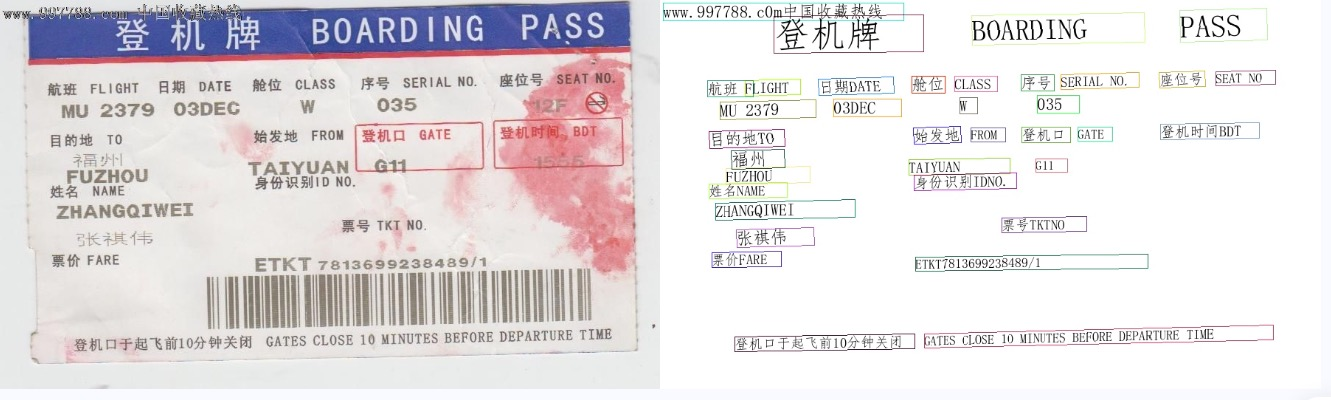
可视化结果如下:
其他产线的命令行使用,只需将 pipeline 参数调整为相应产线的名称,参数调整为对应的产线的参数即可。下面列出了每个产线对应的命令:
👉 更多产线的命令行使用
| 产线名称 | 使用命令 |
|---|---|
| 通用图像分类 | paddlex --pipeline image_classification --input https://paddle-model-ecology.bj.bcebos.com/paddlex/imgs/demo_image/general_image_classification_001.jpg --device gpu:0 --save_path ./output/ |
| 通用目标检测 | paddlex --pipeline object_detection --input https://paddle-model-ecology.bj.bcebos.com/paddlex/imgs/demo_image/general_object_detection_002.png --threshold 0.5 --save_path ./output/ --device gpu:0 |
| 通用实例分割 | paddlex --pipeline instance_segmentation --input https://paddle-model-ecology.bj.bcebos.com/paddlex/imgs/demo_image/general_instance_segmentation_004.png --threshold 0.5 --save_path ./output --device gpu:0 |
| 通用语义分割 | paddlex --pipeline semantic_segmentation --input https://paddle-model-ecology.bj.bcebos.com/paddlex/PaddleX3.0/application/semantic_segmentation/makassaridn-road_demo.png --target_size -1 --save_path ./output --device gpu:0 |
| 图像多标签分类 | paddlex --pipeline image_multilabel_classification --input https://paddle-model-ecology.bj.bcebos.com/paddlex/imgs/demo_image/general_image_classification_001.jpg --save_path ./output --device gpu:0 |
| 小目标检测 | paddlex --pipeline small_object_detection --input https://paddle-model-ecology.bj.bcebos.com/paddlex/imgs/demo_image/small_object_detection.jpg --threshold 0.5 --save_path ./output --device gpu:0 |
| 图像异常检测 | paddlex --pipeline anomaly_detection --input https://paddle-model-ecology.bj.bcebos.com/paddlex/imgs/demo_image/uad_grid.png --save_path ./output --device gpu:0 |
| 行人属性识别 | paddlex --pipeline pedestrian_attribute_recognition --input https://paddle-model-ecology.bj.bcebos.com/paddlex/imgs/demo_image/pedestrian_attribute_002.jpg --save_path ./output/ --device gpu:0 |
| 车辆属性识别 | paddlex --pipeline vehicle_attribute_recognition --input https://paddle-model-ecology.bj.bcebos.com/paddlex/imgs/demo_image/vehicle_attribute_002.jpg --save_path ./output/ --device gpu:0 |
| 3D多模态融合检测 | paddlex --pipeline 3d_bev_detection --input https://paddle-model-ecology.bj.bcebos.com/paddlex/det_3d/demo_det_3d/nuscenes_demo_infer.tar --device gpu:0 --save_path ./output/ |
| 人体关键点检测 | paddlex --pipeline human_keypoint_detection --input https://paddle-model-ecology.bj.bcebos.com/paddlex/imgs/demo_image/keypoint_detection_001.jpg --det_threshold 0.5 --save_path ./output/ --device gpu:0 |
| 开放词汇检测 | paddlex --pipeline open_vocabulary_detection --input https://paddle-model-ecology.bj.bcebos.com/paddlex/imgs/demo_image/open_vocabulary_detection.jpg --prompt "bus . walking man . rearview mirror ." --thresholds "{'text_threshold': 0.25, 'box_threshold': 0.3}" --save_path ./output --device gpu:0 |
| 开放词汇分割 | paddlex --pipeline open_vocabulary_segmentation --input https://paddle-model-ecology.bj.bcebos.com/paddlex/imgs/demo_image/open_vocabulary_segmentation.jpg --prompt_type box --prompt "[[112.9,118.4,513.8,382.1],[4.6,263.6,92.2,336.6],[592.4,260.9,607.2,294.2]]" --save_path ./output --device gpu:0 |
| 旋转目标检测 | paddlex --pipeline rotated_object_detection --input https://paddle-model-ecology.bj.bcebos.com/paddlex/imgs/demo_image/rotated_object_detection_001.png --threshold 0.5 --save_path ./output --device gpu:0 |
| 通用OCR | paddlex --pipeline OCR --input https://paddle-model-ecology.bj.bcebos.com/paddlex/imgs/demo_image/general_ocr_002.png --use_doc_orientation_classify False --use_doc_unwarping False --use_textline_orientation False --save_path ./output --device gpu:0 |
| 文档图像预处理 | paddlex --pipeline doc_preprocessor --input https://paddle-model-ecology.bj.bcebos.com/paddlex/demo_image/doc_test_rotated.jpg --use_doc_orientation_classify True --use_doc_unwarping True --save_path ./output --device gpu:0 |
| 通用表格识别 | paddlex --pipeline table_recognition --input https://paddle-model-ecology.bj.bcebos.com/paddlex/imgs/demo_image/table_recognition.jpg --save_path ./output --device gpu:0 |
| 通用表格识别v2 | paddlex --pipeline table_recognition_v2 --input https://paddle-model-ecology.bj.bcebos.com/paddlex/imgs/demo_image/table_recognition.jpg --save_path ./output --device gpu:0 |
| 通用版面解析 | paddlex --pipeline layout_parsing --input https://paddle-model-ecology.bj.bcebos.com/paddlex/imgs/demo_image/demo_paper.png --use_doc_orientation_classify False --use_doc_unwarping False --use_textline_orientation False --save_path ./output --device gpu:0 |
| 通用版面解析v3 | paddlex --pipeline PP-StructureV3 --input https://paddle-model-ecology.bj.bcebos.com/paddlex/imgs/demo_image/pp_structure_v3_demo.png --use_doc_orientation_classify False --use_doc_unwarping False --use_textline_orientation False --save_path ./output --device gpu:0 |
| 公式识别 | paddlex --pipeline formula_recognition --input https://paddle-model-ecology.bj.bcebos.com/paddlex/demo_image/general_formula_recognition.png --use_layout_detection True --use_doc_orientation_classify False --use_doc_unwarping False --layout_threshold 0.5 --layout_nms True --layout_unclip_ratio 1.0 --layout_merge_bboxes_mode large --save_path ./output --device gpu:0 |
| 印章文本识别 | paddlex --pipeline seal_recognition --input https://paddle-model-ecology.bj.bcebos.com/paddlex/imgs/demo_image/seal_text_det.png --use_doc_orientation_classify False --use_doc_unwarping False --device gpu:0 --save_path ./output |
| 时序预测 | paddlex --pipeline ts_forecast --input https://paddle-model-ecology.bj.bcebos.com/paddlex/ts/demo_ts/ts_fc.csv --device gpu:0 --save_path ./output |
| 时序异常检测 | paddlex --pipeline ts_anomaly_detection --input https://paddle-model-ecology.bj.bcebos.com/paddlex/ts/demo_ts/ts_ad.csv --device gpu:0 --save_path ./output |
| 时序分类 | paddlex --pipeline ts_classification --input https://paddle-model-ecology.bj.bcebos.com/paddlex/ts/demo_ts/ts_cls.csv --device gpu:0 --save_path ./output |
| 多语种语音识别 | paddlex --pipeline multilingual_speech_recognition --input https://paddlespeech.bj.bcebos.com/PaddleAudio/zh.wav --save_path ./output --device gpu:0 |
| 通用视频分类 | paddlex --pipeline video_classification --input https://paddle-model-ecology.bj.bcebos.com/paddlex/videos/demo_video/general_video_classification_001.mp4 --topk 5 --save_path ./output --device gpu:0 |
| 通用视频检测 | paddlex --pipeline video_detection --input https://paddle-model-ecology.bj.bcebos.com/paddlex/videos/demo_video/HorseRiding.avi --device gpu:0 --save_path ./output |
📝 Python 脚本使用
几行代码即可完成产线的快速推理,统一的 Python 脚本格式如下:
from paddlex import create_pipeline

pipeline = create_pipeline(pipeline=[产线名称])
output = pipeline.predict([输入图片名称])
for res in output:
    res.print()
    res.save_to_img("./output/")
    res.save_to_json("./output/")
执行了如下几个步骤:
create_pipeline()实例化产线对象- 传入图片并调用产线对象的
predict()方法进行推理预测 - 对预测结果进行处理
其他产线的 Python 脚本使用,只需将 create_pipeline() 方法的 pipeline 参数调整为相应产线的名称,参数调整为对应的产线的参数即可。下面列出了每个产线对应的参数名称及详细的使用解释:
👉 更多产线的Python脚本使用
| 产线名称 | 对应参数 | 详细说明 |
|---|---|---|
| 文档场景信息抽取v4 | PP-ChatOCRv4-doc | 文档场景信息抽取v4产线Python脚本使用说明 |
| 文档场景信息抽取v3 | PP-ChatOCRv3-doc | 文档场景信息抽取v3产线Python脚本使用说明 |
| 通用图像分类 | image_classification | 通用图像分类产线Python脚本使用说明 |
| 通用目标检测 | object_detection | 通用目标检测产线Python脚本使用说明 |
| 通用实例分割 | instance_segmentation | 通用实例分割产线Python脚本使用说明 |
| 通用语义分割 | semantic_segmentation | 通用语义分割产线Python脚本使用说明 |
| 图像多标签分类 | multi_label_image_classification | 图像多标签分类产线Python脚本使用说明 |
| 小目标检测 | small_object_detection | 小目标检测产线Python脚本使用说明 |
| 图像异常检测 | anomaly_detection | 图像异常检测产线Python脚本使用说明 |
| 通用图像识别 | PP-ShiTuV2 | 通用图像识别Python脚本使用说明 |
| 人脸识别 | face_recognition | 人脸识别Python脚本使用说明 |
| 车辆属性识别 | vehicle_attribute_recognition | 车辆属性识别产线Python脚本使用说明 |
| 行人属性识别 | pedestrian_attribute_recognition | 行人属性识别产线Python脚本使用说明 |
| 3D多模态融合检测 | 3d_bev_detection | 3D多模态融合检测产线Python脚本使用说明 |
| 人体关键点检测 | human_keypoint_detection | 人体关键点检测产线Python脚本使用说明 |
| 开放词汇检测 | open_vocabulary_detection | 开放词汇检测产线Python脚本使用说明 |
| 开放词汇分割 | open_vocabulary_segmentation | 开放词汇分割产线Python脚本使用说明 |
| 旋转目标检测 | rotated_object_detection | 旋转目标检测产线Python脚本使用说明 |
| 通用OCR | OCR | 通用OCR产线Python脚本使用说明 |
| 文档图像预处理 | doc_preprocessor | 文档图像预处理产线Python脚本使用说明 |
| 通用表格识别 | table_recognition | 通用表格识别产线Python脚本使用说明 |
| 通用表格识别v2 | table_recognition_v2 | 通用表格识别v2产线Python脚本使用说明 |
| 通用版面解析 | layout_parsing | 通用版面解析产线Python脚本使用说明 |
| 通用版面解析v3 | PP-StructureV3 | 通用版面解析v3产线Python脚本使用说明 |
| 公式识别 | formula_recognition | 公式识别产线Python脚本使用说明 |
| 印章文本识别 | seal_recognition | 印章文本识别产线Python脚本使用说明 |
| 时序预测 | ts_forecast | 时序预测产线Python脚本使用说明 |
| 时序异常检测 | ts_anomaly_detection | 时序异常检测产线Python脚本使用说明 |
| 时序分类 | ts_classification | 时序分类产线Python脚本使用说明 |
| 多语种语音识别 | multilingual_speech_recognition | 多语种语音识别产线Python脚本使用说明 |
| 通用视频分类 | video_classification | 通用视频分类产线Python脚本使用说明 |
| 通用视频检测 | video_detection | 通用视频检测产线Python脚本使用说明 |
| 文档理解 | doc_understanding | 文档理解产线Python脚本使用说明 |
📖 文档
⬇️ 安装
- 📦 PaddlePaddle 安装教程
- 📦 PaddleX 安装教程
🔥 产线使用
-
📑 PaddleX 产线使用概览
-
📝 文本图像智能分析
-
📄 文档场景信息抽取v3产线使用教程
-
📄 文档场景信息抽取v4产线使用教程
-
-
🔍 OCR
-
📜 通用 OCR 产线使用教程
-
📊 通用表格识别产线使用教程
-
🗂️ 通用表格识别v2产线使用教程
-
📰 通用版面解析产线使用教程
-
🗞️ 通用版面解析产线v3使用教程
-
📐 公式识别产线使用教程
-
📝 印章文本识别产线使用教程
-
🖌️ 文档图像预处理产线使用教程
-
-
🎥 计算机视觉
-
🖼️ 通用图像分类产线使用教程
-
🎯 通用目标检测产线使用教程
-
📋 通用实例分割产线使用教程
-
🗣️ 通用语义分割产线使用教程
-
🏷️ 图像多标签分类产线使用教程
-
🔍 小目标检测产线使用教程
-
🖼️ 图像异常检测产线使用教程
-
🌐 3D多模态融合检测产线使用教程
-
🔍 人体关键点检测产线使用教程
-
📚 开放词汇检测产线使用教程
-
🎨 开放词汇分割产线使用教程
-
🔄 旋转目标检测产线使用教程
-
🖼️ 通用图像识别产线使用教程
-
🚶♀️ 行人属性识别产线使用教程
-
🚗 车辆属性识别产线使用教程
-
🆔人脸识别产线使用教程
-
-
⏱️ 时序分析
-
📈 时序预测产线使用教程
-
📉 时序异常检测产线使用教程
-
🕒 时序分类产线使用教程
-
-
🎤 语音识别
- 🌐 多语种语音识别产线使用教程
-
🎥 视频识别
-
📈 通用视频分类产线使用教程
-
🔍 通用视频检测产线使用教程
-
-
🌐 多模态视觉语言模型
- 📝 文档理解产线使用教程
-
🔧 相关说明文件
-
🖥️ PaddleX 产线命令行使用说明
-
📝 PaddleX 产线 Python 脚本使用说明
-
🔎 产线并行推理
-
⚙️ 单功能模块使用
-
🔍 OCR
-
📝 文本检测模块使用教程
-
🔖 印章文本检测模块使用教程
-
🔠 文本识别模块使用教程
-
🗺️ 版面区域检测模块使用教程
-
📊 表格结构识别模块使用教程
-
📊 表格单元格检测模块使用教程
-
📈 表格分类模块使用教程
-
📄 文档图像方向分类使用教程
-
🔧 文本图像矫正模块使用教程
-
📝 文本行方向分类模块使用教程
-
📐 公式识别模块使用教程
-
-
🖼️ 图像分类
-
📂 图像分类模块使用教程
-
🏷️ 图像多标签分类模块使用教程
-
👤 行人属性识别模块使用教程
-
🚗 车辆属性识别模块使用教程
-
-
🏞️ 图像特征
-
🔗 图像特征模块使用教程
-
😁 人脸特征模块使用教程
-
-
🎯 目标检测
-
🎯 目标检测模块使用教程
-
📏 小目标检测模块使用教程
-
🧑🤝🧑 人脸检测模块使用教程
-
🔍 主体检测模块使用教程
-
🚶 行人检测模块使用教程
-
🚶♂️ 人体关键点检测模块使用教程
-
🌐 开放词汇目标检测模块使用教程
-
-
🖼️ 图像分割
-
🗺️ 语义分割模块使用教程
-
🔍 实例分割模块使用教程
-
🚨 图像异常检测模块使用教程
-
🌐 开放词汇分割模块使用教程
-
-
⏱️ 时序分析
-
📈 时序预测模块使用教程
-
🚨 时序异常检测模块使用教程
-
🕒 时序分类模块使用教程
-
-
🎤 语音识别
- 🌐 多语种语音识别模块使用教程
-
📦 3D
- 📦 3D多模态融合检测模块使用教程
-
🌐 多模态视觉语言模型
-
📝 文档类视觉语言模型模块使用教程
-
📈 图表解析模块使用教程
-
-
📄 相关说明文件
-
📝 PaddleX 单模型 Python 脚本使用说明
-
📝 PaddleX 通用模型配置文件参数说明
-
📝 PaddleX 时序任务模型配置文件参数说明
-
📝 PaddleX 3d任务模型配置文件参数说明
-
📝 模型推理 Benchmark
-
🏗️ 模型产线部署
- 🚀 PaddleX 高性能推理指南
- 🖥️ PaddleX 服务化部署指南
- 📱 PaddleX 端侧部署指南
- 🌐 获取 ONNX 模型
🖥️ 多硬件使用
- 🔧 多硬件使用指南
- 🖲️ 海光 DCU 飞桨安装教程
- 🔲 寒武纪 MLU 飞桨安装教程
- 💻 昇腾 NPU 飞桨安装教程
- 🔌 昆仑 XPU 飞桨安装教程
- 📱 燧原 GCU 飞桨安装教程
📊 数据标注教程
-
💻 计算机视觉
-
📂 图像分类任务模块
-
📂 图像特征任务模块
-
📂 实例分割任务模块
-
📂 图像多标签分类模块
-
📂 目标检测任务模块
-
📂 语义分割任务模块
-
-
🔍 OCR
-
📊 表格识别任务模块
-
📰 文本检测/识别任务模块
-
-
📉 时序分析
-
📈 时序异常检测任务模块
-
📉时序分类任务模块
-
🕜 时序预测任务模块
-
📑 产线列表
- 🖲️ PaddleX产线列表(CPU/GPU)
- 🔲 PaddleX产线列表(DCU)
- 💻 PaddleX产线列表(MLU)
- 🔌 PaddleX产线列表(NPU)
- 📱 PaddleX产线列表(XPU)
📄 模型列表
- 🖲️ PaddleX模型列表(CPU/GPU)
- 🔲 PaddleX模型列表(海光 DCU)
- 💻 PaddleX模型列表(寒武纪 MLU)
- 🔌 PaddleX模型列表(昇腾 NPU)
- 📱 PaddleX模型列表(昆仑 XPU)
- 📺 PaddleX模型列表(燧原 GCU)
📝 产业实践教程&范例
-
📑 文档场景信息抽取v3模型产线———论文文献信息抽取应用教程
-
📑 文档场景信息抽取v3模型产线———印章信息抽取应用教程
-
📑 文档场景信息抽取v3模型产线———DeepSeek 篇
-
🚗 通用 OCR 模型产线———车牌识别教程
-
✍️ 通用 OCR 模型产线———手写中文识别教程
-
🔍 公式识别模型产线实践教程
-
💻 版面区域检测模型使用实践教程———大模型训练数据构建教程
-
😊 人脸识别之卡通人脸识别实践教程———卡通人脸识别教程
-
🖼️ 通用图像分类模型产线———垃圾分类教程
-
🧩 通用实例分割模型产线———遥感图像实例分割教程
-
👥 通用目标检测模型产线———行人跌倒检测教程
-
👗 通用目标检测模型产线———服装时尚元素检测教程
-
🗣️ 通用语义分割模型产线———车道线分割教程
-
🛠️ 时序异常检测模型产线———设备异常检测应用教程
-
🎢 时序分类模型产线———心跳监测时序数据分类应用教程
-
🔋 时序预测模型产线———用电量长期预测应用教程
-
🔧 产线部署实践教程
🤔 FAQ
关于我们项目的一些常见问题解答,请参考FAQ。如果您的问题没有得到解答,请随时在 Issues 中提出
💬 Discussion
我们非常欢迎并鼓励社区成员在 Discussions 板块中提出问题、分享想法和反馈。无论您是想要报告一个 bug、讨论一个功能请求、寻求帮助还是仅仅想要了解项目的最新动态,这里都是一个绝佳的平台。
📄 许可证书
本项目的发布受 Apache 2.0 license 许可认证。
Related repositories
Master programming by recreating your favorite technologies from scratch.
A curated meta-list of curated lists organized by technology domain. The repository acts as a directory pointing to hundreds of specialized awesome lists covering programming languages, platforms, frameworks, and tooling. All content is community-contributed under the CC0 public domain dedication.
Public APIs is a community-curated GitHub repository listing free, publicly accessible APIs across a wide range of categories, with auth type, HTTPS, and CORS noted for each entry. It's a browsable reference, not a library to install.
REA is an MCP server and CLI that gives AI coding agents the ability to reverse engineer binaries, JavaScript apps, .NET assemblies, and websites. It hooks into Hopper, Ghidra, or IDA Pro for native binary work, or runs static JavaScript analysis with just Node.js. Every investigation returns an Evidence bundle that includes what was found, what was not, and the reasoning path. Setup registers REA with supported agents and walks you through connecting an analysis engine. The CLI also works standalone for terminal-first workflows.
Quick answers
How active is development on PaddlePaddle/PaddleX?
The most recent commit recorded on PaddlePaddle/PaddleX was 1 month ago, based on the GitHub push timestamp. The repository has 1.2k forks — one of the better signals of community interest.
How many stars does PaddlePaddle/PaddleX have?
PaddlePaddle/PaddleX has 6.3k GitHub stars — refresh the page for the live number, or check github.com/PaddlePaddle/PaddleX. TopGit mirrors GitHub's count but does not claim minute-by-minute accuracy.
What language is PaddlePaddle/PaddleX written in?
PaddlePaddle/PaddleX is written primarily in Python. GitHub's language field is based on the largest share of bytes in the default branch.
What topics is PaddlePaddle/PaddleX associated with?
GitHub's repository topics for PaddlePaddle/PaddleX: "ai-pipelines", "classification", "deployment", "formula-recognition", "layout-detection", "object-detection", "ocr", "pdf2markdown", "pp-chatocr", "segmentation", "speech-recognition", "time-series". TopGit's editorial category is open-source.
Where do I read more about PaddlePaddle/PaddleX?
This TopGit page is a snapshot — the READ ME tab shows the project's own README content (links stripped, images preserved). The GitHub repository at github.com/PaddlePaddle/PaddleX is the definitive source.
Read full README in the tab above.
Curious whether PaddleX is right for you?
Let ChatGPT, Claude, or Perplexity look into it — click below and see what AI actually says about PaddleX.