Snapshot of pavlobu/testcafe: 1★, JavaScript. A Node.js tool to automate end-to-end web testing.
Snapshot summary built from the project's own GitHub metadata — there's no written TopGit review yet. The page will update automatically when a full review is published.
WHY NO REVIEW YET
TopGit writes full reviews for the most-starred, most-requested repositories. This page is a snapshot until then — see the READ ME tab for the original README in full.
TestCafe is updated with logging cdpPort value to file.
TESTCAFE_CDPPORTS_FILE is an env variable to be used where cdp ports will be logged.
Otherwise these ports values will be logged into cdpPorts.txt file.
A Node.js tool to automate end-to-end web testing. Write tests in JS or TypeScript, run them and view results.
Homepage •
Documentation •
FAQ •
Support
Works on all popular environments: TestCafe runs on Windows, MacOS, and Linux. It supports desktop, mobile, remote and cloud browsers (UI or headless).
1 minute to set up: You do not need WebDriver or any other testing software. Install TestCafe with one command, and you are ready to test: npm install -g testcafe
Free and open source: TestCafe is free to use under the MIT license. Plugins provide custom reports, integration with other tools, launching tests from IDE, etc. You can use the plugins made by the GitHub community or make your own.
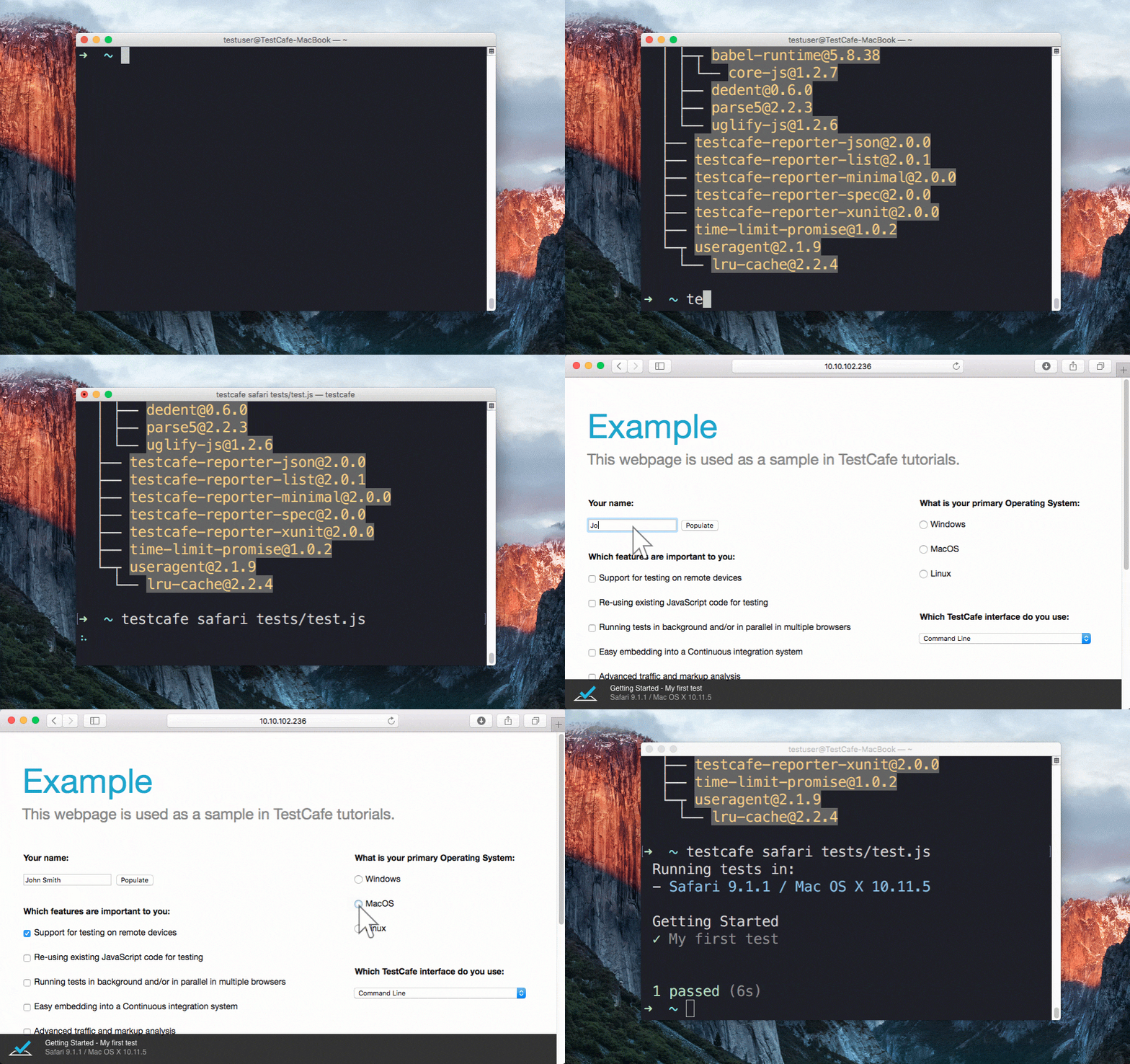
Running a sample test in Safari
Table of contents
pavlobu fork note:
Table of contents
Features
TestCafe Studio: IDE for End-to-End Web Testing
Getting Started
Installation
Creating the Test
Running the Test
Viewing the Results
Documentation
Get Help
Issue Tracker
Stay in Touch
Contributing
Plugins
Different Versions of TestCafe
Badge
Thanks to BrowserStack
License
Creators
Features
Stable tests and no manual timeouts
TestCafe automatically waits for page loads and XHRs before the test starts and after each action.
It also features smart test actions and assertions that wait for page elements to appear.
You can change the maximum wait time.
If elements load faster, tests skip the timeout and continue.
Rapid test development tool
Changes in test code immediately restart the test, and you see the results instantly.
See how it works in the TestCafe Live repository.
Latest JS and TypeScript support
TestCafe supports the latest JavaScript features, including ES2017 (for example, async/await).
You can also use TypeScript
if you prefer a strongly typed language.
Detects JS errors in your code
TestCafe reports JS errors that it finds on the webpage.
Tests automatically fail because of that.
However, you can disable this.
Concurrent test launch
TestCafe can open multiple instances of the same browser to run parallel
tests which decreases test execution time.
PageObject pattern support
The TestCafe's Test API
includes a high-level selector library, assertions, etc.
You can combine them to implement readable tests with the PageObject pattern.
Easy to include in a continuous integration system
You can run TestCafe from a console, and its reports can be viewed in a CI system's interface
(TeamCity, Jenkins, Travis & etc.)
TestCafe Studio: IDE for End-to-End Web Testing
TestCafe works great for JavaScript developers, but at some point you will need to delegate testing tasks to your Q&A department. If that's the case and you are looking for a codeless way to record and maintain tests compatible with your existing infrastructure, check out TestCafe Studio - a testing IDE built on top of the open-source TestCafe.
Read the following article to learn how TestCafe Studio could fit into your workflow: What's Better than TestCafe? TestCafe Studio.
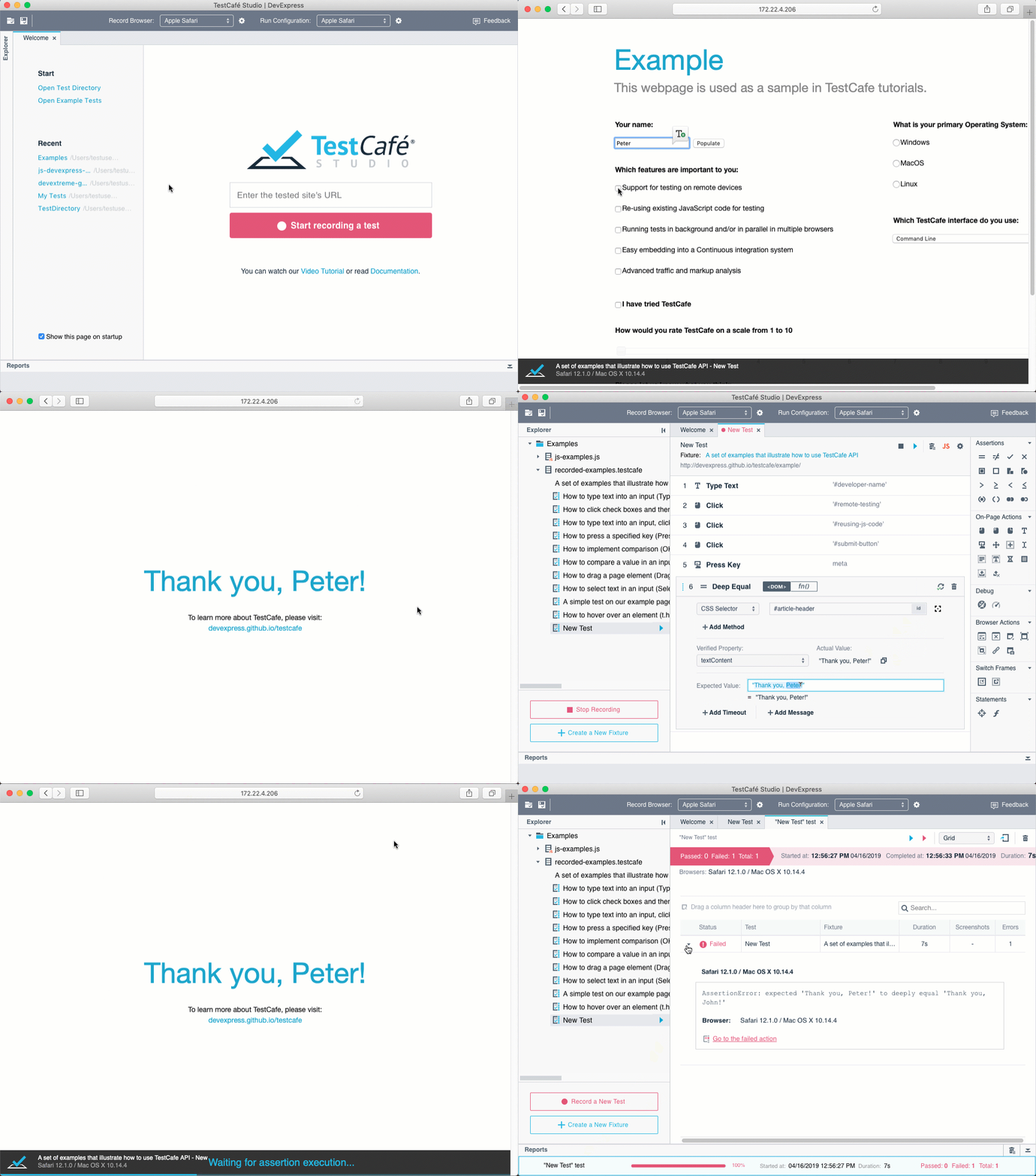
Record and Run a Test in TestCafe Studio
Getting Started
Installation
Ensure that Node.js (Current or Active LTS is recommended, version 12 at minimum) and npm are installed on your computer before running it:
npm install -g testcafe
Creating the Test
As an example, we are going to test the https://devexpress.github.io/testcafe/example page.
Create a .js or .ts file on your computer.
Note that it needs to have a specific structure: tests must be organized into fixtures.
You can paste the following code to see the test in action:
import { Selector } from 'testcafe'; // first import testcafe selectors

fixture `Getting Started`// declare the fixture
    .page `https://devexpress.github.io/testcafe/example`;  // specify the start page


//then create a test and place your code there
test('My first test', async t => {
    await t
        .typeText('#developer-name', 'John Smith')
        .click('#submit-button')

        // Use the assertion to check if the actual header text is equal to the expected one
        .expect(Selector('#article-header').innerText).eql('Thank you, John Smith!');
});
Running the Test
Call the following command in a command shell.
Specify the target browser
and file path.
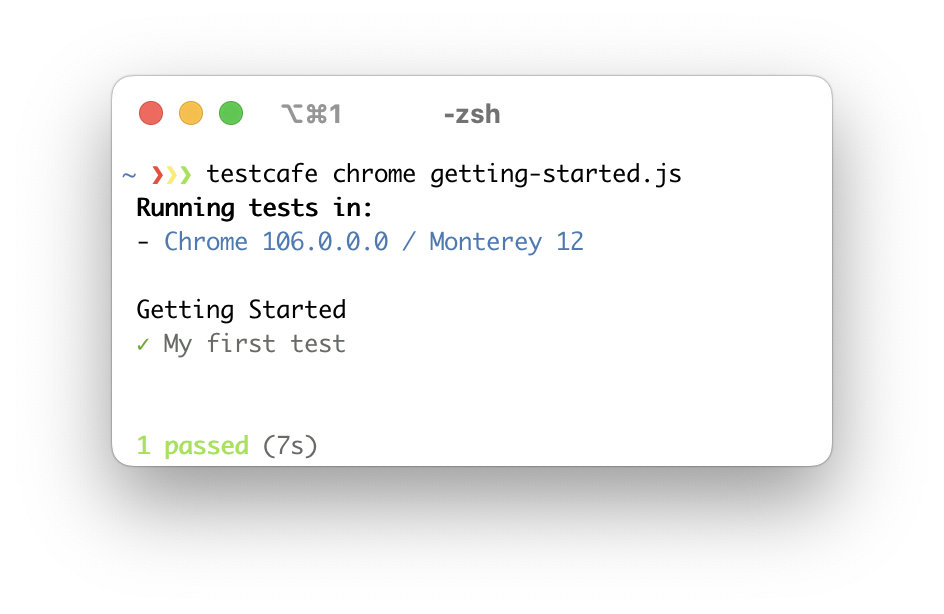
testcafe chrome test1.js
TestCafe opens the browser and starts executing the test.
Important! Make sure the browser tab that runs tests stays active.
Do not minimize the browser window. Inactive tabs and minimized browser windows switch
to a lower resource consumption mode where tests are not guaranteed to execute correctly.
Viewing the Results
TestCafe outputs the results into a command shell by default. See Reporters
for more information. You can also use plugins to customize the reports.
Read the Getting Started page for a more detailed guide.
Documentation
Go to our website for full documentation on TestCafe.
Get Help
Join the TestCafe community on Stack Overflow to get help. Ask and answer questions with the TestCafe tag.
Issue Tracker
Use our GitHub issues page to report bugs and suggest improvements.
Stay in Touch
Follow us on Twitter. We post TestCafe news and updates, several times a week.
Contributing
Read our Contributing Guide to learn how to contribute to the project.
To create your own plugin for TestCafe, you can use these plugin generators:
Build a browser provider
to set up tests on your on-premises server farm, to use a cloud testing platform, or to start your local browsers in a special way. Use this Yeoman generator to write only a few lines of code.
To build a custom reporter
with your formatting and style, check out this generator.
If you want your plugin to be listed below, send us a note in a Github issue.
Thank you to all the people who already contributed to TestCafe!
aha-oretama
ai
aleks-pro
Aleksey28
AlexanderMoiseev
AlexanderMoskovkin
alexey-lin
AlexKamaev
AlexSkorkin
alexwybraniec
andrewbranch
AndreyBelym
AndyWendt
AnnaKondratova
anthophobiac
arubtsov
augustomezencio-hotmart
bdwain
benmonro
beyondcompute
bill-looby-i
bsmithb2
caseyWebb
cdrini
cgfarmer4
Chris-Greaves
churkin
dej611
DIRECTcut
Dmitry-Ostashev
eignatyev
ericyd
Farfurix
flora8984461
GeoffreyBooth
helen-dikareva
honsq90
infctr
inikulin
Ivan-Katovich
jamesgeorge007
jaypea
kanhaiya15
kirovboris
kisrefod
kubejm
LavrovArtem
link89
lzxb
macdonaldr93
MargaritaLoseva
Marketionist
MatthewNielsen27
mattmanske
mcjim
miherlosev
morfey13
mostlyfabulous
murajun1978
NickCis
Nuarat
Ogurecher
pietrovich
radarhere
raspo
rbardini
renancouto
rob4629
rueyaa332266
sgrillon14
smockle
stefanschenk
superroma
sylbru
taiki-fw
theghostbel
titerman
tobiasbueschel
intermike
DevSide
b12031106
tomashanacek
danielroe
michaelficarra
varunkumar
VasilyStrelyaev
vitalics
Vla8islav
wentwrong
Plugins
TestCafe developers and community members made these plugins:
Browser Providers
Use TestCafe with cloud browser providers and emulators.
SauceLabs provider (by @AndreyBelym)
BrowserStack provider (by @AndreyBelym)
CrossBrowserTesting provider (by @sijosyn)
LambdaTest provider (by @kanhaiya15)
Nightmare headless provider (by @ryx)
Testingbot provider (by @testingbot)
fbsimctl iOS emulator (by @ents24)
Electron (by @AndreyBelym)
Puppeteer (by @jdobosz)
Puppeteer Chromium (by @stefanschenk)
Framework-Specific Selectors
Work with page elements in a way that is native to your framework.
React (by @kirovboris)
Angular (by @miherlosev)
Vue (by @miherlosev)
Aurelia (by @miherlosev)
Plugins for Task Runners
Integrate TestCafe into your project's workflow.
Grunt (by @crudo)
Gulp (by @inikulin)
Custom Reporters
View test results in different formats.
TeamCity (by @nirsky)
Slack (by @Shafied)
NUnit (by @AndreyBelym)
TimeCafe (by @jimthedev)
GitHub Action
Run TestCafe tests in GitHub Actions workflows.
Run TestCafe
Test Accessibility
Find accessibility issues in your web app.
axe-testcafe (by @helen-dikareva)
IDE Plugins
Run tests and view results from your favorite IDE.
TestCafe Test Runner for Visual Studio Code (by @romanresh)
TestLatte for Visual Studio Code (by @Selminha)
TestCafe runner for Webstorm (by @lilbaek)
Code snippets for TestCafe (by @hdorgeval)
SublimeText (by @churkin)
ESLint
Use ESLint when writing and editing TestCafe tests.
ESLint plugin (by @miherlosev)
Cucumber Support
Create and run tests that use the Cucumber syntax.
gherkin-testcafe (by @kiwigrid) - run your Cucumber tests with TestCafe as a backend. Requires CucumberJS.
testcafe-cucumber-steps (by @Marketionist) - provides predefined Cucumber steps for gherkin-testcafe.
Different Versions of TestCafe
TestCafe
TestCafe Studio
No need for WebDriver, browser plugins or other tools
✓
✓
Cross-platform and cross-browser out of the box
✓
✓
Write tests in the latest JavaScript or TypeScript
✓
✓
Clear and flexible API supports ES6 and PageModel pattern
✓
✓
Stable tests due to the Smart Assertion Query Mechanism
✓
✓
Tests run fast due to intelligent Automatic Waiting Mechanism and Concurrent Test Execution
✓
✓
Custom reporter plugins
✓
✓
Use third-party Node.js modules in test scripts
✓
✓
Integration with popular CI systems
✓
✓*
Free and open-source
✓
Visual Test Recorder
✓
Interactive Test Editor
✓
Automatic Selector Generation
✓
Run Configuration Manager
✓
IDE-like GUI
✓
* You can use open-source TestCafe to run TestCafe Studio tests in CI systems.
Badge
Show everyone you are using TestCafe:
To display this badge, add the following code to your repository readme:
<a href="https://github.com/DevExpress/testcafe">
    <img alt="Tested with TestCafe" src="https://img.shields.io/badge/tested%20with-TestCafe-2fa4cf.svg">
</a>
Thanks to BrowserStack
We are grateful to BrowserStack for providing the infrastructure that we use to test code in this repository.
The most recent commit recorded on pavlobu/testcafe was 3.9 years ago, based on the GitHub push timestamp. The repository has 0 forks — one of the better signals of community interest.
How many stars does pavlobu/testcafe have?
pavlobu/testcafe has 1 GitHub stars — refresh the page for the live number, or check github.com/pavlobu/testcafe. TopGit mirrors GitHub's count but does not claim minute-by-minute accuracy.
Is pavlobu/testcafe open source?
Yes — pavlobu/testcafe ships under the MIT license, which makes its source code freely readable (and, depending on license terms, forkable and reusable). Source: github.com/pavlobu/testcafe.
What is pavlobu/testcafe?
pavlobu/testcafe (pavlobu/testcafe) is a JavaScript project on GitHub. From the project's own README: A Node.js tool to automate end-to-end web testing.
What language is pavlobu/testcafe written in?
pavlobu/testcafe is written primarily in JavaScript. GitHub's language field is based on the largest share of bytes in the default branch.
What license does pavlobu/testcafe use?
pavlobu/testcafe is released under the MIT license. Always verify the LICENSE file directly on GitHub for the authoritative terms — license strings can be edited out of sync with a project's actual stance.
Where do I read more about pavlobu/testcafe?
This TopGit page is a snapshot — the READ ME tab shows the project's own README content (links stripped, images preserved). The GitHub repository at github.com/pavlobu/testcafe is the definitive source.
Read full README in the tab above.
Still deciding about testcafe?
One click hands the question to an AI along with this page — see what it says about testcafe.
 /testcafe