pedrovgs/Renderers — an open-source project — sits at 1.2k GitHub stars. Renderers is an Android library created to avoid all the boilerplate needed to use a RecyclerView/ListView with adapters.
Snapshot summary built from the project's own GitHub metadata — there's no written TopGit review yet. The page will update automatically when a full review is published.
WHY NO REVIEW YET
TopGit writes full reviews for the most-starred, most-requested repositories. This page is a snapshot until then — see the READ ME tab for the original README in full.
Renderers is an Android library created to avoid all the RecyclerView/Adapter boilerplate needed to create a list/grid of data in your app and all the spaghetti code that developers used to create following the ViewHolder classic implementation. As performance is also important for us, we've added a new diffUpdate and a RVListRendererAdapter method supporting differential updated transparently in the main thread and a background thred respectively.
With this library you can improve your RecyclerView/Adapter/ViewHolder code. The one sometimes we copy and paste again and again :smiley:. Using this library you won't need to create any new class extending from RecyclerViewAdapter.
Create your Renderer classes and declare the mapping between the object to render and the Renderer. The Renderer will use the model information to draw your user interface. You can reuse them in all your RecyclerView and ListView implementations easily. That's it!
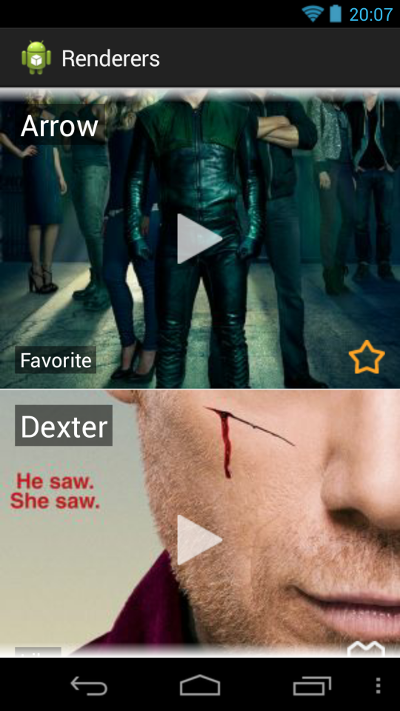
Screenshots
Usage
To use Renderers Android library you only have to follow three steps:
Create your Renderer class or classes extending Renderer<T>. Inside your Renderer classes. You will have to implement some methods to inflate the layout you want to render and implement the rendering algorithm.
You can use Jake Wharton's Butterknife library to avoid findViewById calls inside your Renderers if you want. But the usage of third party libraries is not mandatory.
If you have just one type of item in your list, instantiate a RendererBuilder with a Renderer instance and you are ready to go:
Renderer<Video> renderer = new LikeVideoRenderer();
RendererBuilder<Video> rendererBuilder = new RendererBuilder<Video>(renderer);
If you need to render different objects into your list/grid you can use RendererBuilder.bind fluent API and that's it:
RendererBuilder<Video> rendererBuilder = new RendererBuilder<Video>()
         .bind(VideoHeader.class, new VideoHeaderRenderer())
         .bind(Video.class, new LikeVideoRenderer());
Initialize your ListView or RecyclerView with your RendererBuilder and an optional List inside your Activity or Fragment. You should provide a list of items to configure your RendererAdapter or RVRendererAdapter.
Remember, if you are going to use RecyclerView instead of ListView you'll have to use RVRendererAdapter instead of RendererAdapter.
Diff updates:
If the RecyclerView performance is crucial in your application remember you can use diffUpdate method in your RVRendererAdapter instance to update just the items changed in your adapter and not the whole list/grid.*
adapter.diffUpdate(newList)
This method provides a ready to use diff update for our adapter based on the implementation of the standard equals and hashCode methods from the Object Java class. The classes associated to your renderers will have to implement equals and hashCode methods properly. Your hashCode implementation can be based on the item ID if you have one. You can use your hashCode implementation as an identifier of the object you want to represent graphically. We know this implementation is not perfect, but is the best we can do wihtout adding a new interface you have to implement to the library breaking all your existing code. Here you can review the DiffUtil.Callback implementation used in this library. If you can't follow this implementation you can always use a different approach combined with your already implemented renderers.
Also, RVListRendererAdapter provides a way to perform diff updates in a background thread transparently. When using RVListRendererAdapter you'll have a default DiffUtil.ItemCallback implementation (https://developer.android.com/reference/android/support/v7/util/DiffUtil.ItemCallback)) based on referencial equality for areItemsTheSame method and structural equality for areContentsTheSame method. You also have constructors on this class to provide your own implementation for DiffUtil.ItemCallback. You can even configure the threads used to perform the calculations through AsynDifferConfig class (https://developer.android.com/reference/android/support/v7/recyclerview/extensions/AsyncDifferConfig).
This library can also be used to show views inside a ViewPager. Take a look at VPRendererAdapter :smiley:
If your renderers binding is complex and it's not based on different classes but in properties of these classes, you can also extend RendererBuilder and override getPrototypeClass to customize your binding as follows:
public class VideoRendererBuilder extends RendererBuilder<Video> {

  public VideoRendererBuilder() {
    List<Renderer<Video>> prototypes = getVideoRendererPrototypes();
    setPrototypes(prototypes);
  }

  /**
   * Method to declare Video-VideoRenderer mapping.
   * Favorite videos will be rendered using FavoriteVideoRenderer.
   * Live videos will be rendered using LiveVideoRenderer.
   * Liked videos will be rendered using LikeVideoRenderer.
   *
   * @param content used to map object-renderers.
   * @return VideoRenderer subtype class.
   */
  @Override
  protected Class getPrototypeClass(Video content) {
    Class prototypeClass;
    if (content.isFavorite()) {
      prototypeClass = FavoriteVideoRenderer.class;
    } else if (content.isLive()) {
      prototypeClass = LiveVideoRenderer.class;
    } else {
      prototypeClass = LikeVideoRenderer.class;
    }
    return prototypeClass;
  }

  /**
   * Create a list of prototypes to configure RendererBuilder.
   * The list of Renderer<Video> that contains all the possible renderers that our RendererBuilder
   * is going to use.
   *
   * @return Renderer<Video> prototypes for RendererBuilder.
   */
  private List<Renderer<Video>> getVideoRendererPrototypes() {
    List<Renderer<Video>> prototypes = new LinkedList<Renderer<Video>>();
    LikeVideoRenderer likeVideoRenderer = new LikeVideoRenderer();
    prototypes.add(likeVideoRenderer);

    FavoriteVideoRenderer favoriteVideoRenderer = new FavoriteVideoRenderer();
    prototypes.add(favoriteVideoRenderer);

    LiveVideoRenderer liveVideoRenderer = new LiveVideoRenderer();
    prototypes.add(liveVideoRenderer);

    return prototypes;
  }
}
References
You can find implementation details in these talks:
Copyright 2016 Pedro Vicente Gómez Sánchez

Licensed under the Apache License, Version 2.0 (the "License");
you may not use this file except in compliance with the License.
You may obtain a copy of the License at

   http://www.apache.org/licenses/LICENSE-2.0

Unless required by applicable law or agreed to in writing, software
distributed under the License is distributed on an "AS IS" BASIS,
WITHOUT WARRANTIES OR CONDITIONS OF ANY KIND, either express or implied.
See the License for the specific language governing permissions and
limitations under the License.
The most recent commit recorded on pedrovgs/Renderers was 7 months ago, based on the GitHub push timestamp. The repository has 169 forks — one of the better signals of community interest.
How many stars does pedrovgs/Renderers have?
pedrovgs/Renderers has 1.2k GitHub stars — refresh the page for the live number, or check github.com/pedrovgs/Renderers. TopGit mirrors GitHub's count but does not claim minute-by-minute accuracy.
Is pedrovgs/Renderers open source?
Yes — pedrovgs/Renderers ships under the Apache-2.0 license, which makes its source code freely readable (and, depending on license terms, forkable and reusable). Source: github.com/pedrovgs/Renderers.
What is pedrovgs/Renderers?
pedrovgs/Renderers (pedrovgs/Renderers) is a Java project on GitHub. From the project's own README: Renderers is an Android library created to avoid all the boilerplate needed to use a RecyclerView/ListView with adapters.
What language is pedrovgs/Renderers written in?
pedrovgs/Renderers is written primarily in Java. GitHub's language field is based on the largest share of bytes in the default branch.
What license does pedrovgs/Renderers use?
pedrovgs/Renderers is released under the Apache-2.0 license. Always verify the LICENSE file directly on GitHub for the authoritative terms — license strings can be edited out of sync with a project's actual stance.
Where do I read more about pedrovgs/Renderers?
This TopGit page is a snapshot — the READ ME tab shows the project's own README content (links stripped, images preserved). The GitHub repository at github.com/pedrovgs/Renderers is the definitive source.
Read full README in the tab above.
Curious whether Renderers is right for you?
Let ChatGPT, Claude, or Perplexity look into it — click below and see what AI actually says about Renderers.
 /Renderers