pinojs/pino-pretty sits at 1.7k stars on GitHub, written primarily in JavaScript. 🌲Basic prettifier for Pino log lines
Snapshot summary built from the project's own GitHub metadata — there's no written TopGit review yet. The page will update automatically when a full review is published.
WHY NO REVIEW YET
TopGit writes full reviews for the most-starred, most-requested repositories. This page is a snapshot until then — see the READ ME tab for the original README in full.
This module provides a basic ndjson formatter to be used in development. If an
incoming line looks like it could be a log line from an ndjson logger, in
particular the Pino logging library, then it will apply
extra formatting by considering things like the log level and timestamp.
If you landed on this page due to the deprecation of the prettyPrint option
of pino, read the Programmatic Integration section.
Example
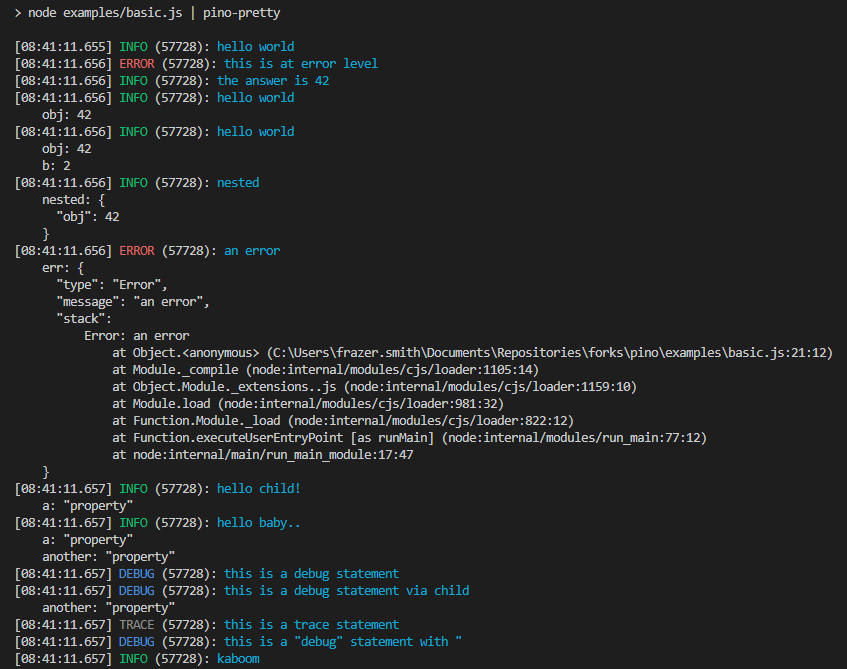
Using the example script from the Pino module, we can see what the
prettified logs will look like:
Install
npm install -g pino-pretty
Usage
It is recommended to use pino-pretty with pino
by piping output to the CLI tool:
node app.js | pino-pretty
CLI Arguments
--colorize (-c): Adds terminal color escape sequences to the output.
--no-colorizeObjects: Suppress colorization of objects.
--crlf (-f): Appends carriage return and line feed, instead of just a line
feed, to the formatted log line.
--errorProps (-e): When formatting an error object, display this list
of properties. The list should be a comma-separated list of properties Default: ''.
Do not use this option if logging from pino@7. Support will be removed from future versions.
--levelFirst (-l): Display the log level name before the logged date and time.
--errorLikeObjectKeys (-k): Define the log keys that are associated with
error like objects. Default: err,error.
--messageKey (-m): Define the key that contains the main log message.
Default: msg.
--levelKey (--levelKey): Define the key that contains the level of the log. Nested keys are supported with each property delimited by a dot character (.).
Keys may be escaped to target property names that contains the delimiter itself:
(--levelKey tags\\.level).
Default: level.
--levelLabel (-b): Output the log level using the specified label.
Default: levelLabel.
--minimumLevel (-L): Hide messages below the specified log level. Accepts a number, trace, debug, info, warn, error, or fatal. If any more filtering is required, consider using jq.
--customLevels (-x): Override default levels with custom levels, e.g. -x err:99,info:1
--customColors (-X): Override default colors with custom colors, e.g. -X err:red,info:blue
--useOnlyCustomProps (-U): Only use custom levels and colors (if provided) (default: true); else fallback to default levels and colors, e.g. -U false
--messageFormat (-o): Format output of message, e.g. {levelLabel} - {pid} - url:{req.url} will output message: INFO - 1123 - url:localhost:3000/test
Default: false
--timestampKey (-a): Define the key that contains the log timestamp.
Default: time.
--translateTime (-t): Translate the epoch time value into a human-readable
date and time string. This flag also can set the format string to apply when
translating the date to a human-readable format. For a list of available pattern
letters, see the dateformat documentation.
The default format is HH:MM:ss.l in the local timezone.
Require a UTC: prefix to translate time to UTC, e.g. UTC:yyyy-mm-dd HH:MM:ss.l o.
Require a SYS: prefix to translate time to the local system's time zone. A
shortcut SYS:standard to translate time to yyyy-mm-dd HH:MM:ss.l o in
system time zone.
--ignore (-i): Ignore one or several keys, nested keys are supported with each property delimited by a dot character (.),
keys may be escaped to target property names that contains the delimiter itself:
(-i time,hostname,req.headers,log\\.domain\\.corp/foo).
The --ignore option would be ignored, if both --ignore and --include are passed.
Default: hostname.
--include (-I): The opposite of --ignore. Include one or several keys, nested keys are supported with each property delimited by a dot character (.),
keys may be escaped to target property names that contains the delimiter itself:
(-I time,hostname,req.headers,log\.domain\.corp/foo).
--hideObject (-H): Hide objects from output (but not error object)
--singleLine (-S): Print each log message on a single line (errors will still be multi-line)
--config: Specify a path to a config file containing the pino-pretty options. pino-pretty will attempt to read from a .pino-prettyrc in your current directory (process.cwd) if not specified
Programmatic Integration
We recommend against using pino-pretty in production and highly
recommend installing pino-pretty as a development dependency.
npm install --save-dev pino-pretty
Install pino-pretty alongside pino and set the transport target to 'pino-pretty':
The following configuration ensures that pino-pretty is activated only in development mode.
const pino = require('pino')

// Define the transport configuration only when the output stream is connected to a TTY
const transport =
  process.stdout.isTTY
    ? { transport: { target: 'pino-pretty' } }
    : {};

const logger = pino({
  ...transport
})

logger.info('hi')
Usage as a stream
If you are using pino-pretty as a stream and you need to provide options to pino,
pass the options as the first argument and pino-pretty as second argument:
Logging with Jest is problematic, as the test framework requires no asynchronous operation to
continue after the test has finished. The following is the only supported way to use this module
with Jest:
Using the new pino v7+
transports not all
options are serializable, for example if you want to use messageFormat as a
function you will need to wrap pino-pretty in a custom module.
Executing main.js below will log a colorized hello world message using a
custom function messageFormat:
This boolean returns whether the currently used TTY supports colorizing the logs.
import pretty from 'pino-pretty'

if (pretty.isColorSupported) {
  ...
}
Options
The options accepted have keys corresponding to the options described in CLI Arguments:
{
  colorize: colorette.isColorSupported, // --colorize
  colorizeObjects: true, //--colorizeObjects
  crlf: false, // --crlf
  errorLikeObjectKeys: ['err', 'error'], // --errorLikeObjectKeys (not required to match custom errorKey with pino >=8.21.0)
  errorProps: '', // --errorProps
  levelFirst: false, // --levelFirst
  messageKey: 'msg', // --messageKey (not required with pino >=8.21.0)
  levelKey: 'level', // --levelKey
  messageFormat: false, // --messageFormat
  timestampKey: 'time', // --timestampKey
  translateTime: false, // --translateTime
  ignore: 'pid,hostname', // --ignore
  include: 'level,time', // --include
  hideObject: false, // --hideObject
  singleLine: false, // --singleLine
  customColors: 'err:red,info:blue', // --customColors
  customLevels: 'err:99,info:1', // --customLevels (not required with pino >=8.21.0)
  levelLabel: 'levelLabel', // --levelLabel
  minimumLevel: 'info', // --minimumLevel
  useOnlyCustomProps: true, // --useOnlyCustomProps
  // The file or file descriptor (1 is stdout) to write to
  destination: 1,

  // Alternatively, pass a `sonic-boom` instance (allowing more flexibility):
  // destination: new SonicBoom({ dest: 'a/file', mkdir: true })

  // You can also configure some SonicBoom options directly
  sync: false, // by default we write asynchronously
  append: true, // the file is opened with the 'a' flag
  mkdir: true, // create the target destination


  customPrettifiers: {}
}
The colorize default follows
colorette.isColorSupported.
The defaults for sync, append, mkdir inherit from
SonicBoom(opts).
customPrettifiers option provides the ability to add a custom prettify function
for specific log properties. customPrettifiers is an object, where keys are
log properties that will be prettified and value is the prettify function itself.
For example, if a log line contains a query property,
you can specify a prettifier for it:
{
  customPrettifiers: {
    query: prettifyQuery
  }
}
//...
const prettifyQuery = value => {
  // do some prettify magic
}
logObjKey - name of the key of the property in the log object that should have this function applied to it
output - the value of the property in the log object
keyName - the name of the property (useful for level and message when levelKey or messageKey is used)
logObj - the full log object, for context
extras - an object containing additional data/functions created in the context of this pino-pretty logger or specific to the key (see level prettifying below)
All extras objects contain colors which is a Colorette object containing color functions. Colors are enabled based on colorize provided to pino-pretty or colorette.isColorSupported if colorize was not provided.
Additionally, customPrettifiers can be used to format the time, hostname,
pid, name, caller and level outputs AS WELL AS any arbitrary key-value that exists on a given log object.
An example usage of customPrettifiers using all parameters from the function signature:
{
  customPrettifiers: {
    // The argument for this function will be the same
    // string that's at the start of the log-line by default:
    time: timestamp => `🕰 ${timestamp}`,

    // The argument for the level-prettifier may vary depending
    // on if the levelKey option is used or not.
    // By default this will be the same numerics as the Pino default:
    level: logLevel => `LEVEL: ${logLevel}`,
    // level provides additional data in `extras`:
    // * label => derived level label string
    // * labelColorized => derived level label string with colorette colors applied based on customColors and whether colors are supported
    level: (logLevel, key, log, { label, labelColorized, colors }) => `LEVEL: ${logLevel} LABEL: ${levelLabel} COLORIZED LABEL: ${labelColorized}`,

    // other prettifiers can be used for the other keys if needed, for example
    hostname: hostname => `MY HOST: ${hostname}`,
    pid: pid => pid,
    name: (name, key, log, { colors }) => `${colors.blue(name)}`,
    caller: (caller, key, log, { colors }) => `${colors.greenBright(caller)}`,
    myCustomLogProp: (value, key, log, { colors }) => `My Prop -> ${colors.bold(value)} <--`
  }
}
messageFormat option allows you to customize the message output.
A template string like this can define the format:
This option can also be defined as a function with this function signature:
{
  messageFormat: (log, messageKey, levelLabel, { colors }) => {
    // do some log message customization
    //
    // `colors` is a Colorette object with colors enabled based on `colorize` option
    return `This is a ${colors.red('colorized')}, custom message: ${log[messageKey]}`;
  }
}
Limitations
Because pino-pretty uses stdout redirection, in some cases the command may
terminate with an error due to shell limitations.
For example, currently, mingw64 based shells (e.g. Bash as supplied by git for
Windows) are affected and terminate the process with
a stdout is not a tty error message.
No homepage URL was recorded for pinojs/pino-pretty in TopGit's last sync. The README tab above frequently contains screenshots and demo links, or check the repository description on GitHub.
Does pinojs/pino-pretty have any tags?
TopGit's last sync did not record any GitHub topics for pinojs/pino-pretty. GitHub topics appear in the right sidebar of a repository page; that's the authoritative place to check.
How active is development on pinojs/pino-pretty?
The most recent commit recorded on pinojs/pino-pretty was 1 month ago, based on the GitHub push timestamp. The repository has 181 forks — one of the better signals of community interest.
How many stars does pinojs/pino-pretty have?
pinojs/pino-pretty has 1.7k GitHub stars — refresh the page for the live number, or check github.com/pinojs/pino-pretty. TopGit mirrors GitHub's count but does not claim minute-by-minute accuracy.
Is pinojs/pino-pretty open source?
Yes — pinojs/pino-pretty ships under the MIT license, which makes its source code freely readable (and, depending on license terms, forkable and reusable). Source: github.com/pinojs/pino-pretty.
Where do I read more about pinojs/pino-pretty?
This TopGit page is a snapshot — the READ ME tab shows the project's own README content (links stripped, images preserved). The GitHub repository at github.com/pinojs/pino-pretty is the definitive source.
Read full README in the tab above.
Is pino-pretty worth your time?
ChatGPT, Claude and Perplexity can all read this page. Ask one of them what it makes of pino-pretty.

 /pino-pretty