As an open-source project, pppscn/XUI has picked up 2 stars on GitHub (Java). 💍A simple and elegant Android native UI framework, free your hands! (一个简洁而优雅的Android原生UI框架,解放你的双手!)
Snapshot summary built from the project's own GitHub metadata — there's no written TopGit review yet. The page will update automatically when a full review is published.
WHY NO REVIEW YET
TopGit writes full reviews for the most-starred, most-requested repositories. This page is a snapshot until then — see the READ ME tab for the original README in full.
A simple and elegant Android native UI framework, free your hands! Click on the instruction document and experience it!
Covers most of the UI components:TextView、Button、EditText、ImageView、Spinner、Picker、Dialog、PopupWindow、ProgressBar、LoadingView、StateLayout、FlowLayout、Switch、Actionbar、TabBar、Banner、GuideView、BadgeView、MarqueeView、WebView、SearchView...etc. A series of components and colorful style themes。
Please read 【wisdom of asking questions】 before raising the issue and strictly follow the issue template fill in and save everyone's time.
Please read the instruction document carefully before use, important things are to be repeated for three time!!!
please read the instruction document carefully before use, important things are to be repeated for three time!!!
Please read the instruction document carefully before use, important things are to be repeated for three time!!!
About me
WeChat public number
juejin
zhihu
CSDN
jianshu
segmentfault
bilibili
toutiao
我的Android开源之旅
Click me
Click me
Click me
Click me
Click me
Click me
Click me
Rapid integration of X-Library
In order to facilitate the rapid integration of X-Library, I provide a template project for your reference: https://github.com/xuexiangjys/TemplateAppProject
In addition, I have also produced several video tutorials for your reference.
Features
Simple and elegant,the total size of the project library is less than 1M (about 644k after packaging).
Rich components,provides the vast majority of our developers in common functional components.
Easy to use,in order to facilitate rapid development and improve development efficiency, the API is optimized to provide one click access.
Uniform style,the framework provides a series of unified styles to make the UI look beautiful and harmonious.
High compatibility,the framework also provides three different sizes of device styles (4.5 inch, 7 inch and 10 inch) and is compatible with Android 17 at least, which makes UI compatibility stronger.
Strong expansibility,each component provides rich properties and style APIs, and different styles of UI can be built by setting different style properties.
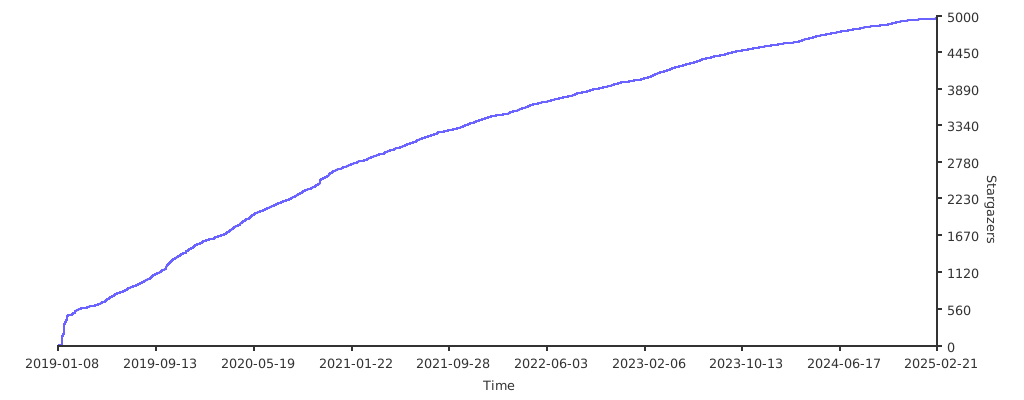
Stargazers over time
Usage
Before you consider using XUI, you must be clear that this framework provides a whole set of UI solutions. If you just want to use a few of them, you don't need to introduce such a huge UI library. You can find better component libraries on GitHub. If you want to have a customized, unified UI overall solution, then you can continue to look!
1.Modify the basic theme of the application (required)
The basic theme of the application must be set, otherwise the component will not work normally! It is very important to ensure that the theme of all windows using XUI components is a subclass of XUITheme!!!
Basic topic type:
Large flat plate(10 inches, 240dpi, 1920*1200):XUITheme.Tablet.Big
Small plate(7 inches, 320dpi, 1920*1200):XUITheme.Tablet.Small
Mobile phone(4.5 inches, 320dpi, 720*1280):XUITheme.Phone
<style name="AppTheme" parent="XUITheme.Phone">

    <!-- Customize your own theme style -->

    <item name="colorPrimary">@color/colorPrimary</item>
    <item name="colorPrimaryDark">@color/colorPrimaryDark</item>
    <item name="colorAccent">@color/colorAccent</item>

</style>
Of course, you can also call the following code at the beginning of the Activity to set the theme dynamically.
The demo program is about 18M (mainly because the demo integrates a small video shooting library, which is about 13M, while XUI library is only 644k in size). The project is relatively large, and dandelion is recommended to download.
Pgyer Download
Pgyer Download password: xuexiangjys
Github Download
Contribution
Due to my limited energy, you are welcome to actively contribute your idea. You will have the opportunity to participate in the maintenance of star over 1000 projects on GitHub and enhance your industry influence!
Code contribution requirements:
Please keep the existing code style, not according to your habits. Please comply with Alibaba java coding specification.
Just modify the code you are sure need to be optimized, not all the different code from your ideas.
Before launching a pull request, you should test your commit code adequately.
Please commit new code to the dev branch instead of the master branch.
Thanks
QMUI_Android
AgentWeb
Android-Iconics
Android-PickerView
CityPicker
ELinkageScroll
FlycoBanner_Master
Linkage-RecyclerView
MaterialEditText
MaterialSpinner
MaterialProgressBar
MPAndroidChart
PictureSelector
SmartRefreshLayout
SlideBack
SwipeRecyclerView
Sponsor
Your support is the driving force of my maintenance. I will list the list of all the reward personnel at the bottom as the voucher. Please leave the notes of the support items before rewarding!
TopGit's last sync did not record any GitHub topics for pppscn/XUI. GitHub topics appear in the right sidebar of a repository page; that's the authoritative place to check.
How active is development on pppscn/XUI?
The most recent commit recorded on pppscn/XUI was 7 months ago, based on the GitHub push timestamp. The repository has 1 forks — one of the better signals of community interest.
How many stars does pppscn/XUI have?
pppscn/XUI has 2 GitHub stars — refresh the page for the live number, or check github.com/pppscn/XUI. TopGit mirrors GitHub's count but does not claim minute-by-minute accuracy.
What language is pppscn/XUI written in?
pppscn/XUI is written primarily in Java. GitHub's language field is based on the largest share of bytes in the default branch.
What license does pppscn/XUI use?
pppscn/XUI is released under the Apache-2.0 license. Always verify the LICENSE file directly on GitHub for the authoritative terms — license strings can be edited out of sync with a project's actual stance.
Where can I see pppscn/XUI in action?
The project maintains a homepage at https://xuexiangjys.github.io/XUI/. The README tab on this page also usually contains screenshots and a quickstart.
Where do I read more about pppscn/XUI?
This TopGit page is a snapshot — the READ ME tab shows the project's own README content (links stripped, images preserved). The GitHub repository at github.com/pppscn/XUI is the definitive source.
Read full README in the tab above.
Want a second opinion on XUI?
Ask an AI that can read this page — one click and you get its take on XUI.
 /XUI
/XUI