ranaroussi/cc-bridge

Indexed by TopGit from live GitHub metadata: ranaroussi/cc-bridge has 53 stars, written primarily in Go. Anthropic API compatibility using the official Claude Code CLI under the hood
Snapshot summary built from the project's own GitHub metadata — there's no written TopGit review yet. The page will update automatically when a full review is published.
TopGit writes full reviews for the most-starred, most-requested repositories. This page is a snapshot until then — see the READ ME tab for the original README in full.
Snapshot
Top contributors
Show top contributors
CC Bridge
Local Claude Code CLI bridge



An experiment that uses Claude Code CLI (`claude -p`) and returns the output in Antropic API compatible format
[!CAUTION]
Experimental - use at your own risk
CC Bridge is a personal exploration project. It is an unofficial wrapper around the Claude Code CLI intended for local experimentation, developer ergonomics, and integration testing.
- This project is not affiliated with, endorsed by, or sponsored by Anthropic.
- Anthropic’s terms, policies, and product behavior can change - you are responsible for ensuring your usage complies with the applicable terms and policies.
- If you need stable, supported programmatic access, use the official Anthropic API and credentials.
See USERGUIDE.md for complete setup and usage instructions.
Why this exists
I wanted a tiny sandbox to explore:
- Using
claude -pin automated developer workflows (pipes, scripts, CI-style steps) - Request/response shaping, streaming output, and robustness
- Logging, retries, timeouts, and failure modes
- How various developer tools behave when pointed at a local endpoint
This repo is best thought of as a fun experiment / prototype - not a recommended integration pattern, and not a production system.
The Drama That Started It All
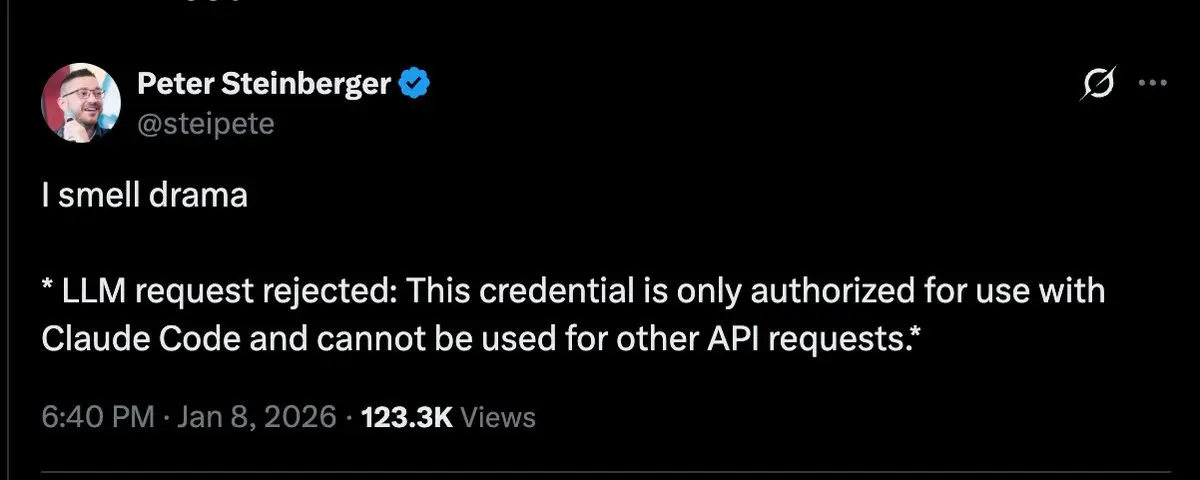
One fateful day, developers everywhere woke up to find their OAuth tokens had been... grounded.
LLM request rejected: This credential is only authorized for use with
Claude Code and cannot be used for other API requests.
The internet panicked. Coffee was spilled. Slack channels burned. Someone probably flipped a table.
So I did what any reasonable developer would do: I asked Claude to hack itself.
And it worked. From the ashes of broken OAuth tokens rose CC-Bridge — a scrappy little Go server that said:
"Fine. You want me to use Claude Code? I'll use Claude Code. Maliciously compliantly."
CC-Bridge solves this by wrapping the official Claude CLI:
// Before (direct Anthropic API - OAuth broken):
const client = new Anthropic({
  apiKey: "sk-ant-oat01-...",  // OAuth token - REJECTED 💀
  baseURL: "https://api.anthropic.com"
});

// After (CC-Bridge - the smooth operator):
const client = new Anthropic({
  apiKey: "dummy",                     // Put whatever you want here, we don't care
  baseURL: "http://localhost:8321"     // Point to CC-Bridge
});

// Zero code changes needed! Your app doesn't even know the difference:
await client.messages.create({ model, messages, ... });  // Just works™
Features
What does this little bridge do? Everything.
- 100% Anthropic API compatible - Your existing code doesn't need to change a single character
- Streaming support - Full SSE streaming, tokens arriving faster than you can read them
- All models - Opus (for when you need big brain), Sonnet (the daily driver), Haiku (speed demon)
- Tool use - Full tool use cycle with emulation that actually works
- Vision & PDFs - Send images and documents, Claude sees all
- System prompts - Full support, whisper sweet instructions to your AI
- Graceful shutdown - Handles SIGTERM like a responsible adult
Prerequisites
Important: Claude Code CLI must be installed and authenticated before using CC-Bridge.
1. Install Claude Code CLI
npm install -g @anthropic-ai/claude-code
claude --version
2. Authenticate
claude
# Follow the prompts to sign in with your Anthropic account
3. Verify CLI Works
echo "Hello" | claude -p --model haiku --output-format json
Installation
Option 1: macOS Menu Bar App (Recommended for macOS)
Download the latest DMG from Releases:
- Download
CC-Bridge.dmg - Open the DMG and drag CC Bridge to Applications
- Launch CC Bridge from Applications
- The server starts automatically in the menu bar (port 8321)
The app is signed and notarized by Apple, so it runs without security warnings. Auto-updates are built-in via Sparkle.
Option 2: Pre-built Binaries
Download binaries for your platform from Releases:
| Platform | Architecture | File |
|---|---|---|
| macOS | Intel (x64) | ccbridge-darwin-amd64 |
| macOS | Apple Silicon | ccbridge-darwin-arm64 |
| Linux | x64 | ccbridge-linux-amd64 |
| Linux | ARM64 | ccbridge-linux-arm64 |
| Windows | x64 | ccbridge-windows-amd64.exe |
# Example: macOS Apple Silicon
curl -L -o ccbridge https://github.com/ranaroussi/cc-bridge/releases/latest/download/ccbridge-darwin-arm64
chmod +x ccbridge
./ccbridge
Option 3: Build from Source
# Clone
git clone https://github.com/ranaroussi/cc-bridge.git
cd cc-bridge

# Build
make build

# Run (default port 8321)
./build/ccbridge

# Or with custom port
./build/ccbridge --port 9000
Test It
curl -X POST http://localhost:8321/v1/messages \
  -H "Content-Type: application/json" \
  -d '{
    "model": "claude-sonnet-4-20250514",
    "messages": [{"role": "user", "content": "Hello!"}]
  }'
Usage with SDKs
JavaScript/TypeScript
import Anthropic from '@anthropic-ai/sdk';

const client = new Anthropic({
  apiKey: 'dummy',
  baseURL: 'http://localhost:8321',
});

const message = await client.messages.create({
  model: 'claude-sonnet-4-20250514',
  max_tokens: 1024,
  messages: [{ role: 'user', content: 'Hello!' }],
});
Python
import anthropic

client = anthropic.Anthropic(
    api_key="dummy",
    base_url="http://localhost:8321"
)

message = client.messages.create(
    model="claude-sonnet-4-20250514",
    max_tokens=1024,
    messages=[{"role": "user", "content": "Hello!"}]
)
How It Works
The secret sauce? We're just a very polite middleman.
Your App (Anthropic SDK)
    │
    │  "Hey Anthropic, here's my request!"
    ↓
CC-Bridge (Go HTTP Server)
    │
    │  "Interesting... let me rephrase that for you"
    ↓  spawn("claude", ["-p", ...])
Claude CLI (Official, Blessed, Allowed™)
    │
    │  "One moment please..."
    ↓
Anthropic API
    │
    │  "Here's your response!"
    ↓
    🎉 Works perfectly
Key insight: We're not fighting OAuth — we're letting the official CLI do what it's allowed to do.
Configuration
Command-Line Flags
./build/ccbridge --port 9000 --host 127.0.0.1
| Flag | Default | Description |
|---|---|---|
--port | 8321 | Server port |
--host | 0.0.0.0 | Bind address |
Environment Variables
Environment variables are used as fallbacks when flags are not provided.
| Variable | Default | Description |
|---|---|---|
CC_BRIDGE_PORT | 8321 | Server port |
CC_BRIDGE_HOST | 0.0.0.0 | Bind address |
CC_BRIDGE_DEBUG | false | Enable debug logging |
CLAUDE_CLI_PATH | claude | Path to Claude CLI |
CLAUDE_CLI_TIMEOUT | none | CLI execution timeout (e.g., 30m, 1h) |
Project Structure
cc-bridge/
├── src/                   # Go HTTP server source
│   ├── main.go            # HTTP server entry point
│   ├── handler.go         # Request handlers
│   ├── types.go           # Type definitions
│   ├── cli.go             # Claude CLI execution
│   ├── mapper.go          # API params ↔ CLI flags
│   ├── streaming.go       # SSE streaming support
│   └── *_test.go          # Tests
├── app/macos/             # macOS menu bar app (Swift)
│   ├── Sources/           # Swift source files
│   ├── Package.swift      # Swift package manifest
│   └── create-app-bundle.sh  # App bundle creation script
├── build/                 # Compiled binaries (gitignored)
├── appcast.xml            # Sparkle auto-update feed
├── Makefile               # Build commands
├── USERGUIDE.md           # Complete user guide
├── CLAUDE.md              # Development guide
└── README.md              # This file
Running Tests
# Unit tests
make test

# Integration tests (requires authenticated Claude CLI)
make test-integration
API Compatibility
Parity Summary
| Category | Parity | Notes |
|---|---|---|
| SDK Compatibility | 100% | All parameters accepted, code runs without changes |
| Content Types | 100% | text, image, document, tool_use, tool_result |
| Tools & Structured Output | 100% | Full tool use cycle, JSON schema |
| Streaming | 100% | All 6 SSE event types |
| Sampling Parameters | 0% | CLI limitation (see below) |
100% Supported Features
| Feature | Status | Notes |
|---|---|---|
| Non-streaming | ✅ | Full support |
| Streaming (SSE) | ✅ | All events: message_start, content_block_*, message_delta, message_stop |
| System prompts | ✅ | Via --append-system-prompt |
| Vision (images) | ✅ | Base64 and URL (JPEG, PNG, GIF, WebP) |
| Documents (PDF) | ✅ | Base64 PDFs via Read tool |
| Tool use | ✅ | Full cycle: definitions → tool_use → tool_result |
| Tool choice | ✅ | auto, any, tool with JSON schema enforcement |
| Structured output | ✅ | Native via --json-schema flag |
| Extended thinking | ✅ | Simulated via <thinking> blocks |
| All models | ✅ | opus, sonnet, haiku |
CLI Limitation: Sampling Parameters
The Claude CLI does not expose flags for these parameters. CC-Bridge accepts them for SDK compatibility, but they have no effect:
| Parameter | Status | Why |
|---|---|---|
temperature | ⚠️ Accepted, ignored | No --temperature flag exists |
top_p | ⚠️ Accepted, ignored | No --top-p flag exists |
top_k | ⚠️ Accepted, ignored | No --top-k flag exists |
max_tokens | ⚠️ Accepted, ignored | No --max-tokens flag exists |
stop_sequences | ⚠️ Accepted, ignored | No --stop-sequences flag exists |
This is a CLI limitation, not a CC-Bridge limitation. Claude uses its default sampling behavior. For most use cases, this works fine. If you need precise control over sampling, you'll need direct API access.
Beta Features
| Feature | Status | Notes |
|---|---|---|
| Extended thinking | ✅ Simulated | Works via <thinking> prompt engineering |
bash_20250124 | ✅ Supported | Maps to CLI Bash tool |
text_editor_20250124 | ✅ Supported | Maps to CLI Edit tool |
| Computer use (mouse/keyboard) | ❌ | Requires anthropic-beta header |
| Prompt caching | ❌ | Requires anthropic-beta header |
| Batch API | ❌ | Different endpoint (/v1/messages/batches) |
Not Available (Requires Direct API)
| Feature | Status | Reason |
|---|---|---|
| Native thinking tokens | ✅ Simulated | CLI blocks beta headers, simulated via prompt engineering |
| Precise token counting | ⚠️ Estimated | Usage is estimated from CLI output |
| Beta headers | ❌ | CLI blocks custom anthropic-beta headers |
CLI Optimizations
CC-Bridge uses these CLI flags for optimal performance:
| Flag | Purpose |
|---|---|
--no-session-persistence | Ephemeral sessions, no disk I/O |
--dangerously-skip-permissions | Bridge handles security, skip CLI prompts |
Limitations
Nothing's perfect (except maybe Claude). Here's the fine print:
- Process overhead - ~100-200ms latency per request from CLI spawning (a small price for freedom)
- Single-user - No multi-tenant support (it's a bridge, not a highway)
- No session persistence - Each request is independent (by design, we're stateless rebels)
- Sampling parameters ignored - Temperature, top_p, top_k use Claude defaults (the CLI doesn't expose these knobs)
Structured Output
CC-Bridge supports structured output via the CLI's --json-schema flag:
message = client.messages.create(
    model="claude-sonnet-4-20250514",
    max_tokens=1024,
    messages=[{"role": "user", "content": "Extract the name and email"}],
    output_format={
        "type": "json_schema",
        "schema": {
            "type": "object",
            "properties": {
                "name": {"type": "string"},
                "email": {"type": "string"}
            },
            "required": ["name", "email"]
        }
    }
)
Extended Thinking (Simulated)
CC-Bridge simulates extended thinking via prompt engineering. When enabled, Claude shows its reasoning in <thinking> blocks:
message = client.messages.create(
    model="claude-sonnet-4-20250514",
    max_tokens=2048,
    messages=[{"role": "user", "content": "What is 127 * 43?"}],
    thinking={"type": "enabled", "budget_tokens": 5000}
)

# Response includes thinking block:
# content[0].type == "thinking"
# content[0].thinking == "Let me work through this step by step..."
# content[1].type == "text"
# content[1].text == "127 × 43 = 5,461"
Note: This is simulated thinking via prompt engineering, not native API thinking tokens. The budget_tokens parameter is accepted for compatibility but doesn't limit actual token usage.
Tool Use (Emulated)
CC-Bridge emulates Anthropic's tool use protocol through prompt engineering. Your client code works exactly as it would with the real API:
# This works with CC-Bridge!
message = client.messages.create(
    model="claude-sonnet-4-20250514",
    max_tokens=1024,
    tools=[{
        "name": "get_weather",
        "description": "Get weather for a location",
        "input_schema": {
            "type": "object",
            "properties": {"location": {"type": "string"}},
            "required": ["location"]
        }
    }],
    messages=[{"role": "user", "content": "What's the weather in Tokyo?"}]
)

# Claude returns tool_use, you execute, send tool_result back
# Exactly like the real API!
How it works: CC-Bridge injects tool schemas into the system prompt and instructs Claude to output tool calls in the native Anthropic JSON format. The response is parsed and returned as proper tool_use content blocks.
Trade-offs:
- ~150 extra tokens for tool instructions
- Each tool round-trip requires a CLI invocation
- Works reliably because Claude is trained on this format
Documentation
- User Guide - Complete setup and usage instructions
- Development Guide - For contributors
License
MIT License - see LICENSE for details.
Disclaimer
This project is not affiliated with, endorsed by, or sponsored by Anthropic. We're just some developers who needed their OAuth tokens to work again and found a creative solution.
Use at your own risk and ensure compliance with all applicable terms of service. We built this bridge, but you're the one crossing it.
Built with ☕ and mild frustration. May your tokens flow freely. ✨
Related repositories
Master programming by recreating your favorite technologies from scratch.
A curated meta-list of curated lists organized by technology domain. The repository acts as a directory pointing to hundreds of specialized awesome lists covering programming languages, platforms, frameworks, and tooling. All content is community-contributed under the CC0 public domain dedication.
Public APIs is a community-curated GitHub repository listing free, publicly accessible APIs across a wide range of categories, with auth type, HTTPS, and CORS noted for each entry. It's a browsable reference, not a library to install.
freeCodeCamp is a free, self-paced curriculum for learning to code, published as open source at freeCodeCamp/freeCodeCamp. It's a 501(c)(3) nonprofit funded by donor support, structured around six certifications in its Full-Stack Developer Curriculum, each gated by required projects instead of open-book quizzes. The repository also carries beta language certifications for developers, interview-prep resources, and the code that runs the live freecodecamp.org platform.
Quick answers
Is ranaroussi/cc-bridge open source?
Yes — ranaroussi/cc-bridge ships under the MIT license, which makes its source code freely readable (and, depending on license terms, forkable and reusable). Source: github.com/ranaroussi/cc-bridge.
What is ranaroussi/cc-bridge?
ranaroussi/cc-bridge (ranaroussi/cc-bridge) is a Go project on GitHub. From the project's own README: Anthropic API compatibility using the official Claude Code CLI under the hood
Where do I read more about ranaroussi/cc-bridge?
This TopGit page is a snapshot — the READ ME tab shows the project's own README content (links stripped, images preserved). The GitHub repository at github.com/ranaroussi/cc-bridge is the definitive source.
Read full README in the tab above.
Still deciding about cc-bridge?
One click hands the question to an AI along with this page — see what it says about cc-bridge.