A look at raulmur/ORB_SLAM2: 10.3k stars on GitHub, written primarily in C++. Real-Time SLAM for Monocular, Stereo and RGB-D Cameras, with Loop Detection and Relocalization Capabilities
Snapshot summary built from the project's own GitHub metadata — there's no written TopGit review yet. The page will update automatically when a full review is published.
WHY NO REVIEW YET
TopGit writes full reviews for the most-starred, most-requested repositories. This page is a snapshot until then — see the READ ME tab for the original README in full.
Authors: Raul Mur-Artal, Juan D. Tardos, J. M. M. Montiel and Dorian Galvez-Lopez (DBoW2)
13 Jan 2017: OpenCV 3 and Eigen 3.3 are now supported.
22 Dec 2016: Added AR demo (see section 7).
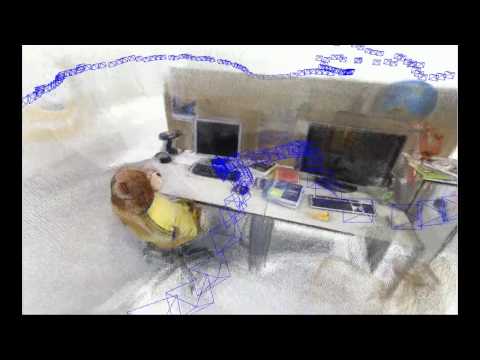
ORB-SLAM2 is a real-time SLAM library for Monocular, Stereo and RGB-D cameras that computes the camera trajectory and a sparse 3D reconstruction (in the stereo and RGB-D case with true scale). It is able to detect loops and relocalize the camera in real time. We provide examples to run the SLAM system in the KITTI dataset as stereo or monocular, in the TUM dataset as RGB-D or monocular, and in the EuRoC dataset as stereo or monocular. We also provide a ROS node to process live monocular, stereo or RGB-D streams. The library can be compiled without ROS. ORB-SLAM2 provides a GUI to change between a SLAM Mode and Localization Mode, see section 9 of this document.
Related Publications:
[Monocular] Raúl Mur-Artal, J. M. M. Montiel and Juan D. Tardós. ORB-SLAM: A Versatile and Accurate Monocular SLAM System. IEEE Transactions on Robotics, vol. 31, no. 5, pp. 1147-1163, 2015. (2015 IEEE Transactions on Robotics Best Paper Award). PDF.
[Stereo and RGB-D] Raúl Mur-Artal and Juan D. Tardós. ORB-SLAM2: an Open-Source SLAM System for Monocular, Stereo and RGB-D Cameras. IEEE Transactions on Robotics, vol. 33, no. 5, pp. 1255-1262, 2017. PDF.
[DBoW2 Place Recognizer] Dorian Gálvez-López and Juan D. Tardós. Bags of Binary Words for Fast Place Recognition in Image Sequences. IEEE Transactions on Robotics, vol. 28, no. 5, pp. 1188-1197, 2012. PDF
1. License
ORB-SLAM2 is released under a GPLv3 license. For a list of all code/library dependencies (and associated licenses), please see Dependencies.md.
For a closed-source version of ORB-SLAM2 for commercial purposes, please contact the authors: orbslam (at) unizar (dot) es.
If you use ORB-SLAM2 (Monocular) in an academic work, please cite:
@article{murTRO2015,
  title={{ORB-SLAM}: a Versatile and Accurate Monocular {SLAM} System},
  author={Mur-Artal, Ra\'ul, Montiel, J. M. M. and Tard\'os, Juan D.},
  journal={IEEE Transactions on Robotics},
  volume={31},
  number={5},
  pages={1147--1163},
  doi = {10.1109/TRO.2015.2463671},
  year={2015}
 }
if you use ORB-SLAM2 (Stereo or RGB-D) in an academic work, please cite:
@article{murORB2,
  title={{ORB-SLAM2}: an Open-Source {SLAM} System for Monocular, Stereo and {RGB-D} Cameras},
  author={Mur-Artal, Ra\'ul and Tard\'os, Juan D.},
  journal={IEEE Transactions on Robotics},
  volume={33},
  number={5},
  pages={1255--1262},
  doi = {10.1109/TRO.2017.2705103},
  year={2017}
 }
2. Prerequisites
We have tested the library in Ubuntu 12.04, 14.04 and 16.04, but it should be easy to compile in other platforms. A powerful computer (e.g. i7) will ensure real-time performance and provide more stable and accurate results.
C++11 or C++0x Compiler
We use the new thread and chrono functionalities of C++11.
Pangolin
We use Pangolin for visualization and user interface. Dowload and install instructions can be found at: https://github.com/stevenlovegrove/Pangolin.
OpenCV
We use OpenCV to manipulate images and features. Dowload and install instructions can be found at: http://opencv.org. Required at leat 2.4.3. Tested with OpenCV 2.4.11 and OpenCV 3.2.
Eigen3
Required by g2o (see below). Download and install instructions can be found at: http://eigen.tuxfamily.org. Required at least 3.1.0.
DBoW2 and g2o (Included in Thirdparty folder)
We use modified versions of the DBoW2 library to perform place recognition and g2o library to perform non-linear optimizations. Both modified libraries (which are BSD) are included in the Thirdparty folder.
ROS (optional)
We provide some examples to process the live input of a monocular, stereo or RGB-D camera using ROS. Building these examples is optional. In case you want to use ROS, a version Hydro or newer is needed.
We provide a script build.sh to build the Thirdparty libraries and ORB-SLAM2. Please make sure you have installed all required dependencies (see section 2). Execute:
cd ORB_SLAM2
chmod +x build.sh
./build.sh
This will create libORB_SLAM2.so at lib folder and the executables mono_tum, mono_kitti, rgbd_tum, stereo_kitti, mono_euroc and stereo_euroc in Examples folder.
4. Monocular Examples
TUM Dataset
Download a sequence from http://vision.in.tum.de/data/datasets/rgbd-dataset/download and uncompress it.
Execute the following command. Change TUMX.yaml to TUM1.yaml,TUM2.yaml or TUM3.yaml for freiburg1, freiburg2 and freiburg3 sequences respectively. Change PATH_TO_SEQUENCE_FOLDERto the uncompressed sequence folder.
Download the dataset (grayscale images) from http://www.cvlibs.net/datasets/kitti/eval_odometry.php
Execute the following command. Change KITTIX.yamlby KITTI00-02.yaml, KITTI03.yaml or KITTI04-12.yaml for sequence 0 to 2, 3, and 4 to 12 respectively. Change PATH_TO_DATASET_FOLDER to the uncompressed dataset folder. Change SEQUENCE_NUMBER to 00, 01, 02,.., 11.
Download a sequence (ASL format) from http://projects.asl.ethz.ch/datasets/doku.php?id=kmavvisualinertialdatasets
Execute the following first command for V1 and V2 sequences, or the second command for MH sequences. Change PATH_TO_SEQUENCE_FOLDER and SEQUENCE according to the sequence you want to run.
Download the dataset (grayscale images) from http://www.cvlibs.net/datasets/kitti/eval_odometry.php
Execute the following command. Change KITTIX.yamlto KITTI00-02.yaml, KITTI03.yaml or KITTI04-12.yaml for sequence 0 to 2, 3, and 4 to 12 respectively. Change PATH_TO_DATASET_FOLDER to the uncompressed dataset folder. Change SEQUENCE_NUMBER to 00, 01, 02,.., 11.
Download a sequence (ASL format) from http://projects.asl.ethz.ch/datasets/doku.php?id=kmavvisualinertialdatasets
Execute the following first command for V1 and V2 sequences, or the second command for MH sequences. Change PATH_TO_SEQUENCE_FOLDER and SEQUENCE according to the sequence you want to run.
Download a sequence from http://vision.in.tum.de/data/datasets/rgbd-dataset/download and uncompress it.
Associate RGB images and depth images using the python script associate.py. We already provide associations for some of the sequences in Examples/RGB-D/associations/. You can generate your own associations file executing:
Execute the following command. Change TUMX.yaml to TUM1.yaml,TUM2.yaml or TUM3.yaml for freiburg1, freiburg2 and freiburg3 sequences respectively. Change PATH_TO_SEQUENCE_FOLDERto the uncompressed sequence folder. Change ASSOCIATIONS_FILE to the path to the corresponding associations file.
Building the nodes for mono, monoAR, stereo and RGB-D
Add the path including Examples/ROS/ORB_SLAM2 to the ROS_PACKAGE_PATH environment variable. Open .bashrc file and add at the end the following line. Replace PATH by the folder where you cloned ORB_SLAM2:
For a monocular input from topic /camera/image_raw run node ORB_SLAM2/Mono. You will need to provide the vocabulary file and a settings file. See the monocular examples above.
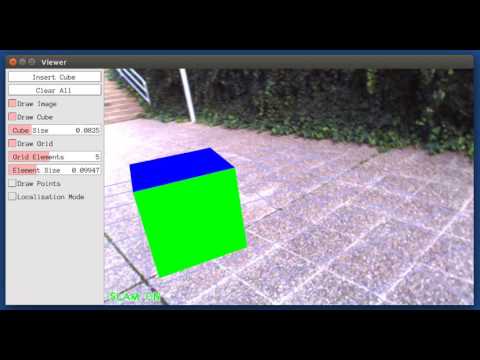
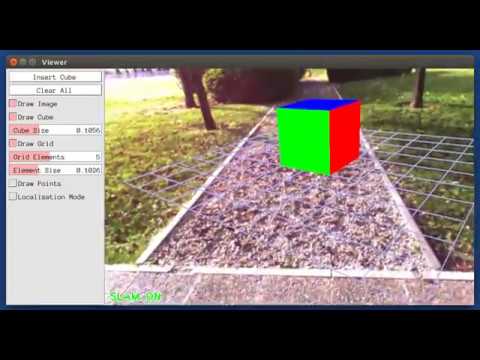
This is a demo of augmented reality where you can use an interface to insert virtual cubes in planar regions of the scene.
The node reads images from topic /camera/image_raw.
For a stereo input from topic /camera/left/image_raw and /camera/right/image_raw run node ORB_SLAM2/Stereo. You will need to provide the vocabulary file and a settings file. If you provide rectification matrices (see Examples/Stereo/EuRoC.yaml example), the node will recitify the images online, otherwise images must be pre-rectified.
Example: Download a rosbag (e.g. V1_01_easy.bag) from the EuRoC dataset (http://projects.asl.ethz.ch/datasets/doku.php?id=kmavvisualinertialdatasets). Open 3 tabs on the terminal and run the following command at each tab:
rosbag play --pause V1_01_easy.bag /cam0/image_raw:=/camera/left/image_raw /cam1/image_raw:=/camera/right/image_raw
Once ORB-SLAM2 has loaded the vocabulary, press space in the rosbag tab. Enjoy!. Note: a powerful computer is required to run the most exigent sequences of this dataset.
Running RGB_D Node
For an RGB-D input from topics /camera/rgb/image_raw and /camera/depth_registered/image_raw, run node ORB_SLAM2/RGBD. You will need to provide the vocabulary file and a settings file. See the RGB-D example above.
You will need to create a settings file with the calibration of your camera. See the settings file provided for the TUM and KITTI datasets for monocular, stereo and RGB-D cameras. We use the calibration model of OpenCV. See the examples to learn how to create a program that makes use of the ORB-SLAM2 library and how to pass images to the SLAM system. Stereo input must be synchronized and rectified. RGB-D input must be synchronized and depth registered.
9. SLAM and Localization Modes
You can change between the SLAM and Localization mode using the GUI of the map viewer.
SLAM Mode
This is the default mode. The system runs in parallal three threads: Tracking, Local Mapping and Loop Closing. The system localizes the camera, builds new map and tries to close loops.
Localization Mode
This mode can be used when you have a good map of your working area. In this mode the Local Mapping and Loop Closing are deactivated. The system localizes the camera in the map (which is no longer updated), using relocalization if needed.
No homepage URL was recorded for raulmur/ORB_SLAM2 in TopGit's last sync. The README tab above frequently contains screenshots and demo links, or check the repository description on GitHub.
How many stars does raulmur/ORB_SLAM2 have?
raulmur/ORB_SLAM2 has 10.3k GitHub stars — refresh the page for the live number, or check github.com/raulmur/ORB_SLAM2. TopGit mirrors GitHub's count but does not claim minute-by-minute accuracy.
Is raulmur/ORB_SLAM2 open source?
TopGit's metadata for raulmur/ORB_SLAM2 does not record a license. Most public repositories on GitHub ARE open source, but the exact terms vary — verify by opening the LICENSE file directly.
What is raulmur/ORB_SLAM2?
raulmur/ORB_SLAM2 (raulmur/ORB_SLAM2) is a C++ project on GitHub. From the project's own README: Real-Time SLAM for Monocular, Stereo and RGB-D Cameras, with Loop Detection and Relocalization Capabilities
Where do I read more about raulmur/ORB_SLAM2?
This TopGit page is a snapshot — the READ ME tab shows the project's own README content (links stripped, images preserved). The GitHub repository at github.com/raulmur/ORB_SLAM2 is the definitive source.
Read full README in the tab above.
Want a second opinion on ORB_SLAM2?
Ask an AI that can read this page — one click and you get its take on ORB_SLAM2.

 /ORB_SLAM2