An open-source entry in TopGit's GitHub warehouse: rstudio/rticles, 1.5k stars, TeX. LaTeX Journal Article Templates for R Markdown
Snapshot summary built from the project's own GitHub metadata — there's no written TopGit review yet. The page will update automatically when a full review is published.
WHY NO REVIEW YET
TopGit writes full reviews for the most-starred, most-requested repositories. This page is a snapshot until then — see the READ ME tab for the original README in full.
The rticles package provides a suite of custom R
Markdown LaTeX formats and templates for
various formats. Most of the templates are provided and maintained by
the community, and anyone can contribute a new template. See How to
contribute below.
Book
Installation
You can install and use rticles from CRAN as follows:
install.packages("rticles")
If you wish to install the development version from GitHub (which often
contains new article formats), you can do this:
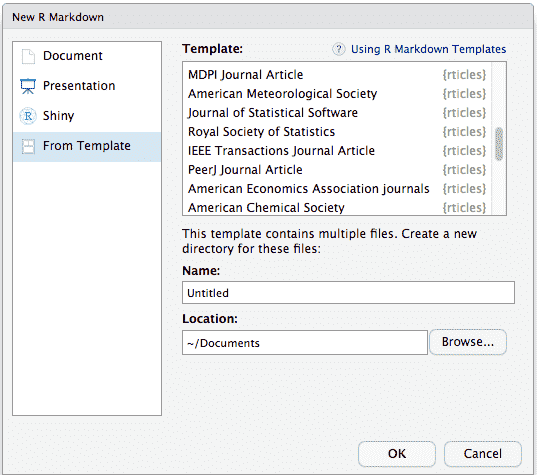
To use rticles from RStudio, you can access the templates through
File -> New File -> R Markdown. This will open the dialog box where
you can select from one of the available templates:
New R Markdown
If you are not using RStudio, you’ll also need to install
Pandoc following these
instructions.
Then, use the rmarkdown::draft() function to create articles:
Those are the values to use within rmarkdown::draft().
Under the hood, LaTeX templates are used to ensure that documents
conform precisely to submission standards. At the same time, composition
and formatting can be done using lightweight
markdown syntax,
and R code and its output can be seamlessly included using
knitr.
Getting help
There are two main places to get help:
The RStudio
community is a
friendly place to ask any questions about rticles. Be sure to
use the rticles tag.
Stack Overflow
is a great source of answers to common bookdown questions. Use
the tags
[r][rticles]
if you ask a question.
Code of Conduct
Please note that the rticles project is released with a Contributor
Code of Conduct.
By contributing to this project, you agree to abide by its terms.
How to contribute?
Most of the templates are contributed directly by the users in the
community. If you want rticles to offer a new journal format, you
can contribute by the following way.
Suggest an idea for new format opening an issue.
You may not feel confident enough or may not have time to contribute a
new format. By opening a new issue, you can share the idea for this
format, and see if someone in the community can help on it.
This is not the best way to quickly get your format included but at
least it is a great way to see if others are interested too.
To see the existing suggested formats, just filter issues with the help
wanted
:heart:
label. You can then add a :+1: or help to add the template :wink:.
Contribute a new template format opening a pull request.
To contribute a new format, you need to open a new pull request (PR).
When opening the PR, you’ll see the PR
template
explaining how to proceed and what is important to check. Please follow
it.
Even if you are just starting or you are not finished, you share your
work by creating a draft
PR.
It is a great way to let us know that you are still working on it (like
these opened
ones),
and it is also a great way to ask for help from the community.
When you are ready, you can submit the PR for review, and we will
iterate until it is merged.
Technical resources helpful to contribute a template
The best way to get started is to look at the previous examples of
submitted PR. You’ll find links to them in the table above.
All the rticles format are build similarly by providing a new pandoc
tex template to replace the default one. You’ll learn more about pandoc
templates in these places:
R Markdown
Cookbook
The Pandoc manual
You can study existing
formats
to see how all this works.
The most recent commit recorded on rstudio/rticles was 1 month ago, based on the GitHub push timestamp. The repository has 515 forks — one of the better signals of community interest.
How many stars does rstudio/rticles have?
rstudio/rticles has 1.5k GitHub stars — refresh the page for the live number, or check github.com/rstudio/rticles. TopGit mirrors GitHub's count but does not claim minute-by-minute accuracy.
What language is rstudio/rticles written in?
rstudio/rticles is written primarily in TeX. GitHub's language field is based on the largest share of bytes in the default branch.
What topics is rstudio/rticles associated with?
GitHub's repository topics for rstudio/rticles: "article", "journal", "paper", "r", "r-package", "rmarkdown". TopGit's editorial category is open-source.
Where can I see rstudio/rticles in action?
The project maintains a homepage at https://pkgs.rstudio.com/rticles/. The README tab on this page also usually contains screenshots and a quickstart.
Where do I read more about rstudio/rticles?
This TopGit page is a snapshot — the READ ME tab shows the project's own README content (links stripped, images preserved). The GitHub repository at github.com/rstudio/rticles is the definitive source.
Read full README in the tab above.
Want a second opinion on rticles?
Ask an AI that can read this page — one click and you get its take on rticles.

 /rticles


 New R Markdown