sanity-io/sanity-template-nextjs-clean is tracked by TopGit as an open-source project, with 411 stars on GitHub, written primarily in TypeScript. A clean Next.js template with a native authoring experience
Snapshot summary built from the project's own GitHub metadata — there's no written TopGit review yet. The page will update automatically when a full review is published.
WHY NO REVIEW YET
TopGit writes full reviews for the most-starred, most-requested repositories. This page is a snapshot until then — see the READ ME tab for the original README in full.
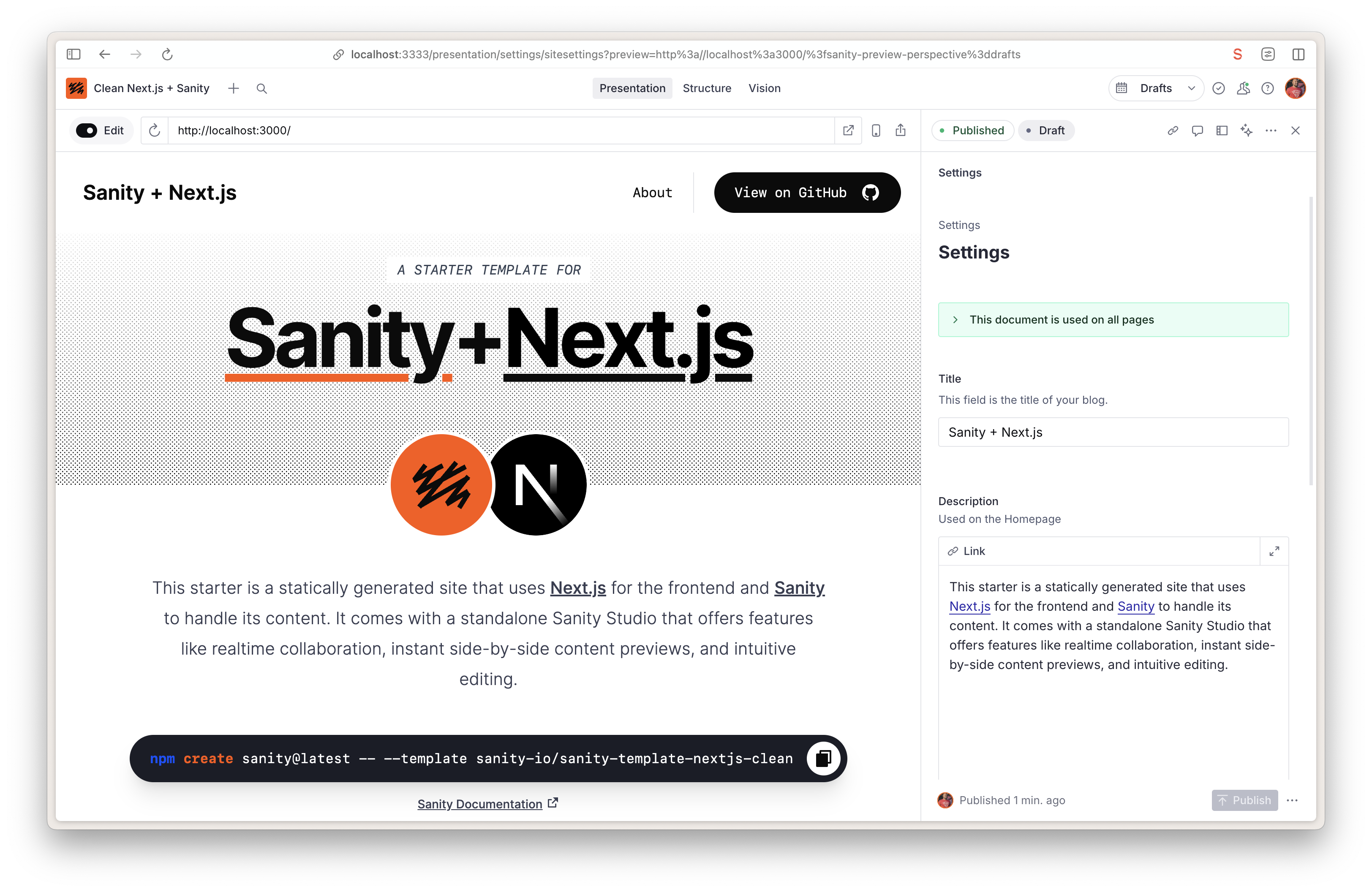
This template includes a Next.js app with a Sanity Studio – an open-source React application that connects to your Sanity project’s hosted dataset. The Studio is configured locally and can then be deployed for content collaboration.
Features
Next.js 16 for Performance: Leverage the power of Next.js 16 App Router for blazing-fast performance and SEO-friendly static sites.
Real-time Visual Editing: Edit content live with Sanity's Presentation Tool and see updates in real time.
Live Content: The Live Content API allows you to deliver live, dynamic experiences to your users without the complexity and scalability challenges that typically come with building real-time functionality.
Customizable Pages with Drag-and-Drop: Create and manage pages using a page builder with dynamic components and Drag-and-Drop Visual Editing.
Powerful Content Management: Collaborate with team members in real-time, with fine-grained revision history.
AI-powered Media Support: Auto-generate alt text with Sanity AI Assist.
On-demand Publishing: No waiting for rebuilds—new content is live instantly with Incremental Static Revalidation.
Easy Media Management: Integrated Unsplash support for seamless media handling.
Demo
https://template-nextjs-clean.sanity.dev
Getting Started
Installing the template
Already deployed with Vercel? If you've already deployed using the Sanity + Vercel Integration or one-click Vercel button, please visit our Vercel deployment instructions to set up your local environment and deploy Sanity Studio.
1. Initialize template with Sanity CLI
Run the command in your Terminal to initialize this template on your local computer.
See the documentation if you are having issues with the CLI.
2. Run Studio and Next.js app locally
Navigate to the template directory using cd <your app name>, and start the development servers by running the following command
npm run dev
3. Open the app and sign in to the Studio
Open the Next.js app running locally in your browser on http://localhost:3000.
Open the Studio running locally in your browser on http://localhost:3333. You should now see a screen prompting you to log in to the Studio. Use the same service (Google, GitHub, or email) that you used when you logged in to the CLI.
Adding content with Sanity
1. Publish your first document
The template comes pre-defined with a schema containing Page, Post, Person, and Settings document types.
From the Studio, click "+ Create" and select the Post document type. Go ahead and create and publish the document.
Your content should now appear in your Next.js app (http://localhost:3000) as well as in the Studio on the "Presentation" Tab
2. Import Sample Data (optional)
You may want to start with some sample content and we've got you covered. Run this command from the root of your project to import the provided dataset (sample-data.tar.gz) into your Sanity project. This step is optional but can be helpful for getting started quickly.
npm run import-sample-data
3. Extending the Sanity schema
The schema for the Post document type is defined in the studio/src/schemaTypes/post.ts file. You can add more document types to the schema to suit your needs.
Deploying your application and inviting editors
1. Deploy Sanity Studio
Your Next.js frontend (/frontend) and Sanity Studio (/studio) are still only running on your local computer. It's time to deploy and get it into the hands of other content editors.
Back in your Studio directory (/studio), run the following command to deploy your Sanity Studio.
npx sanity deploy
2. Deploy Next.js app to Vercel
You have the freedom to deploy your Next.js app to your hosting provider of choice. With Vercel and GitHub being a popular choice, we'll cover the basics of that approach.
Create a GitHub repository from this project. Learn more.
Create a new Vercel project and connect it to your Github repository.
Set the Root Directory to your Next.js app.
Configure your Environment Variables.
3. Invite a collaborator
Now that you’ve deployed your Next.js application and Sanity Studio, you can optionally invite a collaborator to your Studio. Open up Manage, select your project and click "Invite project members"
They will be able to access the deployed Studio, where you can collaborate together on creating content.
How active is development on sanity-io/sanity-template-nextjs-clean?
The most recent commit recorded on sanity-io/sanity-template-nextjs-clean was 10 days ago, based on the GitHub push timestamp. The repository has 127 forks — one of the better signals of community interest.
How many stars does sanity-io/sanity-template-nextjs-clean have?
sanity-io/sanity-template-nextjs-clean has 411 GitHub stars — refresh the page for the live number, or check github.com/sanity-io/sanity-template-nextjs-clean. TopGit mirrors GitHub's count but does not claim minute-by-minute accuracy.
What is sanity-io/sanity-template-nextjs-clean?
sanity-io/sanity-template-nextjs-clean (sanity-io/sanity-template-nextjs-clean) is a TypeScript project on GitHub. From the project's own README: A clean Next.js template with a native authoring experience
What language is sanity-io/sanity-template-nextjs-clean written in?
sanity-io/sanity-template-nextjs-clean is written primarily in TypeScript. GitHub's language field is based on the largest share of bytes in the default branch.
What topics is sanity-io/sanity-template-nextjs-clean associated with?
GitHub's repository topics for sanity-io/sanity-template-nextjs-clean: "team-ecosystem". TopGit's editorial category is open-source.
Read full README in the tab above.
Want a second opinion on sanity-template-nextjs-clean?
Ask an AI that can read this page — one click and you get its take on sanity-template-nextjs-clean.

 /sanity-template-nextjs-clean