5.7k GitHub stars and counting — softprops/action-gh-release is a TypeScript project TopGit is tracking across repositories on the platform. 📦 :octocat: GitHub Action for creating GitHub Releases
Snapshot summary built from the project's own GitHub metadata — there's no written TopGit review yet. The page will update automatically when a full review is published.
WHY NO REVIEW YET
TopGit writes full reviews for the most-starred, most-requested repositories. This page is a snapshot until then — see the READ ME tab for the original README in full.
A GitHub Action for creating GitHub Releases on Linux, Windows, and macOS virtual environments
🤸 Usage
🚥 Limit releases to pushes to tags
⬆️ Uploading release assets
📝 External release notes
💅 Customizing
inputs
outputs
environment variables
Permissions
🤸 Usage
🚥 Limit releases to pushes to tags
Typically usage of this action involves adding a step to a build that
is gated pushes to git tags. You may find step.if field helpful in accomplishing this
as it maximizes the reuse value of your workflow for non-tag pushes.
v2.6.2 is the final v2 release and is no longer maintained or supported. It
uses the Node 20 runtime deprecated by GitHub Actions.
Upgrade to v3, which runs on Node 24. If a problem still reproduces on the
latest v3, open a new issue with the exact action ref, workflow run URL,
runner, and relevant logs.
You can configure a number of options for your
GitHub release and all are optional.
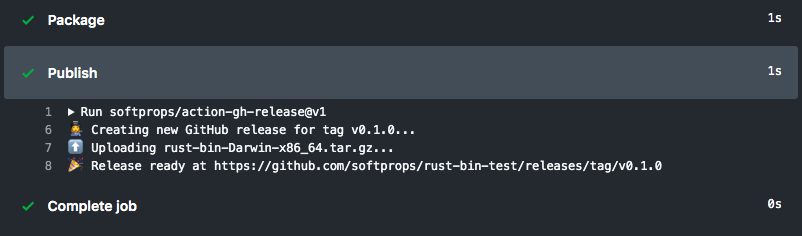
A common case for GitHub releases is to upload your binary after its been validated and packaged.
Use the with.files input to declare a newline-delimited list of glob expressions matching the files
you wish to upload to GitHub releases. If you'd like you can just list the files by name directly.
If a tag already has a GitHub release, the existing release will be updated with the release assets.
Below is an example of uploading a single asset named Release.txt
⚠️ Note: Notice the | in the yaml syntax above ☝️. That lets you effectively declare a multi-line yaml string. You can learn more about multi-line yaml syntax here
⚠️ Note for Windows: Both \ and / path separators are accepted in files globs. If you need to match a literal glob metacharacter such as [ or ], keep escaping the metacharacter itself in the pattern.
If your release assets are generated under a subdirectory, set working_directory
and keep the files patterns relative to that directory.
Many systems exist that can help generate release notes for you. This action supports
loading release notes from a path in your repository's build to allow for the flexibility
of using any changelog generator for your releases, including a human 👩💻
name: Main

on: push

jobs:
  build:
    runs-on: ubuntu-latest
    steps:
      - name: Checkout
        uses: actions/checkout@v6
      - name: Generate Changelog
        run: echo "# Good things have arrived" > ${{ github.workspace }}-CHANGELOG.txt
      - name: Release
        uses: softprops/action-gh-release@v3
        if: github.ref_type == 'tag'
        with:
          body_path: ${{ github.workspace }}-CHANGELOG.txt
          repository: my_gh_org/my_gh_repo
          # note you'll typically need to create a personal access token
          # with permissions to create releases in the other repo.
          # A non-empty explicit token overrides GITHUB_TOKEN.
          # Omit the input to use github.token; passing "" treats the token as unset.
          token: ${{ secrets.CUSTOM_GITHUB_TOKEN }}
When you use GitHub's built-in generate_release_notes support, you can optionally
pin the comparison base explicitly with previous_tag. This is useful when the default
comparison range does not match the release series you want to publish.
Text communicating notable changes in this release
body_path
String
Path to load text communicating notable changes in this release
draft
Boolean
Keep the release as a draft. Defaults to false. When reusing an existing draft release, set this to true to keep it draft; omit it to publish after upload.
prerelease
Boolean
Indicator of whether or not is a prerelease
preserve_order
Boolean
Upload assets sequentially in the provided order. This controls the action's upload behavior, but it does not control the final asset ordering that GitHub may display on the release page or return from the Releases API.
files
String
Newline-delimited globs of paths to assets to upload for release. Escape glob metacharacters when you need to match a literal filename that contains them, such as [ or ]. ~/... expands to the runner home directory. On Windows, both \ and / separators are accepted. GitHub may normalize raw asset filenames that contain special characters; the action restores the asset label when possible, but the final download name remains GitHub-controlled.
working_directory
String
Base directory to resolve files globs against. Use this when release assets live under a subdirectory. If omitted, the action resolves files from ${{ github.workspace }}.
overwrite_files
Boolean
Indicator of whether files should be overwritten when they already exist. Defaults to true
name
String
Name of the release. defaults to tag name
tag_name
String
Name of a tag. defaults to github.ref_name. refs/tags/<name> values are normalized to <name>.
fail_on_unmatched_files
Boolean
Indicator of whether to fail if any of the files globs match nothing
repository
String
Name of a target repository in <owner>/<repo> format. Defaults to GITHUB_REPOSITORY env variable
target_commitish
String
Commitish value that determines where the Git tag is created from. Can be any branch or commit SHA. Defaults to repository default branch. When creating a new tag for an older commit, github.token may not have permission to create the ref; use a PAT or another token with sufficient contents permissions if you hit 403 Resource not accessible by integration.
token
String
Authorized GitHub token or PAT. Defaults to ${{ github.token }} when omitted. A non-empty explicit token overrides GITHUB_TOKEN. Passing "" treats the token as explicitly unset, so omit the input entirely or use an expression such as `${{ inputs.token
discussion_category_name
String
If specified, a discussion of the specified category is created and linked to the release. The value must be a category that already exists in the repository. For more information, see "Managing categories for discussions in your repository."
generate_release_notes
Boolean
Whether to automatically generate the name and body for this release. If name is specified, the specified name will be used; otherwise, a name will be automatically generated. If body is specified, the body will be pre-pended to the automatically generated notes. See the GitHub docs for this feature for more information
previous_tag
String
Optional. When generate_release_notes is enabled, use this tag as GitHub's previous_tag_name comparison base. If omitted, GitHub chooses the comparison base automatically.
append_body
Boolean
Append to existing body instead of overwriting it
make_latest
String
Specifies whether this release should be set as the latest release for the repository. Drafts and prereleases cannot be set as latest. Can be true, false, or legacy. Uses GitHub api defaults if not provided
💡 When providing a body and body_path at the same time, body_path will be
attempted first, then falling back on body if the path can not be read from.
💡 When the release info keys (such as name, body, prerelease, etc.) are not
explicitly set and there is already an existing release for the tag, the release
will retain its original info.
💡 Draft status is handled separately during finalization. If the action reuses an
existing draft release, set draft: true to keep it draft; if draft is omitted,
the action will publish that draft after uploading assets.
💡 GitHub immutable releases lock assets after publication. Standard releases in this
action already upload assets before publishing, but prereleases stay published by
default so release.prereleased workflows keep firing. On an immutable-release
repository, use draft: true for prereleases that upload assets, then publish that
draft later and subscribe downstream workflows to release.published.
💡 files is glob-based, so literal filenames that contain glob metacharacters such as
[ or ] must be escaped in the pattern.
💡 GitHub may normalize or rewrite uploaded asset filenames that contain special or
non-ASCII characters. This action uploads the requested file, but it cannot force the
final asset name that GitHub stores or returns from the Releases API. In particular,
4-byte Unicode characters such as emoji cannot currently be restored via asset labels.
outputs
The following outputs can be accessed via ${{ steps.<step-id>.outputs }} from this action
Name
Type
Description
url
String
Github.com URL for the release
id
String
Release ID
upload_url
String
URL for uploading assets to the release
assets
String
JSON array containing information about each updated (newly uploaded or overwritten) asset, in the format given here (minus the uploader field)
As an example, you can use ${{ fromJSON(steps.<step-id>.outputs.assets)[0].browser_download_url }} to get the download URL of the first asset.
environment variables
The following step.env keys are allowed as a fallback but deprecated in favor of using inputs.
Name
Description
GITHUB_TOKEN
GITHUB_TOKEN as provided by secrets
GITHUB_REPOSITORY
Name of a target repository in <owner>/<repo> format. defaults to the current repository
⚠️ Note: This action was previously implemented as a Docker container, limiting its use to GitHub Actions Linux virtual environments only. With recent releases, we now support cross platform usage. You'll need to remove the docker:// prefix in these versions
Permissions
This Action requires the following permissions on the GitHub integration token:
permissions:
  contents: write
When used with discussion_category_name, additional permission is needed:
permissions:
  contents: write
  discussions: write
GitHub token permissions can be set for an individual job, workflow, or for Actions as a whole.
Note that if you intend to run workflows on the release event (on: { release: { types: [published] } }), you need to use
a personal access token for this action, as the default secrets.GITHUB_TOKEN does not trigger another workflow.
Does softprops/action-gh-release have a project website?
No homepage URL was recorded for softprops/action-gh-release in TopGit's last sync. The README tab above frequently contains screenshots and demo links, or check the repository description on GitHub.
How active is development on softprops/action-gh-release?
The most recent commit recorded on softprops/action-gh-release was 6 days ago, based on the GitHub push timestamp. The repository has 637 forks — one of the better signals of community interest.
Is softprops/action-gh-release open source?
Yes — softprops/action-gh-release ships under the MIT license, which makes its source code freely readable (and, depending on license terms, forkable and reusable). Source: github.com/softprops/action-gh-release.
What license does softprops/action-gh-release use?
softprops/action-gh-release is released under the MIT license. Always verify the LICENSE file directly on GitHub for the authoritative terms — license strings can be edited out of sync with a project's actual stance.
What topics is softprops/action-gh-release associated with?
GitHub's repository topics for softprops/action-gh-release: "github-actions", "github-releases". TopGit's editorial category is open-source.
Where do I read more about softprops/action-gh-release?
This TopGit page is a snapshot — the READ ME tab shows the project's own README content (links stripped, images preserved). The GitHub repository at github.com/softprops/action-gh-release is the definitive source.
Read full README in the tab above.
Curious whether action-gh-release is right for you?
Let ChatGPT, Claude, or Perplexity look into it — click below and see what AI actually says about action-gh-release.
 /action-gh-release