TeamNewPipe/NewPlayer sits at 178 stars on GitHub, written primarily in Kotlin. A media player framework based on ExoPlayer. Separate from NewPipe to enforce modularity.
Snapshot summary built from the project's own GitHub metadata — there's no written TopGit review yet. The page will update automatically when a full review is published.
WHY NO REVIEW YET
TopGit writes full reviews for the most-starred, most-requested repositories. This page is a snapshot until then — see the READ ME tab for the original README in full.
:rotating_light: THIS REPOSITORY HAS MOVED :rotating_light:
NewPlayer is now on Codeberg
https://codeberg.org/TeamNewPipe/NewPlayer
This GitHub repository is archived and will no longer receive updates, bug fixes, or new features.
All issues, pull requests, and contributions should go to the Codeberg repository.
Please update your bookmarks and remotes.
NewPlayer
NewPipe's next media player framework
Icon by Jaime López
So what is NewPlayer then?
NewPlayer is a media framework, which is independent of NewPipe itself. I decided to make it independent, because one of the big issues we have with the current player is that it is deeply integrated into NewPipe. Therefore, I wanted to make NewPlayer a separate module in order to enforce that the interface between NewPipe and the player is only as big as necessary. This also has the advantage that NewPlayer can be used independently of NewPipe itself, which means it can be used in other apps too.
Content
Quick overview
Preview
Documentation
Getting started
How NewPlayer works
Code Documentation
Let me give you a Profile about NewPlayer:
It is a module, separate from NewPipe and can be used as an independent player framework
It is based on the Media3 library
Its UI is created with Jetpack Compose
It's fully written in Kotlin
Its UI resembles the UI of the current NewPipe player, but improves it
Add android:supportsPictureInPicture="true" to the <activity> tag of the activity that will hold the NewPlayerUI
Also add android:configChanges="screenSize|smallestScreenSize|screenLayout|orientation" to the <activity> tag. This will ensure a smooth transition from and to PiP mode. However, be aware that when you do this, a screen rotation or size change does not trigger an activity reconfiguration. You may have to trigger this by yourself. See this code from the text app if you want to know how you could achieve this. However, bear in mind that if you use compose you might not need a screen reconfiguration at all. There just use androidx.adaptive framework to handle screen rotation foo.
Install NewPlayer in your Activity's layout
NewPlayer can be used in a compose as well as the classic views environment.
Use NewPlayer with Compose
You can add NewPlayer in a compose environment by using the NewPlayerUI composable for now we will add it with a dummy view model (later more about that):
NewPlayerUI(NewPlayerViewModelDummy())
Use NewPlayer with views
For a views environment (and for compatibility with NewPipe before its UI refactoring), NewPlayer provides a NewPlayerView. This acts as a simple wrapper for the NewPlayerUI composable.
In order to use it simply put it into the layout of the activity/fragment that should host NewPlayer. You can put multiple instances of NewPlayerView into your layout NewPlayerViewModel. You should only have one instance of NewPlayerView in your layout.
You can find an exmapple of how to use NewPlayerView in the test-app (If there are still two versions of NewPlayerView in the test-app's layout: Dear NewPlayer devs, please make it one asap.)
Remember to also give the NewPlayerView an instance of NewPlayerViewModel in the onCreate() function of your activity/fragment.
Install NewPlayer in your code
NewPlayer requires Hilt for dependency injection. Therefore, you must create an instance of the NewPlayer object through a Component that must install the NewPlayer instance in the Application instance. The NewPlayer instance must live for as long as the app lives. An example of how to do this can be found again in the test-app.
In order to use NewPlayer, the NewPlayer object needs an instance of the MediaRepository. The MediaRepository is the primary way that NewPlayer can access data and request the information it needs to operate. In other words you provide NewPlayer with the information it needs through the MediaRepository. Because of this you will have to implement this yourself and provide it to NewPlayer. For the sake of simplicity however for now you can give the NewPlayer object the PlaceHolderRepository. This repository implementation does nothing but at least allows you to continue installing NewPlayer without a functioning Repository yet.
Install NewPlayer in the NewPlayerViewModel
Eventually you will have to put install the NewPlayer instance in the NewPlayerViewModel instance in the Activity that hosts the viewmodel.
This way NewPlayer can actually talk to your UI. You can do this by simply setting the viewmodel's NewPlayer: myNewPlayerViewModel.newPlayer = myNewPlayer.
Give NewPlayer access to your media
You can do this by implementing your own MediaRepository. More information can be found about thins in the MediaRepository code documentation. There is also an example implementation of it in the test-app.
Do advanced things
Like applying caching and prefetching to your media repository using the meta MediaRepository implementations, or perform error handling and error recovering. TODO: Write the documentation for this
How does NewPlayer work
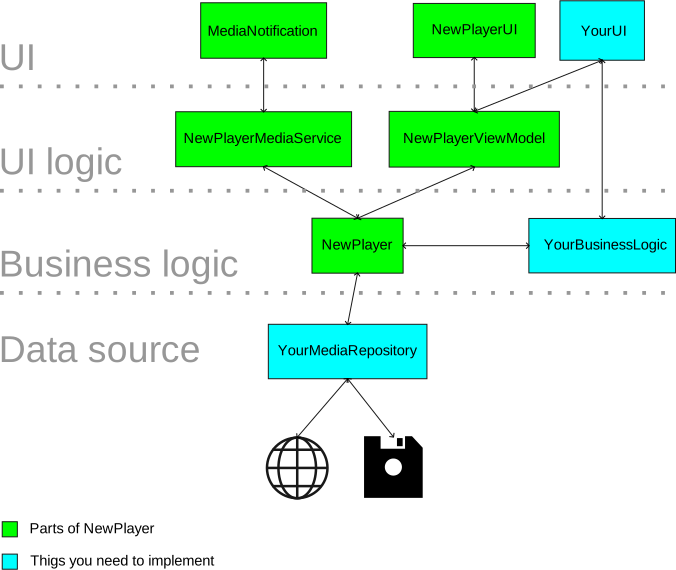
NewPlayer uses MVVM architecture design pattern.
NewPlayerUI
This contains the whole UI of NewPlayer. This composable represents all. From the fullscreen video playback mode to the embedded audio playback mode. This composable resizes or changes its content depending on what should be displayed.
By itself it is dump. It will only render out what is stated by NewPlayerUIState, and forward any input to the view model. The logic behind the UI is defined by NewPlayerViewModel instead.
NewPlayerViewModel
The NewPlayerViewModel contains the logic for the UI itself. This will produce a NewPlayerUIState whenever the NewPlayerUI should change. It will not take care about the playback or data gathering logic. This is the duty of the NewPlayer object.
NewPlayerUIState
This defines a state of the UI. NewPlayerUI basically just renders what this object defines. It is changed and produced by NewPlayerViewModel whenever the UI should be updated.
NewPlayer
This object contains the business logic of NewPlayer. It contains the actual instance of the Media3 ExoPlayer. You can controll playback and else through this object. However, also the NewPlayerViewModel as well as NewPlayer's implementation of the MediaSessionService will interact with this object.
MediaRepository
The MediaRepository is NewPlayer's way to access data. Through that repository NewPlayers is getting the information it needs to display on screen. The repository can deliver data that is either stored on disk or is available online.
NewPlayer itself only supplies the interface of the MediaRepository. It is the duty of the developer using NewPlayer to implement it.
You can find more information about the MediaRepository at its code documentation.
Does TeamNewPipe/NewPlayer have a project website?
No homepage URL was recorded for TeamNewPipe/NewPlayer in TopGit's last sync. The README tab above frequently contains screenshots and demo links, or check the repository description on GitHub.
Does TeamNewPipe/NewPlayer have any tags?
TopGit's last sync did not record any GitHub topics for TeamNewPipe/NewPlayer. GitHub topics appear in the right sidebar of a repository page; that's the authoritative place to check.
How active is development on TeamNewPipe/NewPlayer?
The most recent commit recorded on TeamNewPipe/NewPlayer was 5 months ago, based on the GitHub push timestamp. The repository has 26 forks — one of the better signals of community interest.
Is TeamNewPipe/NewPlayer open source?
Yes — TeamNewPipe/NewPlayer ships under the GPL-3.0 license, which makes its source code freely readable (and, depending on license terms, forkable and reusable). Source: github.com/TeamNewPipe/NewPlayer.
What license does TeamNewPipe/NewPlayer use?
TeamNewPipe/NewPlayer is released under the GPL-3.0 license. Always verify the LICENSE file directly on GitHub for the authoritative terms — license strings can be edited out of sync with a project's actual stance.
Where do I read more about TeamNewPipe/NewPlayer?
This TopGit page is a snapshot — the READ ME tab shows the project's own README content (links stripped, images preserved). The GitHub repository at github.com/TeamNewPipe/NewPlayer is the definitive source.
Read full README in the tab above.
Still deciding about NewPlayer?
One click hands the question to an AI along with this page — see what it says about NewPlayer.

 /NewPlayer