1.0k GitHub stars and counting — tidyverse/readr is a R project TopGit is tracking across repositories on the platform. Read flat files (csv, tsv, fwf) into R
Snapshot summary built from the project's own GitHub metadata — there's no written TopGit review yet. The page will update automatically when a full review is published.
WHY NO REVIEW YET
TopGit writes full reviews for the most-starred, most-requested repositories. This page is a snapshot until then — see the READ ME tab for the original README in full.
The goal of readr is to provide a fast and friendly way to read
rectangular data from delimited files, such as comma-separated values
(CSV) and tab-separated values (TSV). It is designed to parse many types
of data found in the wild, while providing an informative problem report
when parsing leads to unexpected results. If you are new to readr, the
best place to start is the data import
chapter in R for Data Science.
Installation
# The easiest way to get readr is to install the whole tidyverse:
install.packages("tidyverse")

# Alternatively, install just readr:
install.packages("readr")
# Or you can install the development version from GitHub:
# install.packages("pak")
pak::pak("tidyverse/readr")
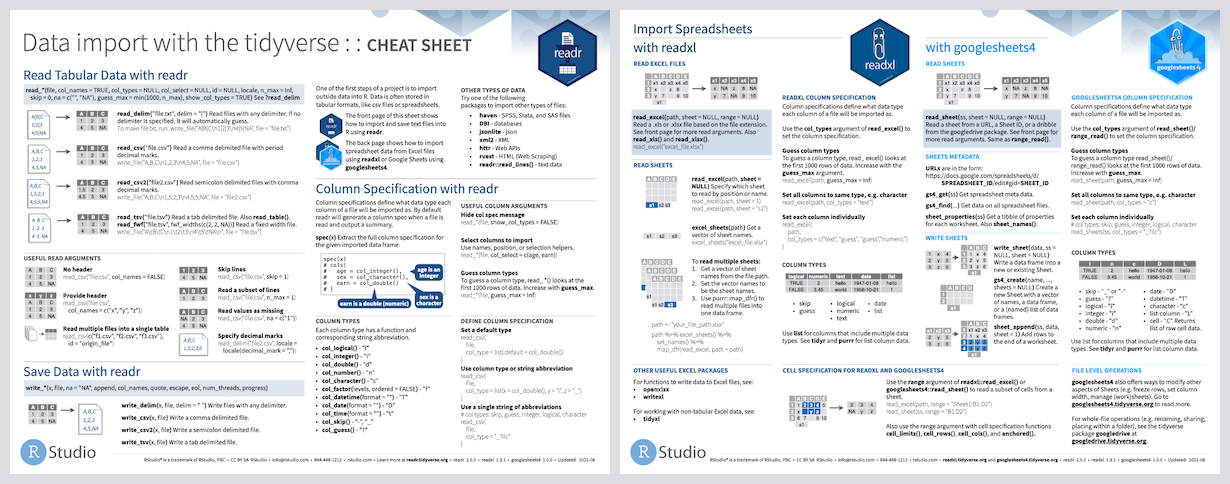
Cheatsheet
Usage
readr is part of the core tidyverse, so you can load it with:
Of course, you can also load readr as an individual package:
library(readr)
To read a rectangular dataset with readr, you combine two pieces: a
function that parses the lines of the file into individual fields and a
column specification.
readr supports the following file formats with these read_*()
functions:
read_csv(): comma-separated values (CSV)
read_tsv(): tab-separated values (TSV)
read_csv2(): semicolon-separated values with , as the decimal mark
read_delim(): delimited files (CSV and TSV are important special
cases)
read_fwf(): fixed-width files
read_table(): whitespace-separated files
read_log(): web log files
A column specification describes how each column should be converted
from a character vector to a specific data type (e.g. character,
numeric, datetime, etc.). In the absence of a column specification,
readr will guess column types from the data. vignette("column-types")
gives more detail on how readr guesses the column types. Column type
guessing is very handy, especially during data exploration, but it’s
important to remember these are just guesses. As any data analysis
project matures past the exploratory phase, the best strategy is to
provide explicit column types.
The following example loads a sample file bundled with readr and guesses
the column types:
(chickens <- read_csv(readr_example("chickens.csv")))
#> Rows: 5 Columns: 4
#> ── Column specification ────────────────────────────────────────────────────────
#> Delimiter: ","
#> chr (3): chicken, sex, motto
#> dbl (1): eggs_laid
#>
#> ℹ Use `spec()` to retrieve the full column specification for this data.
#> ℹ Specify the column types or set `show_col_types = FALSE` to quiet this message.
#> # A tibble: 5 × 4
#>   chicken                 sex     eggs_laid motto
#>   <chr>                   <chr>       <dbl> <chr>
#> 1 Foghorn Leghorn         rooster         0 That's a joke, ah say, that's a jok…
#> 2 Chicken Little          hen             3 The sky is falling!
#> 3 Ginger                  hen            12 Listen. We'll either die free chick…
#> 4 Camilla the Chicken     hen             7 Bawk, buck, ba-gawk.
#> 5 Ernie The Giant Chicken rooster         0 Put Captain Solo in the cargo hold.
Note that readr prints the column types – the guessed column types, in
this case. This is useful because it allows you to check that the
columns have been read in as you expect. If they haven’t, that means you
need to provide the column specification. This sounds like a lot of
trouble, but luckily readr affords a nice workflow for this. Use
spec() to retrieve the (guessed) column specification from your
initial effort.
Now you can copy, paste, and tweak this, to create a more explicit readr
call that expresses the desired column types. Here we express that sex
should be a factor with levels rooster and hen, in that order, and
that eggs_laid should be integer.
chickens <- read_csv(
  readr_example("chickens.csv"),
  col_types = cols(
    chicken   = col_character(),
    sex       = col_factor(levels = c("rooster", "hen")),
    eggs_laid = col_integer(),
    motto     = col_character()
  )
)
chickens
#> # A tibble: 5 × 4
#>   chicken                 sex     eggs_laid motto
#>   <chr>                   <fct>       <int> <chr>
#> 1 Foghorn Leghorn         rooster         0 That's a joke, ah say, that's a jok…
#> 2 Chicken Little          hen             3 The sky is falling!
#> 3 Ginger                  hen            12 Listen. We'll either die free chick…
#> 4 Camilla the Chicken     hen             7 Bawk, buck, ba-gawk.
#> 5 Ernie The Giant Chicken rooster         0 Put Captain Solo in the cargo hold.
vignette("readr") gives an expanded introduction to readr.
Editions
readr got a new parsing engine in version 2.0.0 (released July 2021). In
this so-called second edition, readr calls vroom::vroom(), by default.
The parsing engine in readr versions prior to 2.0.0 is now called the
first edition. If you’re using readr >= 2.0.0, you can still access
first edition parsing via the functions with_edition(1, ...) and
local_edition(1). And, obviously, if you’re using readr < 2.0.0, you
will get first edition parsing, by definition, because that’s all there
is.
We will continue to support the first edition for a number of releases,
but the overall goal is to make the second edition uniformly better than
the first. Therefore the plan is to eventually deprecate and then remove
the first edition code. New code and actively-maintained code should use
the second edition. The workarounds with_edition(1, ...) and
local_edition(1) are offered as a pragmatic way to patch up legacy
code or as a temporary solution for infelicities identified as the
second edition matures.
Alternatives
There are two main alternatives to readr: base R and data.table’s
fread(). The most important differences are discussed below.
Base R
Compared to the corresponding base functions, readr functions:
Use a consistent naming scheme for the parameters (e.g. col_names
and col_types not header and colClasses).
Are generally much faster (up to 10x-100x) depending on the dataset.
Leave strings as is by default, and automatically parse common
date/time formats.
Have a helpful progress bar if loading is going to take a while.
All functions work exactly the same way regardless of the current
locale. To override the US-centric defaults, use locale().
data.table and fread()
data.table has a function
similar to read_csv() called fread(). Compared to fread(), readr
functions:
Are sometimes slower, particularly on numeric heavy data.
Can automatically guess some parameters, but basically encourage
explicit specification of, e.g., the delimiter, skipped rows, and the
header row.
Follow tidyverse-wide conventions, such as returning a tibble, a
standard approach for column name repair, and a common mini-language
for column selection.
Acknowledgements
Thanks to:
Joe Cheng for showing me the beauty of
deterministic finite automata for parsing, and for teaching me why I
should write a tokenizer.
JJ Allaire for helping me come up with
a design that makes very few copies, and is easy to extend.
tidyverse/readr has 1.0k GitHub stars — refresh the page for the live number, or check github.com/tidyverse/readr. TopGit mirrors GitHub's count but does not claim minute-by-minute accuracy.
Is tidyverse/readr open source?
TopGit's metadata for tidyverse/readr does not record a license. Most public repositories on GitHub ARE open source, but the exact terms vary — verify by opening the LICENSE file directly.
What is tidyverse/readr?
tidyverse/readr (tidyverse/readr) is a R project on GitHub. From the project's own README: Read flat files (csv, tsv, fwf) into R
Where can I see tidyverse/readr in action?
The project maintains a homepage at https://readr.tidyverse.org. The README tab on this page also usually contains screenshots and a quickstart.
Where do I read more about tidyverse/readr?
This TopGit page is a snapshot — the READ ME tab shows the project's own README content (links stripped, images preserved). The GitHub repository at github.com/tidyverse/readr is the definitive source.
Read full README in the tab above.
Want a second opinion on readr?
Ask an AI that can read this page — one click and you get its take on readr.
 /readr