A look at typesense/firestore-typesense-search: 182 stars on GitHub, written primarily in JavaScript. Firebase Extension to automatically push Firestore documents to Typesense for full-text search with typo tolerance, faceting, and more
Snapshot summary built from the project's own GitHub metadata — there's no written TopGit review yet. The page will update automatically when a full review is published.
WHY NO REVIEW YET
TopGit writes full reviews for the most-starred, most-requested repositories. This page is a snapshot until then — see the READ ME tab for the original README in full.
A Firebase extension to sync data from your Firestore collection to Typesense,
to be able to do full-text fuzzy search on your Firestore data, with typo tolerance, faceting, filtering, sorting, curation, synonyms, geosearch and more.
This extension listens to your specified Firestore collection and syncs Firestore documents to Typesense
on creation, updates and deletes. It also provides a function to help you backfill data.
What is Typesense?
If you're new to Typesense, it is an open source search engine that is simple to use, run and scale, with clean APIs and documentation. Think of it as an open source alternative to Algolia and an easier-to-use, batteries-included alternative to ElasticSearch. Get a quick overview from this guide.
⚙️ Usage
Step 1️⃣ : Setup Prerequisites
Before installing this extension, make sure that you have:
Set up a Cloud Firestore database in your Firebase project.
If using Google Workspace for Business, ensure that your default cloud compute based service account has the following roles (which can be found in the Google Cloud Console IAM section):
Artifact Registry Administrator
Artifact Registry Create-on-Push Writer
Artifact Registry Service Agent
Logs Writer
Storage Object Viewer
Set up a Typesense cluster on Typesense Cloud or Self-Hosted (free).
Set up a Typesense Collection either through the Typesense Cloud dashboard or
through the API.
[!IMPORTANT]
☝️ #3 above is a commonly missed step. This extension does not create the Typesense Collection for you. Instead it syncs data to a Typesense collection you've already created. If you see an HTTP 404 in the extension logs, it's most likely because of missing this step.
Step 2️⃣ : Install the Extension
You can install this extension either through the Firebase Web console or through the Firebase CLI.
Learn more about installing extensions in the Firebase Extensions documentation: Console, CLI.
Syncing Multiple Firestore collections
[!TIP]
You can install this extension multiple times in your Firebase project by clicking on the installation link above multiple times, and use a different Firestore collection path in each installation instance. Here is a screenshot of how this looks.
[!NOTE]
This release also supports the legacy single-collection params (FIRESTORE_COLLECTION_PATH,
TYPESENSE_COLLECTION_NAME, FIRESTORE_COLLECTION_FIELDS, and FLATTEN_NESTED_DOCUMENTS).
They are deprecated and will log a warning when used. If both config shapes are fully set, the
extension uses the multi-collection params and warns once. If only part of either shape is set,
the install fails with a clear error. For new installs, prefer the multi-collection params
(FIRESTORE_COLLECTION_PATHS, TYPESENSE_COLLECTION_NAMES, FIRESTORE_COLLECTION_FIELDS_LIST,
and FLATTEN_NESTED_DOCUMENTS_LIST).
🎛️ Configuration Parameters
When you install this extension, you'll be able to configure the following parameters:
Parameter
Description
Cloud Functions location
Where do you want to deploy the functions created for this extension? You usually want a location close to your database. For help selecting a location, refer to the location selection guide.
Firestore Database region
Where the Firestore Database that holds the Firestore collection you want to sync into Typesense is located. Refer to the Cloud Firestore locations guide.
Firestore Collection Path
The Firestore collection that needs to be indexed into Typesense.
Firestore Collection Fields
A comma separated list of fields that need to be indexed from each Firestore document. Leave blank to index all fields.
Typesense Hosts
A comma-separated list of Typesense Hosts (only domain without https or port number). For single node clusters, a single hostname is sufficient. For multi-node Highly Available or (Search Delivery Network) SDN Clusters, please be sure to mention all hostnames in a comma-separated list.
Typesense API Key
A Typesense API key with admin permissions. Click on "Generate API Key" in cluster dashboard in Typesense Cloud.
Typesense Collection Name
Typesense collection name to index data into (you need to create this collection in Typesense yourself. This extension does not create the Typesense Collection for you).
Flatten Nested Documents
Should nested documents in Firestore be flattened before they are indexed in Typesense? Set to "Yes" for Typesense Server versions v0.23.1 and below, since indexing Nested objects is natively supported only in Typesense Server v0.24 and above.
Log Typesense Inserts for Debugging
Should data inserted into Typesense be logged in Cloud Logging? This can be useful for debugging, but should not be enabled in production.
⚠️ You'll notice that there is no way to configure the port number or protocol.
This is because this extension only supports connecting to Typesense running HTTPS on Port 443, since your data goes from Firebase to Typesense over the public internet and we want your data to be encrypted in transit.
For Typesense Cloud, HTTPS is already configured for you.
When self-hosting Typesense, you want to make sure you set --api-port=443 and also get an SSL certificate from say LetsEncrypt or any registrar
and configure Typesense to use it using the --ssl-certificate and --ssl-certificate-key server parameters.
Alternatively, if you're running Typesense on your local machine, you can also set up a local HTTPS tunnel using something like ngrok (ngrok http 8108) and use the ngrok hostname in the extension.
Example
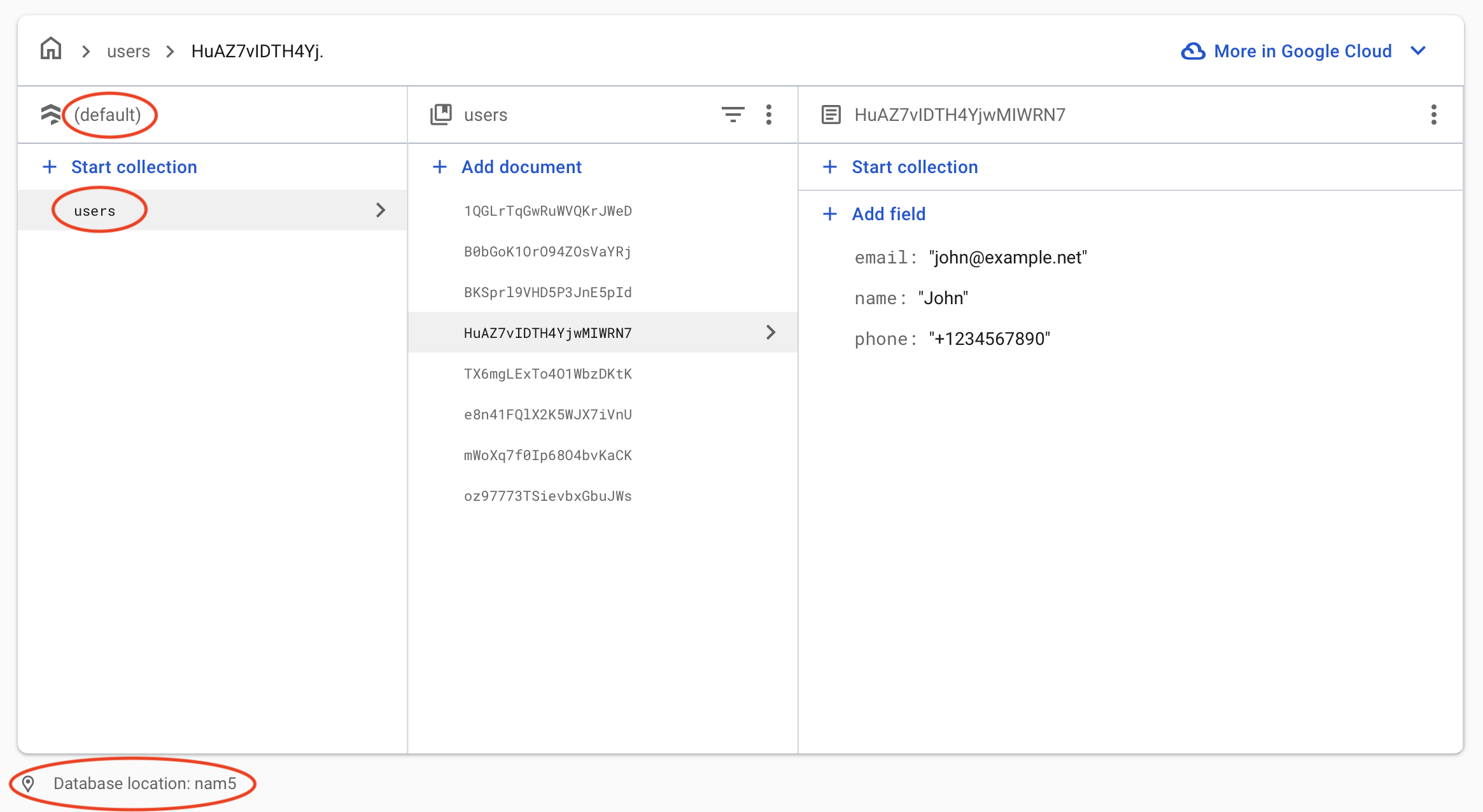
If you have a Firestore database called (default) with a collection inside it called users in the nam5 region like this:
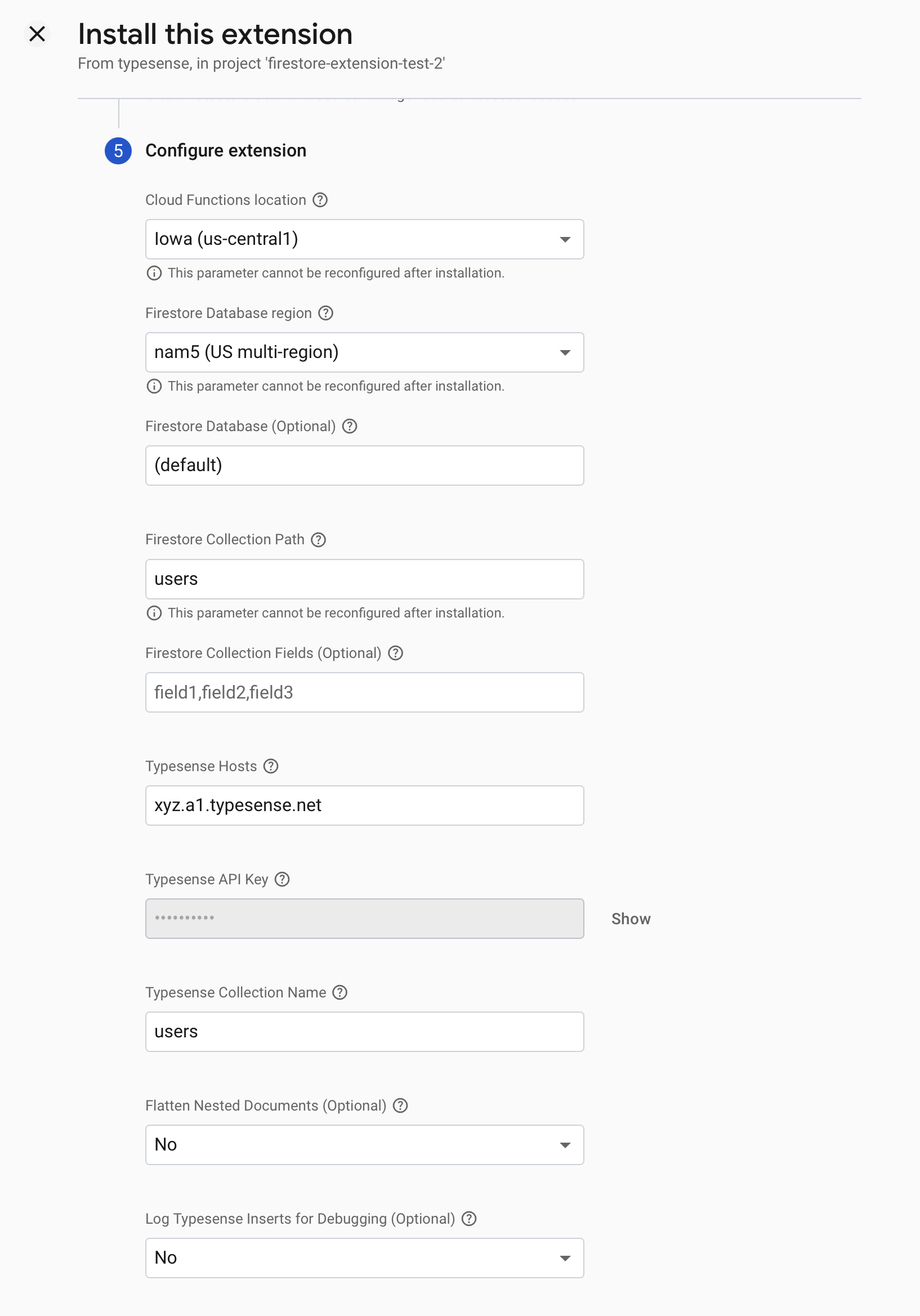
Here's the extension configuration screen with all the options filled out, if you want to sync the users Firestore collection to Typesense:
Step 3️⃣ : [Optional] Backfill existing data
This extension only syncs data that was created or changed in Firestore, after it was installed. In order to backfill data that already exists in your Firestore collection to your Typesense Collection:
Create a new Firestore collection called typesense_sync through the Firestore UI.
Create a new document with the ID backfill and contents of {trigger: true}
[Optional] If you have multiple instances of the extension installed to sync multiple collections, you can specify which particular collections are backfilled by setting the contents of the backfill document in the previous step to {trigger: true, firestore_collections: ["path/to/firestore_collection_1", "path/to/firestore_collection_2"] }
This will trigger the backfill background Cloud function, which will read data from your Firestore collection(s) and create equivalent documents in your Typesense collection.
[!NOTE]
The backfill function is deployed with the Cloud Functions default timeout of 540 seconds (9 minutes). If you're backfilling a large collection (e.g. hundreds of thousands of documents or more) and the function times out before finishing, you can increase the timeout up to 3600 seconds (1 hour) from the Google Cloud Console by editing the backfill Cloud Run service and bumping the request timeout.
☁️ Cloud Functions
indexOnWrite: A function that indexes data into Typesense when it's triggered by Firestore changes.
backfill: A function that backfills data from a Firestore collection into Typesense, triggered when a Firestore document with the path typesense_sync/backfill has the contents of trigger: true.
🔑 Access Required
This extension will operate with the following project IAM roles:
datastore.user (Reason: Required to backfill data from your Firestore collection into Typesense)
🧾 Billing
To install an extension, your project must be on the Blaze (pay as you go) plan.
You will be charged a small amount (typically around $0.01/month) for the Firebase resources required by this extension (even if it is not used).
This extension uses other Firebase and Google Cloud Platform services, which have associated charges if you exceed the service’s free tier:
Cloud Firestore
Cloud Functions (Node.js 14+ runtime. See FAQs)
Usage of this extension also requires you to have a running Typesense cluster either on Typesense Cloud or some
self-hosted server. You are responsible for any associated costs with these services.
Development Workflow
Run Emulator
npm run emulator
npm run typesenseServer
Emulator UI will be accessible at http://localhost:4000.
Local Typesense server will be accessible at http://localhost:8108
Add records in the Firestore UI and they should be created in Typesense.
Run Integration Tests
npm run test
Generate README
The Firebase CLI provides the following convenience command to auto-generate a README file containing content
pulled from extension.yaml file and PREINSTALL.md file:
Please read through the FAQ below, search through past GitHub issues, past threads in our knowledge base and if you're unable to find an answer, please open a GitHub issue in this repo or join our Slack community and ask there.
FAQs
My Typesense collection is empty, even after installing the extension. What could be wrong?
The extension only syncs changes from your Firestore collection from the time when it is installed. To backfill existing data from your Firestore collection into Typesense, you want to run the backfill step described here.
My Typesense collection is missing some records. What could be wrong?
This almost always is because the collection schema in Typesense does not match the structure of the documents in Firebase, and so Typesense is rejecting the documents due to validation failure.
All validation errors returned by Typesense are logged in detail in the Firebase extension logs, which are accessible via the Firebase web console. You want to search the logs for both the backfill function and also the indexing function from this extension.
The backfill function is not getting triggered. What could be wrong?
The backfill function watches for changes to a document with ID called backfill, in a Firestore collection called typesense_sync. This document should have a key called trigger with a boolean value of true. So if you've already created this key, you want to change its value to false and then change it back to true to re-trigger the backfill function.
How do I sync multiple collections?
You can install this extension multiple times and set a different Firestore collection path for each instance. Read more here
How do I backfill just a single collection, when I've installed the extension multiple times?
See the last bullet point under the backfilling instructions here
Is typesense/firestore-typesense-search open source?
Yes — typesense/firestore-typesense-search ships under the Apache-2.0 license, which makes its source code freely readable (and, depending on license terms, forkable and reusable). Source: github.com/typesense/firestore-typesense-search.
What is typesense/firestore-typesense-search?
typesense/firestore-typesense-search (typesense/firestore-typesense-search) is a JavaScript project on GitHub. From the project's own README: Firebase Extension to automatically push Firestore documents to Typesense for full-text search with typo tolerance, faceting, and more
What license does typesense/firestore-typesense-search use?
typesense/firestore-typesense-search is released under the Apache-2.0 license. Always verify the LICENSE file directly on GitHub for the authoritative terms — license strings can be edited out of sync with a project's actual stance.
Where can I see typesense/firestore-typesense-search in action?
The project maintains a homepage at https://extensions.dev/extensions/typesense/firestore-typesense-search. The README tab on this page also usually contains screenshots and a quickstart.
Where do I read more about typesense/firestore-typesense-search?
This TopGit page is a snapshot — the READ ME tab shows the project's own README content (links stripped, images preserved). The GitHub repository at github.com/typesense/firestore-typesense-search is the definitive source.
Read full README in the tab above.
Want a second opinion on firestore-typesense-search?
Ask an AI that can read this page — one click and you get its take on firestore-typesense-search.
 /firestore-typesense-search