Indexed by TopGit from live GitHub metadata: tyxsspa/AnyText has 4.9k stars, written primarily in Python. Official implementation code of the paper <AnyText: Multilingual Visual Text Generation And Editing>
Snapshot summary built from the project's own GitHub metadata — there's no written TopGit review yet. The page will update automatically when a full review is published.
WHY NO REVIEW YET
TopGit writes full reviews for the most-starred, most-requested repositories. This page is a snapshot until then — see the READ ME tab for the original README in full.
AnyText: Multilingual Visual Text Generation And Editing
📌News
[2025.03.03] - 🔥🔥🔥We have open-sourced AnyText2, which is faster, performs better, and allows you to set properties such as font and color for the text! See [demo] [code] [ckpt]!
[2024.04.18] - 👏👏👏The training code and dataset(AnyWord-3M) are released!
[2024.04.18] - You can merge weights from self-trained or community models into AnyText now, including all base models and LoRA models based on SD1.5. Have fun!
[2024.02.21] - The evaluation code and dataset(AnyText-benchmark) are released.
[2024.02.06] - Happy Lunar New Year Everyone! We've launched a fun app(表情包大师/MeMeMaster) on ModelScope and HuggingFace to create cute meme stickers. Come and have fun with it!
[2024.01.17] - 🎉AnyText has been accepted by ICLR 2024(Spotlight)!
[2024.01.04] - FP16 inference is available, 3x faster! Now the demo can be deployed on GPU with >8GB memory. Enjoy!
[2024.01.04] - HuggingFace Online demo is available here!
[2023.12.28] - ModelScope Online demo is available here!
[2023.12.27] - 🧨We released the latest checkpoint(v1.1) and inference code, check on ModelScope in Chinese.
[2023.12.05] - The paper is available at here.
For more AIGC related works of our group, please visit here, and we are seeking collaborators and research interns(Email us).
⏰TODOs
Release the model and inference code
Provide publicly accessible demo link
Provide a free font file(🤔)
Release tools for merging weights from community models or LoRAs
Support AnyText in stable-diffusion-webui(🤔)
Release AnyText-benchmark dataset and evaluation code
Release AnyWord-3M dataset and training code
💡Methodology
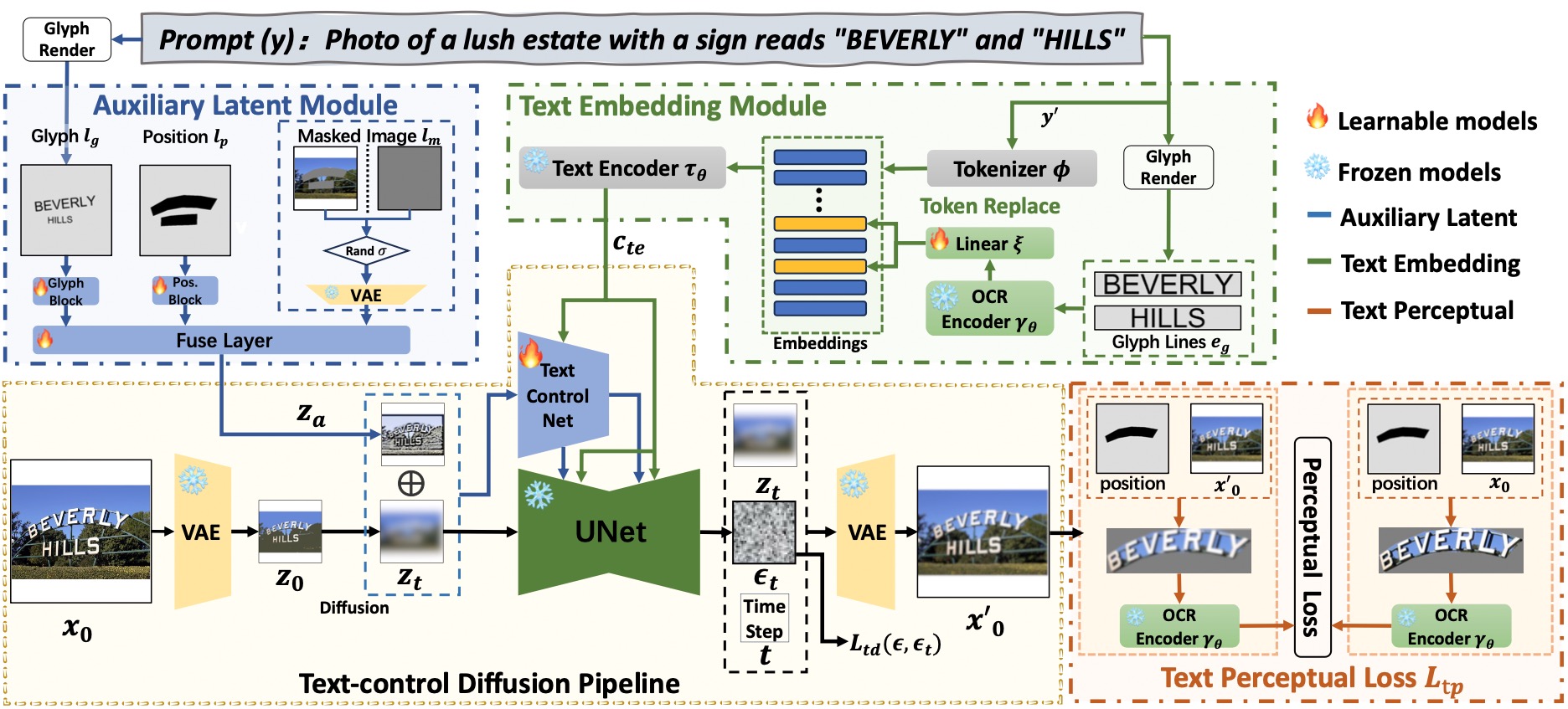
AnyText comprises a diffusion pipeline with two primary elements: an auxiliary latent module and a text embedding module. The former uses inputs like text glyph, position, and masked image to generate latent features for text generation or editing. The latter employs an OCR model for encoding stroke data as embeddings, which blend with image caption embeddings from the tokenizer to generate texts that seamlessly integrate with the background. We employed text-control diffusion loss and text perceptual loss for training to further enhance writing accuracy.
🛠Installation
# Install git (skip if already done)
conda install -c anaconda git
# Clone anytext code
git clone https://github.com/tyxsspa/AnyText.git
cd AnyText
# Prepare a font file; Arial Unicode MS is recommended, **you need to download it on your own**
mv your/path/to/arialuni.ttf ./font/Arial_Unicode.ttf
# Create a new environment and install packages as follows:
conda env create -f environment.yaml
conda activate anytext
🔮Inference
[Recommend]: We release a demo on ModelScope and HuggingFace! You can also try AnyText through our API service.
AnyText include two modes: Text Generation and Text Editing. Running the simple code below to perform inference in both modes and verify whether the environment is correctly installed.
python inference.py
If you have advanced GPU (with at least 8G memory), it is recommended to deploy our demo as below, which includes usage instruction, user interface and abundant examples.
export CUDA_VISIBLE_DEVICES=0 && python demo.py
FP16 inference is used as default, and a Chinese-to-English translation model is loaded for direct input of Chinese prompt (occupying ~4GB of GPU memory). The default behavior can be modified, as the following command enables FP32 inference and disables the translation model:
If FP16 is used and the translation model not used(or load it on CPU, see here), generation of one single 512x512 image will occupy ~7.5GB of GPU memory.
In addition, other font file can be used by(although the result may not be optimal):
Please note that when executing inference for the first time, the model files will be downloaded to: ~/.cache/modelscope/hub. If you need to modify the download directory, you can manually specify the environment variable: MODELSCOPE_CACHE.
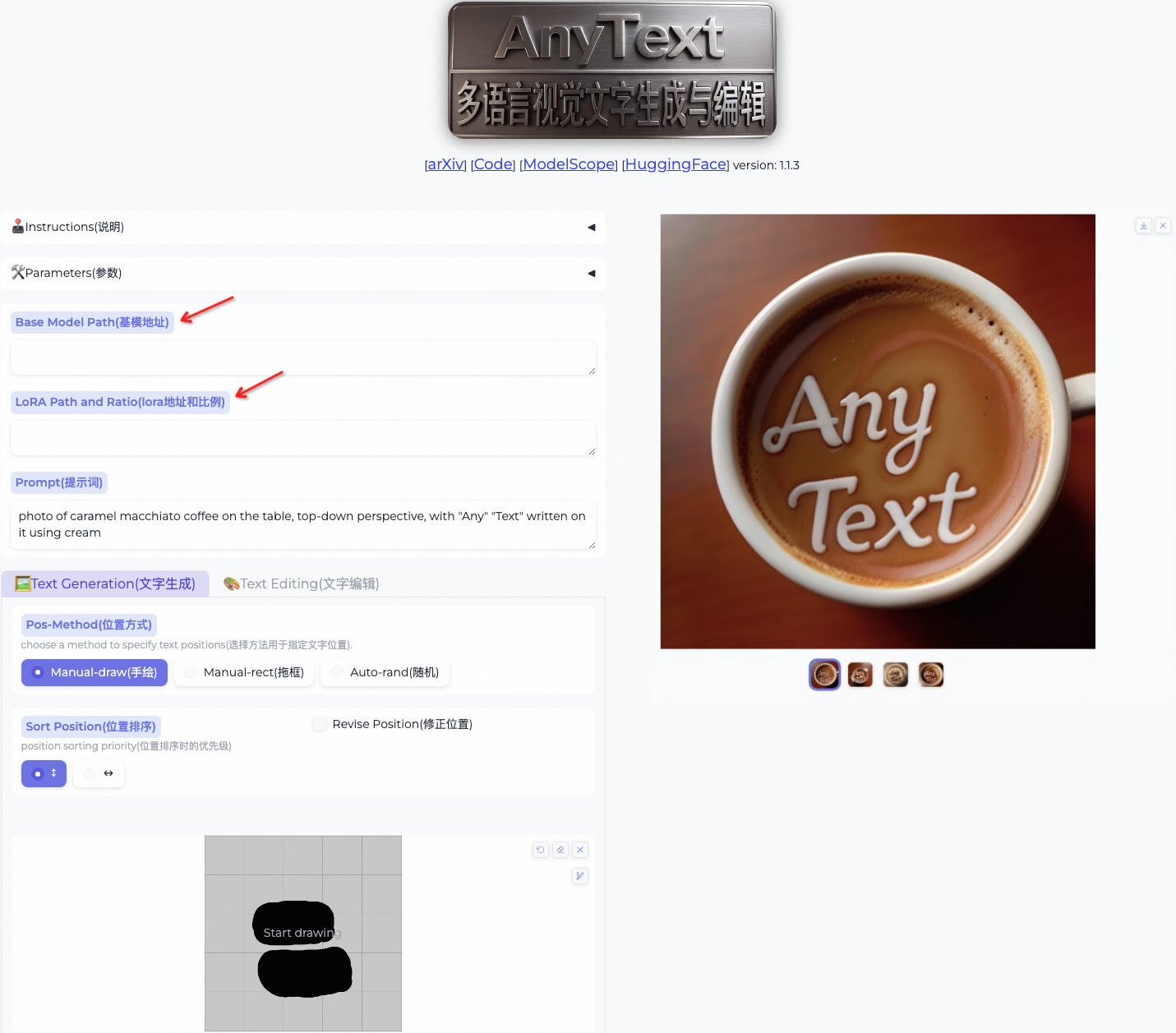
In this demo, you can change the style during inference by either change the base model or loading LoRA models(must based on SD1.5):
Change base model: Simply fill in your local base model's path in the [Base Model Path].
Load LoRA models: Input your LoRA model's path and weight ratio into the [LoRA Path and Ratio]. For example: /path/of/lora1.pth 0.3 /path/of/lora2.safetensors 0.6.
📈Evaluation
1. Data Preparation
Download the AnyText-benchmark dataset from ModelScope or GoogleDrive and unzip the files. In benchmark folder, laion_word and wukong_word are datasets for English and Chinese evaluation, respectively. Open each test1k.json and modify the data_root with your own path of imgs folder. The FID directory contains images that are used for calculating the FID (Fréchet Inception Distance) score.
2. Generate Images
Before evaluation, we need to generate corresponding images for each method based on the evaluation set. We have also provided pre-generated images for all methods. Follow the instructions below to generate images on you own. Note that you need modify the paths and other parameters in the bash script accordingly.
AnyText
bash ./eval/gen_imgs_anytext.sh
(If you encounter an error caused by huggingface being blocked, please uncomment line 98 of ./models_yaml/anytext_sd15.yaml, and replace the path of the clip-vit-large-patch14 folder with a local one)
ControlNet, Textdiffuser, GlyphControl
We use glyph images rendered from AnyText-benchmark dataset as conditional input for these methods:
bash eval/gen_glyph.sh
Next, please clone the official repositories of ControlNet, Textdiffuser, and GlyphControl, and follow their documentation to set up the environment, download the respective checkpoints, and ensure that inference can be executed normally. Then, copy the three files <method>_singleGPU.py, <method>_multiGPUs.py, and gen_imgs_<method>.sh from the ./eval folder to the root directory of the corresponding codebases, and run:
bash gen_imgs_<method>.sh
3. Evaluate
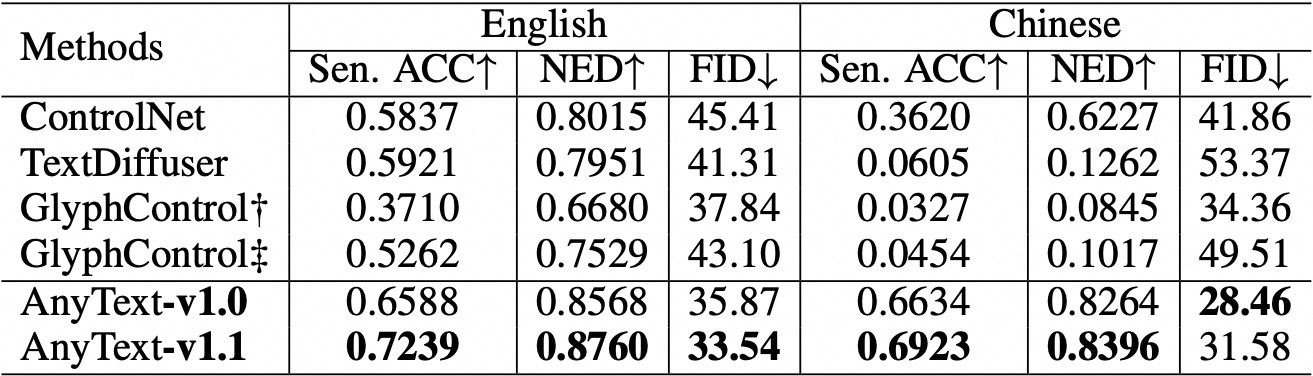
We use Sentence Accuracy (Sen. ACC) and Normalized Edit Distance (NED) to evaluate the accuracy of generated text. Please run:
bash eval/eval_ocr.sh
We use the FID metric to assess the quality of generated images. Please run:
bash eval/eval_fid.sh
Compared to existing methods, AnyText has a significant advantage in both English and Chinese text generation.
Please note that we have reorganized the code and have further aligned the configuration for each method under evaluation. As a result, there may be minor numerical differences compared to those reported in the original paper.
🚂Training
It is highly recommended to create and activate the anytext virtual environment from previous instructions, where the versions of libraries are verified. Otherwise, if you encounter an environmental dependency or training issue, please check if it matches with the versions as listed in environment.yaml.
Download training dataset AnyWord-3M from ModelScope, unzip all *.zip files in each subfolder, then open *.json and modify the data_root with your own path of imgs folder for each sub dataset.
Download SD1.5 checkpoint from HuggingFace, then run python tool_add_anytext.py to get an anytext pretrained model.
Run python train.py. Note: Training AnyText on 8xA100 (80GB) takes ~312 hours, you can also quickly reproduce it with 200k images, which takes ~60 hours on 8xV100(32GB). Enable Perceptual Loss will consume a significant amount of VRAM and reduce the training speed. Additionally, filtering out images containing watermarks will lower the likelihood of generating watermarks. These two steps are usually activated in the last 1 or 2 epochs. Relevant parameters can be found in the Configs within train.py, please check carefully.
The metrics we achieved using 200k images for reproduce are as follows. Note that these metrics are significantly higher than those reported in the original paper because we used V1.1 data and code. For more details, see Appendix 7 of the original paper.
🌄Gallery
Citation
@article{tuo2023anytext,
      title={AnyText: Multilingual Visual Text Generation And Editing},
      author={Yuxiang Tuo and Wangmeng Xiang and Jun-Yan He and Yifeng Geng and Xuansong Xie},
      year={2023},
      eprint={2311.03054},
      archivePrefix={arXiv},
      primaryClass={cs.CV}
}
No homepage URL was recorded for tyxsspa/AnyText in TopGit's last sync. The README tab above frequently contains screenshots and demo links, or check the repository description on GitHub.
Is tyxsspa/AnyText open source?
Yes — tyxsspa/AnyText ships under the Apache-2.0 license, which makes its source code freely readable (and, depending on license terms, forkable and reusable). Source: github.com/tyxsspa/AnyText.
What is tyxsspa/AnyText?
tyxsspa/AnyText (tyxsspa/AnyText) is a Python project on GitHub. From the project's own README: Official implementation code of the paper <AnyText: Multilingual Visual Text Generation And Editing>
What license does tyxsspa/AnyText use?
tyxsspa/AnyText is released under the Apache-2.0 license. Always verify the LICENSE file directly on GitHub for the authoritative terms — license strings can be edited out of sync with a project's actual stance.
Where do I read more about tyxsspa/AnyText?
This TopGit page is a snapshot — the READ ME tab shows the project's own README content (links stripped, images preserved). The GitHub repository at github.com/tyxsspa/AnyText is the definitive source.
Read full README in the tab above.
Still deciding about AnyText?
One click hands the question to an AI along with this page — see what it says about AnyText.

 /AnyText



 Please note that when executing inference for the first time, the model files will be downloaded to:
 Please note that we have reorganized the code and have further aligned the configuration for each method under evaluation. As a result, there may be minor numerical differences compared to those reported in the original paper.

