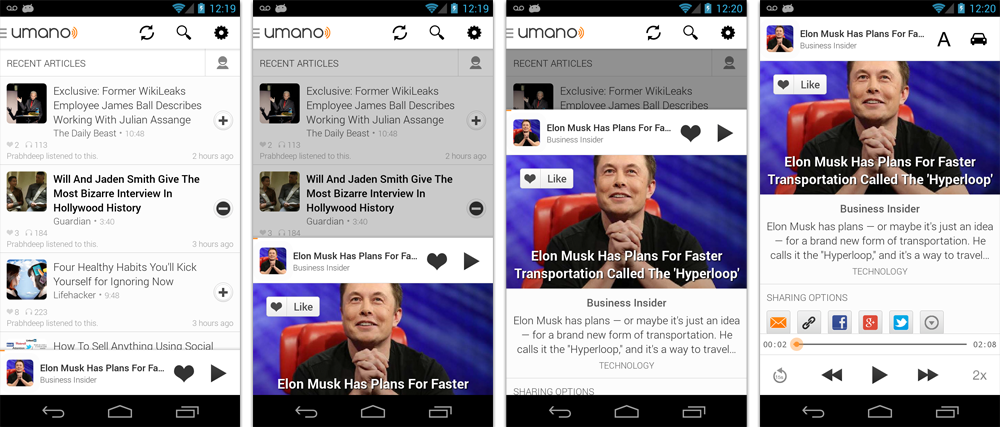
TopGit tracks umano/AndroidSlidingUpPanel on GitHub. The project has 9.4k stars. This library provides a simple way to add a draggable sliding up panel (popularized by Google Music and Google Maps) to your Android application. Brought to you by Umano.
Snapshot summary built from the project's own GitHub metadata — there's no written TopGit review yet. The page will update automatically when a full review is published.
WHY NO REVIEW YET
TopGit writes full reviews for the most-starred, most-requested repositories. This page is a snapshot until then — see the READ ME tab for the original README in full.
Include com.sothree.slidinguppanel.SlidingUpPanelLayout as the root element in your activity layout.
The layout must have gravity set to either top or bottom.
Make sure that it has two children. The first child is your main layout. The second child is your layout for the sliding up panel.
The main layout should have the width and the height set to match_parent.
The sliding layout should have the width set to match_parent and the height set to either match_parent, wrap_content or the max desireable height. If you would like to define the height as the percetange of the screen, set it to match_parent and also define a layout_weight attribute for the sliding view.
By default, the whole panel will act as a drag region and will intercept clicks and drag events. You can restrict the drag area to a specific view by using the setDragView method or umanoDragView attribute.
For more information, please refer to the sample code.
However, in this case you would likely want to add a top margin to your main layout of ?android:attr/actionBarSize
or ?attr/actionBarSize to support older API versions.
Caveats, Additional Features and Customization
If you are using a custom umanoDragView, the panel will pass through the click events to the main layout. Make your second layout clickable to prevent this.
You can change the panel height by using the setPanelHeight method or umanoPanelHeight attribute.
If you would like to hide the shadow above the sliding panel, set shadowHeight attribute to 0.
Use setEnabled(false) to completely disable the sliding panel (including touch and programmatic sliding)
Use setTouchEnabled(false) to disables panel's touch responsiveness (drag and click), you can still control the panel programatically
Use getPanelState to get the current panel state
Use setPanelState to set the current panel state
You can add parallax to the main view by setting umanoParallaxOffset attribute (see demo for the example).
You can set a anchor point in the middle of the screen using setAnchorPoint to allow an intermediate expanded state for the panel (similar to Google Maps).
You can set a PanelSlideListener to monitor events about sliding panes.
You can also make the panel slide from the top by changing the layout_gravity attribute of the layout to top.
You can provide a scroll interpolator for the panel movement by setting umanoScrollInterpolator attribute. For instance, if you want a bounce or overshoot effect for the panel.
By default, the panel pushes up the main content. You can make it overlay the main content by using setOverlayed method or umanoOverlay attribute. This is useful if you would like to make the sliding layout semi-transparent. You can also set umanoClipPanel to false to make the panel transparent in non-overlay mode.
By default, the main content is dimmed as the panel slides up. You can change the dim color by changing umanoFadeColor. Set it to "@android:color/transparent" to remove dimming completely.
Scrollable Sliding Views
If you have a scrollable view inside of the sliding panel, make sure to set umanoScrollableView attribute on the panel to supported nested scrolling. The panel supports ListView, ScrollView and RecyclerView out of the box, but you can add support for any type of a scrollable view by setting a custom ScrollableViewHelper. Here is an example for NestedScrollView
public class NestedScrollableViewHelper extends ScrollableViewHelper {
  public int getScrollableViewScrollPosition(View scrollableView, boolean isSlidingUp) {
    if (mScrollableView instanceof NestedScrollView) {
      if(isSlidingUp){
        return mScrollableView.getScrollY();
      } else {
        NestedScrollView nsv = ((NestedScrollView) mScrollableView);
        View child = nsv.getChildAt(0);
        return (child.getBottom() - (nsv.getHeight() + nsv.getScrollY()));
      }
    } else {
      return 0;
    }
  }
}
Once you define your helper, you can set it using setScrollableViewHelper on the sliding panel.
Implementation
This library was initially based on the opened-sourced SlidingPaneLayout component from the r13 of the Android Support Library. Thanks Android team!
Requirements
Tested on Android 2.2+
Other Contributors
Nov 23, 15 - @kiyeonk - umanoScrollInterpolator support
Jan 21, 14 - ChaYoung You (@yous) - Slide from the top support
Aug 20, 13 - @gipi - Android Studio Support
Jul 24, 13 - Philip Schiffer (@hameno) - Maven Support
Oct 20, 13 - Irina Preșa (@iriina) - Anchor Support
Dec 1, 13 - (@youchy) - XML Attributes Support
Dec 22, 13 - Vladimir Mironov (@MironovNsk) - Custom Expanded Panel Height
If you have an awesome pull request, send it over!
Changelog
3.4.0
Use the latest support library 26 and update the min version to 14.
Bug fixes
3.3.1
Lots of bug fixes from various pull requests.
Removed the nineoldandroids dependency. Use ViewCompat instead.
3.3.0
You can now set a FadeOnClickListener, for when the faded area of the main content is clicked.
PanelSlideListener has a new format (multiple of them can be set now
Fixed the setTouchEnabled bug
3.2.1
Add support for umanoScrollInterpolator
Add support for percentage-based sliding panel height using layout_weight attribute
Add ScrollableViewHelper to allow users extend support for new types of scrollable views.
3.2.0
Rename umanoParalaxOffset to umanoParallaxOffset
RecyclerView support.
3.1.0
Added umanoScrollableView to supported nested scrolling in children (only ScrollView and ListView are supported for now)
3.0.0
Added umano prefix for all attributes
Added clipPanel attribute for supporting transparent panels in non-overlay mode.
setEnabled(false) - now completely disables the sliding panel (touch and programmatic sliding)
setTouchEnabled(false) - disables panel's touch responsiveness (drag and click), you can still control the panel programatically
getPanelState - is now the only method to get the current panel state
setPanelState - is now the only method to modify the panel state from code
2.0.0 - Cleaned up various public method calls. Added animated showPanel/hidePanel methods.
1.0.1 - Initial Release
Licence
Licensed under the Apache License, Version 2.0 (the "License");
you may not use this work except in compliance with the License.
You may obtain a copy of the License in the LICENSE file, or at:
http://www.apache.org/licenses/LICENSE-2.0
Unless required by applicable law or agreed to in writing, software
distributed under the License is distributed on an "AS IS" BASIS,
WITHOUT WARRANTIES OR CONDITIONS OF ANY KIND, either express or implied.
See the License for the specific language governing permissions and
limitations under the License.
How active is development on umano/AndroidSlidingUpPanel?
The most recent commit recorded on umano/AndroidSlidingUpPanel was 4.3 years ago, based on the GitHub push timestamp. The repository has 2.2k forks — one of the better signals of community interest.
How many stars does umano/AndroidSlidingUpPanel have?
umano/AndroidSlidingUpPanel has 9.4k GitHub stars — refresh the page for the live number, or check github.com/umano/AndroidSlidingUpPanel. TopGit mirrors GitHub's count but does not claim minute-by-minute accuracy.
Is umano/AndroidSlidingUpPanel open source?
Yes — umano/AndroidSlidingUpPanel ships under the Apache-2.0 license, which makes its source code freely readable (and, depending on license terms, forkable and reusable). Source: github.com/umano/AndroidSlidingUpPanel.
What is umano/AndroidSlidingUpPanel?
umano/AndroidSlidingUpPanel (umano/AndroidSlidingUpPanel) is a Java project on GitHub. From the project's own README: This library provides a simple way to add a draggable sliding up panel (popularized by Google Music and Google Maps) to your Android application. Brought to you by Umano.
What language is umano/AndroidSlidingUpPanel written in?
umano/AndroidSlidingUpPanel is written primarily in Java. GitHub's language field is based on the largest share of bytes in the default branch.
What license does umano/AndroidSlidingUpPanel use?
umano/AndroidSlidingUpPanel is released under the Apache-2.0 license. Always verify the LICENSE file directly on GitHub for the authoritative terms — license strings can be edited out of sync with a project's actual stance.
Where do I read more about umano/AndroidSlidingUpPanel?
This TopGit page is a snapshot — the READ ME tab shows the project's own README content (links stripped, images preserved). The GitHub repository at github.com/umano/AndroidSlidingUpPanel is the definitive source.
Read full README in the tab above.
Is AndroidSlidingUpPanel worth your time?
ChatGPT, Claude and Perplexity can all read this page. Ask one of them what it makes of AndroidSlidingUpPanel.

 /AndroidSlidingUpPanel