Snapshot summary built from the project's own GitHub metadata — there's no written TopGit review yet. The page will update automatically when a full review is published.
WHY NO REVIEW YET
TopGit writes full reviews for the most-starred, most-requested repositories. This page is a snapshot until then — see the READ ME tab for the original README in full.
This repo includes SVO Pro which is the newest version of Semi-direct Visual Odometry (SVO) developed over the past few years at the Robotics and Perception Group (RPG).
SVO was born as a fast and versatile visual front-end as described in the SVO paper (TRO-17). Since then, different extensions have been integrated through various research and industrial projects.
SVO Pro features the support of different camera models, active exposure control, a sliding window based backend, and global bundle adjustment with loop closure.
In summary, this repository offers the following functionalities:
Visual-odometry: The most recent version of SVO that supports perspective and fisheye/catadioptric cameras in monocular or stereo setup. It also includes active exposure control.
Visual-inertial odometry: SVO fronted + visual-inertial sliding window optimization backend (modified from OKVIS)
Visual-inertial SLAM: SVO frontend + visual-inertial sliding window optimization backend + globally bundle adjusted map (using iSAM2). The global map is updated in real-time, thanks to iSAM2, and used for localization at frame-rate.
Visual-inertial SLAM with loop closure: Loop closures, via DBoW2, are integrated in the global bundle adjustment. Pose graph optimization is also included as a lightweight replacement of the global bundle adjustment.
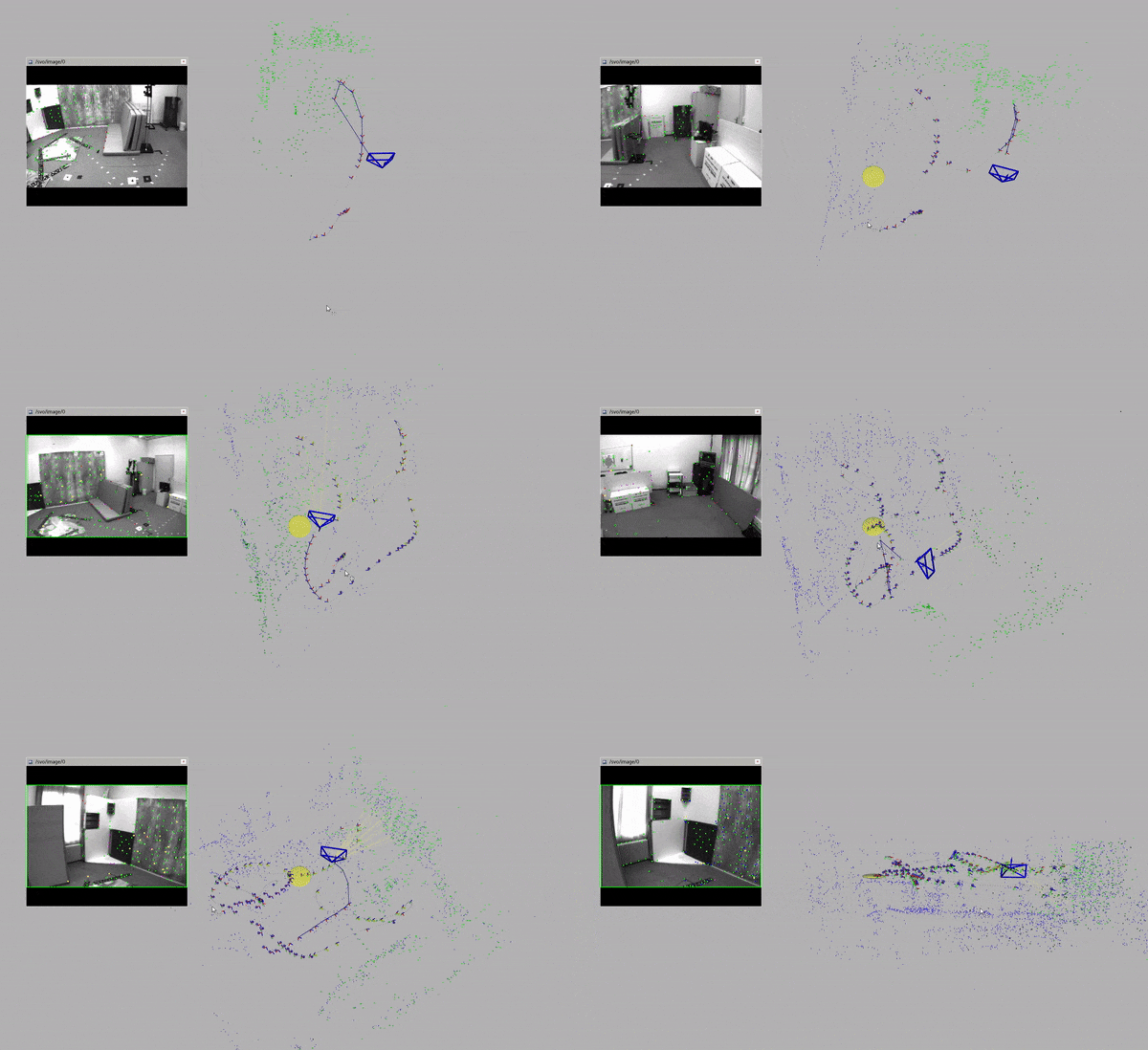
An example of the visual-inertial SLAM pipeline on EuRoC dataset is below (green points - sliding window; blue points - iSAM2 map):
SVO Pro and its extensions have been used to support various projects at RPG, such as our recent work on multiple camera SLAM, voxel map for visual SLAM and the tight-coupling of global positional measurements into VIO. We hope that the efforts we made can facilitate the research and applications of SLAM and spatial perception.
License
The code is licensed under GPLv3. For commercial use, please contact sdavide [at] ifi [dot] uzh [dot] ch.
The visual-inertial backend is modified from OKVIS, and the license is retained at the beginning of the related files.
Credits
If you use the code in the academic context, please cite:
Christian Forster, Matia Pizzoli, Davide Scaramuzza. SVO: Fast Semi-Direct Monocular Visual Odometry. ICRA, 2014. bibtex
Christian Forster, Zichao Zhang, Michael Gassner, Manuel Werlberger, Davide Scaramuzza. SVO: Semi-Direct Visual Odometry for Monocular and Multi-Camera Systems. TRO, 2017. bibtex
Additionally, please cite the following papers for the specific extensions you make use of:
Fisheye/catadioptric camera extension: Zichao Zhang, Henri Rebecq, Christian Forster, Davide Scaramuzza. Benefit of Large Field-of-View Cameras for Visual Odometry. ICRA, 2016. bibtex
Brightness/exposure compensation: Zichao Zhang, Christian Forster, Davide Scaramuzza. Active Exposure Control for Robust Visual Odometry in HDR Environments. ICRA, 2017. bibtex
Ceres-based optimization backend: Stefan Leutenegger, Simon Lynen, Michael Bosse, Roland Siegwart, Paul Timothy Furgale. Keyframe-based visual–inertial odometry using nonlinear optimization. IJRR, 2015. bibtex
Global map powered by iSAM2: Michael Kaess, Hordur Johannsson, Richard Roberts, Viorela Ila, John Leonard, Frank Dellaert. iSAM2: Incremental Smoothing and Mapping Using the Bayes Tree. IJRR, 2012. bibtex
Loop closure: Dorian Gálvez-López and Juan D. Tardós. Bags of Binary Words for Fast Place Recognition in Image Sequences. TRO, 2012. bibtex
Our recent publications that use SVO Pro are:
Multiple camera SLAM: Juichung Kuo, Manasi Muglikar, Zichao Zhang, Davide Scaramuzza. Redesigning SLAM for Arbitrary Multi-Camera Systems. ICRA, 2020. bibtex
Voxel map for visual SLAM: Manasi Muglikar, Zichao Zhang, Davide Scaramuzza. Voxel Map for Visual SLAM. ICRA, 2020. bibtex
Tight-coupling of global positional measurements into VIO: Giovanni Cioffi, Davide Scaramuzza. Tightly-coupled Fusion of Global Positional Measurements in Optimization-based Visual-Inertial Odometry. IROS, 2020. bibtex
Install
The code has been tested on
Ubuntu 18.04 with ROS Melodic
Ubuntu 20.04 with ROS Noetic
Install dependences
Install catkin tools and vcstools if you haven't done so before. Depending on your operating system, run
Create a workspace and clone the code (ROS-DISTRO=melodic/noetic):
mkdir svo_ws && cd svo_ws
# see below for the reason for specifying the eigen path
catkin config --init --mkdirs --extend /opt/ros/<ROS-DISTRO> --cmake-args -DCMAKE_BUILD_TYPE=Release -DEIGEN3_INCLUDE_DIR=/usr/include/eigen3
cd src
git clone [email protected]:uzh-rpg/rpg_svo_pro_open.git
vcs-import < ./rpg_svo_pro_open/dependencies.yaml
touch minkindr/minkindr_python/CATKIN_IGNORE
# vocabulary for place recognition
cd rpg_svo_pro_open/svo_online_loopclosing/vocabularies && ./download_voc.sh
cd ../../..
There are two types of builds that you can proceed from here
Build without the global map (front-end + sliding window back-end + loop closure/pose graph)
catkin build
Build with the global map using iSAM2 (all functionalities)
# 1. gtsam/CMakelists.txt: use system Eigen
-option(GTSAM_USE_SYSTEM_EIGEN "Find and use system-installed Eigen. If 'off', use the one bundled with GTSAM" OFF)
+option(GTSAM_USE_SYSTEM_EIGEN "Find and use system-installed Eigen. If 'off', use the one bundled with GTSAM" ON)
# 2. gtsam/cmake/GtsamBuildTypes: disable avx instruction set
# below the line `list_append_cache(GTSAM_COMPILE_OPTIONS_PUBLIC "-march=native")`
list_append_cache(GTSAM_COMPILE_OPTIONS_PUBLIC "-mno-avx")
Using the same version of Eigen helps avoid memory issues. Disabling avx instruction set also helps with some segment faults in our experience (this can be however OS and hardware dependent).
And finally build the whole workspace
# building GTSAM may take a while
catkin build
Instructions
Get started: running the pipeline
The visual front-end
Visual-inertial odometry
VIO + global map
Benchmarking
Camera and sensor calibration
Known issues and possible improvements
Troubleshooting
Weird building issues after some tinkering. It is recommend to
clean your workspace (catkin clean --all at the workspace root) and rebuild your workspace (catkin build)
or catkin build --force-cmake
after your have made changes to CMake files (CMakeLists.txt or *.cmake) to make sure the changes take effect.
Longer explanation
Catkin tools can detect changes in CMake files and re-build affected files only. But since we are working with a multi-package project, some changes may not be detected as desired. For example, changing the building flags in `svo_cmake/cmake/Modules/SvoSetup.cmake` will affect all the packages but the re-compiling may not be done automatically (since the files in each package are not changed). Also, we need to keep the linking (e.g., library version) and compiling flags consistent across different packages. Therefore, unless you are familiar with how the compilation works out, it is the safest to re-build the whole workspace. `catkin build --force-cmake` should also work in most cases.
Compiling/linking error related to OpenCV: find find_package(OpenCV REQUIRED) in the CMakeLists.txt files in each package (in rpg_common, svo_ros, svo_direct, vikit/vikit_common and svo_online_loopclosing) and replace it with
Longer explanation
First, ROS is built against OpenCV 3 on Ubuntu 18.04 and OpenCV 4 on Ubuntu 20.04. It is desired to keep the OpenCV version linked in SVO consistent with the ROS one, since in `svo_ros` we need to link everything with ROS. Second, The original `CMakeLists.txt` files will work fine if you only have the default OpenCV installed. But if you have some customized version of OpenCV installed (e.g., from source), it is recommended to explicitly specify the version of OpenCV that should be used (=the version ROS uses) as mentione above.
Visualization issues with the PointCloud2: Using Points to visualize PointCloud2 in RVIZ seems to be problematic in Ubuntu 20.04. We use other visualization types instead of Points per default. However, it is good to be aware of this if you want to customize the visualization.
Pipeline crashes with loop closure enabled: If the pipeline crashes calling svo::loadVoc(), did you forgot to download the vocabulary files as mentioned above?
cd rpg_svo_pro_open/svo_online_loopclosing/vocabularies && ./download_voc.sh
Inconsistent Eigen versions during compilation: The same Eigen should be used across the whole project (which should be system Eigen, since we are also using ROS). Check whether eigen_catkin and gtsam find the same version of Eigen:
# for eigen_catkin
catkin build eigen_catkin --force-cmake --verbose
# for gtsam
catkin build gtsam --force-cmake --verbose
Longer explanation
One common pitfall of using Eigen in your projects is have different libraries compiled against different Eigen versions. For SVO, eigen_catkin (https://github.com/ethz-asl/eigen_catkin) is used to keep the Eigen version same, which should be the system one (under /usr/include) on 18.04 and 20.04. For GTSAM, system Eigen is found via a cumstomized cmake file (https://github.com/borglab/gtsam/blob/develop/cmake/FindEigen3.cmake#L66). It searches for `/usr/local/include` first, which may contain Eigen versions that are manually installed. Therefore, we explicitly specifies `EIGEN_INCLUDE_PATH` when configuring the workspace to force GTSAM to find system Eigen. If you still encounter inconsistent Eigen versions, the first thing to check is whether different versions of Eigen are still used.
Acknowledgement
Thanks to Simon Klenk, Manasi Muglikar, Giovanni Cioffi and Javier Hidalgo-Carrió for their valuable help and comments for the open source code.
The work is made possible thanks to the efforts of many contributors from RPG. Apart from the authors listed in the above papers, Titus Cieslewski and Henri Rebecq made significant contributions to the visual front-end. Jeffrey Delmerico made great efforts to apply SVO on different real robots, which in turn helped improve the pipeline. Many PhD and master students and lab engineers have also contributed to the code.
The Ceres-based optimization back-end is based on code developed at Zurich-eye, a spin-off from RPG. Jonathan Huber is the main contributor that integrated the back-end with SVO. Kunal Shrivastava (now CEO of SUIND) developed the loop closure module during his semester project and internship at RPG. The integration of the iSAM2-based global map was developed by Zichao Zhang.
We would like to thank our collaborators at Prophesee for pointing out several bugs in the visual front-end. Part of the code was developed during a funded project with Huawei.
Does uzh-rpg/rpg_svo_pro_open have a project website?
No homepage URL was recorded for uzh-rpg/rpg_svo_pro_open in TopGit's last sync. The README tab above frequently contains screenshots and demo links, or check the repository description on GitHub.
Does uzh-rpg/rpg_svo_pro_open have any tags?
TopGit's last sync did not record any GitHub topics for uzh-rpg/rpg_svo_pro_open. GitHub topics appear in the right sidebar of a repository page; that's the authoritative place to check.
How active is development on uzh-rpg/rpg_svo_pro_open?
The most recent commit recorded on uzh-rpg/rpg_svo_pro_open was 2.6 years ago, based on the GitHub push timestamp. The repository has 417 forks — one of the better signals of community interest.
Is uzh-rpg/rpg_svo_pro_open open source?
Yes — uzh-rpg/rpg_svo_pro_open ships under the GPL-3.0 license, which makes its source code freely readable (and, depending on license terms, forkable and reusable). Source: github.com/uzh-rpg/rpg_svo_pro_open.
What license does uzh-rpg/rpg_svo_pro_open use?
uzh-rpg/rpg_svo_pro_open is released under the GPL-3.0 license. Always verify the LICENSE file directly on GitHub for the authoritative terms — license strings can be edited out of sync with a project's actual stance.
Where do I read more about uzh-rpg/rpg_svo_pro_open?
This TopGit page is a snapshot — the READ ME tab shows the project's own README content (links stripped, images preserved). The GitHub repository at github.com/uzh-rpg/rpg_svo_pro_open is the definitive source.
Read full README in the tab above.
Is rpg_svo_pro_open worth your time?
ChatGPT, Claude and Perplexity can all read this page. Ask one of them what it makes of rpg_svo_pro_open.
 /rpg_svo_pro_open