veltman/flubber

As an open-source project, veltman/flubber has picked up 6.9k stars on GitHub (JavaScript). Tools for smoother shape animations.
Snapshot summary built from the project's own GitHub metadata — there's no written TopGit review yet. The page will update automatically when a full review is published.
TopGit writes full reviews for the most-starred, most-requested repositories. This page is a snapshot until then — see the READ ME tab for the original README in full.
Snapshot
Top contributors
Show top contributors

flubber
Some best-guess methods for smoothly interpolating between 2-D shapes.
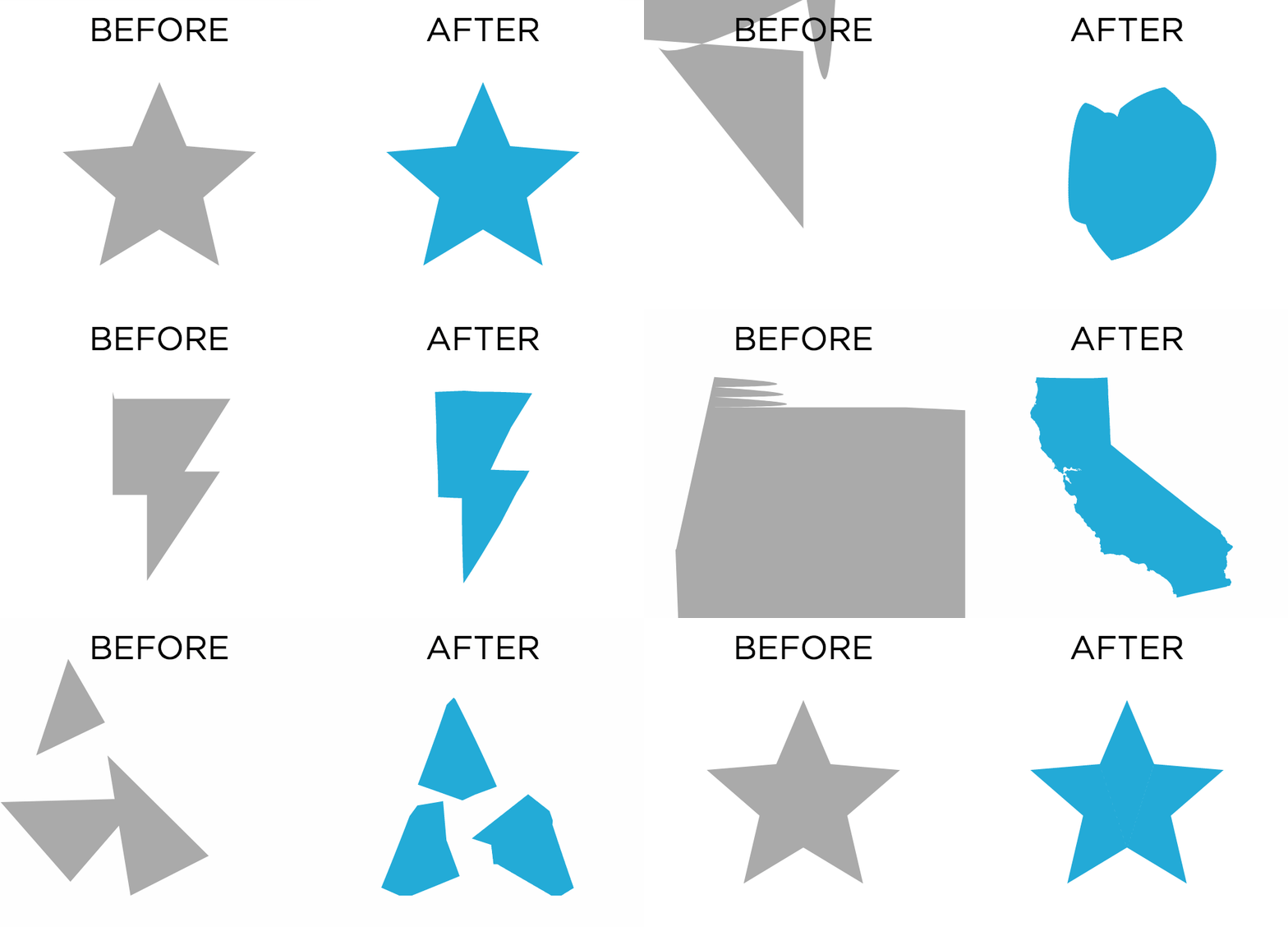
Why?
Let's say you want to animate between two SVG paths or canvas shapes in a visualization. If you plug in their coordinates or their path strings to something like d3.transition(), it might work if the shapes correspond to each other really well - for example, turning a triangle into a different triangle. But once your shapes don't really correspond, you'll get unpredictable results with weird inversions and sudden jumps.
The goal of this library is to provide a best-guess interpolation for any two arbitrary shapes (or collections of shapes) that results in a reasonably smooth animation, without overthinking it.
Installation
In a browser (exposes the flubber global):
<script src="https://unpkg.com/[email protected]"></script>
With NPM:
npm install flubber
And then import/require it:
var flubber = require("flubber"); // Node classic
import { interpolate } from "flubber" // ES6
How to use
Flubber expects a shape input to be either an SVG path string or an array of [x, y] points (a "ring"):
"M100,100 L200,100 L150,200Z" // A triangle as a path string
[[100, 100], [200, 100], [150, 200]] // A triangle as a ring
Flubber methods return interpolators, functions that you can call later with a value from 0 to 1 to get back the corresponding shape, where 0 is the beginning of the animation and 1 is the end.
Using D3, usage could look something like:
var triangle = [[1, 0], [2, 2], [0, 2]],
    pentagon = [[0, 0], [2, 0], [2, 1], [1, 2], [0, 1]];

var interpolator = flubber.interpolate(triangle, pentagon);

d3.select("path")
    .transition()
    .attrTween("d", function(){ return interpolator; });
Without D3, usage might look something like this:
// Mixing and matching input types is OK
var triangle = "M1,0 L2,2 L0,2 Z",
    pentagon = [[0, 0], [2, 0], [2, 1], [1, 2], [0, 1]];

var interpolator = flubber.interpolate(triangle, pentagon);

requestAnimationFrame(draw);

function draw(time) {
    var t = howFarAlongTheAnimationIsOnAScaleOfZeroToOne(time);
    myPathElement.setAttribute("d", interpolator(t));
    if (t < 1) {
        requestAnimationFrame(draw);
    }
}
Note: it doesn't matter whether your ring has a closing point identical to the first point.
API
flubber.interpolate(fromShape, toShape [, options])
fromShape and toShape should each be a ring or an SVG path string. If your path string includes holes or multiple shapes in a single string, everything but the first outer shape will be ignored.
This returns a function that takes a value t from 0 to 1 and returns the in-between shape:
var interpolator = flubber.interpolate(triangle, octagon);

interpolator(0); // returns an SVG triangle path string
interpolator(0.5); // returns something halfway between the triangle and the octagon
interpolator(1); // returns an SVG octagon path string
options can include the following keys:
string: whether to output results as an SVG path string or an array of points. (default: true)
maxSegmentLength: the lower this number is, the smoother the resulting animation will be, at the expense of performance. Represents a number in pixels (if no transforms are involved). Set it to false or Infinity for no smoothing. (default: 10)
.interpolate() in action with SVG paths as input
.interpolate() in action with GeoJSON coordinates as input
flubber.toCircle(fromShape, x, y, r[, options])
Like interpolate(), but for the specific case of transforming the shape to a circle centered at [x, y] with radius r.
var interpolator = flubber.toCircle(triangle, 100, 100, 10);

interpolator(0); // returns an SVG triangle path string
interpolator(0.5); // returns something halfway between the triangle and the circle
interpolator(1); // returns a circle path string centered at 100, 100 with a radius of 10
.toCircle() in action
flubber.toRect(fromShape, x, y, width, height[, options])
Like interpolate(), but for the specific case of transforming the shape to a rectangle with the upper-left corner [x, y] and the dimensions width x height.
var interpolator = flubber.toRect(triangle, 10, 50, 100, 200);

interpolator(0); // returns an SVG triangle path string
interpolator(0.5); // returns something halfway between the triangle and the rectangle
interpolator(1); // returns a rectangle path string from [10, 50] in the upper left to [110, 250] in the lower right
.toRect() in action
flubber.fromCircle(x, y, r, toShape[, options])
Like toCircle() but reversed.
flubber.fromRect(x, y, width, height, toShape[, options])
Like toRect() but reversed.
flubber.separate(fromShape, toShapeList[, options])
If you're trying to interpolate between a single shape and multiple shapes (for example, a group of three circles turning into a single big circle), this method will break your shapes into pieces so you can animate between the two sets. This isn't terribly performant and has some quirks but it tends to get the job done.
fromShape should be a ring or SVG path string, and toShapeList should be an array of them.
The options are the same as for interpolate(), with the additional option of single, which defaults to false.
If single is false, this returns an array of n interpolator functions, where n is the length of toShapeList. If single is set to true this returns one interpolator that combines things into one giant path string or one big array of rings.
// returns an array of two interpolator functions
var interpolators = flubber.separate(triangle, [square, otherSquare]);

d3.selectAll("path")
    .data(interpolators)
    .transition()
    .attrTween("d", function(interpolator) { return interpolator; });
.separate() in action
// returns a single interpolator function
var combinedInterpolator = flubber.separate(triangle, [square, otherSquare], { single: true });

// This one path element will be two squares at the end
d3.select("path")
    .transition()
    .attrTween("d", function() { return combinedInterpolator; });
.separate({ single: true }) in action
flubber.combine(fromShapeList, toShape[, options])
Like separate() but reversed.
flubber.interpolateAll(fromShapeList, toShapeList[, options])
Like separate() or combine() but instead expects two arrays of shapes the same length (e.g. an array of three triangles turning into an array of three squares). The shapes will be matched up in the order of the arrays (the first fromShapeList item will turn into the first toShapeList item, and so on).
.interpolateAll() in action
.interpolateAll({ single: true }) in action
flubber.toPathString(ring)
A helper function for converting an array of points to an SVG path string.
flubber.toPathString([[1, 1], [2, 1], [1.5, 2]]);
// Returns "M1,1L2,1L1.5,2Z"
flubber.splitPathString(pathString)
A helper function for splitting an SVG path string that might contain multiple shapes into an array of one-shape path strings.
flubber.splitPathString("M1,1 L2,1 L1.5,2Z M3,3 L4,3 L3.5,4 Z");
// Returns ["M1,1 L2,1 L1.5,2Z", "M3,3 L4,3 L3.5,4 Z"]
Examples
Note: most of these demos use D3 to keep the code concise, but this can be used with any library, or with no library at all.
Morphing SVG paths
Morphing GeoJSON coordinates
Morphing to and from circles
Morphing to and from rectangles
Morphing between one shape and multiple shapes (one element)
Morphing between one shape and multiple shapes (multiple elements)
Morphing between two sets of multiple shapes
Vanilla JS + Canvas
Medley of different methods
To do
- Maintain original vertices when polygonizing a path string with curves
- Add
force: trueoption to collapse small additional polygons onto the perimeter of the largest - Support unclosed lines
- Use curves between points for
fromCircle()andtoCircle() - Deal with holes?
- Accept SVG elements as arguments instead of just path strings?
- Add pre-simplification as an option
- Simulated annealing or random swapping for multishape matching?
Video
OpenVisConf 2017 talk about shape interpolation
Alternatives
react-svg-morph - utility for morphing between two SVGs in React
GreenSock MorphSVG plugin - GSAP shape morphing utility (costs money, not open source)
d3.geo2rect - a plugin for morphing between GeoJSON and a rectangular SVG grid
d3-interpolate-path - a D3 interpolator to interpolate between two unclosed lines, for things like line chart transitions with mismatched data
Wilderness - an SVG manipulation and animation library
Cirque - JS utility for morphing between circles and polygons
Credits
Many thanks to:
- Mike Bostock for D3 and TopoJSON
- Vladimir Agafonkin and Mapbox for earcut
- Roger Veciana Rovira for svg-path-properties
- Fontello for svgpath
- Rich Harris for Rollup and Bublé
License
MIT License
Copyright (c) 2017 Noah Veltman
Permission is hereby granted, free of charge, to any person obtaining a copy of this software and associated documentation files (the "Software"), to deal in the Software without restriction, including without limitation the rights to use, copy, modify, merge, publish, distribute, sublicense, and/or sell copies of the Software, and to permit persons to whom the Software is furnished to do so, subject to the following conditions:
The above copyright notice and this permission notice shall be included in all copies or substantial portions of the Software.
THE SOFTWARE IS PROVIDED "AS IS", WITHOUT WARRANTY OF ANY KIND, EXPRESS OR IMPLIED, INCLUDING BUT NOT LIMITED TO THE WARRANTIES OF MERCHANTABILITY, FITNESS FOR A PARTICULAR PURPOSE AND NONINFRINGEMENT. IN NO EVENT SHALL THE AUTHORS OR COPYRIGHT HOLDERS BE LIABLE FOR ANY CLAIM, DAMAGES OR OTHER LIABILITY, WHETHER IN AN ACTION OF CONTRACT, TORT OR OTHERWISE, ARISING FROM, OUT OF OR IN CONNECTION WITH THE SOFTWARE OR THE USE OR OTHER DEALINGS IN THE SOFTWARE.
Related repositories
Master programming by recreating your favorite technologies from scratch.
A curated meta-list of curated lists organized by technology domain. The repository acts as a directory pointing to hundreds of specialized awesome lists covering programming languages, platforms, frameworks, and tooling. All content is community-contributed under the CC0 public domain dedication.
Public APIs is a community-curated GitHub repository listing free, publicly accessible APIs across a wide range of categories, with auth type, HTTPS, and CORS noted for each entry. It's a browsable reference, not a library to install.
freeCodeCamp is a free, self-paced curriculum for learning to code, published as open source at freeCodeCamp/freeCodeCamp. It's a 501(c)(3) nonprofit funded by donor support, structured around six certifications in its Full-Stack Developer Curriculum, each gated by required projects instead of open-book quizzes. The repository also carries beta language certifications for developers, interview-prep resources, and the code that runs the live freecodecamp.org platform.
Quick answers
Is veltman/flubber open source?
Yes — veltman/flubber ships under the MIT license, which makes its source code freely readable (and, depending on license terms, forkable and reusable). Source: github.com/veltman/flubber.
What is veltman/flubber?
veltman/flubber (veltman/flubber) is a JavaScript project on GitHub. From the project's own README: Tools for smoother shape animations.
Where do I read more about veltman/flubber?
This TopGit page is a snapshot — the READ ME tab shows the project's own README content (links stripped, images preserved). The GitHub repository at github.com/veltman/flubber is the definitive source.
Read full README in the tab above.
Is flubber worth your time?
ChatGPT, Claude and Perplexity can all read this page. Ask one of them what it makes of flubber.