An open-source entry in TopGit's GitHub warehouse: wangyu-/UDPspeeder, 5.2k stars, C++. A Tunnel which Improves your Network Quality on a High-latency Lossy Link by using Forward Error Correction, possible for All Traffics(TCP/UDP/ICMP)
Snapshot summary built from the project's own GitHub metadata — there's no written TopGit review yet. The page will update automatically when a full review is published.
WHY NO REVIEW YET
TopGit writes full reviews for the most-starred, most-requested repositories. This page is a snapshot until then — see the READ ME tab for the original README in full.
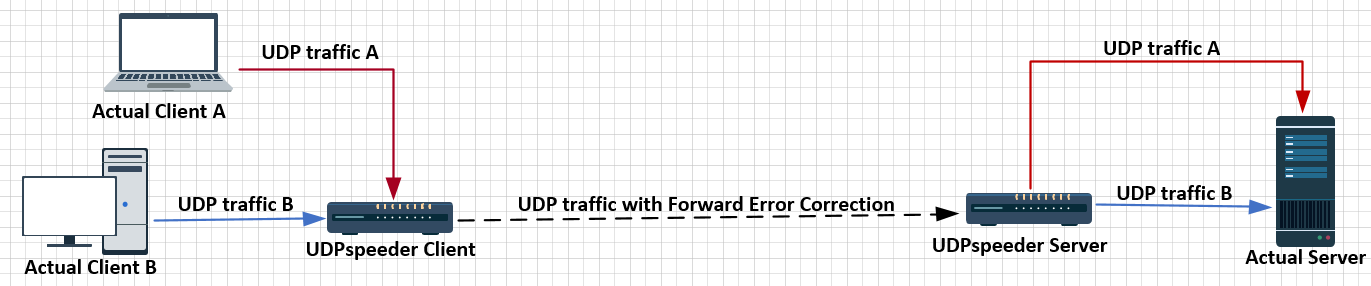
A Tunnel which Improves your Network Quality on a High-latency Lossy Link by using Forward Error Correction.
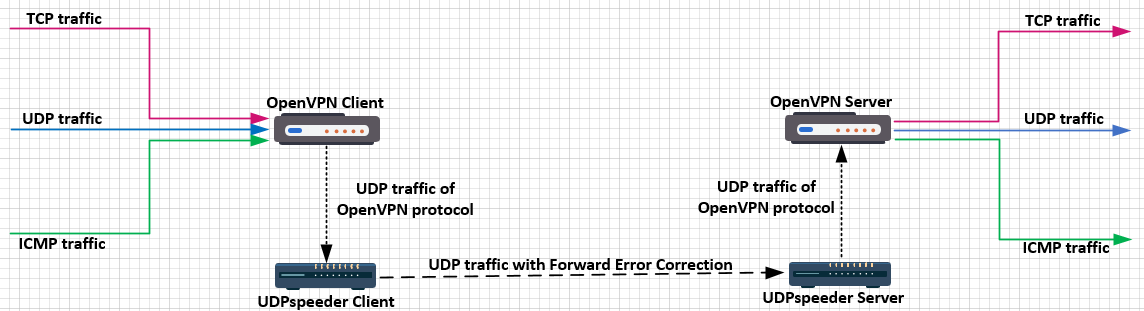
When used alone, UDPspeeder improves only UDP connection. Nevertheless, if you used UDPspeeder + any UDP-based VPN together,
you can improve any traffic(include TCP/UDP/ICMP), currently OpenVPN/L2TP/ShadowVPN are confirmed to be supported。
or
Assume your local network to your server is lossy. Just establish a VPN connection to your server with UDPspeeder + any UDP-based VPN, access your server via this VPN connection, then your connection quality will be significantly improved. With well-tuned parameters , you can easily reduce IP or UDP/ICMP packet-loss-rate to less than 0.01% . Besides reducing packet-loss-rate, UDPspeeder can also significantly improve your TCP latency and TCP single-thread download speed.
UDPspeeder Wiki
简体中文
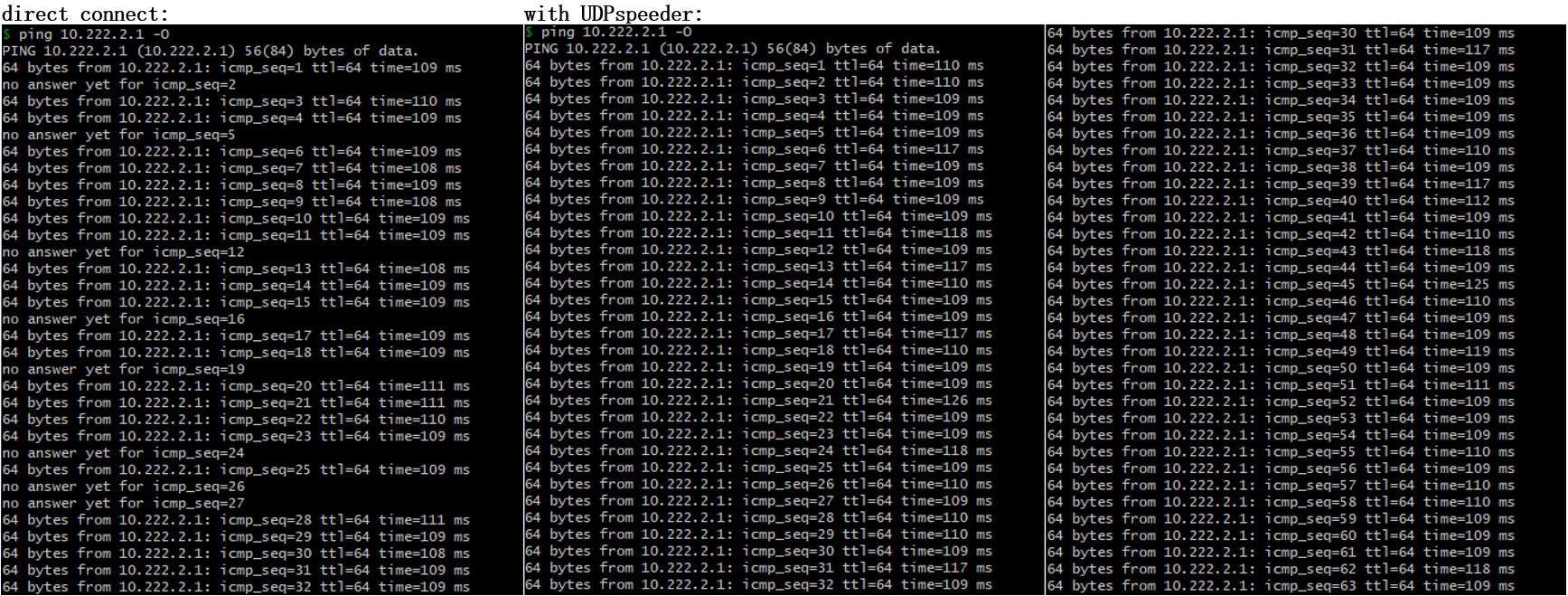
Efficacy
tested on a link with 100ms latency and 10% packet loss at both direction
Ping Packet Loss
SCP Copy Speed
Supported Platforms
Linux host (including desktop Linux,Android phone/tablet, OpenWRT router, or Raspberry PI).
For Windows and MacOS You can run UDPspeeder inside this 7.5mb virtual machine image.
How does it work
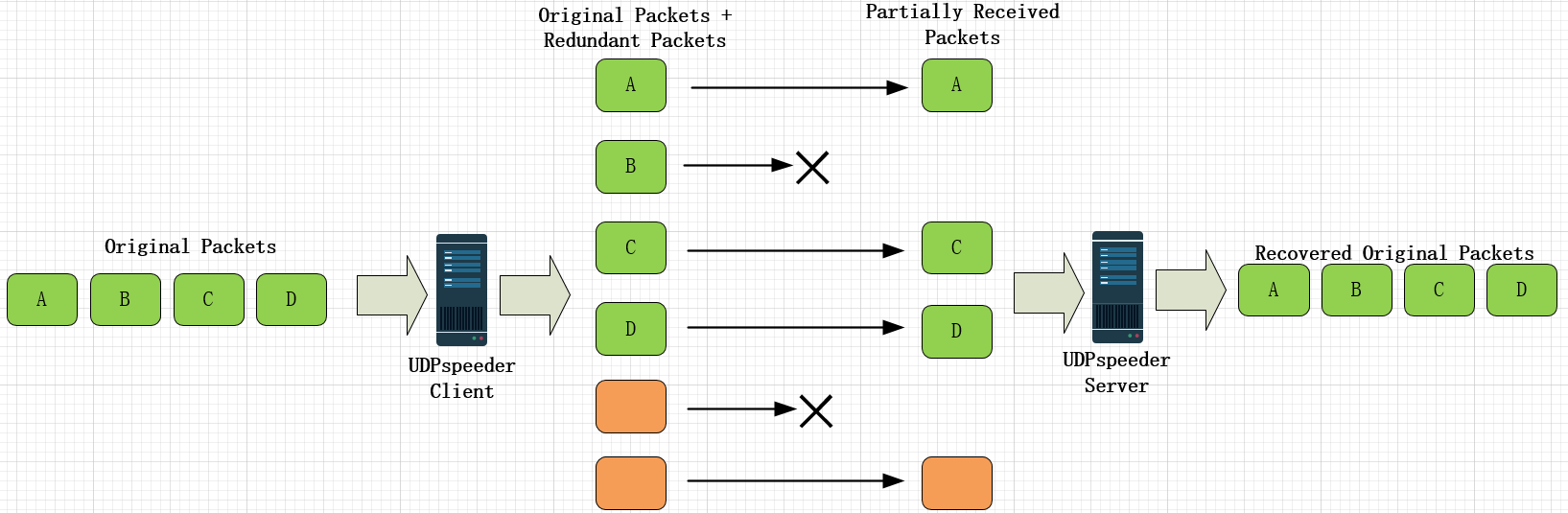
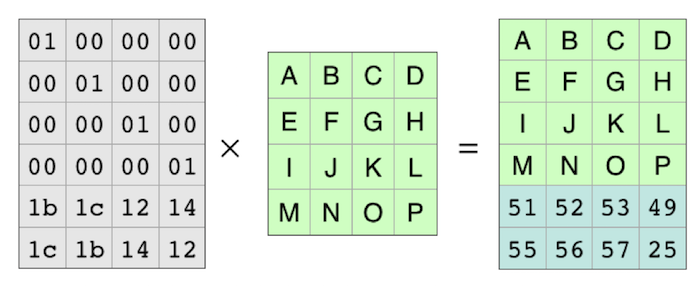
UDPspeeder uses FEC(Forward Error Correction) to reduce packet loss rate, at the cost of additional bandwidth. The algorithm for FEC is called Reed-Solomon.
Reed-Solomon
In coding theory, the Reed–Solomon code belongs to the class of non-binary cyclic error-correcting codes. The Reed–Solomon code is based on univariate polynomials over finite fields.
It is able to detect and correct multiple symbol errors. By adding t check symbols to the data, a Reed–Solomon code can detect any combination of up to t erroneous symbols, or correct up to ⌊t/2⌋ symbols. As an erasure code, it can correct up to t known erasures, or it can detect and correct combinations of errors and erasures. Reed–Solomon codes are also suitable as multiple-burst bit-error correcting codes, since a sequence of b + 1 consecutive bit errors can affect at most two symbols of size b. The choice of t is up to the designer of the code, and may be selected within wide limits.
Check wikipedia for more info, https://en.wikipedia.org/wiki/Reed–Solomon_error_correction
Getting Started
Installing
Download binary release from https://github.com/wangyu-/UDPspeeder/releases
Running (improves UDP traffic only)
Assume your server ip is 44.55.66.77, you have a service listening on udp port 7777.
# Run at server side:
./speederv2 -s -l0.0.0.0:4096 -r 127.0.0.1:7777  -f20:10 -k "passwd"

# Run at client side
./speederv2 -c -l0.0.0.0:3333  -r44.55.66.77:4096 -f20:10 -k "passwd"
Now connecting to UDP port 3333 at the client side is equivalent to connecting to port 7777 at the server side, and the connection has been boosted by UDPspeeder.
Note
-f20:10 means sending 10 redundant packets for every 20 original packets.
-k enables simple XOR encryption
Improves all traffic with OpenVPN + UDPspeeder
See UDPspeeder + openvpn config guide.
Advanced Topic
Full Options
UDPspeeder V2
git version: 3e248b414c    build date: Aug  5 2018 21:59:52
repository: https://github.com/wangyu-/UDPspeeder

usage:
    run as client: ./this_program -c -l local_listen_ip:local_port -r server_ip:server_port  [options]
    run as server: ./this_program -s -l server_listen_ip:server_port -r remote_ip:remote_port  [options]

common options, must be same on both sides:
    -k,--key              <string>        key for simple xor encryption. if not set, xor is disabled
main options:
    -f,--fec              x:y             forward error correction, send y redundant packets for every x packets
    --timeout             <number>        how long could a packet be held in queue before doing fec, unit: ms, default: 8ms
    --report              <number>        turn on send/recv report, and set a period for reporting, unit: s
advanced options:
    --mode                <number>        fec-mode,available values: 0,1; mode 0(default) costs less bandwidth,no mtu problem.
                                          mode 1 usually introduces less latency, but you have to care about mtu.
    --mtu                 <number>        mtu. for mode 0, the program will split packet to segment smaller than mtu value.
                                          for mode 1, no packet will be split, the program just check if the mtu is exceed.
                                          default value: 1250. you typically shouldn't change this value.
    -q,--queue-len        <number>        fec queue len, only for mode 0, fec will be performed immediately after queue is full.
                                          default value: 200.
    -j,--jitter           <number>        simulated jitter. randomly delay first packet for 0~<number> ms, default value: 0.
                                          do not use if you dont know what it means.
    -i,--interval         <number>        scatter each fec group to a interval of <number> ms, to protect burst packet loss.
                                          default value: 0. do not use if you dont know what it means.
    -f,--fec              x1:y1,x2:y2,..  similar to -f/--fec above,fine-grained fec parameters,may help save bandwidth.
                                          example: "-f 1:3,2:4,10:6,20:10". check repo for details
    --random-drop         <number>        simulate packet loss, unit: 0.01%. default value: 0.
    --disable-obscure     <number>        disable obscure, to save a bit bandwidth and cpu.
developer options:
    --fifo                <string>        use a fifo(named pipe) for sending commands to the running program, so that you
                                          can change fec encode parameters dynamically, check readme.md in repository for
                                          supported commands.
    -j ,--jitter          jmin:jmax       similar to -j above, but create jitter randomly between jmin and jmax
    -i,--interval         imin:imax       similar to -i above, but scatter randomly between imin and imax
    --decode-buf          <number>        size of buffer of fec decoder,u nit: packet, default: 2000
    --fix-latency         <number>        try to stabilize latency, only for mode 0
    --delay-capacity      <number>        max number of delayed packets
    --disable-fec         <number>        completely disable fec, turn the program into a normal udp tunnel
    --sock-buf            <number>        buf size for socket, >=10 and <=10240, unit: kbyte, default: 1024
log and help options:
    --log-level           <number>        0: never    1: fatal   2: error   3: warn
                                          4: info (default)      5: debug   6: trace
    --log-position                        enable file name, function name, line number in log
    --disable-color                       disable log color
    -h,--help                             print this help message
--fifo option
Use a fifo(named pipe) for sending commands to the running program. For example --fifo fifo.file, you can use following commands to change parameters dynamically:
No homepage URL was recorded for wangyu-/UDPspeeder in TopGit's last sync. The README tab above frequently contains screenshots and demo links, or check the repository description on GitHub.
Is wangyu-/UDPspeeder open source?
Yes — wangyu-/UDPspeeder ships under the MIT license, which makes its source code freely readable (and, depending on license terms, forkable and reusable). Source: github.com/wangyu-/UDPspeeder.
What is wangyu-/UDPspeeder?
wangyu-/UDPspeeder (wangyu-/UDPspeeder) is a C++ project on GitHub. From the project's own README: A Tunnel which Improves your Network Quality on a High-latency Lossy Link by using Forward Error Correction, possible for All Traffics(TCP/UDP/ICMP)
What license does wangyu-/UDPspeeder use?
wangyu-/UDPspeeder is released under the MIT license. Always verify the LICENSE file directly on GitHub for the authoritative terms — license strings can be edited out of sync with a project's actual stance.
Where do I read more about wangyu-/UDPspeeder?
This TopGit page is a snapshot — the READ ME tab shows the project's own README content (links stripped, images preserved). The GitHub repository at github.com/wangyu-/UDPspeeder is the definitive source.
Read full README in the tab above.
Is UDPspeeder worth your time?
ChatGPT, Claude and Perplexity can all read this page. Ask one of them what it makes of UDPspeeder.

 /UDPspeeder