WongKinYiu/FSS-SAM3 is tracked by TopGit as an open-source project, with 55 stars on GitHub, written primarily in Python. Few Shot Semantic Segmentation Meets SAM3
Snapshot summary built from the project's own GitHub metadata — there's no written TopGit review yet. The page will update automatically when a full review is published.
WHY NO REVIEW YET
TopGit writes full reviews for the most-starred, most-requested repositories. This page is a snapshot until then — see the READ ME tab for the original README in full.
This repository contains the evaluation code for applying the SAM3 (Segment Anything Model 3) to Few-Shot Segmentation (FSS) tasks. We explore the model's few-shot capabilities with a unified canvas using geometric prompts (bounding boxes) and analyze its performance on standard datasets like COCO-20i and PASCAL-5i.
Furthermore, this project investigates a novel two-stage inference approach using Negative Prompt Mining to refine segmentation results and reduce false positives.
📂 Repository Structure
The evaluation framework is divided into two main scripts:
evaluate.py: The unified baseline evaluation script for 1-shot and 5-shot FSS tasks. It supports multiple canvas layouts, text prompt toggling, and target/support swapping.
evaluate_neg.py: An experimental ablation script focusing on 1-shot COCO. It introduces a two-stage inference pipeline that automatically extracts negative bounding boxes from the support image based on model confidence scores.
🚀 Quick Start
1. Standard Evaluation
The script ./model/evaluate.py handles the standard pairwise evaluation. By default, it runs COCO 1-shot evaluation with text prompt enabled.
Basic Usage:
# Run COCO 1-shot
python evaluate.py

# Run PASCAL 1-shot
python evaluate.py --dataset pascal

# Run COCO 5-shot
python evaluate.py --shot 5

# Run PASCAL 5-shot
python evaluate.py --dataset pascal --shot 5
Advanced Configurations:
# COCO 1-shot with visual prompt only
python evaluate.py --disable_text

# PASCAL 1-shot with Horizontal orientation and custom canvas ratio
python evaluate.py --dataset pascal --orient horizontal --ratio 0.5

# COCO 5-shot with Vertical Strip layout
python evaluate.py --shot 5 --layout vertical_strip
2. Negative Mining Evaluation
The script ./model/evaluate_neg.py runs the customized two-stage pipeline. It first infers the support image to extract positive (score > 0.5) and negative (0.1 < score <= 0.5) geometric prompts, then projects these multiple prompts onto the collage canvas for precise target segmentation.
Usage:
# Run 1-shot COCO with Negative Mining
python evaluate_neg.py --max_neg 1
(Note: The canvas layout is fixed to Support at the Bottom with a 0.6 ratio for this specific experiment.)
📊 Evaluation Metrics
Both scripts automatically compute and output the following metrics across 4 cross-validation folds:
mIoU (Mean Intersection over Union): The standard class-wise segmentation accuracy.
FB-IoU (Foreground-Background IoU): The average IoU of the foreground and background regions.
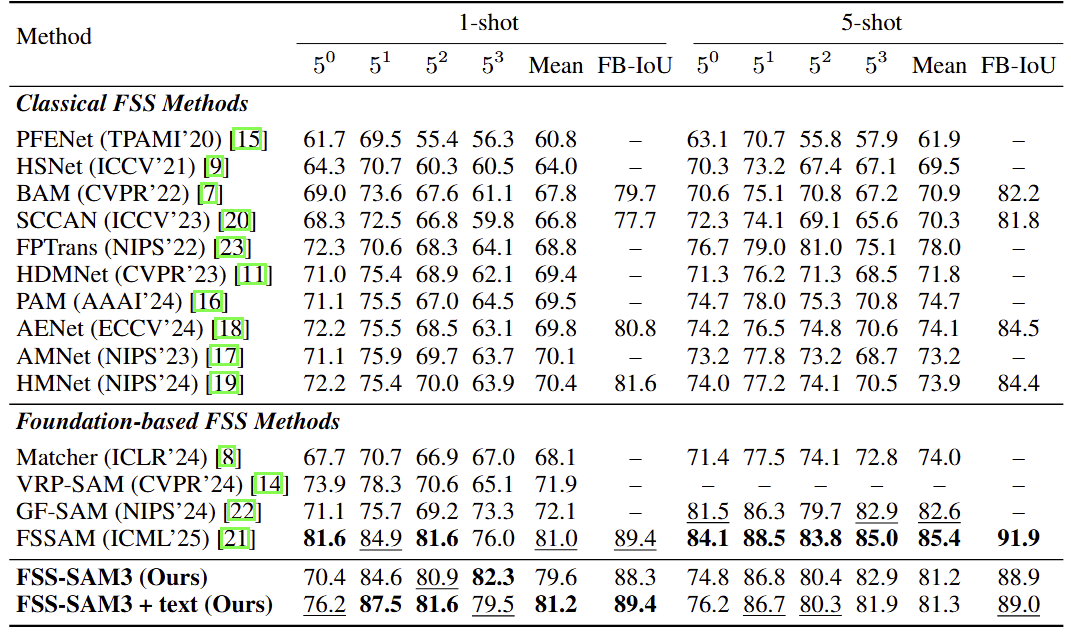
Comparison with state-of-the-art methods on PASCAL-5i dataset
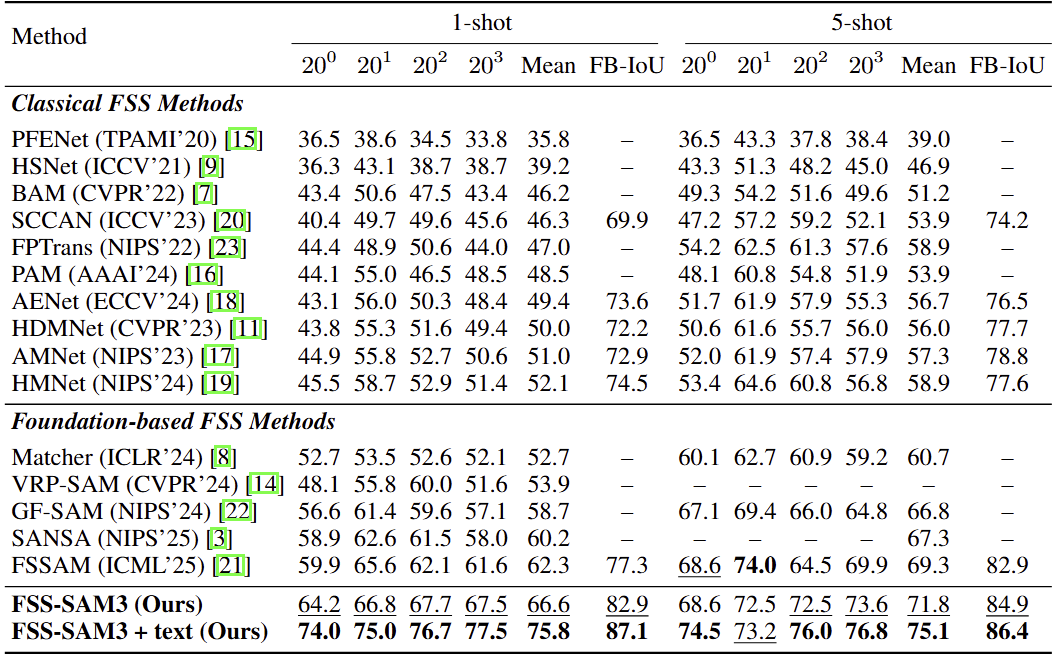
Comparison with state-of-the-art methods on COCO-20i dataset
Experiment on the number of negative prompts for COCO-20i dataset
$\Delta_m$ and $\Delta_F$ represent the decrease in mIoU and FB-IoU, respectively, compared to the $N_{neg}=0$ baseline.
Max Negative Prompts
$20^0$
$20^1$
$20^2$
$20^3$
mIoU
$\Delta_m$
FB-IoU
$\Delta_F$
$N_{neg} = 0$ (Positive Only)
64.2
66.8
67.7
67.5
66.6
--
82.9
--
$N_{neg} \le 1$
51.1
57.5
54.2
56.6
54.8
-11.8
77.2
-5.7
$N_{neg} \le 3$
41.7
49.1
47.6
47.9
46.6
-20.0
73.1
-9.8
$N_{neg} \le 5$
40.0
48.1
45.9
44.9
44.7
-21.9
72.4
-10.5
🖼️ Visualizations
To help qualitatively analyze the model's behavior, the scripts automatically save visualization collages for the first few episodes of each fold.
Outputs are saved in: vis_results/<dataset>_<shot>shot/ or vis_results/coco_neg_<max_neg>.
The visualizations include the prompt boxes (Green for Positive, Red for Negative) and the local IoU score stamped on the target image.
📥 Download Datasets
Our dataset setup and directory structure follow the convention used in VRPSAM.
Download COCO2014 train/val annotations from the Google Drive: [train2014.zip], [val2014.zip].
(and locate both train2014/ and val2014/ under annotations/ directory).
2. Directory Structure
The dataset directory structure should be organized as follows.
The core architecture and some utility scripts are based on Segment Anything Model 3 (SAM3).
We thank the Meta AI team for their amazing work.
This project follows the original SAM License found in the LICENSE file. Our modifications are also open-sourced under the same terms.
[Update] Few-Shot Object Detection (FSOD)
We additionally evaluate our FSS-SAM3 under the Few-Shot Object Detection (FSOD) setting using the unified support-query collage framework with geometric prompts.
Our evaluation protocol follows the dataset setup from FSOD-VFM, including:
The original FSOD-VFM COCO benchmark provides fixed support protocols for:
10-shot
30-shot
Since our canvas-based prompting framework currently supports up to five support images within a single collage layout, we evaluate the 1-shot and 5-shot settings instead of the original 10-shot and 30-shot configurations.
Setting
AP
AP50
AP75
COCO 1-shot
0.3049
0.3818
0.3350
COCO 5-shot
0.3382
0.4287
0.3720
Dataset Setup
Please follow the dataset structure and benchmark protocol from FSOD-VFM.
The repository includes:
Pascal VOC episodic split JSON files
COCO fixed-support JSON files
Unified evaluation scripts for Pascal and COCO benchmarks
TopGit's metadata for WongKinYiu/FSS-SAM3 does not record a license. Most public repositories on GitHub ARE open source, but the exact terms vary — verify by opening the LICENSE file directly.
What is WongKinYiu/FSS-SAM3?
WongKinYiu/FSS-SAM3 (WongKinYiu/FSS-SAM3) is a Python project on GitHub. From the project's own README: Few Shot Semantic Segmentation Meets SAM3
Where do I read more about WongKinYiu/FSS-SAM3?
This TopGit page is a snapshot — the READ ME tab shows the project's own README content (links stripped, images preserved). The GitHub repository at github.com/WongKinYiu/FSS-SAM3 is the definitive source.
Read full README in the tab above.
Still deciding about FSS-SAM3?
One click hands the question to an AI along with this page — see what it says about FSS-SAM3.

 /FSS-SAM3