xoreaxeaxeax/sandsifter is one of the open-source repositories TopGit tracks, currently at 5.1k stars, written primarily in Python. The x86 processor fuzzer
Snapshot summary built from the project's own GitHub metadata — there's no written TopGit review yet. The page will update automatically when a full review is published.
WHY NO REVIEW YET
TopGit writes full reviews for the most-starred, most-requested repositories. This page is a snapshot until then — see the READ ME tab for the original README in full.
The sandsifter audits x86 processors for hidden instructions and hardware bugs,
by systematically generating machine code to search through a processor's
instruction set, and monitoring execution for anomalies. Sandsifter has
uncovered secret processor instructions from every major vendor; ubiquitous
software bugs in disassemblers, assemblers, and emulators; flaws in enterprise
hypervisors; and both benign and security-critical hardware bugs in x86 chips.
With the multitude of x86 processors in existence, the goal of the tool is to
enable users to check their own systems for hidden instructions and bugs.
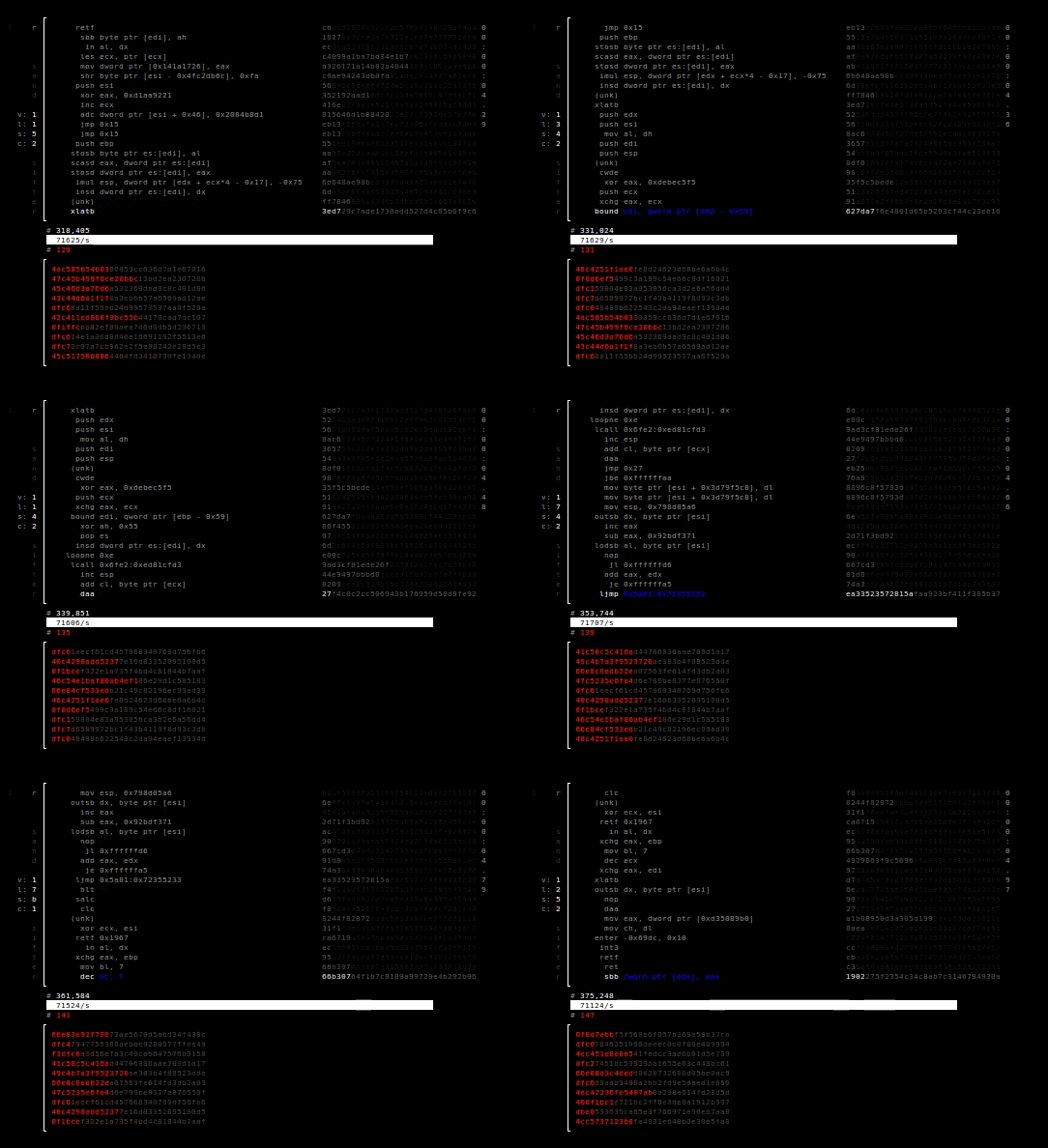
The computer is systematically scanned for anomalous instructions. In the upper
half, you can view the instructions that the sandsifter is currently testing on
the processor. In the bottom half, the sandsifter reports anomalies it finds.
The search will take from a few hours to a few days, depending on the speed of
and complexity of your processor. When it is complete, summarize the results:
./summarize.py data/log
Typically, several million undocumented instructions on your processor will be
found, but these generally fall into a small number of different groups. After
binning the anomalies, the summarize tool attempts to assign each instruction to
an issue category:
Software bug (for example, a bug in your hypervisor or disassembler),
Hardware bug (a bug in your CPU), or
Undocumented instruction (an instruction that exists in the processor, but is
not acknowledged by the manufacturer)
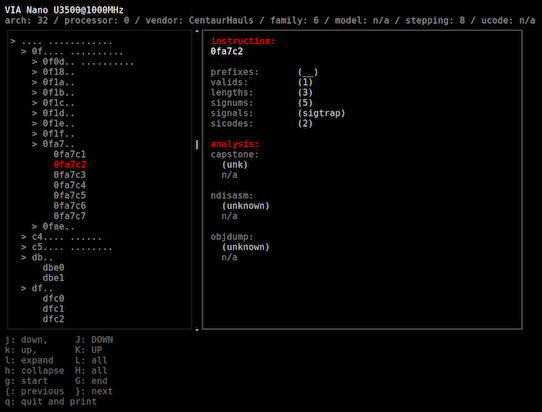
Press 'Q' to quit and obtain a text based summary of the system scan:
The results of a scan can sometimes be difficult for the tools to automatically
classify, and may require manual analysis. For help analyzing your results, feel
free to send the ./data/log file to [email protected]. No personal
information, other than the processor make, model, and revision (from
/proc/cpuinfo) are included in this log.
Results
Scanning with the sandsifter has uncovered undocumented processor features
across dozens of opcode categories, flaws in enterprise hypervisors, bugs in
nearly every major disassembly and emulation tool, and critical hardware bugs
opening security vulnerabilities in the processor itself.
Details of the results can be found in the project
whitepaper.
(TODO: detailed results enumeration here)
Building
Sandsifter requires first installing the Capstone disassembler:
http://www.capstone-engine.org/. Capstone can typically be installed with:
--len
	search for length differences in all instructions (instructions that
	executed differently than the disassembler expected, or did not
	exist when the disassembler expected them to

--dis
	search for length differences in valid instructions (instructions that
	executed differently than the disassembler expected)

--unk
	search for unknown instructions (instructions that the disassembler doesn't
	know about but successfully execute)

--ill
	the inverse of --unk, search for invalid disassemblies (instructions that do
	not successfully execute but that the disassembler acknowledges)

--tick
	periodically write the current instruction to disk

--save
	save search progress on exit

--resume
	resume search from last saved state

--sync
	write search results to disk as they are found

--low-mem
	do not store results in memory
Injector flags:
-b
	mode: brute force

-r
	mode: randomized fuzzing

-t
	mode: tunneled fuzzing

-d
	mode: externally directed fuzzing

-R
	raw output mode

-T
	text output mode

-x
	write periodic progress to stderr

-0
	allow null dereference (requires sudo)

-D
	allow duplicate prefixes

-N
	no nx bit support

-s seed
	in random search, seed value

-B brute_depth
	in brute search, maximum search depth

-P max_prefix
	maximum number of prefixes to search

-i instruction
	instruction at which to start search (inclusive)

-e instruction
	instruction at which to end search (exclusive)

-c core
	core on which to perform search

-X blacklist
	blacklist the specified instruction

-j jobs
	number of simultaneous jobs to run

-l range_bytes
	number of base instruction bytes in each sub range
Keys
m: Mode - change the search mode (brute force, random, or tunnel) for the sifter
q: Quit - exit the sifter
p: Pause - pause or unpause the search
Algorithms
The scanning supports four different search algorithms, which can be set at the
command line, or cycled via hotkeys.
Random searching generates random instructions to test; it generally produces
results quickly, but is unable to find complex hidden instructions and bugs.
Brute force searching tries instructions incrementally, up to a user-specified
length; in almost all situations, it performs worse than random searching.
Driven or mutation driven searching is designed to create new, increasingly
complex instructions through genetic algorithms; while promising, this
approach was never fully realized, and is left as a stub for future research.
Tunneling is the approach described in the presentation and white paper, and
in almost all cases provides the best trade-off between thoroughness and
speed.
Tips
sudo
For best results, the tool should be run as the root user. This is necessary so
that the process can map into memory a page at address 0, which requires root
permissions. This page prevents many instructions from seg-faulting on memory
accesses, which allows a more accurate fault analysis.
Prefixes
The primary limitation for the depth of an instruction search is the number
of prefix bytes to explore, with each additional prefix byte increasing the
search space by around a factor of 10. Limit prefix bytes with the -P flag.
Colors
The interface for the sifter is designed for a 256 color terminal. While
the details vary greatly depending on your terminal, this can roughly be
accomplished with:
export TERM='xterm-256color'
GUI
The interface assumes the terminal is of at least a certain size; if the
interface is not rendering properly, try increasing the terminal size; this
can often be accomplished by decreasing the terminal font size.
In some cases, it may be desirable or necessary to run the tool without the
graphical front end. This can be done by running the injector directly:
sudo ./injector -P1 -t -0
To filter the results of a direct injector invocation, grep can be used.
For example,
searches for instructions for which the processor and disassembler disagreed
on the instruction length (grep '.r'), but the instruction successfully
executed (grep -v sigill).
Targeted fuzzing
In many cases, it is valuable to direct the fuzzer to a specific target.
For example, if you suspect that an emulator has flaws around repeated 'lock'
prefixes (0xf0), you could direct the fuzzer to search this region of the
instruction space with the -i and -e flags:
If you observe your scans completing too quickly (for example, a scan
completes in seconds), it is typically because these flags are required for
the processor you are scanning.
32 vs. 64 bit
By default, sandsifter is built to target the bitness of the host operating
system. However, some instructions have different behaviors when run in a
32 bit process compared to when run in a 64 bit process. To explore these
scenarios, it is sometimes valuable to run a 32 bit sandsifter on a 64 bit
system.
To build a 32 bit sandsifter on a 64 bit system, Capstone must be installed
as 32 bit; the instructions for this can be found at http://www.capstone-engine.org/.
Then sandsifter must be built for a 32 bit architecture:
make CFLAGS=-m32
With this, the 32 bit instruction space can be explored on a 64 bit system.
References
A discussion of the techniques and results can be found in the Black Hat
presentation.
Technical details are described in the
whitepaper.
Slides from the Black Hat presentation are
here.
Author
sandsifter is a research effort from Christopher Domas
(@xoreaxeaxeax).
How active is development on xoreaxeaxeax/sandsifter?
The most recent commit recorded on xoreaxeaxeax/sandsifter was 2.5 years ago, based on the GitHub push timestamp. The repository has 355 forks — one of the better signals of community interest.
How many stars does xoreaxeaxeax/sandsifter have?
xoreaxeaxeax/sandsifter has 5.1k GitHub stars — refresh the page for the live number, or check github.com/xoreaxeaxeax/sandsifter. TopGit mirrors GitHub's count but does not claim minute-by-minute accuracy.
Is xoreaxeaxeax/sandsifter open source?
Yes — xoreaxeaxeax/sandsifter ships under the BSD-3-Clause license, which makes its source code freely readable (and, depending on license terms, forkable and reusable). Source: github.com/xoreaxeaxeax/sandsifter.
What is xoreaxeaxeax/sandsifter?
xoreaxeaxeax/sandsifter (xoreaxeaxeax/sandsifter) is a Python project on GitHub. From the project's own README: The x86 processor fuzzer
What language is xoreaxeaxeax/sandsifter written in?
xoreaxeaxeax/sandsifter is written primarily in Python. GitHub's language field is based on the largest share of bytes in the default branch.
What license does xoreaxeaxeax/sandsifter use?
xoreaxeaxeax/sandsifter is released under the BSD-3-Clause license. Always verify the LICENSE file directly on GitHub for the authoritative terms — license strings can be edited out of sync with a project's actual stance.
Where do I read more about xoreaxeaxeax/sandsifter?
This TopGit page is a snapshot — the READ ME tab shows the project's own README content (links stripped, images preserved). The GitHub repository at github.com/xoreaxeaxeax/sandsifter is the definitive source.
Read full README in the tab above.
Want a second opinion on sandsifter?
Ask an AI that can read this page — one click and you get its take on sandsifter.
 /sandsifter