
yihong0618/GitHubPoster

1.9k GitHub stars and counting — yihong0618/GitHubPoster is a Python project TopGit is tracking across repositories on the platform. Make everything a GitHub svg poster and Skyline!
Snapshot summary built from the project's own GitHub metadata — there's no written TopGit review yet. The page will update automatically when a full review is published.
TopGit writes full reviews for the most-starred, most-requested repositories. This page is a snapshot until then — see the READ ME tab for the original README in full.
Snapshot
Top contributors
Show top contributors
GitHubPoster
Make everything a GitHub svg poster and skyline!
简体中文 | English
直接引入 svg 在 README 中的例子

Summary

Skyline
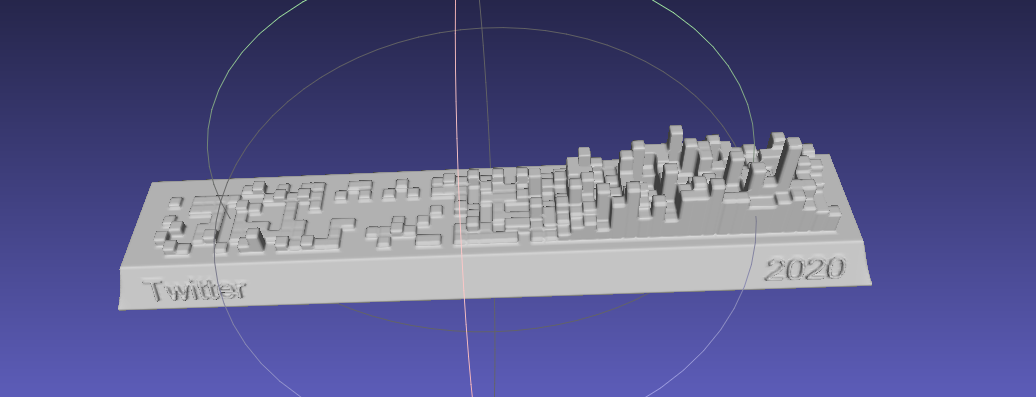
Circular

支持
- Strava
- 开心词场
- 扇贝
- 不背单词
- Nintendo Switch
- GPX
- 多邻国
- Issue
- YouTube
- Bilibili
- GitHub
- GitLab
- Kindle
- WakaTime
- Dota2
- Nike
- Notion
- Garmin
- Forest
- Json
- Multiple
- 即刻
- 微信读书
- 总结
- Covid
- Todoist
- 开言英语
- Apple Health
- ChatGPT
- NeoDB
- AutoSleep
下载
git clone https://github.com/yihong0618/GitHubPoster.git
pip 安装
pip3 install -U 'github_poster[all]'
安装(Python3.11+)
uv sync --all-extras
使用
生成的 svg 在 OUT_FOLDER 内, 用 type 命名(暂时)
不同类型按下方指定的使用方式:
--year 2022: 可以指定年份(默认)或年份区间--year 2012-2022--track-color=#f4cccc: 指定基础颜色--special-number1 10 -- special_number2 20: 可以指定特殊颜色,默认自动生成不同颜色需要的 number(特殊颜色)--special-color1 pink --special-color2 '#33C6A4': 指定特殊颜色--with-animation: 可以增加动画 (加入 GOGOGO 动画)--animation-time 14: 可以控制动画时间(默认是 10s), 配合--with-animation使用--with-skyline: 可以增加 Skyline (默认生成的为 to_year)--skyline-with-name: 将用户名打印在 Skyline 上, 配合--with-skyline使用--is-circular: 支持 circular svg 配合动画--without-type-name: 支持隐藏标题中生成类型的名称
其它参数可以见 python3 -m github_poster <type> --help
GPX
Make your GPX GitHub poster
把其它软件生成的(like running_page) gpx files 拷贝到 GPX_FOLDER 之后运行,或指定文件夹如我的文件夹是 ~/blog/GPX_OUT/
python3 -m github_poster gpx --gpx_dir ~/blog/GPX_OUT/ --year 2013-2021
or pip
github_poster gpx --gpx_dir ~/blog/GPX_OUT/ --year 2013-2021
Strava
Make your Strava GitHub poster
-
注册/登陆 Strava 账号
-
登陆成功后打开 Strava Developers -> Create & Manage Your App
-
创建
My API Application输入下列信息: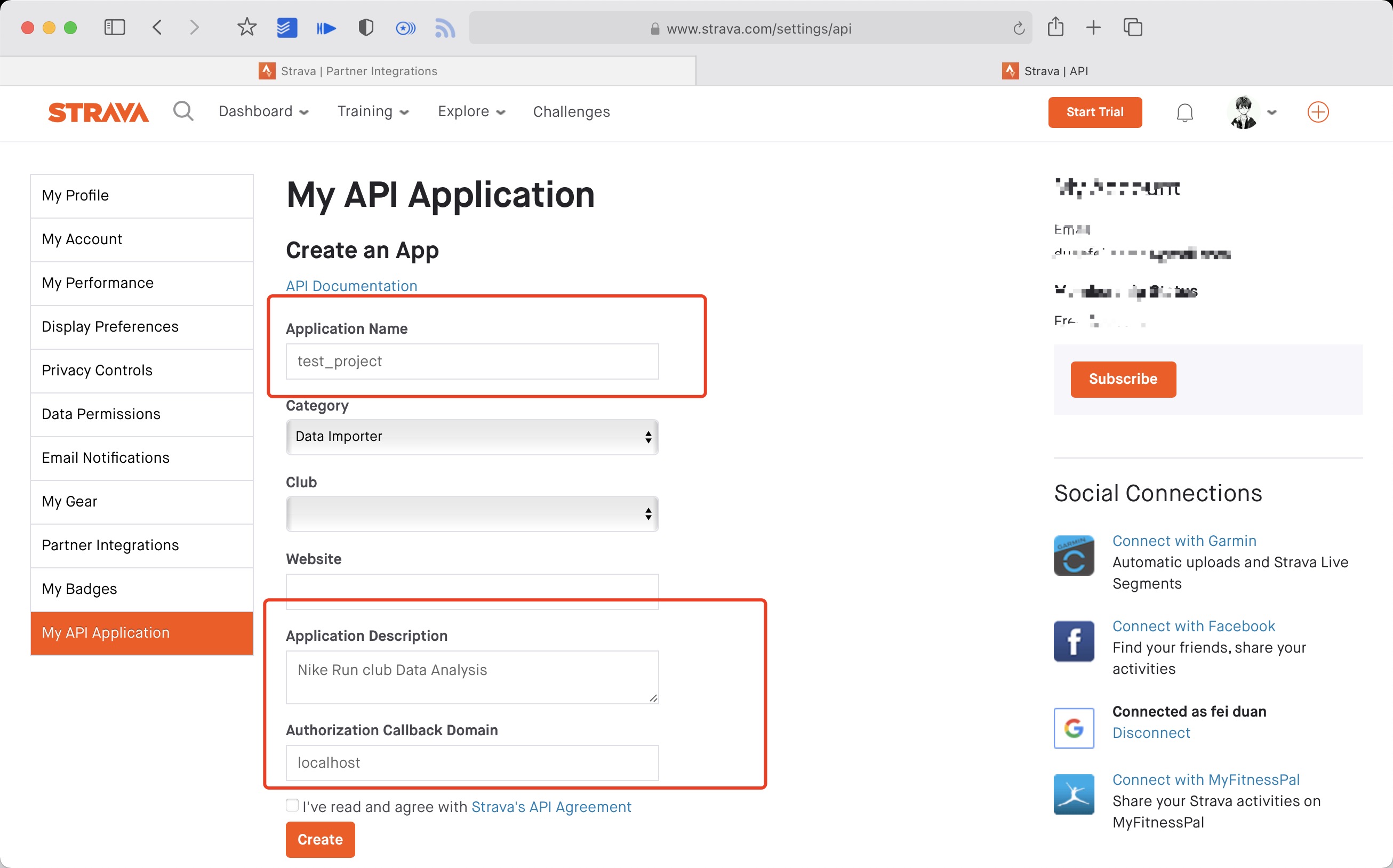 创建成功:

-
使用以下链接请求所有权限 将 ${your_id} 替换为 My API Application 中的 Client ID 后访问完整链接
https://www.strava.com/oauth/authorize?client_id=${your_id}&response_type=code&redirect_uri=http://localhost/exchange_token&approval_prompt=force&scope=read_all,profile:read_all,activity:read_all,profile:write,activity:write
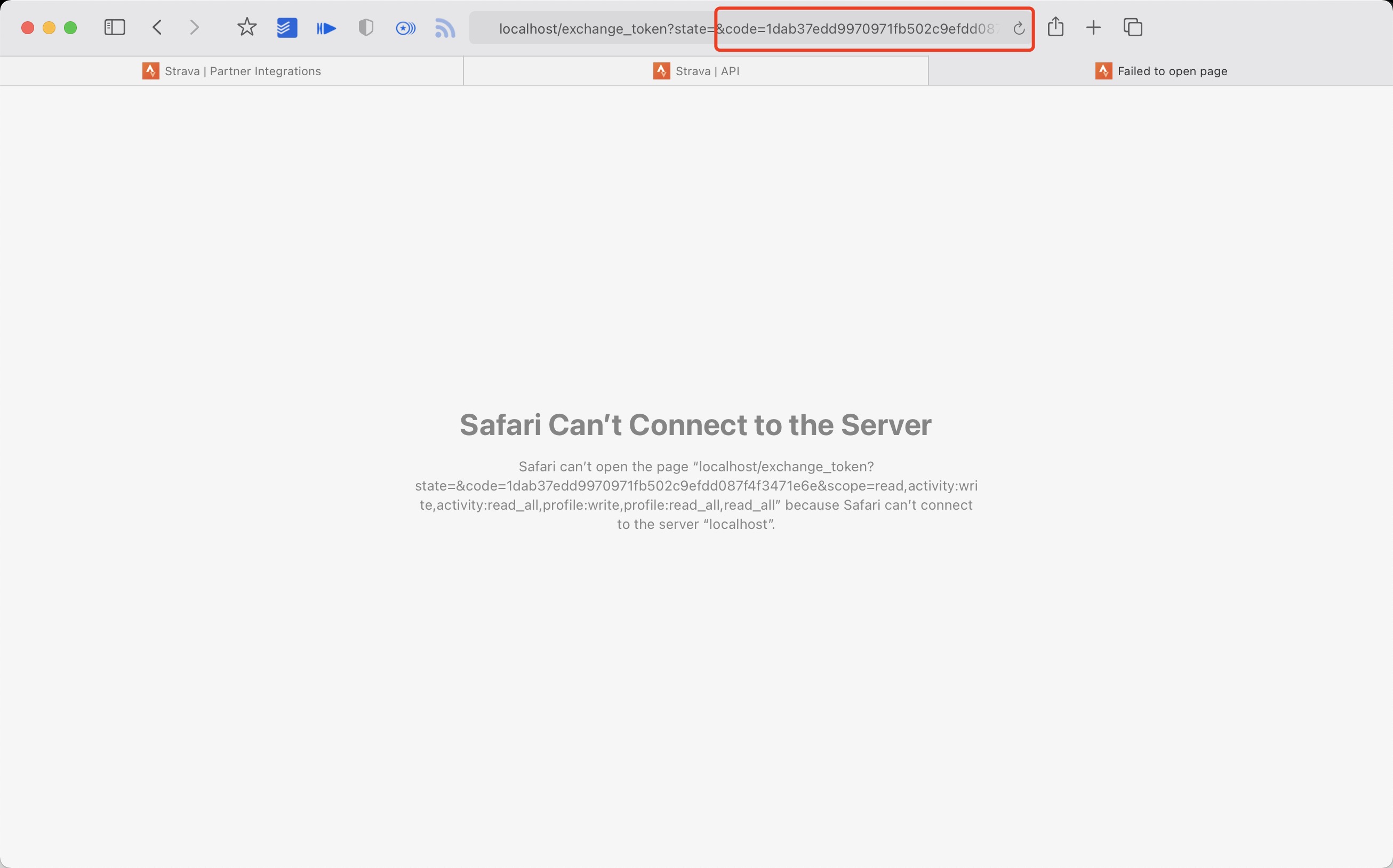
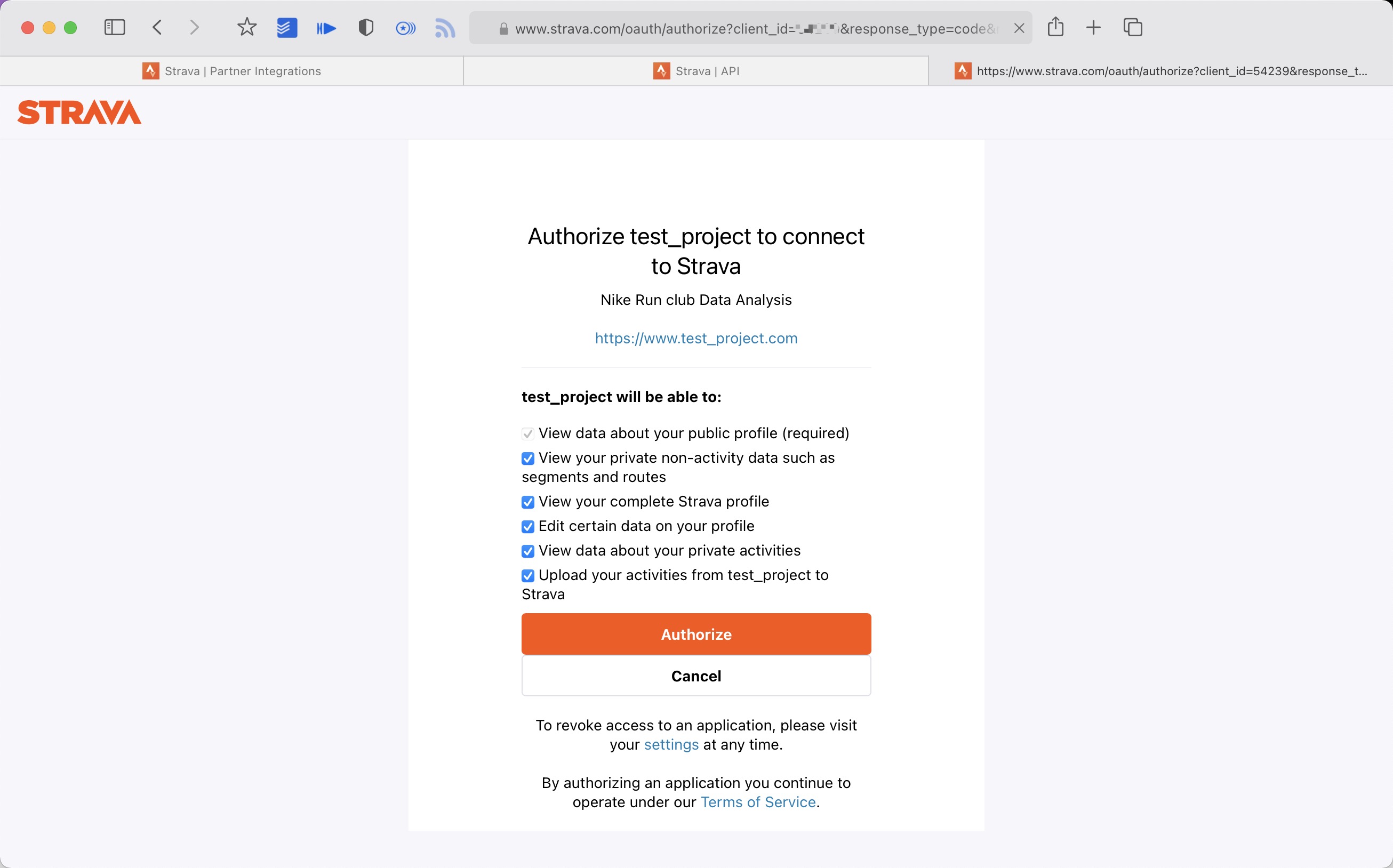 5. 提取授权后返回链接中的 code 值
例如:
http://localhost/exchange_token?state=&code=1dab37edd9970971fb502c9efdd087f4f3471e6e&scope=read,activity:write,activity:read_all,profile:write,profile:read_all,read_all
code 数值为:
1dab37edd9970971fb502c9efdd087f4f3471e6
 6. 使用
Client_id、Client_secret、Code 请求 refresch_token
在 终端/iTerm 中执行:
curl -X POST https://www.strava.com/oauth/token \
-F client_id=${Your Client ID} \
-F client_secret=${Your Client Secret} \
-F code=${Your Code} \
-F grant_type=authorization_code
示例:
curl -X POST https://www.strava.com/oauth/token \
-F client_id=12345 \
-F client_secret=b21******d0bfb377998ed1ac3b0 \
-F code=d09******b58abface48003 \
-F grant_type=authorization_code

- 同步数据至
Strava在项目根目录执行:
python3 -m github_poster strava --strava_client_id  ${client_id} --strava_client_secret ${client_secret} --strava_refresh_token ${refresh_token} --year 2012-2021
or pip
github_poster strava --strava_client_id  ${client_id} --strava_client_secret ${client_secret} --strava_refresh_token ${refresh_token} --year 2012-2021
NS
Make your Nintendo Switch GitHub poster
需要下载 家长控制那个 APP(Nintendo Switch Parent Controls) 进行抓包(可以使用 mitmproxy 等抓包软件)
python3 -m github_poster ns --ns_session_token ${session_token} --ns_device_id ${device_id} --year 2020-2021
or pip
github_poster ns --ns_session_token ${session_token} --ns_device_id ${device_id} --year 2020-2021
开心词场
Make your 开心词场 GitHub poster
需要填写开心词场的账号和密码
python3 -m github_poster cichang --cichang_user_name ${user_name} --cichang_password ${pass_word} --year 2016-2021 --special-color1 blue --special-color2 pink --me yihong0618
or
github_poster cichang --cichang_user_name ${user_name} --cichang_password ${pass_word} --year 2016-2021 --special-color1 blue --special-color2 pink --me yihong0618
多邻国
Make your 多邻国(duolingo) GitHub poster
-
在网页登录多邻国
-
按
F12在控制台(console)使用document.cookie.match(new RegExp('(^| )jwt_token=([^;]+)'))[0].slice(11)获取 duolingo_jwt -
在多邻国用户主页或 通过地址栏
https://www.duolingo.cn/profile/{duolingo id}获取 duolingo id
python3 -m github_poster duolingo --duolingo_user_name ${duolingo_user_name} --duolingo_jwt ${duolingo_jwt} --year 2015-2021
or
github_poster duolingo --duolingo_user_name ${duolingo_user_name} --duolingo_jwt ${duolingo_jwt} --year 2015-2021
扇贝
Make your 扇贝(shanbay) GitHub poster
需要找到你的扇贝 user_id, 从网页抓 xhr 就可以获得如下图 
python3 -m github_poster shanbay --shanbay_user_name ${user_name} --year 2012-2021 --special-color1 '#009688' --special-color2 '#007BFF' --track-color '#ADD8E6'
or
github_poster shanbay --shanbay_user_name ${user_name} --year 2012-2021 --special-color1 '#009688' --special-color2 '#007BFF' --track-color '#ADD8E6'
不背单词
Make your 不背单词(bbdc) GitHub poster
在设置最下方可以获得 user_id

python3 -m github_poster bbdc --bbdc_user_id ${user_id} --bbdc_type ${time/word}
or
github_poster bbdc --bbdc_user_id ${user_id} --bbdc_type ${time/word}
Issue
Make your Issue GitHub poster
可以参考我的 issue
- 确保issue中是有内容的
- 内容的第一行必须是数字,因为是取的第一行的数字来进行计数的
python3 -m github_poster issue --issue_number ${issue_number} --repo_name ${repo_name} --github_token ${github_token}
or
github_poster issue --issue_number ${issue_number} --repo_name ${repo_name} --github_token ${github_token}
LeetCode
Make your LeetCode GitHub poster
需要找到你 LeetCode 的 cookie
python3 -m github_poster leetcode --leetcode_cookie ${leetcode_cookie} --year 2019-2021
or
github_poster leetcode --leetcode_cookie ${leetcode_cookie} --year 2019-2021
如果使用的是 leetcode-cn(leetcode 中国需要加上参数)--cn
python3 -m github_poster leetcode --leetcode_cookie ${leetcode_cookie} --year 2019-2021 --cn
or
github_poster leetcode --leetcode_cookie ${leetcode_cookie} --year 2019-2021 --cn
Youtube
Make your YouTube GitHub poster
利用 Google 的历史下载下载 YouTube 的历史数据,选择 json 格式,将 watch-history.json 拷贝到 IN-FOLDER 然后运行
python3 -m github_poster youtube --year 2015-2021
or
github_poster youtube --year 2015-2021
Bilibili
Make your Bilibili GitHub poster
需要找到你 Bilibili (XHR) 的 cookie
python3 -m github_poster bilibili --bilibili_cookie "${bilibili-cookie}"
or
github_poster bilibili --bilibili_cookie "${bilibili-cookie}"
GitHub
Make your GitHub GitHub poster
需要找到你 GitHub Name (url 后面那个)
python3 -m github_poster github --github_user_name "${github_user_name}" --with-skyline
or
github_poster github --github_user_name "${github_user_name}" --with-skyline
GitLab
Make your GitLab GitLab poster
需要找到你 GitLab Name (url 后面那个)
python3 -m github_poster gitlab --gitlab_user_name "${gitlab_user_name}"
or
github_poster gitlab --gitlab_user_name "${gitlab_user_name}"
如果是自己搭建的 GitLab,可以指定 GitLab 的 URL,以及登录 GitLab 后得到的 _gitlab_session 这个 cookie(如果需要登录的话)
python3 -m github_poster gitlab --gitlab_user_name "${gitlab_user_name}" --base_url "https://your-gitlab.com" --session "${gitlab_session}"
or
github_poster gitlab --gitlab_user_name "${gitlab_user_name}" --base_url "https://your-gitlab.com" --session "${gitlab_session}"
Kindle
Make your Kindle GitHub poster
在亚马逊网站上需要找到你 Amazon-CN (XHR) Cookie
python3 -m github_poster kindle --kindle_cookie ${kindle_cookie} --cn --year 2018-2021
or
github_poster kindle --kindle_cookie ${kindle_cookie} --cn --year 2018-2021
WakaTime
Make your WakaTime poster
在 WakaTime 官网获取你的 WakaTime API Key:WakaTime API Key
python3 -m github_poster wakatime --wakatime_key="your_wakatime_api_key" --year 2019-2021
or
github_poster wakatime --wakatime_key="your_wakatime_api_key" --year 2019-2021
Dota2
Make your Dota2 poster
找到 Dota2 的游戏 ID,例如:Dendi 的 ID 70388657
通过 steam url/username 查询到你的 dota2_id : https://steamid.xyz/
使用 dota2_id 取得你的游戏数据:https://api.opendota.com/api/players/{dota2_id}/matches.
更多接口信息:https://docs.opendota.com/#section/Introduction"
python3 -m github_poster dota2 --dota2_id="your dota2 id" --year 2017-2018
or
github_poster dota2 --dota2_id="your dota2 id" --year 2017-2018
Nike
Make your Nike poster
获取 Nike 的 refresh_token
获取 Nike 的 refresh_token
全部需要在大陆以外的全局 ip 下进行

-
在这里登陆website, 打开 F12 在浏览器抓 login -> XHR -> get the
refresh_tokenfrom login api -
复制
refresh_token
python3 -m github_poster nike --nike_refresh_token="your nike_refresh_token" --year 2012-2021
or
github_poster nike --nike_refresh_token="your nike_refresh_token" --year 2012-2021
Notion
Make your Notion poster
获取 Notion 的 Internal Integration Token(notion_token),查看官方文档获取更多信息。
- 登录 Notion 开发者网站
- 点击「New integration」添加基础信息后,创建新的 Token
- 提交后可以看到
Secrets下的Internal Integration Token
获取用于生成 Poster 的 Notion 数据库 ID(database_id),查看官方文档获取更多信息。
- 以全屏页面打开数据库
- 复制页面链接,链接组成应该是
https://www.notion.so/{workspace_name}/{database_id}?v={view_id}这样的 - 其中
{database_id}部分即为数据库 ID
注:数据库需要添加一个属性类型为 Date 的日期属性,该属性的值将作为生成 Poster 的日期数据使用。在生成时需将该日期属性的名称作为选项 prop_name 的值,默认值为 Datetime
python3 -m github_poster notion --notion_token="your notion_token" --database_id="your database_id" --prop_name="your prop_name"
or
github_poster notion --notion_token="your notion_token" --database_id="your database_id" --prop_name="your prop_name"
Garmin
Make your Garmin poster
需要填写 Garmin 的账号和密码
python3 -m github_poster garmin --garmin_user_name ${user_name} --garmin_password ${pass_word} --year 2016-2021 --special-color1 blue --special-color2 pink --me yihong0618 --cn
or
github_poster garmin --garmin_user_name ${user_name} --garmin_password ${pass_word} --year 2016-2021 --special-color1 blue --special-color2 pink --me yihong0618 --cn
Forest
Make your Forest GitHub poster
需要填写 Forest 的邮箱账号和密码,如果你转到了中国区,需要添加 --cn 参数
python3 -m github_poster forest --forest_email ${user_name} --forest_password ${pass_word} --year 2016-2021 --special-color1 blue --me yihong0618
or
github_poster forest --forest_email ${user_name} --forest_password ${pass_word} --year 2016-2021 --special-color1 blue --me yihong0618
Json
Make your Json(source data) types poster
make sure your json file format is like data.json in examples
python3 -m github_poster json --json_file "your json data file" --year 2019-2021 --me PythonHunter
or
github_poster json --json_file "your json data file" --year 2019-2021 --me PythonHunter
Multiple
Make your Multiple types poster
多个 types 最多支持三个,参数参考上面文档
python3 -m github_poster multiple  --types "github, strava"  --github_user_name "github user name" --strava_client_id  "your strava client id"  --strava_client_secret "your strava client secret"  --strava_refresh_token "your strava refresh token"  --year 2020-2021
or
github_poster multiple  --types "github, strava" --github_user_name "github user name" --strava_client_id  "your strava client id"  --strava_client_secret "your strava client secret"  --strava_refresh_token "your strava refresh token"  --year 2020-2021
Summary
Make your Summary types poster
多个 types,参数参考上面文档
python3 -m github_poster summary --types "github, strava" --github_user_name "github user name" --strava_client_id  "your strava client id"  --strava_client_secret "your strava client secret"  --strava_refresh_token "your strava refresh token"  --year 2021
or
github_poster summary --types "github, strava"  --github_user_name "github user name" --strava_client_id  "your strava client id"  --strava_client_secret "your strava client secret"  --strava_refresh_token "your strava refresh token"  --year 2021
即刻
Make your 即刻 (source data) types poster
需要找到你的 Jike (XHR) 的 cookie 和 jike_user_id,jike_user_id 可在个人主页的链接中获取:
如https://web.okjike.com/u/82D23B32-CF36-4C59-AD6F-D05E3552CBF3中82D23B32-CF36-4C59-AD6F-D05E3552CBF3为user_id
ps. 只能获取最近一年的数据
可选参数count_type,指定统计类型:
record: 动态记录数(默认)like: 动态被点赞数share: 动态被分享数comment: 动态被评论数repost: 动态被转发数
python3 -m github_poster jike --jike_cookie "your jike cookie" --jike_user_id 'your jike user id' --year 2021 --me "your name" --with-animation --animation-time 14 --count_type 'like'
or
github_poster jike --jike_cookie "your jike cookie" --jike_user_id "your jike user id" --year 2021 --me "your name" --with-animation --animation-time 14 --count_type 'like'
微信读书
Make your 微信读书 (source data) types poster
需要获取微信读书网页版的 Cookie
How to:
- 浏览器打开 https://weread.qq.com/
- 微信扫码登录确认,提示没有权限忽略即可
- 按F12进入开发者模式,依次点 Network -> Doc -> Headers-> cookie。复制 Cookie 字符串;
python3 -m github_poster weread --weread_cookie "your weread cookie" --year 2020-2022 --me "your name"
or
github_poster weread --weread_cookie "your weread cookie" --year 2020-2022 --me "your name"
Covid
Make COVID-19 GitHub poster
python3 -m github_poster covid --covid_area China --year 2020-2022 --me China
or
github_poster covid --covid_area US --year 2020-2022 --me US
Todoist
Make Todoist 完成任务 GitHub poster
Todoist因为接口限制,只有Pro Plan的付费用户可以获取所有的历史数据,并统计对应的热图。
Token获取请参考:Todoist Developer Docs
python3 -m github_poster todoist --year 2021-2022 --todoist_token "your todoist dev token" --me "your name"
or
github_poster todoist --year 2021-2022 --todoist_token "your todoist dev token" --me "your name"
开言英语
Make 开言英语 GitHub poster
因为某种原因,请保证你的密码只有字母和数字,否则会报错。
python3 -m github_poster openlanguage --year 2021-2022 --openlanguage_user_name "you account" --openlanguage_password "you password" --me "your name"
or
github_poster openlanguage --year 2021-2022 --openlanguage_user_name "you account" --openlanguage_password "you password" --me "your name"
AppleHealth
Make Apple Health GitHub poster
Apple Health 里有丰富的数据,此 loader 暂时只支持 Apple Watch Activity 里的三大项,即 Move,Exercise,Stand。但理论上任何 Apple Health 里的数据都能支持。
Loader 支持两种模式:
increment 模式(默认)适用于每日更新,可利用 Shortcut 每日自动触发,参考 https://github.com/yihong0618/iBeats
python3 -m github_poster apple_health --date <date-str> --value <value> --apple_health_record_type <move, exercise, stand> --me "your name"
or
github_poster apple_health --appple_health_date <date-str> --apple_health_value <value> --apple_health_record_type <move, exercise, stand> --me "your name"
backfill 模式适用于一次性导入所有数据。
打开 Health App, 点击右上方头像,选择 Export All Health Data, 将所得压缩包拷贝到 IN-FOLDER 后解压,会得到一个 apple_health_export 文件夹。之后运行:
python3 -m github_poster apple_health --apple_health_mode backfill --year 2015-2021 --apple_health_record_type <move, exercise, stand> --me "your name"
or
github_poster apple_health --apple_health_mode backfill --year 2015-2021 --apple_health_record_type <move, exercise, stand> --me "your name"
ChatGPT
Make your ChatGPT GitHub poster
将ChatGPT官方导出的历史记录中的conversations.json, 拷贝到 IN-FOLDER 然后运行(重命名为 chatgpt-history.json)
python3 -m github_poster chatgpt
or
github_poster chatgpt --me yihong0618
NeoDB
Make your NeoDB GitHub poster
利用 NeoDB 提供的 API,可以方便地制作以标注作为数据的 GitHub Poster。
需要在 NeoDB 的开发者页面获取访问用户信息的 token。
neodb 模块需要两个参数,neodb_token 为获取到的 token,mark_type 对应 NeoDB 上标注的三种分类:complete, wishlist, progress.
python3 -m github_poster neodb --neodb_token <token> --mark_type <complete, wishlist, progress, all> --me "your name"
特别地,mark_type 也可以选择 all, 此时会将三种分类的标注都导入。
AutoSleep
Make your AutoSleep Github poster
导出 AutoSleep 的数据(eg. autosleep.csv)
python3 -m github_poster autosleep --autosleep_file "your csv file" --me "your name"
or
github_poster autosleep --autosleep_file "your csv file" --me "your name"
Google Keep
Make your Google Keep GitHub poster
导出 Google Keep 的数据,并解压(eg. Takeout/Keep)
python3 -m github_poster googlekeep --gkeep_dir "your export folder" --me "your name"
or
github_poster googlekeep --gkeep_dir "your export folder" --me "your name"
参与项目
- 任何 Issues PR 均欢迎。
- 可以提交新的 loader
- 如何编写新的loader by
ruter如何为 GithubPoster 添加 loader
提交PR前:
- 使用 black 对 Python 代码进行格式化。(
black .) - 使用 isort 对 Python import 进行格式化。(
isort --profile black **/**/*.py)
TODO
- GitLab
- GitHub
- LeetCode
- GitHub from issues
- YouTube
- Bilibili
- GitHub Actions
- Change all default color
- Skyline
- Dota2
- pypi
- test
- English README
- 如何写 loader 的 doc
- Refactor some code
GitHub Actions
- fork or clone this repo
- 更改需要的 secrets
- 更改需要的 type, 多个 type 用逗号分隔


特别感谢
- @flopp 特别棒的项目 GpxTrackPoster
- @JasonkayZK Wakatime loader
- @shaonianche Dota2 loader
- @umm233 Jike loader
- @ruter Notion loader
- @frostming
CIrefator and some Actions code - @j178 refator the import logic
- @iamshaynez todolist loader
- @guaguaguaxia OpenLanguage loader
- @rip-tyang AppleHealth loader
赞赏
谢谢就够了
Just enjoy it
Related repositories
Master programming by recreating your favorite technologies from scratch.
A curated meta-list of curated lists organized by technology domain. The repository acts as a directory pointing to hundreds of specialized awesome lists covering programming languages, platforms, frameworks, and tooling. All content is community-contributed under the CC0 public domain dedication.
Public APIs is a community-curated GitHub repository listing free, publicly accessible APIs across a wide range of categories, with auth type, HTTPS, and CORS noted for each entry. It's a browsable reference, not a library to install.
REA is an MCP server and CLI that gives AI coding agents the ability to reverse engineer binaries, JavaScript apps, .NET assemblies, and websites. It hooks into Hopper, Ghidra, or IDA Pro for native binary work, or runs static JavaScript analysis with just Node.js. Every investigation returns an Evidence bundle that includes what was found, what was not, and the reasoning path. Setup registers REA with supported agents and walks you through connecting an analysis engine. The CLI also works standalone for terminal-first workflows.
Quick answers
Does yihong0618/GitHubPoster have a project website?
No homepage URL was recorded for yihong0618/GitHubPoster in TopGit's last sync. The README tab above frequently contains screenshots and demo links, or check the repository description on GitHub.
How many stars does yihong0618/GitHubPoster have?
yihong0618/GitHubPoster has 1.9k GitHub stars — refresh the page for the live number, or check github.com/yihong0618/GitHubPoster. TopGit mirrors GitHub's count but does not claim minute-by-minute accuracy.
Is yihong0618/GitHubPoster open source?
Yes — yihong0618/GitHubPoster ships under the MIT license, which makes its source code freely readable (and, depending on license terms, forkable and reusable). Source: github.com/yihong0618/GitHubPoster.
What is yihong0618/GitHubPoster?
yihong0618/GitHubPoster (yihong0618/GitHubPoster) is a Python project on GitHub. From the project's own README: Make everything a GitHub svg poster and Skyline!
Where do I read more about yihong0618/GitHubPoster?
This TopGit page is a snapshot — the READ ME tab shows the project's own README content (links stripped, images preserved). The GitHub repository at github.com/yihong0618/GitHubPoster is the definitive source.
Read full README in the tab above.
Curious whether GitHubPoster is right for you?
Let ChatGPT, Claude, or Perplexity look into it — click below and see what AI actually says about GitHubPoster.